Introduction
An  App FeaturePython object, or formally an
 App::FeaturePython, is a simple instance of the App DocumentObject in Python.
This is a simple object that by default doesn't have many properties, for example it doesn't have a placement or a topological shape. Depending on the properties that are assigned to it, it can be used to manage different types of data.
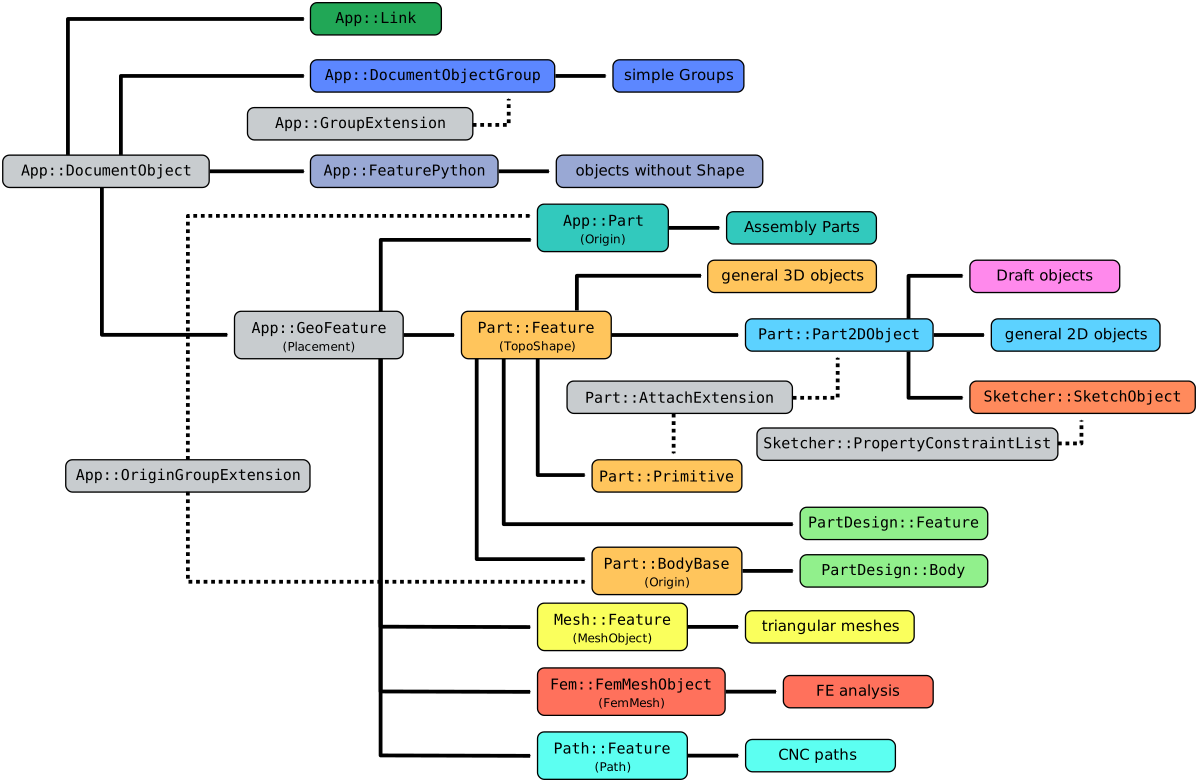
Simplified diagram of the relationships between the core objects in FreeCAD
Usage
The App FeaturePython is an internal object, so it cannot be created from the graphical interface. It is meant to be sub-classed by classes that will handle different types of data.
For example, the Draft Text, Draft Dimension, and Draft WorkingPlaneProxy objects of the Draft Workbench are App::FeaturePython objects with a custom icon and additional properties. They hold data but not an actual Part TopoShape.
If the desired object should have a placement, a shape, an attachment or other complex properties, it is better to create one of the more complex classes, for example, App GeoFeature, Part Feature, or Part Part2DObject.
Properties
See Property for all property types that scripted objects can have.
The App FeaturePython (App::FeaturePython class) is derived from the basic App DocumentObject (App::DocumentObject class) and inherits all its properties. It also has several additional properties.
These are the properties available in the Property View. Hidden properties can be shown by using the Show hidden command in the context menu of the Property View.
Data
Base
- Data (Hidden)Proxy (
PythonObject): a custom class associated with this object. - DataLabel (
String): the user editable name of this object, it is an arbitrary UTF8 string. - Data (Hidden)Label2 (
String): a longer, user editable description of this object, it is an arbitrary UTF8 string that may include newlines. By default, it is an empty string"". - Data (Hidden)Expression Engine (
ExpressionEngine): a list of expressions. By default, it is empty[]. - Data (Hidden)Visibility (
Bool): whether to display the object or not.
View
Base
- View (Hidden)Proxy (
PythonObject): a custom viewprovider class associated with this object.
Display Options
- ViewDisplay Mode (
Enumeration): it is empty by default. - ViewShow In Tree (
Bool): it defaults totrue, in which case the object will appear in the Tree View; otherwise, the object will be hidden in the Tree View. Once an object in the tree is invisible, you can see it again by opening the context menu over the name of the document (right-click), and selecting Show hidden items. Then the hidden item can be chosen and ViewShow In Tree can be switched back to
 true. - ViewVisibility (
Bool): it defaults totrue, in which case the object will be visible in the 3D View if it has a Shape, otherwise it will be invisible. By default this property can be toggled on and off by selecting the object, and pressing the Space bar.
Selection
- ViewOn Top When Selected (
Enumeration): it controls the way in which the selection occurs in the 3D View if the object has a Shape, and there are many objects partially covered by others. It defaults toDisabled, meaning that no special highlighting will occur;Enabledmeans that the object will appear on top of any other object when selected;Objectmeans that the object will appear on top only if the entire object is selected in the Tree View;Elementmeans that the object will appear on top only if a subelement (vertex, edge, face) is selected in the 3D View. - ViewSelection Style (
Enumeration): it controls the way the object is highlighted if it has a Shape. If it isShape, the entire shape (vertices, edges, and faces) will be highlighted in the 3D View; if it isBoundBoxa bounding box will appear surrounding the object and will be highlighted.
Scripting
See also: FreeCAD Scripting Basics and scripted objects.
See Part Feature for the general information on adding objects to the document.
An App FeaturePython is created with the addObject() method of the document.
import FreeCAD as App

doc = App.newDocument()
obj = App.ActiveDocument.addObject("App::FeaturePython", "Name")
obj.Label = "Custom label"
This page is retrieved from https://wiki.freecad.org/App_FeaturePython