


|
|
| Menu location |
|---|
| TechDraw → Attributes/Modifications → Align Horizontal Chain Dimensions |
| Workbenches |
| TechDraw |
| Default shortcut |
| None |
| Introduced in version |
| 0.20 |
| See also |
| TechDraw ExtensionPosVertChainDimension, TechDraw ExtensionPosObliqueChainDimension |
Description
The TechDraw ExtensionPosHorizChainDimension tool aligns horizontal dimensions to create a chain dimension.
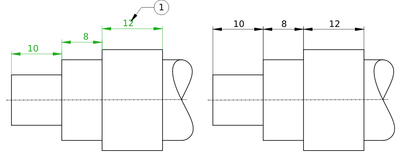
On the right the aligned dimensions
Usage
- Select two or more horizontal dimensions.
- The first dimension defines the position. This dimension will not be move.
- There are several ways to invoke the tool:
- Press the
 Align Horizontal Chain Dimensions button.
 - Select the TechDraw → Attributes/Modifications → Align Horizontal Chain Dimensions option from the menu.
- Press the
- The dimensions are aligned and their dimension texts are centered.
Notes
- The tool can also be used to center the dimension text of a single dimension.
This page is retrieved from https://wiki.freecad.org/TechDraw_ExtensionPosHorizChainDimension