


|
|
| Menyplacering |
|---|
| Sketch → Sketcher constraints → Constrain angle |
| Arbetsbänkar |
| Sketcher, PartDesign |
| Standard genväg |
| A |
| Introducerad i version |
| - |
| Se även |
| Constraint Length, Constraint Perpendicular |

Description
The  Sketcher ConstrainAngle tool fixes the angle between two edges (lines are then treated as infinite, and open curves are virtually extended as well), the angle of a line with the horizontal axis of the sketch, or the aperture angle of a circular arc.
Usage
See also: Drawing aids.
Continue mode
- Make sure there is no selection.
- There are several ways to invoke the tool:
- introduced in 1.0: If the Dimensioning constraints preference is set to
Single tool(default): press the down arrow to the right of the
 button and select the Angle Dimension option from the dropdown.
 - If this preference has a different value (and in 0.21 and below): press the Angle Dimension button.
- Select the Sketch → Constraints → Angle Dimension option from the menu.
- introduced in 1.0: Right-click in the 3D View and select the Dimension → Angle Dimension option from the context menu.
- Use the keyboard shortcut: K then A.
- introduced in 1.0: If the Dimensioning constraints preference is set to
- The cursor changes to a cross with the tool icon.
- Do one of the following:
- Select two lines.
- Select a point and two edges (in that order).
- Select an edge, a point and an edge (idem).
- If a driving dimensional constraint is created, depending on the preferences, a dialog opens to edit its value. A negative value will reverse the angle direction.
- An angle constraint is added. If a point and two edges have been selected, up to two point-on-object constraints can also be added. See Examples.
- Optionally keep creating constraints.
- To finish, right-click or press Esc, or start another geometry or constraint creation tool.
Run-once mode
- Do one of the following:
- Select a single line.
- Select a single circular arc.
- Select two lines.
- Select a point and two edges (in any order).
- Invoke the tool as described above, or with the following additional option:
- Right-click in the Elements section of the Sketcher Dialog and select the Angle Dimension option from the context menu.
- Right-click in the Elements section of the Sketcher Dialog and select the
- Optionally edit the constraint value.
- An angle constraint is added. If a point and two edges have been selected, up to two point-on-object constraints can also be added. See Examples.
Examples
Single line
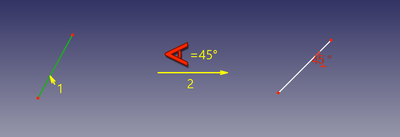
The angle of the line with the positive X-axis of the sketch is fixed.
Single circular arc
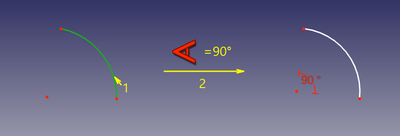
The aperture angle of the arc is fixed.
Between two lines
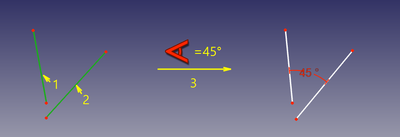
The angle between the two lines is fixed. It is not required that the lines intersect.
Between two edges at point
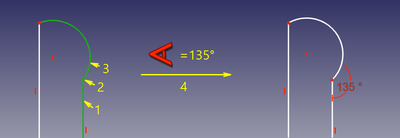
The angle between the two edges at a given point is fixed. The point can be any point, e.g. the center of a circle, the endpoint of an edge, or the origin, it can belong to either or both edges, and it can also be a point object. If required point-on-object constraint(s) are added to ensure the point lies on both (extended) edges. These additional constraints are called helper constraints.
Scripting
Angle Constraint can be created from macros and from the Python console by using the following:
# line slope angle
Sketch.addConstraint(Sketcher.Constraint('Angle',iline,angle))

# angular span of arc
Sketch.addConstraint(Sketcher.Constraint('Angle',iarc,angle))

# angle between lines
Sketch.addConstraint(Sketcher.Constraint('Angle',iline1,pointpos1,iline2,pointpos2,angle))

# angle-via-point (no helper constraints are added automatically when from python)
Sketch.addConstraint(Sketcher.Constraint('AngleViaPoint',icurve1,icurve2,geoidpoint,pointpos,angle))
where:
Sketchis a sketch objectiline, iline1, iline2are integers specifying the lines by their ordinal numbers inSketch.pointpos1, pointpos2should be 1 for start point and 2 for end point. The choice of endpoints allows to set internal angle (or external), and it affects how the constraint is drawn on the screen.geoidpointandpointposinAngleViaPointare the indexes specifying the point of intersection.angleis the angle value in radians. The angle is counted between tangent vectors in counterclockwise direction. Tangent vectors are pointing from start to end for the lines (or vice versa if ending point is supplied in angle between lines mode), and along counterclockwise direction for circles, arcs and ellipses. Quantity is also accepted as an angle (e.g.App.Units.Quantity('45 deg'))
The Sketcher scripting page explains the values which can be used for iline, iline1, iline2, pointpos1, pointpos2, geoidpoint and pointpos and contains further examples on how to create constraints from Python scripts.
Denna sida hämtas från https://wiki.freecad.org/Sketcher_ConstrainAngle