


|
|
| Menyplacering |
|---|
| Sketch → Sketcher constraints → Constrain distance |
| Arbetsbänkar |
| Sketcher |
| Standard genväg |
| Shift + D |
| Introducerad i version |
| - |
| Se även |
| Constraint HorizontalDistance, Constraint VerticalDistance |

Description
The  Sketcher ConstrainDistance tool fixes the length of a line, the distance between two points, the perpendicular distance between a point and a line; or, introduced in 0.21, the distance between the edges of two circles or arcs, or between the edge of a circle or arc and a line; or, introduced in 1.0, the length of an arc.
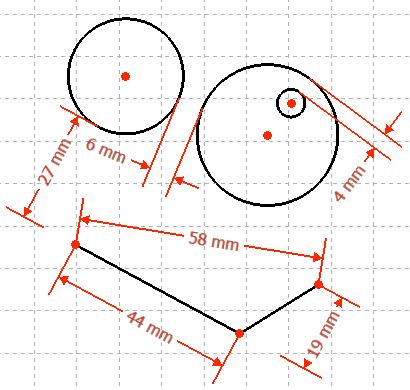
Usage
See also: Drawing aids.
Continue mode
- Make sure there is no selection.
- There are several ways to invoke the tool:
- introduced in 1.0: If the Dimensioning constraints preference is set to
Single tool(default): press the down arrow to the right of the
 button and select the Distance Dimension option from the dropdown.
 - If this preference has a different value (and in 0.21 and below): press the Distance Dimension button.
- Select the Sketch → Constraints → Distance Dimension option from the menu.
- introduced in 1.0: Right-click in the 3D View and select the Dimension → Distance Dimension option from the context menu.
- Use the keyboard shortcut K then D.
- introduced in 1.0: If the Dimensioning constraints preference is set to
- The cursor changes to a cross with the tool icon.
- Do one of the following:
- Select a single line.
- Select two points.
- Select a point and a line (in that order).
- If a driving dimensional constraint is created, depending on the preferences, a dialog opens to edit its value.
- A constraint is added.
- Optionally keep creating constraints.
- To finish, right-click or press Esc, or start another geometry or constraint creation tool
Run-once mode
- Do one of the following:
- Select a single line.
- Select two points.
- Select a point and a line (in any order).
- Select the edges of two circles or arcs.
- Select the edge of a circle or arc and a line (idem).
- introduced in 1.0: Select the edge of a single arc.
- Invoke the tool as described above, or with the following additional option:
- Right-click in the Elements section of the Sketcher Dialog and select the Distance Dimension option from the context menu.
- Right-click in the Elements section of the Sketcher Dialog and select the
- Optionally edit the constraint value.
- A constraint is added.
Notes
See Sketcher Dimension.
- introduced in 1.2 For point-line and circle/arc distance constraints, the solver preserves the intended orientation of the constraint more reliably. This reduces unexpected flips when geometry changes.
- If needed, toggling a constraint between driving and reference, or deactivating and reactivating it, can recompute its orientation.
Scripting
Distance from origin:
Sketch.addConstraint(Sketcher.Constraint('Distance', Edge, PointOfEdge, -1, 1, App.Units.Quantity('123.0 mm')))
Distance between two vertices:
Sketch.addConstraint(Sketcher.Constraint('Distance', Edge1, PointOfEdge1, Edge2, PointOfEdge2, App.Units.Quantity('123.0 mm')))
Length of line (the GUI allows selecting the edge itself, but it is just a shorthand for using the two extremities of the same line):
Sketch.addConstraint(Sketcher.Constraint('Distance', Line, 1, Line, 2, App.Units.Quantity('123.0 mm')))
Distance from point (Edge, PointOfEdge) to perpendicular point on line (Line):
Sketch.addConstraint(Sketcher.Constraint('Distance', Edge, PointOfEdge, Line, 0, App.Units.Quantity('123.0 mm')))
Distance between the edges of two circles:
Sketch.addConstraint(Sketcher.Constraint('Distance', Circle1, 0, Circle2, 0, App.Units.Quantity('123.0 mm')))
The Sketcher scripting page explains the values which can be used for Edge, Edge1, Edge2, PointOfEdge, PointOfEdge1, PointOfEdge2, Line, Circle1 and Circle2, and contains further examples on how to create constraints from Python scripts.
Denna sida hämtas från https://wiki.freecad.org/Sketcher_ConstrainDistance