FreeCAD Logo FreeCAD 1.0
  • 英語 アフリカーンス語 アラビア語 ベラルーシ語 カタロニア語 チェコ語 ドイツ語 ギリシャ語 スペイン語 スペイン語 バスク語 フィンランド語 フィリピン語 フランス語 ガリシア語 クロアチア語 ハンガリー語 インドネシア語 イタリア語 日本語 カビル語 韓国語 リトアニア語 オランダ語 ブークモール・ノルウェー語 ポーランド語 ポルトガル語 ポルトガル語 ルーマニア語 ロシア語 スロバキア語 スロベニア語 セルビア語 スウェーデン語 トルコ語 ウクライナ語 バレンシア語 ベトナム語 中国語 中国語
  • 特徴
  • ダウンロード
  • ブログ
  • ドキュメント
    ドキュメントの目次 初めての方へ ユーザー ドキュメント FreeCAD マニュアル ワークベンチのドキュメント Python コーディングドキュメント C++ コーディングドキュメント チュートリアル よくある質問 プライバシーポリシー FreeCADについて
  • 協力する
    協力するには Sponsor バグを報告 プルリクエストを作成 雇用と資金援助 コントリビューション ガイドライン 開発者ハンドブック 翻訳
  • コミュニティ
    行動規範 フォーラム The FPA GitHub GitLab Codeberg Mastodon Matrix IRC IRC via Webchat Gitter Discord Reddit Twitter Facebook LinkedIn カレンダー
  • ♥ Donate

Donate

$
SEPA 情報
SEPA 銀行振込を設定してください。:
Beneficiary: The FreeCAD project association
IBAN: BE04 0019 2896 4531
BIC/SWIFT: GEBABEBBXXX
銀行振込サービス: BNP Paribas Fortis
アドレス: Rue de la Station 64, 1360 Perwez, Belgium

While Stripe doesn't support monthly donations, you can still become a sponsor! Simply make a one-time donation equivalent to 12 months of support, and you'll gain access to the corresponding sponsoring tier. It's an easy and flexible way to contribute.

If you are not sure or not able to commit to a regular donation, but still want to help the project, you can do a one-time donation, of any amount.

Choose freely the amount you wish to donate one time only.

You can support FreeCAD by sponsoring it as an individual or organization through various platforms. Sponsorship provides a steady income for developers, allowing the FPA to plan ahead and enabling greater investment in FreeCAD. To encourage sponsorship, we offer different tiers, and unless you choose to remain anonymous, your name or company logo will be featured on our website accordingly.

from 1 USD / 1 EUR per month. You will not have your name displayed here, but you will have helped the project a lot anyway. Together, normal sponsors maintain the project on its feet as much as the bigger sponsors.

from 25 USD / 25 EUR per month. Your name or company name is displayed on this page.

from 100 USD / 100 EUR per month. Your name or company name is displayed on this page, with a link to your website, and a one-line description text.

from 200 USD / 200 EUR per month. Your name or company name and logo displayed on this page, with a link to your website and a custom description text. Companies that have helped FreeCAD early on also appear under Gold sponsors.

Instead of donating each month, you might find it more comfortable to make a one-time donation that, when divided by twelve, would give you right to enter a sponsoring tier. Don't hesitate to do so!

Choose freely the amount you wish to donate each month.

Please inform your forum name or twitter handle as a notein your transfer, or reach to us, so we can give you proper credits!

Decrease B-Spline Degree
Decrease Knot Multiplicity
Sketcher

Sketcher BSplineIncreaseKnotMultiplicity

Menu location
Sketch → B-Spline Tools → Increase Knot Multiplicity
Workbenches
Sketcher
Default shortcut
None
Introduced in version
0.17
See also
Sketcher BSplineDecreaseKnotMultiplicity

Description

The Sketcher BSplineIncreaseKnotMultiplicity tool increases the multiplicity of a B-spline knot.

Usage

  1. Select a B-spline knot.
  2. There are several ways to invoke the tool:
    • Press the Increase Knot Multiplicity button.
    • Select the Sketch → B-Spline Tools → Increase Knot Multiplicity option from the menu.

Example

B-splines are basically a combination of Bézier curves (nicely explained in this and this video). The points where two Bézier pieces are connected are called knots. A knot with multiplicity m on a B-spline with degree d means the curve to the left and right of the knot has at least an equal n order derivative (called Cn continuity) where n = d - m.

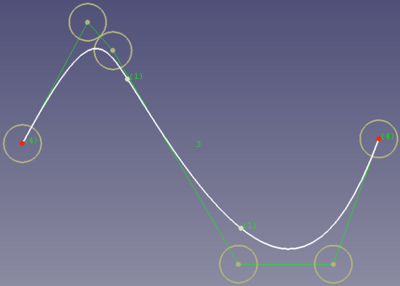
In this cubic B-spline (degree 3) there are 3 segments, meaning 3 curves are connected at 2 knots. The knots have multiplicity 1.

The multiplicity is indicated by the numbers in round brackets. See Toggle B-Spline Knot Multiplicity.

B-spline where both knots have multiplicity 1.

A multiplicity of 3 will change this B-spline so that even the first order derivatives are not equal (C0 continuity). Here is the same B-spline where the multiplicity of the knot on the left was increased to 3:
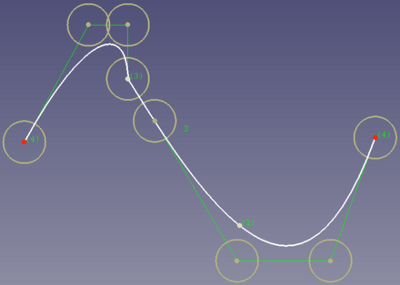
Same B-spline with knot multiplicity 3. A control point was moved to show that the knot has C0 continuity.

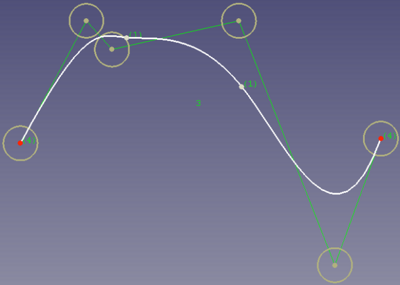
A consequence of a higher multiplicity is that for the price of loosing continuity you gain local control. Meaning changing one control point will only affect the B-spline locally.

This can be seen in this example, where the B-spline with knot multiplicity 1 from the first image above was taken, and the second control point from the right was moved up. As a result the complete shape of the B-spline has changed:
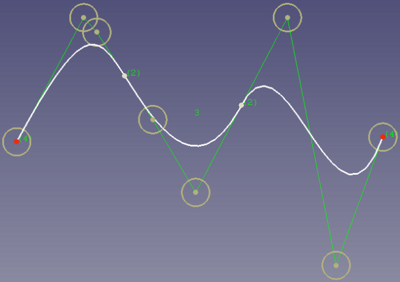
After increasing the multiplicity of the knots to 2, moving the second control point from the right results in significant changes on the right side of the shape only:
Notes

  • Knot multiplicity can also be increased with Sketcher BSplineInsertKnot.


Decrease B-Spline Degree
Decrease Knot Multiplicity
Sketcher

このページは以下から取得されています https://wiki.freecad.org/Sketcher_BSplineIncreaseKnotMultiplicity

お問い合わせ
Forum GitHub Mastodon Matrix IRC Gitter.im Discord Reddit Twitter Facebook LinkedIn

© The FreeCAD チーム. ホームページの画像クレジット(上から下へ): ppemawm, r-frank, epileftric, regis, rider_mortagnais, bejant.

このプロジェクトは次の人によってサポートされています: , KiCad Services Corp. および その他のスポンサー

GitHubGitHub でこのページを改善する