


|
|
| Menu location |
|---|
| Solver → Solver Elmer |
| Workbenches |
| FEM |
| Default shortcut |
| S E |
| Introduced in version |
| - |
| See also |
| FEM SolverElmer SolverSettings, FEM Solver CalculixCxxtools, FEM Solver Z88, FEM tutorial |
Description
Elmer is an open source multiphysical simulation software mainly developed by CSC - IT Center for Science (CSC). Elmer development was started 1995 in collaboration with Finnish Universities, research institutes and industry. After it's open source publication in 2005, the use and development of Elmer has become international.
Elmer includes physical models of fluid dynamics, structural mechanics, electromagnetics, heat transfer and acoustics, for example. These are described by partial differential equations which Elmer solves by the Finite Element Method (FEM).
Creating the SolverElmer object in the Analysis container in FreeCAD, gives access to the Elmer Equations for simple or multiphysical analysis.
Since FreeCAD already has an extensive integration of  Calculix and
  Z88 as solvers for mechanical and thermo-mechanical analysis, Elmer will be preferred for computational fluid dynamics (CFD), heat, electrostatics and electrodynamics. It can also be used for mechanical FEA through the Elasticity equation or any combination of the aforementioned equations. This combination makes Elmer the preferred choice for multi-physics analyses.
Installation
Elmer requires two components to be interfaced with FreeCAD:
- ElmerSolver is handling the computation
- ElmerGrid is the interface handling meshes
There are standalone programs for both of these applications but their installation and usage are beyond the scope of the FreeCAD integration.
- Download and install the version best suited to your Operating System (Windows or Linux). It is recommended to install the
mpiversion to get multi-core support (introduced in 0.21). - In FreeCAD switch to the
 FEM Workbench and go to Edit → Preferences → FEM → Elmer
 - In the FEM preferences set the correct path for both
ElmerSolverandElmerGrid, or 0.21 and above: set the path forElmerSolver_mpiinstead ofElmerSolverto make Elmer use all available CPU cores.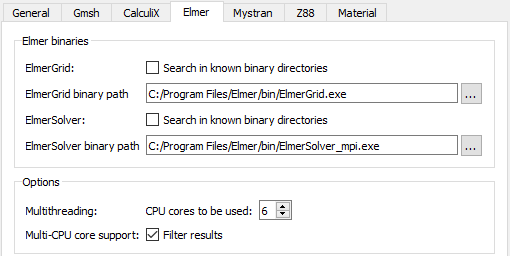
Elmer preferences dialog menu showing fields to locate important Elmer binaries on Windows OS
You are ready to use Elmer in FreeCAD.
0.19 and below: Now start FreeCAD and change the units scheme to MKS in the preferences. See Notes.
Usage
- Switch to the FEM Workbench
- Create an
 Analysis container.
 - There are several ways to invoke the command:
- Press the
 Solver Elmer button.
 - Select the Solve → Solver Elmer option from the menu.
- Use the keyboard shortcut: S then E.
- Press the
- Edit the parameters for the solver in the Property View Data tab of the SolverElmer object in the model Tree View
- Double-click on the SolverElmer object to prepare an analysis run
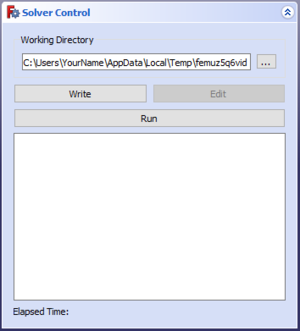
Dialog box to run an Elmer analysis
- Select the path to write the analysis in by clicking …
- Click Write to write the case files in the directory selected previously
- Click Run to start the analysis
Note: A successful analysis will require at least a Model (2D or 3D), a Material (Fluid or Solid), a Mesh, Equations and Boundary conditions.
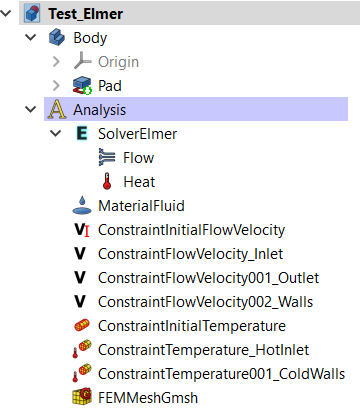
Example of a Tree View once a Solver for Elmer is activated
Equations
- To perform the analysis of a particular physical behavior, an Equation must be used (Flow, Heat, Electrostatics…)
- Disambiguation: The term Equation is used in FreeCAD to describe the different physical mechanisms, the term Solver is used in all Elmer documents. Thus when using in FreeCAD the "Flow Equation", in reality Elmer uses the "Flow Solver" to find a solution to the Navier-Stokes equation.
- One or several equations can be used at once with Elmer by simply adding the equation object under the SolverElmer object, thus performing multi-physics analyses:
- Click on the SolverElmer object in the model Tree View
- Select one or several of the available equations:


Solver Settings
- Depending on the used equations, you must change the default solver settings. They are explained in the Elmer solver settings.
- The solver will by default perform a steady-state simulation. To perform a transient simulation (how the model behaves/develops over time) see the section Timestepping (transient analyses) in the Elmer solver settings.
Visualization
The Elmer solver results are output in result pipeline objects. (Result objects are not possible.)
For transient analyses you get a result pipeline for every output time step. To edit all of them at once, select them in the Tree View and set the parameters in the Property View. To make animations of the temporal progression, the best method is currently to:
- Hide the view of the first time result.
- Select an object of your choice in the Tree View, but not a pipeline object.
- Hover with the mouse over the pipelines.
The result is an animation like this:

Notes
- Important: in order to get sensible results and to be able to exchange the Elmer input files (named case.sif) with others, all values in the input files must be in SI units. In FreeCAD version 0.19 and earlier this is only the case if you use the unit scheme MKS in the preferences.
- Parameters for the Solver and for the Equations are independently set through the Property View Data tab of their respective objects in the Tree View.
- Each equation will have a priority, for example, if trying see the effect of a convective flow of hot air, the equation for Flow should be solved with higher priority than Heat, otherwise the solver will first solve Heat through conduction and then Flow.
- 2D vs 3D cases: Elmer can be used to solve both 2D and 3D cases. However, when defining a 2D case, the faces need to be mapped in the XY-plane of FreeCAD, otherwise the solver will try to compute a 3D case on a face, and normal vectors will be under-defined. Further information can be found in the FreeCAD forums: https://forum.freecad.org/viewtopic.php?f=18&t=48175
Documentation
The following link gives access to the full documentation for Elmer. This includes the manuals as well as tutorials. Note that documentation and files appended with "gui" generally concern the usage of the Elmer GUI and not the FreeCAD implementation of Elmer.
Tato stránka je načtena z https://wiki.freecad.org/FEM_SolverElmer