


|
|
| Menu location |
|---|
| Gear → Worm Gear |
| Workbenches |
| Gear |
| Default shortcut |
| None |
| Introduced in version |
| v0.16 |
| See also |
| PartDesign InvoluteGear |
Description
The  FCGear WormGear command creates a worm gear. By default this is a single thread worm with one start that can also be transformed into a double or multiple thread worm with two or several starts respectively.
The worm can be considered a special case of a helical gear. Imagine that there is only one tooth on a spur gear. Now increase the helix angle so much that the tooth winds around the spur gear several times before it emerges on the opposite side. The result would be a single thread worm.
For a single-start worm, each full turn (360 degrees) of the worm advances the gear by one tooth. So a gear with 24 teeth will provide a gear reduction of 24:1. For a multi-start worm, the gear reduction equals the number of teeth on the gear, divided by the number of starts on the worm.
A worm can only be used with a worm wheel. This is called a worm drive. Like other gear arrangements, a worm drive can reduce rotational speed or transmit higher torque. One of the major advantages of worm gear drive units are that they can transfer motion in 90 degrees. A worm drive is also self-locking.
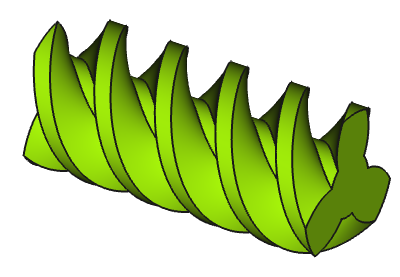
Worm gear (No. of teeth 3)
Usage
- Switch to the
 Gear Workbench.
 - There are several ways to invoke the command:
- Press the Worm Gear button in the toolbar.
- Select the Gear → Worm Gear option from the menu.
- Press the
- Change the gear parameter to the required conditions (see Properties).
Properties
See also: Property View.
An FCGear WormGear object is derived from a Part Feature object and inherits all its properties. It also has the following additional properties:
Data
base
- Datadiameter (
Length): Default is5 mm. Pitch diameter. - Dataheight (
Length): Default is5 mm. Value of the worm length. - Datamodule (
Length): Default is1 mm. Module is the ratio of the reference diameter of the gear divided by the number of teeth (see Notes). - Datanum_teeth (
Integer): Default is3. Number of teeth (see Notes). - Datareverse_pitch (
Bool): Default isfalse,truechanges the rotating direction from right to left.
computed
- Databeta (
Angle): (read-only) Lead angle (see also the information in Notes and Useful formulas).
involute
- Datapressure_angle (
Angle): Default is20°(see Notes).
tolerance
- Dataclearance (
Float): Default is0.25(see Notes). - Datahead (
Float): Default is0. This value is used to change the tooth height.
version
- Dataversion (
String):
Notes
- Databeta (): If the lead angle is less than 5°, it is a self-locking gear. A typical example are the tuning pegs on a guitar or ukulele.
- Dataclearance (): At a worm gearing, clearance is the distance between the tooth tip of the worm and the tooth root of the worm wheel.
- Datamodule (): Using ISO (International Organization for Standardization) guidelines, Module size is designated as the unit representing gear tooth-sizes.
- The module multiplied by the number of teeth () defines the pitch circle diameter ():
- The module multiplied by Pi () defines the pitch (), the arc distance on the pitch circle between corresponding points of adjacent teeth:
- Datanum_teeth (number of teeth, ): The number of teeth in a worm is called the number of threads. Correspondingly, one speaks of single, double or multiple thread worms. In general, mainly single worms are produced, but in special cases the number of starts can be up to four (sometimes also more). If the number of teeth is changed, Databeta also changes.
- Datapressure_angle: Only change the parameter, if sufficient knowledge of the gear geometry is available.
Useful formulas
| Symbol | Term | Formula | FCGear Parameter |
|---|---|---|---|
| Module | - | ||
| Number of Teeth | - | ||
| Pitch | - | ||
| Lead Angle | or |
||
| Pitch Diameter | |||
| Axial Pitch | - |
- Axial pitch AKA lead
- Lead angle AKA helix angle
- Number of teeth AKA number of Threads
Worm wheel
The worm wheel must be designed manually. For this purpose FCGear InvoluteGear can be used for a simple construction. In any case, in-depth knowledge of the gear types is required.
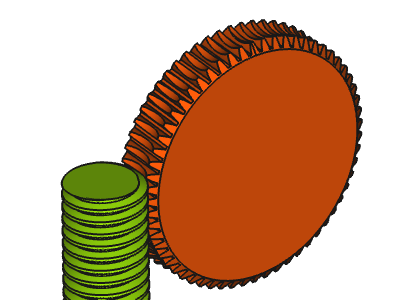
Worm with worm wheel
Scripting
Use the power of Python to automate your gear modeling:
import FreeCAD as App
import FreeCADGui as Gui
import freecad.gears.commands
gear = freecad.gears.commands.CreateWormGear.create()
gear.num_teeth = 2
gear.diameter = 10
gear.height = 20
App.ActiveDocument.recompute()
Gui.SendMsgToActiveView("ViewFit")
This page is retrieved from https://wiki.freecad.org/FCGear_WormGear