


|
|
| Menu location |
|---|
| Gear → Crown Gear |
| Workbenches |
| Gear |
| Default shortcut |
| None |
| Introduced in version |
| v0.16 |
| See also |
| FCGear InvoluteGear |
Description
The  FCGear CrownGear command creates a crown gear wheel that also takes the size of the matching pinion into account.
The crown wheel resembles a ring-shaped curved rack. The pressure angle decreases continuously from the outer to the inner diameter. Thus, the variable peripheral speed at the crown wheel is compensated against the constant peripheral speed of the pinion. The pointed outer teeth and the steep tooth flanks on the inner diameter limit the usable tooth width. Crown gears achieve similar efficiencies as spur gears. One crown gear can drive several pinions.
Known field of application of crown gears:
- Rear axle drives for cars and motorcycles
- Swivel mechanism for operating tables
- Angular milling heads
- Powered tool systems with multiple pinions and a crown gear
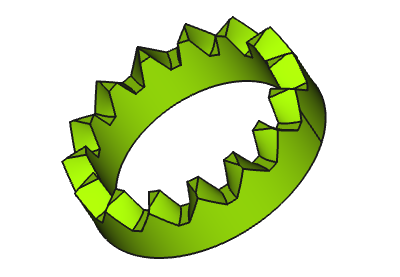
Above: Crown gear
Usage
- Switch to the
 Gear Workbench.
 - There are several ways to invoke the command:
- Press the Crown Gear button in the toolbar.
- Select the Gear → Crown Gear option from the menu.
- Press the
- The crown gear is displayed without teeth by default. (introduced in 0.21)
- Change the gear parameters to the required conditions (see Properties).
- Set the Datapreview_mode property to
falseto display the teeth (see Notes).
Properties
See also: Property View.
An FCGear CrownGear object is derived from a Part Feature object and inherits all its properties. It also has the following additional properties:
Data
accuracy
- Datanum_profiles (
Integer): Default is4. Number of profiles used for loft. - Datapreview_mode (
Bool): Default istrue.
base
- Dataheight (
Length): Default is2 mm. Value for the tooth width. - Datamodule (
Length): Default is1 mm. Module is the ratio of the reference diameter of the gear divided by the number of teeth (see Notes). - Datanum_teeth (
Integer): Default is15. Number of teeth. - Dataother_teeth (
Integer): Default is15. Number of teeth of the construction gear (pinion) (see Notes). - Datathickness (
Length): Default is5 mm. Height from the tip of tooth to the lower side of the crown wheel.
involute
- Datapressure_angle (
Angle): Default is20°(see Notes).
version
- Dataversion (
String):
Notes
- The Datapreview_mode property is set to
trueby default and when the gear is created you'll find this message in the report view:- Gear module: Crown gear created, preview_mode = true for improved performance. Set preview_mode property to false when ready to cut teeth.
- Datamodule (): Using ISO (International Organization for Standardization) guidelines, Module size is designated as the unit representing gear tooth-sizes.
- The module multiplied by the number of teeth () defines the pitch circle diameter ():
- The module multiplied by Pi () defines the pitch (), the arc distance on the pitch circle between corresponding points of adjacent teeth:
- Dataother_teeth: Several pinions with the same number of teeth only can be used on one crown wheel.
- Datapressure_angle: Only change the parameter, if sufficient knowledge of the gear geometry is available.
- The geometry of the crown gear is primarily determined by the spur pinion geometry according to its number of teeth (thus represented by the Dataother_teeth property).
- A matching spur gear can be created with
 Involute Gear. Its Datanum_teeth value must equal this crown gear's Dataother_teeth value.
 - Adjustments for optimal running characteristics can be made with the parameters of involute gear.
Crown and spur gear set overview
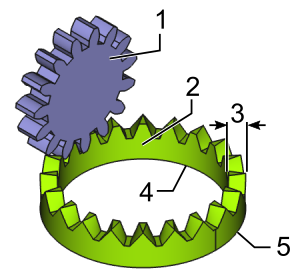
- (1) Spur gear
- (2) Crown gear
- (3) Tooth width
- (4) Inner diameter
- (5) Outer diameter
Useful formulas
| Symbol | Term | Formula | FCGear Parameter |
|---|---|---|---|
| Module | - | ||
| Number of Teeth | - | ||
| Width of Teeth | - | ||
| Pitch | - | ||
| Inner, or Pitch Diameter | - | ||
| Outer Diameter | - |
Inner diameter (4)
- inner diameter = module (spur gear) * teeth (crown gear) * cos pressure_paramter (pinion) : cos pressure_parameter (crown gear)
- (Editor note: Can someone confirm the formula above? Pressure_parameter seems to be the pressure angle which should be identical for paired gears (as well as the module) and so the last two parameters can be reduced reduced to 1 giving the formula in the table)
Scripting
Use the power of Python to automate your gear modeling:
import FreeCAD as App
import FreeCADGui as Gui
import freecad.gears.commands
gear = freecad.gears.commands.CreateCrownGear.create()
gear.num_teeth = 20
gear.other_teeth = 15
gear.height = 3
gear.preview_mode = False
App.ActiveDocument.recompute()
Gui.SendMsgToActiveView("ViewFit")
This page is retrieved from https://wiki.freecad.org/FCGear_CrownGear