


Beskrivning
The  Draft Facebinder command creates a surface object from selected faces. A Draft Facebinder is parametric, it will update if you modify its source object(s).
It can be used to create an extrusion from a collection of faces. This extrusion can for example represent a wall finish in architectural design.
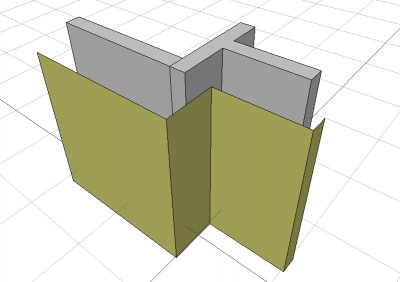
Facebinder created from the faces of walls
Bruk
- Select one or more faces.
- There are several ways to invoke the command:
- Press the Facebinder button.
- Draft: Select the Drafting → Facebinder option from the menu.
- BIM: Select the 3D/BIM → Generic 3D tools → Facebinder option from the menu.
- Draft: Use the keyboard shortcut: F then F.
- Press the
Properties
See also: Property View.

On the left an extruded facebinder with closed corners (pink),
on the right an extruded facebinder with open corners (orange).
Closed corners are a V1.1 feature.
A Draft Facebinder object is derived from a Part Feature object and inherits all its properties. It also has the following additional properties:
Data
Draft
- DataArea (
Area): (read-only) specifies the total area of the linked faces of the facebinder. - DataExtrusion (
Distance): specifies the extrusion thickness of the facebinder. introduced in 1.1: If the facebinder has connected faces and DataSew istrue, an attempt is made to close the corners of the extrusion. If this is not possible faces are extruded separately. - DataFaces (
LinkSubList): specifies the linked faces of the facebinder. - DataOffset (
Distance): specifies an offset distance to apply between the facebinder and the original faces, prior to extrusion. - DataRemove Splitter (
Bool): Specifies whether to remove splitter lines that divide co-planar faces of the facebinder. - DataSew (
Bool): Specifies whether to perform a topological sewing operation on the facebinder.
View
Draft
- VyPattern (
Enumeration): specifies the Draft Pattern with which to fill the faces of the facebinder. This property only works if VyDisplay Mode isFlat Lines. - VyPattern Size (
Float): specifies the size of the Draft Pattern.
Scripting
Skript
To create a Draft Facebinder use the make_facebinder method (introduced in 0.19) of the Draft module. This method replaces the deprecated makeFacebinder method.
facebinder = make_facebinder(selectionset)
- Creates a
facebinderobject from the givenselectionset, which is a list ofSelectionObjects as returned byFreeCADGui.Selection.getSelectionEx(). Only selected faces are taken into account.selectionsetcan also be aPropertyLinkSubList.
A PropertyLinkSubList is a list of tuples; each tuple contains as first element an object, and as second element a list (or tuple) of strings; these strings indicate the names of the sub-elements (faces) of that object.
PropertyLinkSubList = [tuple1, tuple2, tuple3, ...]
PropertyLinkSubList = [(object1, list1), (object2, list2), (object3, list3), ...]
PropertyLinkSubList = [(object1, ['Face1', 'Face4', 'Face6']), ...]
PropertyLinkSubList = [(object1, ('Face1', 'Face4', 'Face6')), ...]
The thickness of the Facebinder can be added by overwriting its Extrusion attribute; the value is entered in millimeters.
The placement of the Facebinder can be changed by overwriting its Placement attribute, or by individually overwriting its Placement.Base and Placement.Rotation attributes.
Example:
import FreeCAD as App
import FreeCADGui as Gui
import Draft

doc = App.newDocument()

# Insert a solid box
box = doc.addObject("Part::Box", "Box")
box.Length = 2300
box.Width = 800
box.Height = 1000

# selection = Gui.Selection.getSelectionEx()
selection = [(box, ("Face1", "Face6"))]
facebinder = Draft.make_facebinder(selection)
facebinder.Extrusion = 50

doc.recompute()

facebinder.Placement.Base = App.Vector(1000, -1000, 100)
facebinder.ViewObject.ShapeColor = (0.99, 0.99, 0.4)

doc.recompute()
Denna sida hämtas från https://wiki.freecad.org/Draft_Facebinder