


|
|
| poziția meniului |
|---|
| Arch → Roof |
| Ateliere |
| Arch |
| scurtătură |
| R F |
| Prezentat în versiune |
| - |
| A se vedea, de asemenea, |
| Arch Structure, Arch Wall |
Descriere
Instrumentul Acoperiș vă permite să creați un acoperiș înclinat de la o linie selctată. Obiectul de acoperiș creat este parametric, menținându-și relația cu obiectul de bază. Rețineți că acest instrument este în curs de dezvoltare și ar putea să nu reușească cu forme foarte complexe. Principiul este acela că fiecare margine este văzută alocând un profil de acoperiș (panta, lățimea, lungimea, grosimea ...).
Note: This tool is still in development, and might fail with very complex shapes.
Cum se folosește
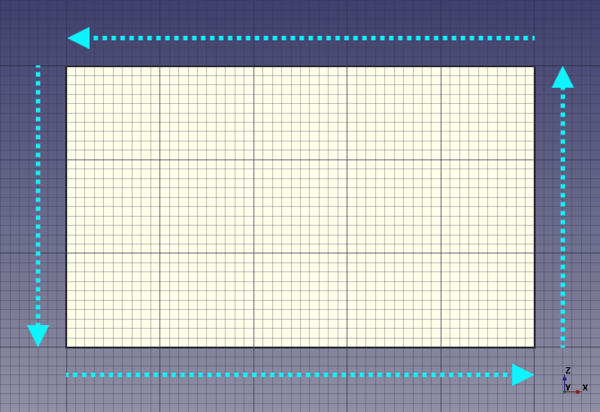
- Create a wire with following the counterclockwise direction and select it.
- Press the
 Arch Roof button, or press R then F keys
 - The default roof object could have a strange shape, it's because the tool have not all the needed informations.
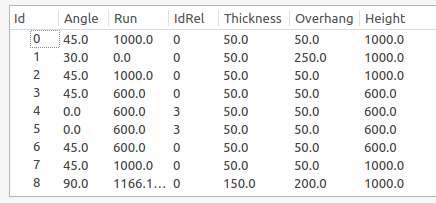
- After creating the default roof, double click on the object in the tree view to access and edit all the properties. Angle must be between 0 and 90.
- Each line correspond to a roof pane. So you can set properties you want for each roof pane.
- To help you, you can set Angle or Run to 0 and defined a Relative Id, this make automatic calculs to find the data relative to the relative Id.
- It work like this :
- If Angle = 0 and Run = 0 then profile is identical to the relative profile.
- If Angle = 0 then angle is calculated so that the height is the same one as the relative profile.
- If Run = 0 then Run is calculated so that the height is the same one as the relative profile.
- At the end, set an angle to 90° to make a gable.
- Also you can check this video : https://www.youtube.com/watch?v=4Urwru71dVk
Usage (solid base)
If your roof has a complex shape (e.g. contains pitched windows or other non-standard features) you can create a custom solid object using various other FreeCAD workbenches (Part, Sketcher etc.). And then use this solid as the DateBase object of your roof:
- Select the solid base object.
- Press the
 Arch Roof button, or press R then F keys.
Subtracting a roof
Roofs have an automatically generated subtraction volume (introduced in 1.0 for roofs with a solid base). When a roof is removed from the walls of a building, both the roof itself as well as everything above it is subtracted from the walls.
introduced in 1.0: It is possible to override the automatic subtraction volume by setting the DateSubvolume property of the roof to a custom solid object.
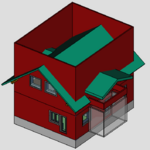
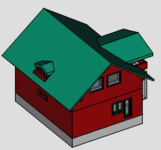
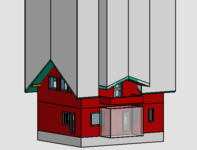
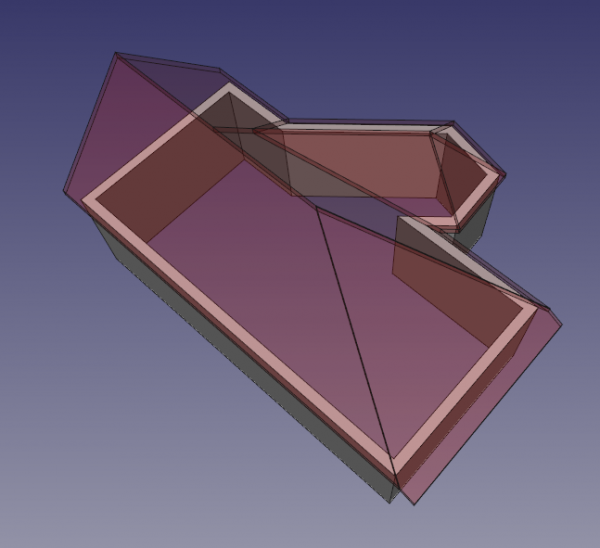
Solid-based roof before (1st image) and after (2nd image) removing it from walls.
The 3rd image shows the automatically generated subtraction volume.
Proprietăți
An Arch Roof object shares the common properties and behaviors of all Arch Components.
Data
Roof
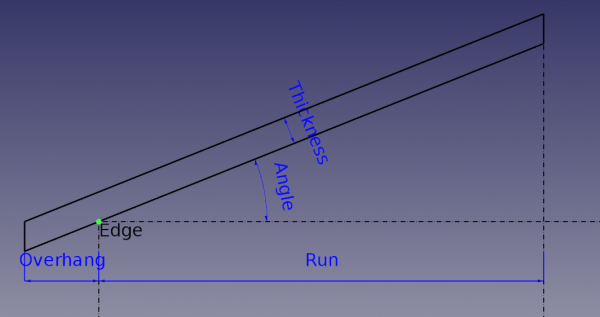
- DateAngles: Valorea unghiurilor apei/versantului acoperișului (un unghi pentru fiecare margine filamentului).
- DateRuns: Proiecția orizontală a lungimii apei/versantului acoperișului (o apă/versant pentru fiecare margine a filamentului inițial).
- DateIdRel: Relația/raportul Id între unghiul și panta acoperișului
- DateThickness: List of thickness of the roof pane. (a thickness for each edge in the wire).
- DateOverhang: Proiecția orizontală a streașinei fiecărei ape/versat al acoperișului (o sreașină pentru fiecare margine a filamentului original).
- DateFace: Indexul fațetei obiectului de bază de utilizat #Nu este deocamdaă utilizat
Scripting
Scrip-Programare
Instrumentul Acoperiș poate fi folosit în macros și din consola python utilizând următoarea funcție:
Roof = makeRoof(baseobj=None, facenr=0, angles=[45.,], run=[], idrel=[0,], thickness=[50.,], overhang=[100.,], name="Roof")
- Face un acoperiș pe baza unui filament închis. Puteți furniza o listă de unghiuri, run, idrel, grosime, consola pentru fiecare margine a firului pentru a defini forma acoperișului. Valoarea implicită pentru unghi este de 45 și lista este completată automat pentru a se potrivi cu numărul de muchii din fir.
Exempluː
import FreeCAD as App
import Arch, Draft

doc = App.newDocument()

rect = Draft.makeRectangle(3000, 4000)
doc.recompute()

roof = Arch.makeRoof(rect, angles=[30.,])

p1 = App.Vector(0, 0, 0)
p2 = App.Vector(1000, 1000, 0)
p3 = App.Vector(0, 2000, 0)

wire = Draft.make_wire([p1, p2, p3], closed=True)
doc.recompute()

roof1 = Arch.makeRoof(wire)

doc.recompute()
Această pagină este preluată de la https://wiki.freecad.org/Arch_Roof