


|
|
| Menu location |
|---|
| TechDraw → Symbols → Weld Symbol |
| Workbenches |
| TechDraw |
| Default shortcut |
| None |
| Introduced in version |
| 0.19 |
| See also |
| TechDraw Leaderline |
Description
The TechDraw WeldingSymbol tool adds welding specifications to an existing leader line.
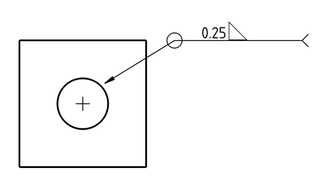
Welding specification added to a leader line
Usage
- Select an existing leaderline.
- There are several ways to invoke the tool:
- Press the
 Weld Symbol button.
 - Select the TechDraw → Symbols → Weld Symbol option from the menu.
- Press the
- A task panel opens.
- Specify the welding symbols and accompanying text to be added to the leader line.
- Press the OK button.
Notes
- After creation a welding symbol can be edited by double clicking it in the Tree View.
- There is a preference parameter for the default welding symbol directory. You can add your own symbols in a personal directory.
Properties
Weld Symbol
- DataAll Around: Shows the All Around symbol (circle) at the kink in the leader line.
- DataField Weld: Show the Field Weld symbol (flag) at the kink in the leader line.
- DataAlternate Weld: Offsets the lower symbol to indicate alternating welds.
- DataTail Text: Text to be shown at the end of the leader line.
Tile
Each individual symbol ("arrow side" and "other side") is represented by a "tile" object. A Welding Symbol has 1 or 2 tiles associated with it. Each of it has the following properties:
- DataTile Parent: The parent Weld Symbol
- DataTile Row: Row of the tile. 0 means above the line, -1 below the line. Note: If you change the row of one tile, you must also change the tile for the second side! This way you can flip the sides.
- DataTile Column: Column of the tile. At the moment it is always 0, therefore the property is not editable.
- DataSymbol File: Directory and file name of the symbol's SVG file.
- DataSymbol Included: Directory and file name of the actual included symbol SVG file. (It is a temporary directory.)
- DataLeft Text: Text to be displayed to the left of the SVG symbol.
- DataCenter Text: Text to be displayed above/below the SVG symbol.
- DataRight Text: Text to be displayed to the right of the SVG symbol.
Scripting
See also: Autogenerated API documentation and FreeCAD Scripting Basics.
The WeldingSymbol tool can be used in macros and from the Python Console by using the following functions:
symbolName = "DrawWeldSymbol001")
symbolType = "TechDraw::DrawWeldSymbol"
App.activeDocument().addObject(symbolType, symbolName)
App.activeDocument().Page.addView(App.activeDocument().DrawWeldSymbol001)
App.activeDocument().DrawWeldSymbol001.Leader = myLeader
App.activeDocument().DrawWeldSymbol001.AllAround = True
App.activeDocument().DrawWeldSymbol001.FieldWeld = True
App.activeDocument().DrawWeldSymbol001.AlternatingWeld = True
App.activeDocument().DrawWeldSymbol001.TailText = "process text"

tileName = "DrawTileWeld001"
tileType = "TechDraw::DrawTileWeld"
App.activeDocument().addObject(tileType, tileName)
App.activeDocument().DrawTileWeld001.TileParent = App.activeDocument().DrawWeldSymbol001
App.activeDocument().DrawTileWeld001.TileRow = 0
App.activeDocument().DrawTileWeld001.TileColumn = 0
App.activeDocument().DrawTileWeld001.SymbolFile = fullPathToMySvgFile
App.activeDocument().DrawTileWeld001.LeftText = "left text"
App.activeDocument().DrawTileWeld001.RightText = "right text"
App.activeDocument().DrawTileWeld001.CenterText = "center text"
Svg Symbol Tiles
Individual symbols are formed by 64x64 pixel SVG files. Additional symbols can be created in an SVG program like Inkscape using one of the symbols supplied by FreeCAD as a template.
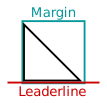
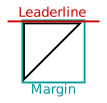
- Individual symbols are formed by 64x64 (nominal) pixel SVG files. The tiles actually have a "border" of 4px. The border ensures that the leader line and symbol meet nicely.
- The symbol is drawn in black on a transparent background. The stroke width is 0.5mm.
- The leader passes below symbols for the arrow side (see image on the left) and above symbols for the "other" side (see image on the right).
- There is no particular naming standard other than to append "Up/Down" to the arrow/other side symbols.
This page is retrieved from https://wiki.freecad.org/TechDraw_WeldSymbol