


|
|
| Menu location |
|---|
| Surface → Extend Face |
| Workbenches |
| Surface |
| Default shortcut |
| None |
| Introduced in version |
| 0.17 |
| See also |
| None |
Opis
The  Surface ExtendFace tool extrapolates an existing face or surface at its boundaries with its local U and V parameters.
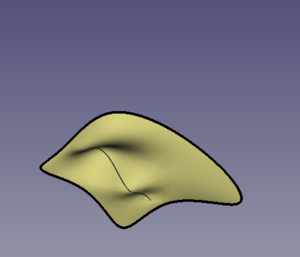
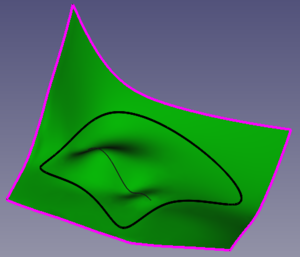
Left: original face. Right: extended face.
Upotreba
- Make sure you have an object that has faces. The object could be created with the
 Surface Workbench but it could also be any other object, for example, created with
  Part or
  PartDesign.
 - Select the face to extend by clicking on it on the 3D View.
- There are several ways to invoke the tool:
- Press the Extend Face button.
- Select the Surface → Extend Face option from the menu.
- Press the
Options
This command doesn't have any options. Either it works with the selection or not.
Properties
A Surface Extend object (Surface::Extend class) is derived from the basic Part Feature (Part::Feature class, through the Part::Spline subclass), therefore it shares all the latter's properties.
In addition to the properties described in Part Feature, the Surface Extend object has the following properties in the Property View.
Data
Base
- PodaciFace (
LinkSub): the subelement from an object that will be extended; it must be a face. - PodaciTolerance (
FloatConstraint): it defaults to0.1.
- PodaciExtend UNeg (
FloatConstraint): it defaults to0.05. The ratio of the local U parameter that will be extended in the negative direction. - PodaciExtend UPos (
FloatConstraint): it defaults to0.05. The ratio of the local U parameter that will be extended in the positive direction. - PodaciExtend USymetric (
Bool): it defaults totrue, in which case PodaciExtend UNeg and PodaciExtend UPos will have the same value.
- PodaciExtend VNeg (
FloatConstraint): it defaults to0.05. The ratio of the local V that will be extended in the negative direction. - PodaciExtend VPos (
FloatConstraint): it defaults to0.05. The ratio of the local V direction that will be extended in the positive direction. - PodaciExtend VSymetric (
Bool): it defaults totrue, in which case PodaciExtend VNeg and PodaciExtend VPos will have the same value.
- PodaciSampleU (
IntegerConstraint): it defaults to32. - PodaciSampleV (
IntegerConstraint): it defaults to32.
Pogled
Base
- PregledControl Points (
Bool): it defaults tofalse; if set totrue, it will show an overlay with the control points of the surface.
Scripting
See also: FreeCAD Scripting Basics.
The Surface Extend tool can be used in macros and from the Python Console by adding the Surface::Extend object.
- The face to extend must be assigned as a LinkSub to the
Faceproperty of the object. It must contain only a single face.
import FreeCAD as App
import Draft

doc = App.newDocument()

a = App.Vector(-20, -20, 0)
b = App.Vector(-18, 25, 0)
c = App.Vector(60, 26, 0)
d = App.Vector(33, -20, 0)

points = [a, App.Vector(-20, -8, 0), b, c,
          App.Vector(37, 4, 0), d,
          App.Vector(-2, -18, 0), a]
obj = Draft.make_bspline(points)
doc.recompute()

if App.GuiUp:
    obj.ViewObject.Visibility = False

surf = doc.addObject("Surface::Filling", "Surface")
surf.BoundaryEdges = [(obj, "Edge1")]
doc.recompute()

# ---------------------------------------------------------
points_spl = [App.Vector(-10, 0, 2),
              App.Vector(4, 0, 7),
              App.Vector(18, 0, -5),
              App.Vector(25, 0, 0),
              App.Vector(30, 0, 0)]
aux_edge = Draft.make_bspline(points_spl)
doc.recompute()

surf.UnboundEdges = [(aux_edge, "Edge1")]
doc.recompute()

# ---------------------------------------------------------
surf_extended = doc.addObject("Surface::Extend", "Surface")
surf_extended.Face = [surf, "Face1"]
doc.recompute()
Ova stranica je preuzeta s https://wiki.freecad.org/Surface_ExtendFace