FreeCAD Logo FreeCAD 1.0
  • Inglés Africano Árabe Bielorruso Catalán Checo Alemán Griego Español Español Euskera Finlandés Filipino Francés Gallego Croata Húngaro Indonesio Italiano Japonés Cabilio Coreano Lituano Neerlandés bokmal de Noruega Polaco Portugués Portugués Rumano Ruso Eslovaco Esloveno Serbio Sueco Turco Ucraniano Valenciano Vietnamita Chino Chino
  • Características
  • Descarga
  • Blog
  • Documentación
    Índice de documentación Primeros pasos Documentacion para el usuario El manual de FreeCAD Documentación de entornos de trabajo Documentación sobre FreeCAD + Python Documentación de codificación de C++ Tutoriales Preguntas frecuentes Política de privacidad Acerca de FreeCAD
  • Contribuir
    ¿Cómo puedo ayudar? Sponsor Informar de un error Hacer un pull request Trabajos y financiación Pautas de contribución Manual de desarrolladores Traducciones
  • Comunidad
    Código de conducta Foro The FPA GitHub GitLab Codeberg Mastodon Matrix IRC IRC via Webchat Gitter Discord Reddit Twitter Facebook LinkedIn Calendario
  • ♥ Donate

Donate

$
Información de SEPA
Configure su transferencia bancaria SEPA a:
Beneficiary: The FreeCAD project association
IBAN: BE04 0019 2896 4531
BIC/SWIFT: GEBABEBBXXX
Agencia bancaria: BNP Paribas Fortis
Dirección: Rue de la Station 64, 1360 Perwez, Belgium

While Stripe doesn't support monthly donations, you can still become a sponsor! Simply make a one-time donation equivalent to 12 months of support, and you'll gain access to the corresponding sponsoring tier. It's an easy and flexible way to contribute.

If you are not sure or not able to commit to a regular donation, but still want to help the project, you can do a one-time donation, of any amount.

Choose freely the amount you wish to donate one time only.

You can support FreeCAD by sponsoring it as an individual or organization through various platforms. Sponsorship provides a steady income for developers, allowing the FPA to plan ahead and enabling greater investment in FreeCAD. To encourage sponsorship, we offer different tiers, and unless you choose to remain anonymous, your name or company logo will be featured on our website accordingly.

from 1 USD / 1 EUR per month. You will not have your name displayed here, but you will have helped the project a lot anyway. Together, normal sponsors maintain the project on its feet as much as the bigger sponsors.

from 25 USD / 25 EUR per month. Your name or company name is displayed on this page.

from 100 USD / 100 EUR per month. Your name or company name is displayed on this page, with a link to your website, and a one-line description text.

from 200 USD / 200 EUR per month. Your name or company name and logo displayed on this page, with a link to your website and a custom description text. Companies that have helped FreeCAD early on also appear under Gold sponsors.

Instead of donating each month, you might find it more comfortable to make a one-time donation that, when divided by twelve, would give you right to enter a sponsoring tier. Don't hesitate to do so!

Choose freely the amount you wish to donate each month.

Please inform your forum name or twitter handle as a notein your transfer, or reach to us, so we can give you proper credits!

Reorientar croquis
Fusionar croquis
Croquizador

Croquizador ValidarCroquis

Ubicación en el Menú
Croquizador → Validar Croquis
Entornos de trabajo
Croquizador, DiseñoPieza
Atajo de teclado por defecto
Ninguno
Introducido en versión
-
Ver también
Croquizador RestringirCoincidencia, Problema de denominación topológica

Descripción

La utilidad Validar croquis puede utilizarse para analizar y reparar un croquis que ya no es editable o que tiene restricciones no válidas, o para añadir las restricciones coincidentes que faltan a un croquis creado a partir de geometría importada, como los archivos DXF. También puede ser útil para localizar una coincidencia que falta en un boceto nativo que genera un error de "no se puede validar la cara rota" al intentar aplicar una función de DiseñoPieza.
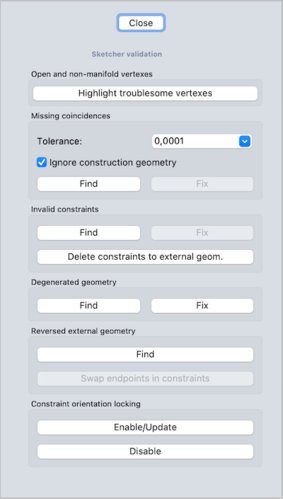
El panel de tareas de validación de Croquizador

Utilización

  1. This tool cannot be used while a sketch is in edit mode. To finish edit mode see Sketcher LeaveSketch.
  2. Select a sketch.
  3. There are several ways to invoke the tool:
    • Press the Validate Sketch button.
    • Select the Sketch → Validate Sketch option from the menu.
  4. The Sketch Validation task panel opens. See Options for more information.
  5. Press the Close button to finish.

Opciones

Coincidencias Falta

Finds out missing coincidences for overlapping vertices, and adds them. Press the Find button; a pop up dialog will appear to report how many missing coincidences were found; they will be shown in the 3D View as yellow crosses. Press OK to close the dialog, then press the Fix button to add the missing coincidences.

If necessary, define a different tolerance value in the drop-down field.

Press Highlight Troublesome Vertices to highlight vertexes that are outside this tolerance.

This tolerance is also used by the Find/Fix process.

Leave the "Ignore construction geometry" checkbox checked to disregard construction geometry in the analysis.

Restricciones no válidas

Checks for malformed constraints.

For example, if there is a Circle-Line-Tangent constraint, but it references two lines, it is considered invalid.

(This sometimes happens due to the Topological naming problem, i.e. the external geometry changes type).

It also does other checks, such as for empty links.

Geometría degenerada

Degenerated geometry can result from solver actions in a sketch.

For instance, if a line is forced to shorten to become almost a point.

Other examples: a zero length line or zero radius circle/arc.

Geometría externa invertida

Reversed external geometry can happen because the handling of reversed geometry was changed around revision 0.15.

This process might be helpful if sketches with external-geometry fail to solve because of these changes.

Bloqueo de la orientación de las restricciones

Tangent and perpendicular constraints are implemented (via-point).

Internally they work by constraining the angle between tangent vectors. With tangent constraint for example, the angle can be 0 or 180 degrees (co-directed or opposed vectors). The actual angle is remembered in the constraint data ("constraint orientation is locked"), it guards against flipping. But the angle can be erased ("constraint orientation unlock") or updated; these tools do exactly that.

The locking mechanism typically works well and this tool should not be needed. It should only used after making a backup of the open document.


Reorientar croquis
Fusionar croquis
Croquizador

Esta página ha sido recuperada de https://wiki.freecad.org/Sketcher_ValidateSketch

¡Contáctanos!
Forum GitHub Mastodon Matrix IRC Gitter.im Discord Reddit Twitter Facebook LinkedIn

© El equipo de FreeCAD. Créditos de imagen de la página principal (de arriba a abajo): ppemawm, r-frank, epileftric, regis, rider_mortagnais, bejant.

Este proyecto es apoyado por: , KiCad Services Corp. y otros patrocinadores

GitHubMejora esta página en GitHub