
|
|
| Menu location |
|---|
| 3D/BIM → Reinforcement Tools → Bent-Shape Rebar |
| Workbenches |
| Reinforcement, BIM |
| Default shortcut |
| None |
| Introduced in version |
| 0.17 |
| See also |
| None |

Descriere
Instrumentul  Bent Shape Rebar permite utilizatorului să creeze o formă de armătură bent shape reinforcing bar în elementul de structură.
This tool is part of the Reinforcement Workbench, an external workbench that can be installed with the  Addon Manager.
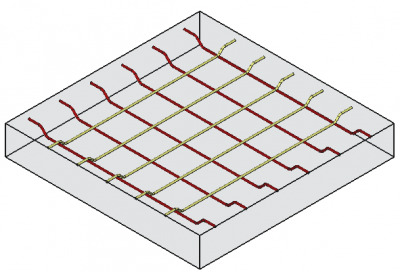
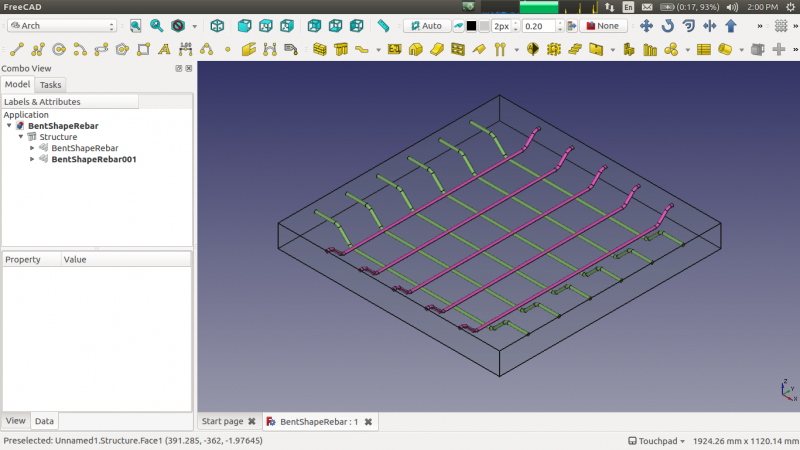
Cum se folosește
- Creați un elemente de structure
- Selectați orice fațetă a structurii
- Apoi selectați Bent Shape Rebar dintre instrumentele dedicate rebar tools
- Un panou de activități contextual va apărea în partea stângă a ecranului, după cum se arată mai jos
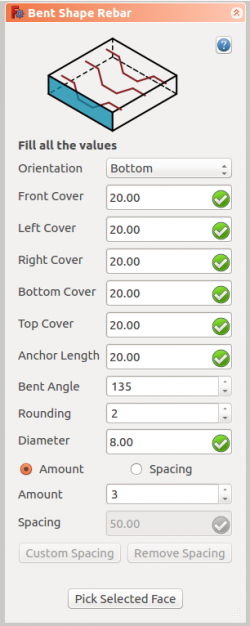
- Selectați orientarea dorită
- Definiți datele inițiale ca și capacul frontal, capacul din stânga, capacul din dreapta, capacul inferior, capacul superior, lungimea ancorei, unghiul îndoit, rotunjirea și diametrul barei
- Selectați modul de distribuire fie cantitate, fie spațiere
- Dacă spațiul este selectat, un utilizator poate de asemenea să opteze pentru spacing custom
- Selectați fațete utilizată petnru a verifica sau schimba faștea pentru distrubuția armăturii/ rebar distribution
- Click pe OK sau pe Apply pentru a genera armăturile
- Click pe Cancel pentru a ieși din task panel
Task panel for the tool
Proprietăți
- DateOrientation: Acesta decide orientarea armăturii (de ex. jos, sus, drepta și stânga).
- DateFront Cover: Distanța dintre armături și fațetele selectate.
- DateRight Cover: Distanța între capătul dintre capătul dreapta al armăturii și fațeta dreapta a structurii.
- DateLeft Cover: Distanța dintre capătul din stânga al armăturii și fațeta stângă a structurii
- DateBottom Cover: Distanța dintre armătură și fațeta de jos a structurii.
- DateTop Cover: Distanța dintre armătură și fața superioară a structurii.
- DateAnchor Length: Aceasta este lungimea brațelor armăturii îndoite/bent shape rebar.
- DateBent Angle: Stabilește unghiul de îndoire a bent shape rebar.
- DateAmount: Cantitatea de armătură.
- DateSpacing: Distanța între acele fiecărei bare.
Scrip-Programare
See also: Arch API, Reinforcement API and FreeCAD Scripting Basics.
Instrumentul Bent Shape Rebar poate fi utilizat în macros și de la consola Python console utilizând următorele funcții:
Rebar = makeBentShapeRebar(f_cover, b_cover, l_cover, r_cover,
                           diameter, t_cover, bentLength, bentAngle, rounding, amount_spacing_check, amount_spacing_value, orientation="Bottom",
                           structure=None, facename=None)
- Bent Shape Rebar are patru orientări diferite:
- Bottom
- Top
- Left
- Right
- Adaugă un obiect Bent Shape reinforcing bar la obeictul structural selectat .
- Dacă nu este dată nici o structură și nici o Facename, ea va avea ca intrare fațeta selectată de utilizator.
- Aici argumentul CoverAlong este de tip tuplă.
- Returnează noul obiect Rebar.
Example
import FreeCAD, Arch, BentShapeRebar

Structure = Arch.makeStructure(length=1000, width=1000, height=100)
Structure.ViewObject.Transparency = 80
FreeCAD.ActiveDocument.recompute()

Rebar = BentShapeRebar.makeBentShapeRebar(50, 20, 20, 20,
                                          8, 40, 100, 135, 2, True, 4, "Bottom", Structure, "Face4")
Rebar.ViewObject.ShapeColor = (0.9, 0.0, 0.0)

Rebar2 = BentShapeRebar.makeBentShapeRebar(50, 40, 20, 20,
                                           8, 20, 100, 135, 2, True, 4, "Bottom", Structure, "Face6")
Rebar2.ViewObject.ShapeColor = (0.0, 0.0, 0.9)
Edition of the rebar
You can change the properties of the rebar with the following function:
editBentShapeRebar(Rebar, f_cover, b_cover, l_cover, r_cover,
                   diameter, t_cover, bentLength, bentAngle, rounding, amount_spacing_check, amount_spacing_value, orientation,
                   structure=None, facename=None)
Rebaris a previously createdBentShapeRebarobject.- The other parameters are the same as required by the
makeBentShapeRebar()function. structureandfacenamemay be omitted so that the rebar stays in the original structure.
import BentShapeRebar

BentShapeRebar.editBentShapeRebar(Rebar, 50, 20, 20, 20,
                                  12, 20, 100, 155, 2, True, 6, "Top")

BentShapeRebar.editBentShapeRebar(Rebar2, 50, 35, 20, 20,
                                  12, 35, 100, 155, 2, True, 6, "Top")


Această pagină este preluată de la https://wiki.freecad.org/Reinforcement_BentShapeRebar