This documentation is not finished. Please help and contribute documentation.
GuiCommand model explains how commands should be documented. Browse Category:UnfinishedDocu to see more incomplete pages like this one. See Category:Command Reference for all commands.
See WikiPages to learn about editing the wiki pages, and go to Help FreeCAD to learn about other ways in which you can contribute.


|
|
| Menu location |
|---|
| 부품 설계 → 뺄셈 도형특징 생성 → 오목자리 |
| Workbenches |
| 부품설계 작업대 |
| Default shortcut |
| None |
| Introduced in version |
| - |
| See also |
| 부품설계 깔판 |
설명
오목자리(Pocket) 도구는 직선 경로를 따라 스케치나 고체의 면을 음의 방향으로 돌출시켜 고체를 자릅니다.
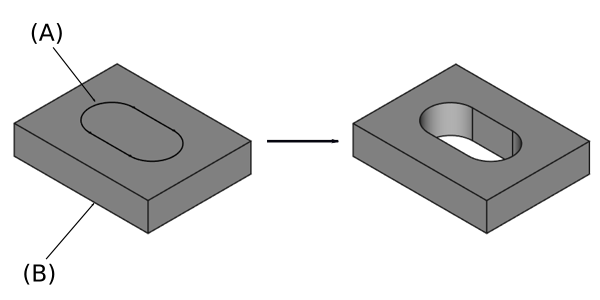
스케치 윤곽(A)는 기본 고체(B)의 윗면에 그려져 있고. 오른쪽은 그 윤곽으로 오목자리를 만든 결과입니다.
용법
- 몸통에서 하나의 스케치나 면을 선택합니다.
 오목자리 버튼을 누르세요.
- 오목자리 매개변수를 설정하려면 아래의 선택사항을 참조하세요.
- 확인 버튼을 누르세요.
선택사항
새로 오목자리를 생성하거나 나무 보기에서 기존 오목자리를 두 번 클릭하면 오목자리 매개변수 작업판이 나타납니다. 이 작업판에서 다음과 같은 설정을 할 수 있습니다.

유형(Type)
유형은 오목자리의 깊이를 지정하는 다섯 가지 방법을 제공합니다:
치수
오목자리의 깊이에 대한 숫자 값을 입력하세요. 평면에 대칭 옵션을 사용하면 오목자리가 스케치나 면을 기준으로 양쪽으로 대칭되게 지정된 길이의 절반만큼 확장됩니다.
관통
오목자리는 진행 방향 반대편 마지막 면까지 확장되어 관통합니다. 평면에 대칭 옵션을 사용하면 오목자리가 양쪽 방향으로 몸통을 관통합니다. 기술적인 이유로 관통은 실제로 10미터 깊이의 포켓입니다. 더 깊은 오목자리가 필요하면 치수 유형을 사용하세요.
첫 번째 만나는 면까지
오목자리는 해당 방향으로 진행하다 만나는 첫 번째 면까지만 확장됩니다.
면 까지
오목자리는 특정한 면까지 확장됩니다. 면 선택 버튼을 누르고 몸통의 일부 평면이나 기준 평면을 선택하세요.
2개 치수
이 유형은 오목자리가 반대 방향으로 확장되는 두 번째 길이를 입력할 수 있습니다. 반전을 체크하면 방향을 바꿀 수 있습니다.
형상까지
1.0 버전부터 도입: 오목자리가 선택한 형상까지 확장됩니다. 형상 선택 버튼을 눌러 형상을 선택합니다. 모든 면 선택 확인란을 활성화된 상태로 두거나 비활성화한 다음, 선택 버튼을 누르고 오목자리를 생성할 면을 선택합니다.
면에서 편차
오목자리가 끝나는 면으로부터의 편차입니다. 이 옵션은 유형이 관통, 첫 번째 만나는 면까지 또는 면까지인 경우에만 사용할 수 있습니다.
길이
Defines the length of the pocket. This option is only available if Type is Dimension or Two dimensions. The length is measured along the direction vector, or along the normal of the sketch or face. Negative values are not possible. Use the Reversed option instead.
2nd length
Defines the length of the pocket in the opposite direction. This option is only available if Type is Two dimensions.
Symmetric to plane
Check this option to extrude half the given length to either side of the sketch or face, if Type is Dimension, or Through all if that is the Type.
Reversed
Reverses the direction of the pocket.
Direction
Direction/edge
You can select the direction of the extrusion:
- Sketch normal or Face normal: The sketch or face is extruded in the opposite direction of its normal. If you have selected several sketches or faces to be extruded, the normal of the first one will be used.
- Select reference…: The sketch or face is extruded in the opposite direction of a straight edge or a datum line selected from the Body.
- Custom direction: The sketch or face is extruded in the direction of the specified vector.
Show direction
If checked, the pocket direction will be shown. In case the pocket uses a Custom direction, it can be changed.
Length along sketch normal
If checked, the pocket length is measured along the sketch or face normal, otherwise along the custom direction.
Taper angle
Tapers the pocket in the extrusion direction by the given angle. A positive angle means the outer pocket border gets wider. Note that inner structures receive the opposite taper angle. This is done to facilitate the design of molds and molded parts. This option is only available if Type is Dimension or Two dimensions.
2nd taper angle
Tapers the pocket in the opposite extrusion direction by the given angle. See Taper angle. This option is only available if Type is Two dimensions.
Properties
Data
Part Design
- 데이터Refine (
Bool): True or false. Cleans up residual edges left after the operation. This property is initially set according to the user's settings (found in Preferences → Part Design → General → Model settings).
- 데이터Type (
Enumeration): Defines how the pocket will be extruded, see Options. - 데이터Length (
Length): Defines the length of the pocket, see Options. - 데이터Length2 (
Length): Second pocket length in case the 데이터Type is TwoLengths, see Options. - 데이터Use Custom Vector (
Bool): If checked, the pocket direction will not be the normal vector of the sketch but the given vector, see Options. - 데이터Direction (
Vector): Vector of the pocket direction if 데이터Use Custom Vector is used. - 데이터Reference Axis (
LinkSub) - 데이터Along Sketch Normal (
Bool): If true, the pocket length is measured along the sketch normal. Otherwise and if 데이터Use Custom Vector is used, it is measured along the custom direction. - 데이터Up To Face (
LinkSub): A face the pocket will extrude up to, see Options. - 데이터Offset (
Length) - 데이터Taper Angle (
Angle) - 데이터Taper Angle2 (
Angle)
Sketch Based
- 데이터Profile (
LinkSub) - 데이터Midplane (
Bool) - 데이터Reversed (
Bool) - 데이터Allow Multi Face (
Bool)
제한 사항
- 다른 유형은 패턴화할 때 문제가 발생할 수 있으므로 가능한 한 치수 또는 관통 유형을 사용하십시오.
- 그렇지 않으면 오목자리 특징은 깔판 특징과 동일한 제한 사항을 갖습니다.
이 페이지에서 인용한 것은 https://wiki.freecad.org/PartDesign_Pocket