|
|
| Description |
|---|
| This macro creates a circle circumscribed on 3 selected points, orthogonal manner or in 3D at the option space. Points can be objects such as cubes, cylinders,... then selected coordinates will be the centre of these forms. Macro version: 1.0 Last modified: 2014-08-08 FreeCAD version: All Download: ToolBar Icon Icon View-Top Icon View-Left Icon View-Front Icon View-C3P Author: Mario52 |
| Author |
| Mario52 |
| Download |
| ToolBar Icon Icon View-Top Icon View-Left Icon View-Front Icon View-C3P |
| Links |
| Macros recipes How to install macros How to customize toolbars |
| Macro Version |
| 1.0 |
| Date last modified |
| 2014-08-08 |
| FreeCAD Version(s) |
| All |
| Default shortcut |
| None |
| See also |
| None |

Description
This macro creates a circle circumscribed on 3 selected points, orthogonal manner or in 3D at the option space. Points can be objects such as cubes, cylinders,... then selected coordinates will be the centre of these forms.
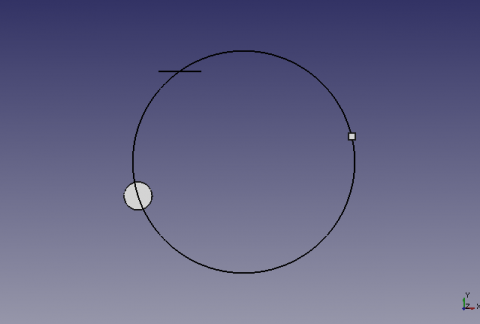
Circle built on 3 selected points
Usage
Select 3 points, or forms in the 3D view and run the macro.
If the shape is a line, the coordinate will be the center of the line.
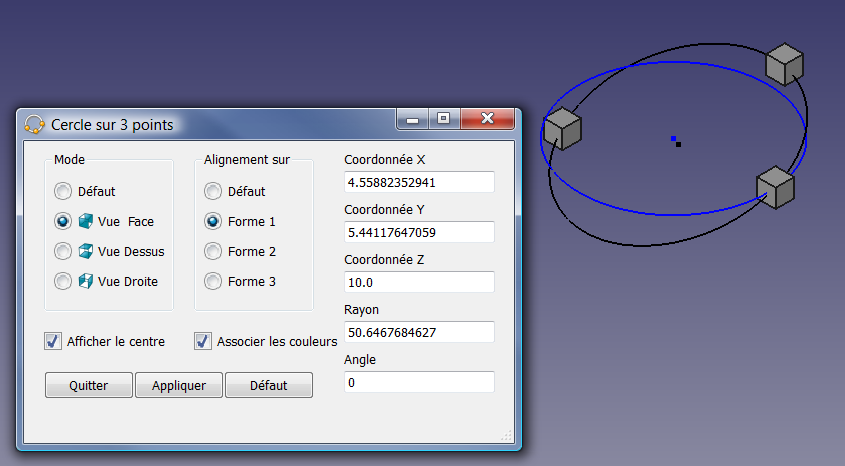
Options
Mode
Default :
- Mode by default, creates a circle on the three points or shapes in 3d space.
- The order of selection of fear forms influencing the angle AXIS and reverse the inclination of the circle. In this case, reverse or change the order of selection of the shapes.
- Coordinates X, Y, Z value 0 or alignment does not allow calculation, can return a division by zero error, and translated by The three points are aligned
Vue Face :
- Creates the circle in the front views of the form chosen, 1, 2 or 3
Vue Dessus :
- Creates the circle in the top on the form chosen view, 1, 2 or 3
Vue Droite :
- Creates the circle in the view of right on the form chosen, 1, 2 or 3
Alignement sur
Forme 1, 2, 3
- Forms, in the order of their selections.
Afficher le centre
- If this box is checked, a point on the centre of the built circle will be created
Associer les couleurs
- If this box is checked, the circle will take the colour of the relevant view,
- View-Top (X,Y) = Blue(axe Z)
- View-Front (Z,X) = Green(Axe Y)
- View-Left (Z,Y) = Red(Axe X)
-
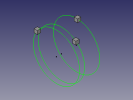
 Circumcircle on 3 forms (front view),
 -
 in an orthogonal manner on the form chosen (right view)
 -
-
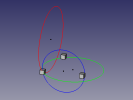 Three bystanders orthogonal circles by the form chosen.
Script


The three icons must be in the same directory as the module.
To download them, resting your mouse over the icon and then right-click and save image as...
ToolBar Icon 
Make_Circle_3_Points.FCMacro
# -*- coding: utf-8 -*-
# Cercle sur 3 points.py
# create a circle from 3 points selected
# combination of the two programs 'create a circle from 3 points selected'
# with as options (orthogonal) circle can be built on a choice plans
# to coordinate one of the three selected choice shapes
# mode by default, creates the circle in 3D space
# the options create the circle of orthogonal way on the map and view the choice
# with the creation of a central color related to the axes Y/N Y/N
# 04/03/2013 # 24/03/2013 # 08/08/2014 by mario52
# the formula adapted (with permission of its author) by "mario52" for orthogonal circles comes from
# http://www-obs.univ-lyon1.fr/labo/fc/Ateliers_archives/ateliers_2005-06/cercle_3pts.pdf
# read the note in pdf, on the order of selection points,
# If the formula returns an error (example the 3 points in the same alignment)
# the formula adapted by "galou_breizh" for the cecle in 3D space comes from
# https://en.wikipedia.org/wiki/Circumscribed_circle
# the window is always visible and allows you to work on other programs
# as for example to select other items in FreeCAD

#08/08/2014 PyQt4 and PySide

#OS: Windows Vista
#Word size: 32-bit
#Version: 0.14.3700 (Git)
#Branch: releases/FreeCAD-0-14
#Hash: 32f5aae0a64333ec8d5d160dbc46e690510c8fe1
#Python version: 2.6.2
#Qt version: 4.5.2
#Coin version: 3.1.0
#SoQt version: 1.4.1
#OCC version: 6.5.1

try:
    import PyQt4
    from PyQt4 import QtCore, QtGui
except Exception:
    import PySide
    from PySide import QtCore, QtGui

import Draft, Part, FreeCAD, math, PartGui, FreeCADGui
from math import sqrt, pi, sin, cos, asin
from FreeCAD import Base

                    # vueChoix = 0 et alignerSur = 0 , mode par défaut
global vueChoix		# choix de la vue Dessus=1 XY, vue Face=2 ZX, vue Droite=3 ZY (Orthogonal)
global alignerSur   # aligne le cercle sur une forme au choix (1,2 ou 3) ou sur Z=0 (Orthogonal)
global afficherPoint# affiche le point central du cercle
global colorer     	# colorer suivant l'axe 1=Ok 0=Couleur courante uniquement Orthogonal !
vueChoix = 0
alignerSur = 0
afficherPoint = 1
colorer = 1

try:
    _fromUtf8 = QtCore.QString.fromUtf8
except AttributeError:
    def _fromUtf8(s):
        return s

try:
    _encoding = QtGui.QApplication.UnicodeUTF8
    def _translate(context, text, disambig):
        return QtGui.QApplication.translate(context, text, disambig, _encoding)
except AttributeError:
    def _translate(context, text, disambig):
        return QtGui.QApplication.translate(context, text, disambig)

class Ui_MainWindow(object):

    def __init__(self, MainWindow):
        self.window = MainWindow
        path = FreeCAD.ConfigGet("AppHomePath") # chemin

        MainWindow.setObjectName(_fromUtf8("MainWindow"))
        MainWindow.resize(490, 302)
        MainWindow.setWindowIcon(QtGui.QIcon(path+'View-C3P.png'))
        self.centralWidget = QtGui.QWidget(MainWindow)
        self.centralWidget.setObjectName(_fromUtf8("centralWidget"))

        self.groupBox = QtGui.QGroupBox(self.centralWidget)
        self.groupBox.setGeometry(QtCore.QRect(20, 10, 130, 161))
        self.groupBox.setObjectName(_fromUtf8("groupBox_1"))

        self.radioButton_1 = QtGui.QRadioButton(self.groupBox)
        self.radioButton_1.setGeometry(QtCore.QRect(10, 30, 130, 20))
        self.radioButton_1.setChecked(True)
        self.radioButton_1.setObjectName(_fromUtf8("radioButton_1"))
        self.radioButton_1.clicked.connect(self.on_radioButton_1_clicked) #connection radioButton_1
        self.radioButton_1.setToolTip(_translate("MainWindow", "Cercle sur 3 points dans l'espace", None))

        self.radioButton_2 = QtGui.QRadioButton(self.groupBox)
        self.radioButton_2.setGeometry(QtCore.QRect(10, 60, 130, 20))
        self.radioButton_2.setObjectName(_fromUtf8("radioButton_2"))
        self.radioButton_2.clicked.connect(self.on_radioButton_2_clicked) #connection radioButton_2
        self.radioButton_2.setToolTip(_translate("MainWindow", "Cercle orthogonal sur la vue de face", None))
        #self.image_01 = "C:\Program Files\FreeCAD0.13\View-Front.png"
        self.image_01 = path+"View-Front.png"
        icon01 = QtGui.QIcon()
        icon01.addPixmap(QtGui.QPixmap(self.image_01),QtGui.QIcon.Normal, QtGui.QIcon.Off)
        self.radioButton_2.setIcon(icon01)

        self.radioButton_3 = QtGui.QRadioButton(self.groupBox)
        self.radioButton_3.setGeometry(QtCore.QRect(10, 90, 130, 20))
        self.radioButton_3.setObjectName(_fromUtf8("radioButton_3"))
        self.radioButton_3.clicked.connect(self.on_radioButton_3_clicked) #connection radioButton_3
        self.radioButton_3.setToolTip(_translate("MainWindow", "Cercle orthogonal sur la vue de dessus", None))
        #self.image_02 = "C:\Program Files\FreeCAD0.13\View-Top.png"
        self.image_02 = path+"View-Top.png"
        icon02 = QtGui.QIcon()
        icon02.addPixmap(QtGui.QPixmap(self.image_02),QtGui.QIcon.Normal, QtGui.QIcon.Off)
        self.radioButton_3.setIcon(icon02)

        self.radioButton_4 = QtGui.QRadioButton(self.groupBox)
        self.radioButton_4.setGeometry(QtCore.QRect(10, 120, 130, 20))
        self.radioButton_4.setObjectName(_fromUtf8("radioButton_4"))
        self.radioButton_4.clicked.connect(self.on_radioButton_4_clicked) #connection radioButton_4
        self.radioButton_4.setToolTip(_translate("MainWindow", "Cercle orthogonal sur la vue de droite", None))
        #self.image_03 = "C:\Program Files\FreeCAD0.13\View-Left.png"
        self.image_03 = path+"View-Left.png"
        icon03 = QtGui.QIcon()
        icon03.addPixmap(QtGui.QPixmap(self.image_03),QtGui.QIcon.Normal, QtGui.QIcon.Off)
        self.radioButton_4.setIcon(icon03)

        self.groupBox_2 = QtGui.QGroupBox(self.centralWidget)
        self.groupBox_2.setGeometry(QtCore.QRect(170, 10, 120, 161))
        self.groupBox_2.setObjectName(_fromUtf8("groupBox_2"))

        self.radioButton_5 = QtGui.QRadioButton(self.groupBox_2)
        self.radioButton_5.setGeometry(QtCore.QRect(10, 30, 95, 20))
        self.radioButton_5.setChecked(True)
        self.radioButton_5.setObjectName(_fromUtf8("radioButton_5"))
        self.radioButton_5.clicked.connect(self.on_radioButton_5_clicked) #connection radioButton_5
        self.radioButton_5.setToolTip(_translate("MainWindow", "Cercle sur 3 points dans l'espace", None))

        self.radioButton_6 = QtGui.QRadioButton(self.groupBox_2)
        self.radioButton_6.setGeometry(QtCore.QRect(10, 60, 95, 20))
        self.radioButton_6.setObjectName(_fromUtf8("radioButton_6"))
        self.radioButton_6.clicked.connect(self.on_radioButton_6_clicked) #connection radioButton_6
        self.radioButton_6.setToolTip(_translate("MainWindow", "Cercle orthogonal sur la forme 1", None))

        self.radioButton_7 = QtGui.QRadioButton(self.groupBox_2)
        self.radioButton_7.setGeometry(QtCore.QRect(10, 90, 95, 20))
        self.radioButton_7.setObjectName(_fromUtf8("radioButton_7"))
        self.radioButton_7.clicked.connect(self.on_radioButton_7_clicked) #connection radioButton_7
        self.radioButton_7.setToolTip(_translate("MainWindow", "Cercle orthogonal sur la forme 2", None))

        self.radioButton_8 = QtGui.QRadioButton(self.groupBox_2)
        self.radioButton_8.setGeometry(QtCore.QRect(10, 120, 95, 20))
        self.radioButton_8.setObjectName(_fromUtf8("radioButton_8"))
        self.radioButton_8.clicked.connect(self.on_radioButton_8_clicked) #connection radioButton_8
        self.radioButton_8.setToolTip(_translate("MainWindow", "Cercle orthogonal sur la forme 3", None))

        self.checkBox_1 = QtGui.QCheckBox(self.centralWidget)
        self.checkBox_1.setGeometry(QtCore.QRect(20, 190, 140, 20))
        self.checkBox_1.setChecked(True)
        self.checkBox_1.setObjectName(_fromUtf8("checkBox_1"))
        self.checkBox_1.setToolTip(_translate("MainWindow", "Affiche un point sur le centre du cercle", None))
#        self.checkBox_1.clicked.connect(self.on_checkBox_1_clicked) #connection checkBox_1

        self.checkBox_2 = QtGui.QCheckBox(self.centralWidget)
        self.checkBox_2.setGeometry(QtCore.QRect(170, 190, 150, 20))
        self.checkBox_2.setChecked(True)
        self.checkBox_2.setObjectName(_fromUtf8("checkBox_2"))
        self.checkBox_2.setToolTip(_translate("MainWindow", "Associe la couleur du cercle à la couleur des axes X,Y,Z (Orthogonal)", None))
#        self.checkBox_2.clicked.connect(self.on_checkBox_2_clicked) #connection checkBox_1

        self.lineEdit_1 = QtGui.QLineEdit(self.centralWidget)
        self.lineEdit_1.setGeometry(QtCore.QRect(320, 30, 151, 22))
        self.lineEdit_1.setObjectName(_fromUtf8("lineEdit_1"))
        self.lineEdit_1.setReadOnly(True)

        self.lineEdit_2 = QtGui.QLineEdit(self.centralWidget)
        self.lineEdit_2.setGeometry(QtCore.QRect(320, 80, 151, 22))
        self.lineEdit_2.setObjectName(_fromUtf8("lineEdit_2"))
        self.lineEdit_2.setReadOnly(True)

        self.lineEdit_3 = QtGui.QLineEdit(self.centralWidget)
        self.lineEdit_3.setGeometry(QtCore.QRect(320, 130, 151, 22))
        self.lineEdit_3.setObjectName(_fromUtf8("lineEdit_3"))
        self.lineEdit_3.setReadOnly(True)

        self.lineEdit_4 = QtGui.QLineEdit(self.centralWidget)
        self.lineEdit_4.setGeometry(QtCore.QRect(320, 180, 151, 22))
        self.lineEdit_4.setObjectName(_fromUtf8("lineEdit_4"))
        self.lineEdit_4.setReadOnly(True)

        self.lineEdit_5 = QtGui.QLineEdit(self.centralWidget)
        self.lineEdit_5.setGeometry(QtCore.QRect(320, 230, 151, 22))
        self.lineEdit_5.setObjectName(_fromUtf8("lineEdit_5"))
        self.lineEdit_5.setReadOnly(True)

        self.label_1 = QtGui.QLabel(self.centralWidget)
        self.label_1.setGeometry(QtCore.QRect(320, 10, 91, 16))
        self.label_1.setObjectName(_fromUtf8("label_1"))

        self.label_2 = QtGui.QLabel(self.centralWidget)
        self.label_2.setGeometry(QtCore.QRect(320, 60, 91, 16))
        self.label_2.setObjectName(_fromUtf8("label_2"))

        self.label_3 = QtGui.QLabel(self.centralWidget)
        self.label_3.setGeometry(QtCore.QRect(320, 110, 91, 16))
        self.label_3.setObjectName(_fromUtf8("label_3"))

        self.label_4 = QtGui.QLabel(self.centralWidget)
        self.label_4.setGeometry(QtCore.QRect(320, 160, 53, 16))
        self.label_4.setObjectName(_fromUtf8("label_4"))

        self.label_5 = QtGui.QLabel(self.centralWidget)
        self.label_5.setGeometry(QtCore.QRect(320, 210, 81, 16))
        self.label_5.setObjectName(_fromUtf8("label_5"))

        self.pushButton_1 = QtGui.QPushButton(self.centralWidget)
        self.pushButton_1.setGeometry(QtCore.QRect(20, 230, 90, 28))
        self.pushButton_1.setObjectName(_fromUtf8("pushButton_1"))
        self.pushButton_1.clicked.connect(self.on_pushButton_1_clicked) #connection pushButton_1
        self.pushButton_1.setToolTip(_translate("MainWindow", "Quitte la fonction", None))

        self.pushButton_2 = QtGui.QPushButton(self.centralWidget)
        self.pushButton_2.setGeometry(QtCore.QRect(110, 230, 90, 28))
        self.pushButton_2.setObjectName(_fromUtf8("pushButton_2"))
        self.pushButton_2.clicked.connect(self.on_pushButton_2_clicked) #connection pushButton_2
        self.pushButton_2.setToolTip(_translate("MainWindow", "Applique la fonction sans quitter", None))
        #self.pushButton_2.setStyleSheet("background-color: red") #cette fonction donne une couleur au bouton
        #self.pushButton_2.setStyleSheet("color : #ff0000") #cette fonction donne une couleur au texte du bouton
        #self.pushButton_2.setStyleSheet("color : #ff0000; background-color : #0000ff;" ) #combinaison des deux

        self.pushButton_3 = QtGui.QPushButton(self.centralWidget)
        self.pushButton_3.setGeometry(QtCore.QRect(200, 230, 90, 28))
        self.pushButton_3.setObjectName(_fromUtf8("pushButton_3"))
        self.pushButton_3.clicked.connect(self.on_pushButton_3_clicked) #connection pushButton_3
        self.pushButton_3.setToolTip(_translate("MainWindow", "Définit le mode par défaut (Cercle sur 3 points dans l'espace)", None))

        MainWindow.setCentralWidget(self.centralWidget)
        self.statusBar = QtGui.QStatusBar(MainWindow)
        self.statusBar.setObjectName(_fromUtf8("statusBar"))
        MainWindow.setStatusBar(self.statusBar)

        self.retranslateUi(MainWindow)
        QtCore.QMetaObject.connectSlotsByName(MainWindow)

    def retranslateUi(self, MainWindow):
        try:
            MainWindow.setWindowFlags(PyQt4.QtCore.Qt.WindowStaysOnTopHint) # PyQt4 cette fonction met la fenêtre en avant
        except Exception:
            MainWindow.setWindowFlags(PySide.QtCore.Qt.WindowStaysOnTopHint) # PySide cette fonction met la fenêtre en avant
        #MainWindow.setStyleSheet("background-color: red") #cette fonction donne une couleur à la fenêtre
        #MainWindow.setWindowOpacity(0.5)    #cette fonction donne une transparence à la fenêtre
        MainWindow.setWindowTitle(_translate("MainWindow", "Cercle sur 3 points", None))
        self.groupBox.setTitle(_translate("MainWindow", "Mode", None))
        self.radioButton_1.setText(_translate("MainWindow", "Défaut", None))
        self.radioButton_2.setText(_translate("MainWindow", "Vue  Face", None))
        self.radioButton_3.setText(_translate("MainWindow", "Vue Dessus", None))
        self.radioButton_4.setText(_translate("MainWindow", "Vue Droite", None))
        self.groupBox_2.setTitle(_translate("MainWindow", "Alignement sur", None))
        self.radioButton_5.setText(_translate("MainWindow", "Défaut", None))
        self.radioButton_6.setText(_translate("MainWindow", "Forme 1", None))
        self.radioButton_7.setText(_translate("MainWindow", "Forme 2", None))
        self.radioButton_8.setText(_translate("MainWindow", "Forme 3", None))
        self.checkBox_1.setText(_translate("MainWindow", "Afficher le centre", None))
        self.checkBox_2.setText(_translate("MainWindow", "Associer les couleurs", None))
        self.label_1.setText(_translate("MainWindow", "Coordonnée X", None))
        self.label_2.setText(_translate("MainWindow", "Coordonnée Y", None))
        self.label_3.setText(_translate("MainWindow", "Coordonnée Z", None))
        self.label_4.setText(_translate("MainWindow", "Rayon", None))
        self.label_5.setText(_translate("MainWindow", "Angle", None))
        self.pushButton_1.setText(_translate("MainWindow", "Quitter", None))
        self.pushButton_2.setText(_translate("MainWindow", "Appliquer", None))
        self.pushButton_3.setText(_translate("MainWindow", "Défaut", None))
    # première série de radioboutons
    def on_radioButton_1_clicked(self):
        if self.radioButton_1.isChecked():
            self.radioButton_5.setChecked(True)
    def on_radioButton_2_clicked(self):
        if self.radioButton_5.isChecked():
            self.radioButton_6.setChecked(True)
    def on_radioButton_3_clicked(self):
        if self.radioButton_5.isChecked():
            self.radioButton_6.setChecked(True)
    def on_radioButton_4_clicked(self):
        if self.radioButton_5.isChecked():
            self.radioButton_6.setChecked(True)
    # deuxième série de radioboutons
    def on_radioButton_5_clicked(self):
        if self.radioButton_5.isChecked():
            self.radioButton_1.setChecked(True)
    def on_radioButton_6_clicked(self):
        if self.radioButton_1.isChecked():
            self.radioButton_2.setChecked(True)
    def on_radioButton_7_clicked(self):
        if self.radioButton_1.isChecked():
            self.radioButton_2.setChecked(True)
    def on_radioButton_8_clicked(self):
        if self.radioButton_1.isChecked():
            self.radioButton_2.setChecked(True)
    # Boutons
    def on_pushButton_1_clicked(self):    # Bouton Quitte la fonction
        App.Console.PrintMessage("Terminé\r\n")
        self.window.hide()

    def on_pushButton_2_clicked(self):    # Bouton Appliquer
        if self.radioButton_1.isChecked():
            vueChoix=0
        if self.radioButton_2.isChecked():
            vueChoix=1
        if self.radioButton_3.isChecked():
            vueChoix=2
        if self.radioButton_4.isChecked():
            vueChoix=3

        if self.radioButton_5.isChecked():
            alignerSur=0
        if self.radioButton_6.isChecked():
            alignerSur=1
        if self.radioButton_7.isChecked():
            alignerSur=2
        if self.radioButton_8.isChecked():
            alignerSur=3

        if self.checkBox_1.checkState()==0:
            afficherPoint=0
        else:
            afficherPoint=1
        if self.checkBox_2.checkState()==0:
            colorer=0
        else:
            colorer=1

        # App.Console.PrintMessage("Appliquer\r\n")
        # App.Console.PrintMessage(str(vueChoix)+" \t")
        # App.Console.PrintMessage(str(alignerSur)+" \t")
        # App.Console.PrintMessage(str(afficherPoint)+" \t")
        # App.Console.PrintMessage(str(colorer)+" \r\n")

        def errorDialog(msg):
            # Create a simple dialog QMessageBox
            # The first argument indicates the icon used: one of QtGui.QMessageBox.{NoIcon, Information, Warning, Critical, Question}
            diag = QtGui.QMessageBox(QtGui.QMessageBox.Critical,u"Error Message",msg)
            try:
                diag.setWindowFlags(PyQt4.QtCore.Qt.WindowStaysOnTopHint) # PyQt4 cette fonction met la fenêtre en avant
            except Exception:
                diag.setWindowFlags(PySide.QtCore.Qt.WindowStaysOnTopHint) # PySide cette fonction met la fenêtre en avant
            #diag.setWindowModality(QtCore.Qt.ApplicationModal) # la fonction a été désactivée pour favoriser "WindowStaysOnTopHint"
            diag.exec_()

        def affiche(x,y,z,rayon,r,v,b,afficherPoint,angle):
            pl.Base=FreeCAD.Vector(x,y,z)
            Draft.makeCircle((rayon),placement=pl,face=False,support=None)
            if colorer==1:
                FreeCADGui.activeDocument().activeObject().LineColor = (r,v,b)
            if afficherPoint==1:
                Draft.makePoint(x,y,z)
                if colorer==1:
                    FreeCADGui.activeDocument().activeObject().PointColor = (r,v,b)
            str(self.lineEdit_1.setText(str(x)))
            str(self.lineEdit_2.setText(str(y)))
            str(self.lineEdit_3.setText(str(z)))
            str(self.lineEdit_4.setText(str(rayon)))
            str(self.lineEdit_5.setText(str(angle)))

        # prendre les objets selectionnes
        sel = FreeCADGui.Selection.getSelection()
        i=0
        centreX=0;centreY=0;rayon=0

        # S'il y a 3 points sélectionnés alors..
        if len(sel)==3 :
            i=0
            ta=[0,0,0,0,0,0,0,0,0]
            for obj in sel:
                x=(obj.Shape.BoundBox.Center)
                ta[i+0]=(x.x)
                ta[i+1]=(x.y)
                ta[i+2]=(x.z)
                i=i+3

            if vueChoix==3:        # Vue de droite ZY (Rouge)
                z_point_1=ta[0]
                x_point_1=ta[1]
                y_point_1=ta[2]

                z_point_2=ta[3]
                x_point_2=ta[4]
                y_point_2=ta[5]

                z_point_3=ta[6]
                x_point_3=ta[7]
                y_point_3=ta[8]

            elif vueChoix==2:    # Vue de face ZX (Vert)
                y_point_1=ta[0]
                z_point_1=ta[1]
                x_point_1=ta[2]

                y_point_2=ta[3]
                z_point_2=ta[4]
                x_point_2=ta[5]

                y_point_3=ta[6]
                z_point_3=ta[7]
                x_point_3=ta[8]

            else:                # Vue de dessus XY (Bleu)
                x_point_1=ta[0]
                y_point_1=ta[1]
                z_point_1=ta[2]

                x_point_2=ta[3]
                y_point_2=ta[4]
                z_point_2=ta[5]

                x_point_3=ta[6]
                y_point_3=ta[7]
                z_point_3=ta[8]

            # Calcul des coordonnées du centre du cercle
            try:
                centreX =((x_point_3**2-x_point_2**2+y_point_3**2-y_point_2**2)/(2*(y_point_3-y_point_2))-(x_point_2**2-x_point_1**2+y_point_2**2-y_point_1**2)/(2*(y_point_2-y_point_1)))/((x_point_3-x_point_2)/(y_point_3-y_point_2)-(x_point_2-x_point_1)/(y_point_2-y_point_1))
                centreY =-(x_point_2-x_point_1)/(y_point_2-y_point_1)*centreX+(x_point_2**2-x_point_1**2+y_point_2**2-y_point_1**2)/(2*(y_point_2-y_point_1))
                rayon =sqrt((x_point_1-centreX)**2+(y_point_1-centreY)**2)
            except:
                errorDialog(u"Calcul impossible trop d'élements alignés")
            else:
            #finally: # si finally est présent, il sera TOUJOURS exécuté
               # Définition de la coordonnée Z
                centreZ=0
                # Création du cercle
                pl=FreeCAD.Placement()
                if vueChoix==1:    # Plan XY Dessus
                    pl.Rotation.Q=(0,0,0,1.0)
                    if alignerSur==1:
                        affiche(centreX,centreY,z_point_1,rayon,0.0,0.0,1.0,afficherPoint,0)
                    elif alignerSur==2:
                        affiche(centreX,centreY,z_point_2,rayon,0.0,0.0,1.0,afficherPoint,0)
                    elif alignerSur==3:
                        affiche(centreX,centreY,z_point_3,rayon,0.0,0.0,1.0,afficherPoint,0)
                elif vueChoix==2:    # Plan XZ Face
                    pl.Rotation.Q=(1,0,0,1.0)
                    if alignerSur==1:
                        affiche(centreY,z_point_1,centreX,rayon,0.0,1.0,0.0,afficherPoint,0)
                    elif alignerSur==2:
                        affiche(centreY,z_point_2,centreX,rayon,0.0,1.0,0.0,afficherPoint,0)
                    elif alignerSur==3:
                        affiche(centreY,z_point_3,centreX,rayon,0.0,1.0,0.0,afficherPoint,0)
                elif vueChoix==3:    # Plan YZ Droite
                    pl.Rotation.Q=(0,1,0,1.0)
                    if alignerSur==1:
                        affiche(z_point_1,centreX,centreY,rayon,1.0,0.0,0.0,afficherPoint,0)
                    elif alignerSur==2:
                        affiche(z_point_2,centreX,centreY,rayon,1.0,0.0,0.0,afficherPoint,0)
                    elif alignerSur==3:
                        affiche(z_point_3,centreX,centreY,rayon,1.0,0.0,0.0,afficherPoint,0)
                else:    # 3D XYZ
                    P1 = sel[0].Shape.BoundBox.Center
                    P2 = sel[1].Shape.BoundBox.Center
                    P3 = sel[2].Shape.BoundBox.Center

                    P1P2 = (P2 - P1).Length
                    P2P3 = (P3 - P2).Length
                    P3P1 = (P1 - P3).Length

                    # Circle radius.
                    l = ((P1 - P2).cross(P2 - P3)).Length
                    try:
                    #if l < 1e-8:
                    #    errorDialog("The three points are aligned")
                        r = P1P2 * P2P3 * P3P1 / 2 / l
                    except:
                        errorDialog("The three points are aligned")
                    else:
                        # Sphere center.
                        a = P2P3**2 * (P1 - P2).dot(P1 - P3) / 2 / l**2
                        b = P3P1**2 * (P2 - P1).dot(P2 - P3) / 2 / l**2
                        c = P1P2**2 * (P3 - P1).dot(P3 - P2) / 2 / l**2
                        P1.multiply(a)
                        P2.multiply(b)
                        P3.multiply(c)
                        PC = P1 + P2 + P3

                        # Creation of a circle
                        pl = Base.Placement()
                        v = (P1 - P2).cross(P3 - P2)
                        v.normalize()
                        axis = Base.Vector(0, 0, 1).cross(v)
                        angle = asin(axis.Length) * 180 / pi
                        axis.normalize()
                        pl = Base.Placement(PC, axis, angle)
                        affiche((PC.x),(PC.y),(PC.z),r,0.0,0.0,0.0,afficherPoint,angle)

        else:
            # Si la condition n'est pas remplie, recommencer
            errorDialog(u"Sélectionnez 3 points et recommencez")
            #FreeCAD.Console.PrintError("Sélectionnez 3 points et recommencez\r\n")
#________________________________________________________________________________
    def on_pushButton_3_clicked(self):    # Valeurs d'origine
        App.Console.PrintMessage("Défaut\r\n")
        vueChoix=0		# choix de la vue Dessus=1 XY, vue Face=2 ZX, vue Droite=3 ZY
        self.radioButton_1.setChecked(True)
        alignerSur=0	# aligne le cercle sur une forme au choix (1,2 ou 3) ou sur Z=0
        self.radioButton_5.setChecked(True)
        afficherPoint=1	# affiche le point central du cercle
        self.checkBox_1.setChecked(True)
        colorer=1		# colorer suivant l'axe 1=Ok 0=Couleur courante uniquement Orthogonal !
        self.checkBox_2.setChecked(True)

#______________________________________________________________________________________

MainWindow = QtGui.QMainWindow()
ui = Ui_MainWindow(MainWindow)
MainWindow.show()
Path
The file should be copied to " C:/Program Files/FreeCAD0.13/ " If you want to put it in another directory, modify the path to line 53
path = FreeCAD.ConfigGet("AppHomePath") # chemin
Anaglyphe
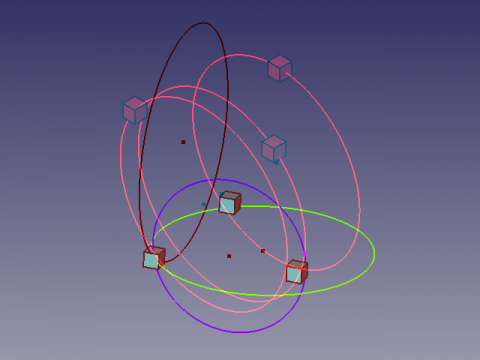
Here an Anaglyph view that allows you to see two different positions of the view by using glasses with filters red and Cyan  .
.
Watch alternately with the left eye and the right eye to see the views separately.
Credits
The genesis of the macro Draft_Circle_3_Points sur le forum (PYTHON) coordonnées d'un point helped flachyjoe thanks.
The formula comes from cercle_3pts.pdf and used with the kind permission of its author.
The formula adapted by " galou_breizh " circle in 3D space comes from
Circumscribed_circle
Separate programs are located here,
Macro Draft Circle 3 Points
Macro Draft Circle 3 Points 3D
Ta strona pochodzi z https://wiki.freecad.org/Macro_Make_Circle_3_Points