|
|
| Descrizione |
|---|
| Crea un cerchio passante per tre punti selezionati nello spazio Versione macro: 1.0 Ultima modifica: 2014-08-08 Versione FreeCAD: All Download: ToolBar Icon Icon View-Top Icon View-Left Icon View-Front Icon View-C3P Autore: Mario52 |
| Autore |
| Mario52 |
| Download |
| ToolBar Icon Icon View-Top Icon View-Left Icon View-Front Icon View-C3P |
| Link |
| Raccolta di macro Come installare le macro Personalizzare la toolbar |
| Versione macro |
| 1.0 |
| Data ultima modifica |
| 2014-08-08 |
| Versioni di FreeCAD |
| All |
| Scorciatoia |
| Nessuna |
| Vedere anche |
| Nessuno |

Descrizione
Questa macro crea un cerchio circoscritto a 3 punti selezionati, su un piano o in 3D nello spazio, a scelta. I punti possono essere in oggetti come cubi, cilindri, ecc.; verranno selezionate come coordinate il centro di queste forme.
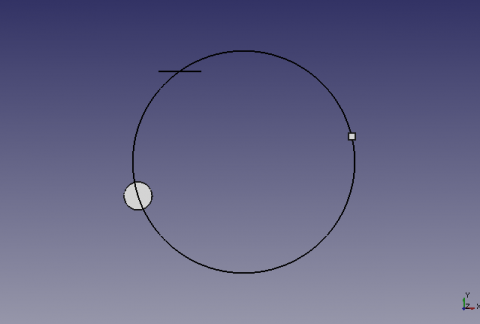
Cerchio costruito da 3 punti selezionati
Utilizzo
Selezionare 3 punti, o 3 forme nella vista 3D ed eseguire la macro.
Se la forma è una linea, le coordinate sono date dal centro della linea.
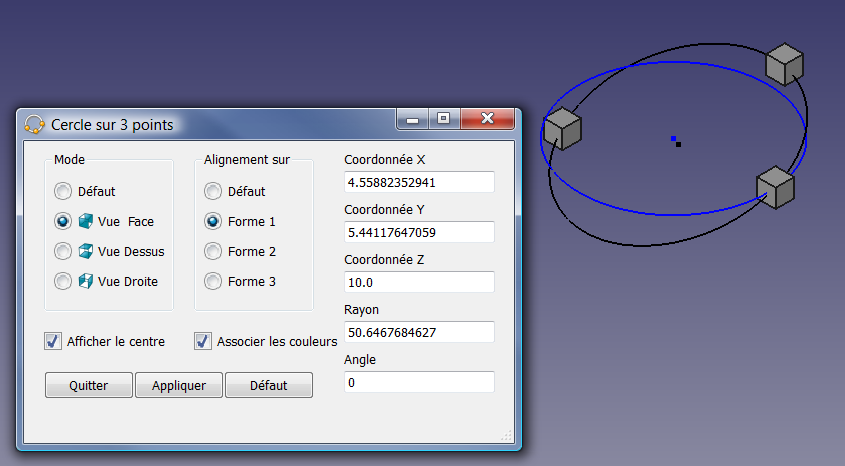
Opzioni
Modalità
Default:
- Modalità predefinita, crea un cerchio da tre punti o forme nello spazio 3D.
- L'ordine di selezione delle forme influenza l'angolo AXIS e inverte l'inclinazione del cerchio. In questo caso, inverte o modifica l'ordine di selezione delle forme.
- Il valore delle coordinate X, Y, Z è 0 o l'allineamento non consente il calcolo, può restituire un errore di divisione per zero e tradotto da I tre punti sono allineati
Vista frontale :
- Crea il cerchio nella vista frontale della forma scelta, 1, 2 or 3
Vista dall'alto :
- Crea il cerchio nella vista in pianta della forma scelta, 1, 2 or 3
Vista da destra :
- Crea il cerchio nella vista da destra della forma scelta, 1, 2 or 3
Allineamento
Forme 1, 2, 3
- Forme, nell'ordine in cui sono state selezionate.
Mostra centro
- Se questa casella è selezionata, verrà creato un punto al centro del cerchio costruito
Abbinamento dei colori
- Se questa casella è selezionata, il cerchio prendere il colore della vista corrispondente,
- Vista dall'alto (X,Y) = Blue(axe Z)
- Vista frontale (Z,X) = Green(Axe Y)
- Vista laterale (Z,Y) = Red(Axe X)
-
 Circumcircle on 3 forms (front view),
 -
 in an orthogonal manner on the form chosen (right view)
 -
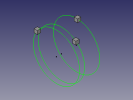 Three bystanders orthogonal circles by the form chosen.
Script


Le tre icone devono trovarsi nella stessa directory del modulo.
Per scaricarle, posizionare il mouse sopra l'icona, fare clic destro e poi salva immagine con nome ...
Icona barra degli strumenti 
Make_Circle_3_Points.FCMacro
# -*- coding: utf-8 -*-
# Cercle sur 3 points.py
# create a circle from 3 points selected
# combination of the two programs 'create a circle from 3 points selected'
# with as options (orthogonal) circle can be built on a choice plans
# to coordinate one of the three selected choice shapes
# mode by default, creates the circle in 3D space
# the options create the circle of orthogonal way on the map and view the choice
# with the creation of a central color related to the axes Y/N Y/N
# 04/03/2013 # 24/03/2013 # 08/08/2014 by mario52
# the formula adapted (with permission of its author) by "mario52" for orthogonal circles comes from
# http://www-obs.univ-lyon1.fr/labo/fc/Ateliers_archives/ateliers_2005-06/cercle_3pts.pdf
# read the note in pdf, on the order of selection points,
# If the formula returns an error (example the 3 points in the same alignment)
# the formula adapted by "galou_breizh" for the cecle in 3D space comes from
# https://en.wikipedia.org/wiki/Circumscribed_circle
# the window is always visible and allows you to work on other programs
# as for example to select other items in FreeCAD

#08/08/2014 PyQt4 and PySide

#OS: Windows Vista
#Word size: 32-bit
#Version: 0.14.3700 (Git)
#Branch: releases/FreeCAD-0-14
#Hash: 32f5aae0a64333ec8d5d160dbc46e690510c8fe1
#Python version: 2.6.2
#Qt version: 4.5.2
#Coin version: 3.1.0
#SoQt version: 1.4.1
#OCC version: 6.5.1

try:
    import PyQt4
    from PyQt4 import QtCore, QtGui
except Exception:
    import PySide
    from PySide import QtCore, QtGui

import Draft, Part, FreeCAD, math, PartGui, FreeCADGui
from math import sqrt, pi, sin, cos, asin
from FreeCAD import Base

                    # vueChoix = 0 et alignerSur = 0 , mode par défaut
global vueChoix		# choix de la vue Dessus=1 XY, vue Face=2 ZX, vue Droite=3 ZY (Orthogonal)
global alignerSur   # aligne le cercle sur une forme au choix (1,2 ou 3) ou sur Z=0 (Orthogonal)
global afficherPoint# affiche le point central du cercle
global colorer     	# colorer suivant l'axe 1=Ok 0=Couleur courante uniquement Orthogonal !
vueChoix = 0
alignerSur = 0
afficherPoint = 1
colorer = 1

try:
    _fromUtf8 = QtCore.QString.fromUtf8
except AttributeError:
    def _fromUtf8(s):
        return s

try:
    _encoding = QtGui.QApplication.UnicodeUTF8
    def _translate(context, text, disambig):
        return QtGui.QApplication.translate(context, text, disambig, _encoding)
except AttributeError:
    def _translate(context, text, disambig):
        return QtGui.QApplication.translate(context, text, disambig)

class Ui_MainWindow(object):

    def __init__(self, MainWindow):
        self.window = MainWindow
        path = FreeCAD.ConfigGet("AppHomePath") # chemin

        MainWindow.setObjectName(_fromUtf8("MainWindow"))
        MainWindow.resize(490, 302)
        MainWindow.setWindowIcon(QtGui.QIcon(path+'View-C3P.png'))
        self.centralWidget = QtGui.QWidget(MainWindow)
        self.centralWidget.setObjectName(_fromUtf8("centralWidget"))

        self.groupBox = QtGui.QGroupBox(self.centralWidget)
        self.groupBox.setGeometry(QtCore.QRect(20, 10, 130, 161))
        self.groupBox.setObjectName(_fromUtf8("groupBox_1"))

        self.radioButton_1 = QtGui.QRadioButton(self.groupBox)
        self.radioButton_1.setGeometry(QtCore.QRect(10, 30, 130, 20))
        self.radioButton_1.setChecked(True)
        self.radioButton_1.setObjectName(_fromUtf8("radioButton_1"))
        self.radioButton_1.clicked.connect(self.on_radioButton_1_clicked) #connection radioButton_1
        self.radioButton_1.setToolTip(_translate("MainWindow", "Cercle sur 3 points dans l'espace", None))

        self.radioButton_2 = QtGui.QRadioButton(self.groupBox)
        self.radioButton_2.setGeometry(QtCore.QRect(10, 60, 130, 20))
        self.radioButton_2.setObjectName(_fromUtf8("radioButton_2"))
        self.radioButton_2.clicked.connect(self.on_radioButton_2_clicked) #connection radioButton_2
        self.radioButton_2.setToolTip(_translate("MainWindow", "Cercle orthogonal sur la vue de face", None))
        #self.image_01 = "C:\Program Files\FreeCAD0.13\View-Front.png"
        self.image_01 = path+"View-Front.png"
        icon01 = QtGui.QIcon()
        icon01.addPixmap(QtGui.QPixmap(self.image_01),QtGui.QIcon.Normal, QtGui.QIcon.Off)
        self.radioButton_2.setIcon(icon01)

        self.radioButton_3 = QtGui.QRadioButton(self.groupBox)
        self.radioButton_3.setGeometry(QtCore.QRect(10, 90, 130, 20))
        self.radioButton_3.setObjectName(_fromUtf8("radioButton_3"))
        self.radioButton_3.clicked.connect(self.on_radioButton_3_clicked) #connection radioButton_3
        self.radioButton_3.setToolTip(_translate("MainWindow", "Cercle orthogonal sur la vue de dessus", None))
        #self.image_02 = "C:\Program Files\FreeCAD0.13\View-Top.png"
        self.image_02 = path+"View-Top.png"
        icon02 = QtGui.QIcon()
        icon02.addPixmap(QtGui.QPixmap(self.image_02),QtGui.QIcon.Normal, QtGui.QIcon.Off)
        self.radioButton_3.setIcon(icon02)

        self.radioButton_4 = QtGui.QRadioButton(self.groupBox)
        self.radioButton_4.setGeometry(QtCore.QRect(10, 120, 130, 20))
        self.radioButton_4.setObjectName(_fromUtf8("radioButton_4"))
        self.radioButton_4.clicked.connect(self.on_radioButton_4_clicked) #connection radioButton_4
        self.radioButton_4.setToolTip(_translate("MainWindow", "Cercle orthogonal sur la vue de droite", None))
        #self.image_03 = "C:\Program Files\FreeCAD0.13\View-Left.png"
        self.image_03 = path+"View-Left.png"
        icon03 = QtGui.QIcon()
        icon03.addPixmap(QtGui.QPixmap(self.image_03),QtGui.QIcon.Normal, QtGui.QIcon.Off)
        self.radioButton_4.setIcon(icon03)

        self.groupBox_2 = QtGui.QGroupBox(self.centralWidget)
        self.groupBox_2.setGeometry(QtCore.QRect(170, 10, 120, 161))
        self.groupBox_2.setObjectName(_fromUtf8("groupBox_2"))

        self.radioButton_5 = QtGui.QRadioButton(self.groupBox_2)
        self.radioButton_5.setGeometry(QtCore.QRect(10, 30, 95, 20))
        self.radioButton_5.setChecked(True)
        self.radioButton_5.setObjectName(_fromUtf8("radioButton_5"))
        self.radioButton_5.clicked.connect(self.on_radioButton_5_clicked) #connection radioButton_5
        self.radioButton_5.setToolTip(_translate("MainWindow", "Cercle sur 3 points dans l'espace", None))

        self.radioButton_6 = QtGui.QRadioButton(self.groupBox_2)
        self.radioButton_6.setGeometry(QtCore.QRect(10, 60, 95, 20))
        self.radioButton_6.setObjectName(_fromUtf8("radioButton_6"))
        self.radioButton_6.clicked.connect(self.on_radioButton_6_clicked) #connection radioButton_6
        self.radioButton_6.setToolTip(_translate("MainWindow", "Cercle orthogonal sur la forme 1", None))

        self.radioButton_7 = QtGui.QRadioButton(self.groupBox_2)
        self.radioButton_7.setGeometry(QtCore.QRect(10, 90, 95, 20))
        self.radioButton_7.setObjectName(_fromUtf8("radioButton_7"))
        self.radioButton_7.clicked.connect(self.on_radioButton_7_clicked) #connection radioButton_7
        self.radioButton_7.setToolTip(_translate("MainWindow", "Cercle orthogonal sur la forme 2", None))

        self.radioButton_8 = QtGui.QRadioButton(self.groupBox_2)
        self.radioButton_8.setGeometry(QtCore.QRect(10, 120, 95, 20))
        self.radioButton_8.setObjectName(_fromUtf8("radioButton_8"))
        self.radioButton_8.clicked.connect(self.on_radioButton_8_clicked) #connection radioButton_8
        self.radioButton_8.setToolTip(_translate("MainWindow", "Cercle orthogonal sur la forme 3", None))

        self.checkBox_1 = QtGui.QCheckBox(self.centralWidget)
        self.checkBox_1.setGeometry(QtCore.QRect(20, 190, 140, 20))
        self.checkBox_1.setChecked(True)
        self.checkBox_1.setObjectName(_fromUtf8("checkBox_1"))
        self.checkBox_1.setToolTip(_translate("MainWindow", "Affiche un point sur le centre du cercle", None))
#        self.checkBox_1.clicked.connect(self.on_checkBox_1_clicked) #connection checkBox_1

        self.checkBox_2 = QtGui.QCheckBox(self.centralWidget)
        self.checkBox_2.setGeometry(QtCore.QRect(170, 190, 150, 20))
        self.checkBox_2.setChecked(True)
        self.checkBox_2.setObjectName(_fromUtf8("checkBox_2"))
        self.checkBox_2.setToolTip(_translate("MainWindow", "Associe la couleur du cercle à la couleur des axes X,Y,Z (Orthogonal)", None))
#        self.checkBox_2.clicked.connect(self.on_checkBox_2_clicked) #connection checkBox_1

        self.lineEdit_1 = QtGui.QLineEdit(self.centralWidget)
        self.lineEdit_1.setGeometry(QtCore.QRect(320, 30, 151, 22))
        self.lineEdit_1.setObjectName(_fromUtf8("lineEdit_1"))
        self.lineEdit_1.setReadOnly(True)

        self.lineEdit_2 = QtGui.QLineEdit(self.centralWidget)
        self.lineEdit_2.setGeometry(QtCore.QRect(320, 80, 151, 22))
        self.lineEdit_2.setObjectName(_fromUtf8("lineEdit_2"))
        self.lineEdit_2.setReadOnly(True)

        self.lineEdit_3 = QtGui.QLineEdit(self.centralWidget)
        self.lineEdit_3.setGeometry(QtCore.QRect(320, 130, 151, 22))
        self.lineEdit_3.setObjectName(_fromUtf8("lineEdit_3"))
        self.lineEdit_3.setReadOnly(True)

        self.lineEdit_4 = QtGui.QLineEdit(self.centralWidget)
        self.lineEdit_4.setGeometry(QtCore.QRect(320, 180, 151, 22))
        self.lineEdit_4.setObjectName(_fromUtf8("lineEdit_4"))
        self.lineEdit_4.setReadOnly(True)

        self.lineEdit_5 = QtGui.QLineEdit(self.centralWidget)
        self.lineEdit_5.setGeometry(QtCore.QRect(320, 230, 151, 22))
        self.lineEdit_5.setObjectName(_fromUtf8("lineEdit_5"))
        self.lineEdit_5.setReadOnly(True)

        self.label_1 = QtGui.QLabel(self.centralWidget)
        self.label_1.setGeometry(QtCore.QRect(320, 10, 91, 16))
        self.label_1.setObjectName(_fromUtf8("label_1"))

        self.label_2 = QtGui.QLabel(self.centralWidget)
        self.label_2.setGeometry(QtCore.QRect(320, 60, 91, 16))
        self.label_2.setObjectName(_fromUtf8("label_2"))

        self.label_3 = QtGui.QLabel(self.centralWidget)
        self.label_3.setGeometry(QtCore.QRect(320, 110, 91, 16))
        self.label_3.setObjectName(_fromUtf8("label_3"))

        self.label_4 = QtGui.QLabel(self.centralWidget)
        self.label_4.setGeometry(QtCore.QRect(320, 160, 53, 16))
        self.label_4.setObjectName(_fromUtf8("label_4"))

        self.label_5 = QtGui.QLabel(self.centralWidget)
        self.label_5.setGeometry(QtCore.QRect(320, 210, 81, 16))
        self.label_5.setObjectName(_fromUtf8("label_5"))

        self.pushButton_1 = QtGui.QPushButton(self.centralWidget)
        self.pushButton_1.setGeometry(QtCore.QRect(20, 230, 90, 28))
        self.pushButton_1.setObjectName(_fromUtf8("pushButton_1"))
        self.pushButton_1.clicked.connect(self.on_pushButton_1_clicked) #connection pushButton_1
        self.pushButton_1.setToolTip(_translate("MainWindow", "Quitte la fonction", None))

        self.pushButton_2 = QtGui.QPushButton(self.centralWidget)
        self.pushButton_2.setGeometry(QtCore.QRect(110, 230, 90, 28))
        self.pushButton_2.setObjectName(_fromUtf8("pushButton_2"))
        self.pushButton_2.clicked.connect(self.on_pushButton_2_clicked) #connection pushButton_2
        self.pushButton_2.setToolTip(_translate("MainWindow", "Applique la fonction sans quitter", None))
        #self.pushButton_2.setStyleSheet("background-color: red") #cette fonction donne une couleur au bouton
        #self.pushButton_2.setStyleSheet("color : #ff0000") #cette fonction donne une couleur au texte du bouton
        #self.pushButton_2.setStyleSheet("color : #ff0000; background-color : #0000ff;" ) #combinaison des deux

        self.pushButton_3 = QtGui.QPushButton(self.centralWidget)
        self.pushButton_3.setGeometry(QtCore.QRect(200, 230, 90, 28))
        self.pushButton_3.setObjectName(_fromUtf8("pushButton_3"))
        self.pushButton_3.clicked.connect(self.on_pushButton_3_clicked) #connection pushButton_3
        self.pushButton_3.setToolTip(_translate("MainWindow", "Définit le mode par défaut (Cercle sur 3 points dans l'espace)", None))

        MainWindow.setCentralWidget(self.centralWidget)
        self.statusBar = QtGui.QStatusBar(MainWindow)
        self.statusBar.setObjectName(_fromUtf8("statusBar"))
        MainWindow.setStatusBar(self.statusBar)

        self.retranslateUi(MainWindow)
        QtCore.QMetaObject.connectSlotsByName(MainWindow)

    def retranslateUi(self, MainWindow):
        try:
            MainWindow.setWindowFlags(PyQt4.QtCore.Qt.WindowStaysOnTopHint) # PyQt4 cette fonction met la fenêtre en avant
        except Exception:
            MainWindow.setWindowFlags(PySide.QtCore.Qt.WindowStaysOnTopHint) # PySide cette fonction met la fenêtre en avant
        #MainWindow.setStyleSheet("background-color: red") #cette fonction donne une couleur à la fenêtre
        #MainWindow.setWindowOpacity(0.5)    #cette fonction donne une transparence à la fenêtre
        MainWindow.setWindowTitle(_translate("MainWindow", "Cercle sur 3 points", None))
        self.groupBox.setTitle(_translate("MainWindow", "Mode", None))
        self.radioButton_1.setText(_translate("MainWindow", "Défaut", None))
        self.radioButton_2.setText(_translate("MainWindow", "Vue  Face", None))
        self.radioButton_3.setText(_translate("MainWindow", "Vue Dessus", None))
        self.radioButton_4.setText(_translate("MainWindow", "Vue Droite", None))
        self.groupBox_2.setTitle(_translate("MainWindow", "Alignement sur", None))
        self.radioButton_5.setText(_translate("MainWindow", "Défaut", None))
        self.radioButton_6.setText(_translate("MainWindow", "Forme 1", None))
        self.radioButton_7.setText(_translate("MainWindow", "Forme 2", None))
        self.radioButton_8.setText(_translate("MainWindow", "Forme 3", None))
        self.checkBox_1.setText(_translate("MainWindow", "Afficher le centre", None))
        self.checkBox_2.setText(_translate("MainWindow", "Associer les couleurs", None))
        self.label_1.setText(_translate("MainWindow", "Coordonnée X", None))
        self.label_2.setText(_translate("MainWindow", "Coordonnée Y", None))
        self.label_3.setText(_translate("MainWindow", "Coordonnée Z", None))
        self.label_4.setText(_translate("MainWindow", "Rayon", None))
        self.label_5.setText(_translate("MainWindow", "Angle", None))
        self.pushButton_1.setText(_translate("MainWindow", "Quitter", None))
        self.pushButton_2.setText(_translate("MainWindow", "Appliquer", None))
        self.pushButton_3.setText(_translate("MainWindow", "Défaut", None))
    # première série de radioboutons
    def on_radioButton_1_clicked(self):
        if self.radioButton_1.isChecked():
            self.radioButton_5.setChecked(True)
    def on_radioButton_2_clicked(self):
        if self.radioButton_5.isChecked():
            self.radioButton_6.setChecked(True)
    def on_radioButton_3_clicked(self):
        if self.radioButton_5.isChecked():
            self.radioButton_6.setChecked(True)
    def on_radioButton_4_clicked(self):
        if self.radioButton_5.isChecked():
            self.radioButton_6.setChecked(True)
    # deuxième série de radioboutons
    def on_radioButton_5_clicked(self):
        if self.radioButton_5.isChecked():
            self.radioButton_1.setChecked(True)
    def on_radioButton_6_clicked(self):
        if self.radioButton_1.isChecked():
            self.radioButton_2.setChecked(True)
    def on_radioButton_7_clicked(self):
        if self.radioButton_1.isChecked():
            self.radioButton_2.setChecked(True)
    def on_radioButton_8_clicked(self):
        if self.radioButton_1.isChecked():
            self.radioButton_2.setChecked(True)
    # Boutons
    def on_pushButton_1_clicked(self):    # Bouton Quitte la fonction
        App.Console.PrintMessage("Terminé\r\n")
        self.window.hide()

    def on_pushButton_2_clicked(self):    # Bouton Appliquer
        if self.radioButton_1.isChecked():
            vueChoix=0
        if self.radioButton_2.isChecked():
            vueChoix=1
        if self.radioButton_3.isChecked():
            vueChoix=2
        if self.radioButton_4.isChecked():
            vueChoix=3

        if self.radioButton_5.isChecked():
            alignerSur=0
        if self.radioButton_6.isChecked():
            alignerSur=1
        if self.radioButton_7.isChecked():
            alignerSur=2
        if self.radioButton_8.isChecked():
            alignerSur=3

        if self.checkBox_1.checkState()==0:
            afficherPoint=0
        else:
            afficherPoint=1
        if self.checkBox_2.checkState()==0:
            colorer=0
        else:
            colorer=1

        # App.Console.PrintMessage("Appliquer\r\n")
        # App.Console.PrintMessage(str(vueChoix)+" \t")
        # App.Console.PrintMessage(str(alignerSur)+" \t")
        # App.Console.PrintMessage(str(afficherPoint)+" \t")
        # App.Console.PrintMessage(str(colorer)+" \r\n")

        def errorDialog(msg):
            # Create a simple dialog QMessageBox
            # The first argument indicates the icon used: one of QtGui.QMessageBox.{NoIcon, Information, Warning, Critical, Question}
            diag = QtGui.QMessageBox(QtGui.QMessageBox.Critical,u"Error Message",msg)
            try:
                diag.setWindowFlags(PyQt4.QtCore.Qt.WindowStaysOnTopHint) # PyQt4 cette fonction met la fenêtre en avant
            except Exception:
                diag.setWindowFlags(PySide.QtCore.Qt.WindowStaysOnTopHint) # PySide cette fonction met la fenêtre en avant
            #diag.setWindowModality(QtCore.Qt.ApplicationModal) # la fonction a été désactivée pour favoriser "WindowStaysOnTopHint"
            diag.exec_()

        def affiche(x,y,z,rayon,r,v,b,afficherPoint,angle):
            pl.Base=FreeCAD.Vector(x,y,z)
            Draft.makeCircle((rayon),placement=pl,face=False,support=None)
            if colorer==1:
                FreeCADGui.activeDocument().activeObject().LineColor = (r,v,b)
            if afficherPoint==1:
                Draft.makePoint(x,y,z)
                if colorer==1:
                    FreeCADGui.activeDocument().activeObject().PointColor = (r,v,b)
            str(self.lineEdit_1.setText(str(x)))
            str(self.lineEdit_2.setText(str(y)))
            str(self.lineEdit_3.setText(str(z)))
            str(self.lineEdit_4.setText(str(rayon)))
            str(self.lineEdit_5.setText(str(angle)))

        # prendre les objets selectionnes
        sel = FreeCADGui.Selection.getSelection()
        i=0
        centreX=0;centreY=0;rayon=0

        # S'il y a 3 points sélectionnés alors..
        if len(sel)==3 :
            i=0
            ta=[0,0,0,0,0,0,0,0,0]
            for obj in sel:
                x=(obj.Shape.BoundBox.Center)
                ta[i+0]=(x.x)
                ta[i+1]=(x.y)
                ta[i+2]=(x.z)
                i=i+3

            if vueChoix==3:        # Vue de droite ZY (Rouge)
                z_point_1=ta[0]
                x_point_1=ta[1]
                y_point_1=ta[2]

                z_point_2=ta[3]
                x_point_2=ta[4]
                y_point_2=ta[5]

                z_point_3=ta[6]
                x_point_3=ta[7]
                y_point_3=ta[8]

            elif vueChoix==2:    # Vue de face ZX (Vert)
                y_point_1=ta[0]
                z_point_1=ta[1]
                x_point_1=ta[2]

                y_point_2=ta[3]
                z_point_2=ta[4]
                x_point_2=ta[5]

                y_point_3=ta[6]
                z_point_3=ta[7]
                x_point_3=ta[8]

            else:                # Vue de dessus XY (Bleu)
                x_point_1=ta[0]
                y_point_1=ta[1]
                z_point_1=ta[2]

                x_point_2=ta[3]
                y_point_2=ta[4]
                z_point_2=ta[5]

                x_point_3=ta[6]
                y_point_3=ta[7]
                z_point_3=ta[8]

            # Calcul des coordonnées du centre du cercle
            try:
                centreX =((x_point_3**2-x_point_2**2+y_point_3**2-y_point_2**2)/(2*(y_point_3-y_point_2))-(x_point_2**2-x_point_1**2+y_point_2**2-y_point_1**2)/(2*(y_point_2-y_point_1)))/((x_point_3-x_point_2)/(y_point_3-y_point_2)-(x_point_2-x_point_1)/(y_point_2-y_point_1))
                centreY =-(x_point_2-x_point_1)/(y_point_2-y_point_1)*centreX+(x_point_2**2-x_point_1**2+y_point_2**2-y_point_1**2)/(2*(y_point_2-y_point_1))
                rayon =sqrt((x_point_1-centreX)**2+(y_point_1-centreY)**2)
            except:
                errorDialog(u"Calcul impossible trop d'élements alignés")
            else:
            #finally: # si finally est présent, il sera TOUJOURS exécuté
               # Définition de la coordonnée Z
                centreZ=0
                # Création du cercle
                pl=FreeCAD.Placement()
                if vueChoix==1:    # Plan XY Dessus
                    pl.Rotation.Q=(0,0,0,1.0)
                    if alignerSur==1:
                        affiche(centreX,centreY,z_point_1,rayon,0.0,0.0,1.0,afficherPoint,0)
                    elif alignerSur==2:
                        affiche(centreX,centreY,z_point_2,rayon,0.0,0.0,1.0,afficherPoint,0)
                    elif alignerSur==3:
                        affiche(centreX,centreY,z_point_3,rayon,0.0,0.0,1.0,afficherPoint,0)
                elif vueChoix==2:    # Plan XZ Face
                    pl.Rotation.Q=(1,0,0,1.0)
                    if alignerSur==1:
                        affiche(centreY,z_point_1,centreX,rayon,0.0,1.0,0.0,afficherPoint,0)
                    elif alignerSur==2:
                        affiche(centreY,z_point_2,centreX,rayon,0.0,1.0,0.0,afficherPoint,0)
                    elif alignerSur==3:
                        affiche(centreY,z_point_3,centreX,rayon,0.0,1.0,0.0,afficherPoint,0)
                elif vueChoix==3:    # Plan YZ Droite
                    pl.Rotation.Q=(0,1,0,1.0)
                    if alignerSur==1:
                        affiche(z_point_1,centreX,centreY,rayon,1.0,0.0,0.0,afficherPoint,0)
                    elif alignerSur==2:
                        affiche(z_point_2,centreX,centreY,rayon,1.0,0.0,0.0,afficherPoint,0)
                    elif alignerSur==3:
                        affiche(z_point_3,centreX,centreY,rayon,1.0,0.0,0.0,afficherPoint,0)
                else:    # 3D XYZ
                    P1 = sel[0].Shape.BoundBox.Center
                    P2 = sel[1].Shape.BoundBox.Center
                    P3 = sel[2].Shape.BoundBox.Center

                    P1P2 = (P2 - P1).Length
                    P2P3 = (P3 - P2).Length
                    P3P1 = (P1 - P3).Length

                    # Circle radius.
                    l = ((P1 - P2).cross(P2 - P3)).Length
                    try:
                    #if l < 1e-8:
                    #    errorDialog("The three points are aligned")
                        r = P1P2 * P2P3 * P3P1 / 2 / l
                    except:
                        errorDialog("The three points are aligned")
                    else:
                        # Sphere center.
                        a = P2P3**2 * (P1 - P2).dot(P1 - P3) / 2 / l**2
                        b = P3P1**2 * (P2 - P1).dot(P2 - P3) / 2 / l**2
                        c = P1P2**2 * (P3 - P1).dot(P3 - P2) / 2 / l**2
                        P1.multiply(a)
                        P2.multiply(b)
                        P3.multiply(c)
                        PC = P1 + P2 + P3

                        # Creation of a circle
                        pl = Base.Placement()
                        v = (P1 - P2).cross(P3 - P2)
                        v.normalize()
                        axis = Base.Vector(0, 0, 1).cross(v)
                        angle = asin(axis.Length) * 180 / pi
                        axis.normalize()
                        pl = Base.Placement(PC, axis, angle)
                        affiche((PC.x),(PC.y),(PC.z),r,0.0,0.0,0.0,afficherPoint,angle)

        else:
            # Si la condition n'est pas remplie, recommencer
            errorDialog(u"Sélectionnez 3 points et recommencez")
            #FreeCAD.Console.PrintError("Sélectionnez 3 points et recommencez\r\n")
#________________________________________________________________________________
    def on_pushButton_3_clicked(self):    # Valeurs d'origine
        App.Console.PrintMessage("Défaut\r\n")
        vueChoix=0		# choix de la vue Dessus=1 XY, vue Face=2 ZX, vue Droite=3 ZY
        self.radioButton_1.setChecked(True)
        alignerSur=0	# aligne le cercle sur une forme au choix (1,2 ou 3) ou sur Z=0
        self.radioButton_5.setChecked(True)
        afficherPoint=1	# affiche le point central du cercle
        self.checkBox_1.setChecked(True)
        colorer=1		# colorer suivant l'axe 1=Ok 0=Couleur courante uniquement Orthogonal !
        self.checkBox_2.setChecked(True)

#______________________________________________________________________________________

MainWindow = QtGui.QMainWindow()
ui = Ui_MainWindow(MainWindow)
MainWindow.show()
Percorso
il file deve essere copiato in " C:/Program Files/FreeCAD0.13/ ". Per metterlo in un'altra cartella, modificare il percorso nella riga 53
path = FreeCAD.ConfigGet("AppHomePath") # chemin
Anaglifo
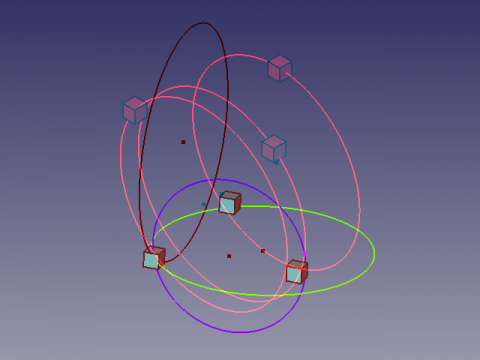
Ecco una vista anaglifica che consente di vedere due diverse posizioni della vista utilizzando occhiali con filtri rosso e ciano  .
.
Guardare alternativamente con l'occhio sinistro e con quello destro per vedere le viste separatamente.
Ringraziamenti
La genesi della macro Draft Circle 3 Points si trova nel forum sur le forum (PYTHON) coordonnées d'un point a cui ha contribuito flachyjoe che ringrazio.
La formula è presa da cercle_3pts.pdf ed utilizzata con il gentile permesso del suo autore.
La formula circle in 3D space, adattata da " galou_breizh " è presa da Circumscribed_circle
Altre macro si trovano in:
Questa pagina è recuperata da https://wiki.freecad.org/Macro_Make_Circle_3_Points