|
|
| Description |
|---|
| Macro avec interface graphique qui permet à l'utilisateur de créer un mécanisme de roue de Genève à partir de zéro. Cette macro est basée sur la macro Macro Geneva Wheel de drei. Version macro : 1.0 Date dernière modification : 2014-09-21 Version FreeCAD : Toutes Téléchargement : Icône de la barre d'outils Auteur: quick61 |
| Auteur |
| quick61 |
| Téléchargement |
| Icône de la barre d'outils |
| Liens |
| Page des macros Comment installer une macro Comment créer une barre d'outils |
| Version Macro |
| 1.0 |
| Dernière modification |
| 2014-09-21 |
| Version(s) FreeCAD |
| Toutes |
| Raccourci clavier |
| None |
| Voir aussi |
| None |

Description
Interface graphique permettant à l’utilisateur de créer un mécanisme de roue de Genève à partir de rien. Basé sur la Macro Geneva Wheel de drei.
Utilisation
Pour utiliser cette macro, la copier dans votre répertoire Macro de FreeCAD et inclure l'icône GW_Dim.png ci-dessous dans le même répertoire que le macro.

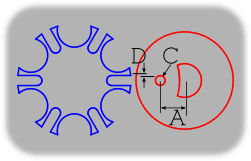
Copier et inclure dans la même répertoire que la macro.
Prise d'écran
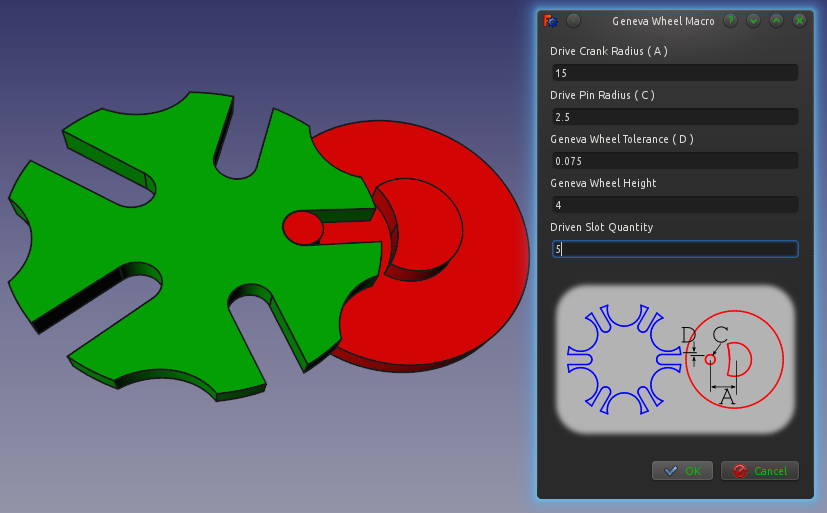
Script
Icône de la barre d’outils
Macro_Geneva_Wheel_GUI.FCMacro
#Creation of a Geneva Wheel with Parametric values  By: Isaac Ayala (drei) & Mark Stephen (quick61)
#This Macro creates the main parts of a Geneva Wheel Mechanism

#It depends on six values that must be altered in the following code
#The variables are a, b, n, p, t and h.

#Definition for each variable
#    Input
#a = Drive Crank Radius
#b = Geneva Wheel Radius
#p = Drive Pin Radius
#t = Geneva Wheel Tolerance
#h = Geneva Wheel Height
#n = Driven Slot Quantity
#    Output
#c = Distance Between Centers
#s = Slot Center Width
#w = Slot Width
#y = Stop Arc Radius
#z = Stop Disc Radius
#v = Clearance Arc

#Please note that you can alter the code so it depends on five values exclusively
#Just replace c, and either a or b with the following
#    Keep value for a
#c = a/math.sin(math.pi/n)
#b = math.sqrt((math.pow(c,2))-(math.pow(a,2)))
#    Keep value for b
#c = b/math.cos(math.pi/n)
#a = math.sqrt((math.pow(c,2))-(math.pow(b,2)))

from __future__ import division
import math
from FreeCAD import Base
from PySide import QtGui, QtCore
from PySide.QtGui import QApplication, QDialog, QMainWindow
import Part
import Draft
class p():


   def Ggear(self):

      try:
         #Inputs
         a = float(self.dCr.text())
         #b = float(self.gWr.text())
         p = float(self.dPd.text())
         t = float(self.gWt.text())
         h = float(self.gWh.text())
         n = float(self.gWn.text())

         #Outputs
         #c = math.sqrt(pow(a,2) + pow(b,2))
         c = a/math.sin(math.pi/n)
         b = math.sqrt((math.pow(c,2))-(math.pow(a,2)))
         s = a + b - c
         w = p + t
         y = a - (3 * p)
         z = y - t
         v = (b * z)/a
         m = math.sqrt((v**2)+(z**2)) # Solves for location of clearance cut axis

         #    Create the Drive Crank (Will be placed on the origin)
         driveCrank = Part.makeCylinder(z, h)
         #driveCrank.translate(Base.Vector(0,0,0))

         #genevaWheelClearanceCut = Part.makeCylinder(b, h)
         #genevaWheelClearanceCut.translate(Base.Vector(-c,0,0))

         genevaWheelClearanceCut = Part.makeCylinder(v, h)
         genevaWheelClearanceCut.translate(Base.Vector(-m,0,0))

         driveCrank = driveCrank.cut(genevaWheelClearanceCut)

         driveCrankBase = Part.makeCylinder((a+(2*p)), h)
         driveCrankBase.translate(Base.Vector(0,0,-h))

         driveCrank = driveCrank.fuse(driveCrankBase)

         drivePin = Part.makeCylinder(p,h)
         drivePin.translate(Base.Vector(-a,0,0))

         driveCrank = driveCrank.fuse(drivePin)

         #    Create the Geneva  Wheel (Will be placed on the x-axis on the left side)
         genevaWheel = Part.makeCylinder(b,h)
         genevaWheel.translate(Base.Vector(-c,0,0))

         stopArc = Part.makeCylinder(y, h)
         stopArc.rotate(Base.Vector(-c,0,0),Base.Vector(0,0,1),(180/n))

         for i in range(int(n)):
            stopArc.rotate(Base.Vector(-c,0,0),Base.Vector(0,0,1),(360/n))
            genevaWheel = genevaWheel.cut(stopArc)

         slotLength = Part.makeBox(s,(2*w),h)
         slotLength.translate(Base.Vector(-a,-w,0))

         slotRadius = Part.makeCylinder(w,h)
         slotRadius.translate(Base.Vector(-a,0,0))

         slot=slotLength.fuse(slotRadius)

         for i in range(int(n)):
            slot.rotate(Base.Vector(-c,0,0),Base.Vector(0,0,1),(360/n))
            genevaWheel = genevaWheel.cut(slot)

         #    Display Result

         Part.show(driveCrank)
         Part.show(genevaWheel)

      except:
         FreeCAD.Console.PrintError("Unable to complete task. Please recheck your data entries.")

      self.close()

   def close(self):
      self.dialog.hide()

   def __init__(self):
      self.dialog = None

      self.dialog = QtGui.QDialog()
      self.dialog.resize(240,100)

      self.dialog.setWindowTitle("Geneva Wheel Macro")
      la = QtGui.QVBoxLayout(self.dialog)

      DCR = QtGui.QLabel("Drive Crank Radius ( A )")
      la.addWidget(DCR)
      self.dCr = QtGui.QLineEdit()
      la.addWidget(self.dCr)

      #GWR = QtGui.QLabel("Geneva Wheel Radius ( B )")
      #la.addWidget(GWR)
      #self.gWr = QtGui.QLineEdit()
      #la.addWidget(self.gWr)

      DPD = QtGui.QLabel("Drive Pin Radius ( C )")
      la.addWidget(DPD)
      self.dPd = QtGui.QLineEdit()
      la.addWidget(self.dPd)

      GWT = QtGui.QLabel("Geneva Wheel Tolerance ( D )")
      la.addWidget(GWT)
      self.gWt = QtGui.QLineEdit()
      la.addWidget(self.gWt)

      GWH = QtGui.QLabel("Geneva Wheel Height")
      la.addWidget(GWH)
      self.gWh = QtGui.QLineEdit()
      la.addWidget(self.gWh)

      GWN = QtGui.QLabel("Driven Slot Quantity")
      la.addWidget(GWN)
      self.gWn = QtGui.QLineEdit()
      la.addWidget(self.gWn)

      #
      # - Include graphic image in dialog window -
      #
      # Insure that image is in the same directory as this Macro.
      # Image should be available from same source as Macro.
      #

      import os
      macro_dir = os.path.dirname(__file__)
      self.PiX = QtGui.QLabel()
      self.PiX.setPixmap(os.path.join(macro_dir, "GW_Dim.png"))

      hbox = QtGui.QHBoxLayout()
      hbox.addStretch()
      hbox.addWidget(self.PiX)
      hbox.addStretch()

      la.addSpacing(15)
      la.addLayout(hbox)
      la.addSpacing(15)

      # - End Image layout -

      okbox = QtGui.QDialogButtonBox(self.dialog)
      okbox.setOrientation(QtCore.Qt.Horizontal)
      okbox.setStandardButtons(QtGui.QDialogButtonBox.Cancel|QtGui.QDialogButtonBox.Ok)
      la.addWidget(okbox)
      QtCore.QObject.connect(okbox, QtCore.SIGNAL("accepted()"), self.Ggear)
      QtCore.QObject.connect(okbox, QtCore.SIGNAL("rejected()"), self.close)
      QtCore.QMetaObject.connectSlotsByName(self.dialog)
      self.dialog.show()
      self.dialog.exec_()

p()
Liens
Cette macro est la version graphique de l'original Macro Geneva Wheel créé par Drei
Cette page est extraite de https://wiki.freecad.org/Macro_Geneva_Wheel_GUI