|
|
| Descrizione |
|---|
| Una interfaccia grafica che permette all'utente di impostare i valori per creare un meccanismo Croce di Malta da zero. Basata sulla macro Macro Geneva Wheel di drei Versione macro: 1.0 Ultima modifica: 2014-09-21 Versione FreeCAD: All Download: ToolBar Icon Autore: quick61 |
| Autore |
| quick61 |
| Download |
| ToolBar Icon |
| Link |
| Raccolta di macro Come installare le macro Personalizzare la toolbar |
| Versione macro |
| 1.0 |
| Data ultima modifica |
| 2014-09-21 |
| Versioni di FreeCAD |
| All |
| Scorciatoia |
| Nessuna |
| Vedere anche |
| Nessuno |

Descrizione
Una GUI front-end che consente all'utente di creare un meccanismo Croce di Malta da zero. Basata sulla Macro Croce di Malta di drei
Utilizzo
Per utilizzare questa macro, copiarla nella directory delle Macro di FreeCAD e includere l'immagine nella stessa directory
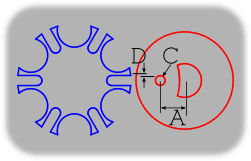
Copy and include this graphic with the macro.
Schermata
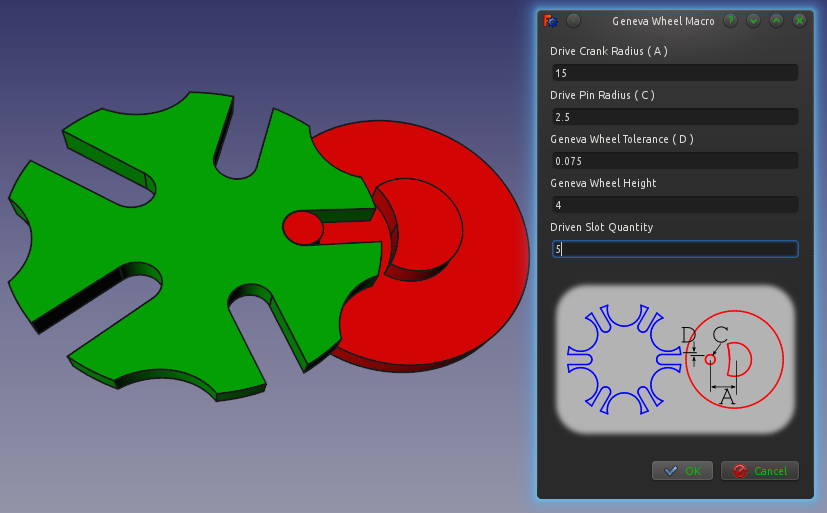
Script
Icona barra strumenti
Macro_Geneva_Wheel_GUI.FCMacro
#Creation of a Geneva Wheel with Parametric values  By: Isaac Ayala (drei) & Mark Stephen (quick61)
#This Macro creates the main parts of a Geneva Wheel Mechanism

#It depends on six values that must be altered in the following code
#The variables are a, b, n, p, t and h.

#Definition for each variable
#    Input
#a = Drive Crank Radius
#b = Geneva Wheel Radius
#p = Drive Pin Radius
#t = Geneva Wheel Tolerance
#h = Geneva Wheel Height
#n = Driven Slot Quantity
#    Output
#c = Distance Between Centers
#s = Slot Center Width
#w = Slot Width
#y = Stop Arc Radius
#z = Stop Disc Radius
#v = Clearance Arc

#Please note that you can alter the code so it depends on five values exclusively
#Just replace c, and either a or b with the following
#    Keep value for a
#c = a/math.sin(math.pi/n)
#b = math.sqrt((math.pow(c,2))-(math.pow(a,2)))
#    Keep value for b
#c = b/math.cos(math.pi/n)
#a = math.sqrt((math.pow(c,2))-(math.pow(b,2)))

from __future__ import division
import math
from FreeCAD import Base
from PySide import QtGui, QtCore
from PySide.QtGui import QApplication, QDialog, QMainWindow
import Part
import Draft
class p():


   def Ggear(self):

      try:
         #Inputs
         a = float(self.dCr.text())
         #b = float(self.gWr.text())
         p = float(self.dPd.text())
         t = float(self.gWt.text())
         h = float(self.gWh.text())
         n = float(self.gWn.text())

         #Outputs
         #c = math.sqrt(pow(a,2) + pow(b,2))
         c = a/math.sin(math.pi/n)
         b = math.sqrt((math.pow(c,2))-(math.pow(a,2)))
         s = a + b - c
         w = p + t
         y = a - (3 * p)
         z = y - t
         v = (b * z)/a
         m = math.sqrt((v**2)+(z**2)) # Solves for location of clearance cut axis

         #    Create the Drive Crank (Will be placed on the origin)
         driveCrank = Part.makeCylinder(z, h)
         #driveCrank.translate(Base.Vector(0,0,0))

         #genevaWheelClearanceCut = Part.makeCylinder(b, h)
         #genevaWheelClearanceCut.translate(Base.Vector(-c,0,0))

         genevaWheelClearanceCut = Part.makeCylinder(v, h)
         genevaWheelClearanceCut.translate(Base.Vector(-m,0,0))

         driveCrank = driveCrank.cut(genevaWheelClearanceCut)

         driveCrankBase = Part.makeCylinder((a+(2*p)), h)
         driveCrankBase.translate(Base.Vector(0,0,-h))

         driveCrank = driveCrank.fuse(driveCrankBase)

         drivePin = Part.makeCylinder(p,h)
         drivePin.translate(Base.Vector(-a,0,0))

         driveCrank = driveCrank.fuse(drivePin)

         #    Create the Geneva  Wheel (Will be placed on the x-axis on the left side)
         genevaWheel = Part.makeCylinder(b,h)
         genevaWheel.translate(Base.Vector(-c,0,0))

         stopArc = Part.makeCylinder(y, h)
         stopArc.rotate(Base.Vector(-c,0,0),Base.Vector(0,0,1),(180/n))

         for i in range(int(n)):
            stopArc.rotate(Base.Vector(-c,0,0),Base.Vector(0,0,1),(360/n))
            genevaWheel = genevaWheel.cut(stopArc)

         slotLength = Part.makeBox(s,(2*w),h)
         slotLength.translate(Base.Vector(-a,-w,0))

         slotRadius = Part.makeCylinder(w,h)
         slotRadius.translate(Base.Vector(-a,0,0))

         slot=slotLength.fuse(slotRadius)

         for i in range(int(n)):
            slot.rotate(Base.Vector(-c,0,0),Base.Vector(0,0,1),(360/n))
            genevaWheel = genevaWheel.cut(slot)

         #    Display Result

         Part.show(driveCrank)
         Part.show(genevaWheel)

      except:
         FreeCAD.Console.PrintError("Unable to complete task. Please recheck your data entries.")

      self.close()

   def close(self):
      self.dialog.hide()

   def __init__(self):
      self.dialog = None

      self.dialog = QtGui.QDialog()
      self.dialog.resize(240,100)

      self.dialog.setWindowTitle("Geneva Wheel Macro")
      la = QtGui.QVBoxLayout(self.dialog)

      DCR = QtGui.QLabel("Drive Crank Radius ( A )")
      la.addWidget(DCR)
      self.dCr = QtGui.QLineEdit()
      la.addWidget(self.dCr)

      #GWR = QtGui.QLabel("Geneva Wheel Radius ( B )")
      #la.addWidget(GWR)
      #self.gWr = QtGui.QLineEdit()
      #la.addWidget(self.gWr)

      DPD = QtGui.QLabel("Drive Pin Radius ( C )")
      la.addWidget(DPD)
      self.dPd = QtGui.QLineEdit()
      la.addWidget(self.dPd)

      GWT = QtGui.QLabel("Geneva Wheel Tolerance ( D )")
      la.addWidget(GWT)
      self.gWt = QtGui.QLineEdit()
      la.addWidget(self.gWt)

      GWH = QtGui.QLabel("Geneva Wheel Height")
      la.addWidget(GWH)
      self.gWh = QtGui.QLineEdit()
      la.addWidget(self.gWh)

      GWN = QtGui.QLabel("Driven Slot Quantity")
      la.addWidget(GWN)
      self.gWn = QtGui.QLineEdit()
      la.addWidget(self.gWn)

      #
      # - Include graphic image in dialog window -
      #
      # Insure that image is in the same directory as this Macro.
      # Image should be available from same source as Macro.
      #

      import os
      macro_dir = os.path.dirname(__file__)
      self.PiX = QtGui.QLabel()
      self.PiX.setPixmap(os.path.join(macro_dir, "GW_Dim.png"))

      hbox = QtGui.QHBoxLayout()
      hbox.addStretch()
      hbox.addWidget(self.PiX)
      hbox.addStretch()

      la.addSpacing(15)
      la.addLayout(hbox)
      la.addSpacing(15)

      # - End Image layout -

      okbox = QtGui.QDialogButtonBox(self.dialog)
      okbox.setOrientation(QtCore.Qt.Horizontal)
      okbox.setStandardButtons(QtGui.QDialogButtonBox.Cancel|QtGui.QDialogButtonBox.Ok)
      la.addWidget(okbox)
      QtCore.QObject.connect(okbox, QtCore.SIGNAL("accepted()"), self.Ggear)
      QtCore.QObject.connect(okbox, QtCore.SIGNAL("rejected()"), self.close)
      QtCore.QMetaObject.connectSlotsByName(self.dialog)
      self.dialog.show()
      self.dialog.exec_()

p()
Link
Questa macro è basata su Macro Geneva Wheel
Questa pagina è recuperata da https://wiki.freecad.org/Macro_Geneva_Wheel_GUI