FreeCAD Logo FreeCAD 1.0
  • Anglais Afrikaans Arabe Biélorusse Catalan Tchèque Allemand Grec Espagnol Espagnol Basque Finnois Philippin Français Galicien Croate Hongrois Indonésien Italien Japonais Kabyle Coréen Lituanien Néerlandais Norvégien classique Polonais Portugais Portugais Roumain Russe Slovaque Slovène Serbe Suédois Turc Ukrainien Valencien Vietnamien Chinois Chinois
  • Fonctions
  • Télécharger
  • Blog
  • Documentation
    Index de la documentation Premiers pas Documentation pour les utilisateurs Manuel de FreeCAD Documentation des ateliers Documentation sur le codage en Python Documentation pour les développeurs Tutoriels Foire aux questions Politique de confidentialité À propos de FreeCAD
  • Contribuer
    Comment aider Sponsor Signaler un bogue Faire une demande de modification (PR) Emplois et financements Guide pour les contributions Manuel pour les développeurs Traductions
  • Communauté
    Code de conduite Forum The FPA GitHub GitLab Codeberg Mastodon Matrix IRC IRC via Webchat Gitter Discord Reddit Twitter Facebook LinkedIn Calendrier
  • ♥ Donate

Donate

$
Informations SEPA
Veuillez configurer votre virement bancaire SEPA pour:
Beneficiary: The FreeCAD project association
IBAN: BE04 0019 2896 4531
BIC/SWIFT: GEBABEBBXXX
Agence bancaire: BNP Paribas Fortis
Adresse: Rue de la Station 64, 1360 Perwez, Belgium

While Stripe doesn't support monthly donations, you can still become a sponsor! Simply make a one-time donation equivalent to 12 months of support, and you'll gain access to the corresponding sponsoring tier. It's an easy and flexible way to contribute.

If you are not sure or not able to commit to a regular donation, but still want to help the project, you can do a one-time donation, of any amount.

Choose freely the amount you wish to donate one time only.

You can support FreeCAD by sponsoring it as an individual or organization through various platforms. Sponsorship provides a steady income for developers, allowing the FPA to plan ahead and enabling greater investment in FreeCAD. To encourage sponsorship, we offer different tiers, and unless you choose to remain anonymous, your name or company logo will be featured on our website accordingly.

from 1 USD / 1 EUR per month. You will not have your name displayed here, but you will have helped the project a lot anyway. Together, normal sponsors maintain the project on its feet as much as the bigger sponsors.

from 25 USD / 25 EUR per month. Your name or company name is displayed on this page.

from 100 USD / 100 EUR per month. Your name or company name is displayed on this page, with a link to your website, and a one-line description text.

from 200 USD / 200 EUR per month. Your name or company name and logo displayed on this page, with a link to your website and a custom description text. Companies that have helped FreeCAD early on also appear under Gold sponsors.

Instead of donating each month, you might find it more comfortable to make a one-time donation that, when divided by twelve, would give you right to enter a sponsoring tier. Don't hesitate to do so!

Choose freely the amount you wish to donate each month.

Please inform your forum name or twitter handle as a notein your transfer, or reach to us, so we can give you proper credits!

Geneva Wheel

Description
Permet à l'utilisateur de créer un mécanisme de roue genevoise à partir de zéro. Il faut éditer des valeurs dans la macro pour modifier la taille de l'objet.

Version macro : 1.0
Date dernière modification : 2014-09-21
Version FreeCAD : Toutes
Téléchargement : Icône de la barre d'outils
Auteur: Drei
Auteur
Drei
Téléchargement
Icône de la barre d'outils
Liens
Page des macros
Comment installer une macro
Comment créer une barre d'outils
Version Macro
1.0
Dernière modification
2014-09-21
Version(s) FreeCAD
Toutes
Raccourci clavier
None
Voir aussi
None

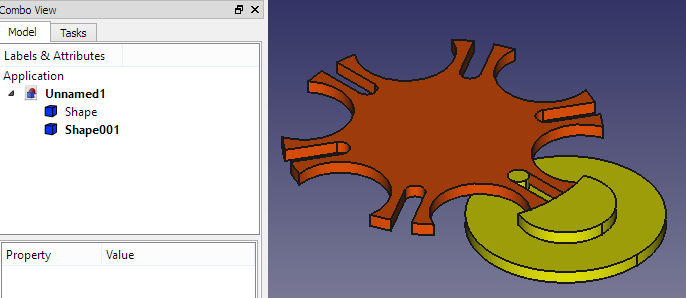
Description

Permet à l'utilisateur de créer un mécanisme de roue de Genève à partir de zéro. Vous devez modifier les valeurs dans la macro pour modifier la taille de l'objet.
Utilisation

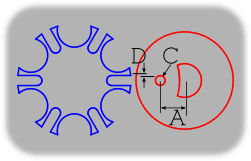
Cette macro crée un mécanisma Geneva Wheel. Il dépend de six valeurs à modifier dans le code, lisez les commentaires dans le code. les variables à modifier sont :

Input Output
  • a = Drive Crank Radius
  • b = Geneva Wheel Radius
  • n = Driven Slot Quantity
  • p = Drive Pin Diameter
  • t = Tolerance
  • h = Height
  • c = Distance Between Centers
  • s = Slot Center Width
  • w = Slot Width
  • y = Stop Arc Radius
  • z = Stop Disc Radius
  • v = Clearance Arc

Liens

Macro Geneva Wheel GUI: Même macro mais avec interface graphique.

Script

Icône de la barre d’outils
Macro_Geneva_Wheel.FCMacro

#Creation of a Geneva Wheel with Parametric values  By: Isaac Ayala (drei)
#This Macro creates the main parts of a Geneva Wheel Mechanism 

#It depends on six values that must be altered in the following code
#The variables are a, b, n, p, t and h. 

#Definition for each variable
#    Input
#a = Drive Crank Radius
#b = Geneva Wheel Radius
#n = Driven Slot Quantity
#p = Drive Pin Diameter
#t = Tolerance
#h = Height
#    Output
#c = Distance Between Centers
#s = Slot Center Width
#w = Slot Width
#y = Stop Arc Radius
#z = Stop Disc Radius
#v = Clearance Arc

#Please note that you can alter the code so it depends on five values exclusively
#Just replace c, and either a or b with the following
#    Keep value for a
#c = a/math.sin(math.pi/n)
#b = math.sqrt((math.pow(c,2))-(math.pow(a,2)))
#    Keep value for b
#c = b/math.cos(math.pi/n)
#a = math.sqrt((math.pow(c,2))-(math.pow(b,2)))

from __future__ import division
import time
import math
from PySide import QtCore, QtGui
from FreeCAD import Base
import Part

#Inputs
a = 25.0
b = 60.0
n = 6
p = 4
t = 0.01
h = 5
T = 60

#Outputs
c = math.sqrt(pow(a,2) + pow(b,2))
s = a + b - c
w = p + t
y = a - (1.5 * p)
z = y - t
v = (b * z)/a 

#    Create the Drive Crank (Will be placed on the origin)
driveCrank = Part.makeCylinder(z, h)
driveCrank.translate(Base.Vector(0,0,0))

genevaWheelClearanceCut = Part.makeCylinder(b, h)
genevaWheelClearanceCut.translate(Base.Vector(-c,0,0))

driveCrank = driveCrank.cut(genevaWheelClearanceCut)

driveCrankBase = Part.makeCylinder((1.5*a), h)
driveCrankBase.translate(Base.Vector(0,0,-h))

driveCrank = driveCrank.fuse(driveCrankBase)

drivePin = Part.makeCylinder(p,h)
drivePin.translate(Base.Vector(-a,0,0))

driveCrank = driveCrank.fuse(drivePin)

#    Create the Geneva  Wheel (Will be placed on the x-axis on the left side)
genevaWheel = Part.makeCylinder(b,h)
genevaWheel.translate(Base.Vector(-c,0,0))

stopArc = Part.makeCylinder(y, h)
stopArc.translate(Base.Vector(((y-(b/2)),0,0)))
stopArc.rotate(Base.Vector(-c,0,0),Base.Vector(0,0,1),30)

for i in range(6):
    stopArc.rotate(Base.Vector(-c,0,0),Base.Vector(0,0,1),60)
    genevaWheel = genevaWheel.cut(stopArc)

slotLength = Part.makeBox(s,(2*w),h)
slotLength.translate(Base.Vector(-a,-w,0))

slotRadius = Part.makeCylinder(w,h)
slotRadius.translate(Base.Vector(-a,0,0))

slot=slotLength.fuse(slotRadius)

for i in range(6):
    slot.rotate(Base.Vector(-c,0,0),Base.Vector(0,0,1),60)
    genevaWheel = genevaWheel.cut(slot)

#    Display Result

Part.show(driveCrank)
Part.show(genevaWheel)

Cette page est extraite de https://wiki.freecad.org/Macro_Geneva_Wheel

Contactez-nous !
Forum GitHub Mastodon Matrix IRC Gitter.im Discord Reddit Twitter Facebook LinkedIn

© L'équipe FreeCAD. Crédits des images de la page d'accueil (de haut en bas) : ppemawm, r-frank, epileftric, regis, rider_mortagnais, bejant.

Ce projet est soutenu par : , KiCad Services Corp. et autres parrains

GitHubAméliorer cette page sur GitHub