|
|
| Description |
|---|
| 이 기능을 사용하면 스프레드시트의 셀에 대한 별칭을 빠르고 쉽게 만들 수 있습니다. 이는 한 열에 이미 만들어 놓은 텍스트 레이블을 가져와서 다음 열의 별칭으로 사용합니다. Macro version: 2023.11.06 Last modified: 2023-11-06 FreeCAD version: 0.21 Download: ToolBar Icon Author: TheMarkster |
| Author |
| TheMarkster |
| Download |
| ToolBar Icon |
| Links |
| Macros recipes How to install macros How to customize toolbars |
| Macro Version |
| 2023.11.06 |
| Date last modified |
| 2023-11-06 |
| FreeCAD Version(s) |
| 0.21 |
| Default shortcut |
| None |
| See also |
| None |


설명
이것을 사용하면 스프레드시트의 셀에 대한 별칭을 빠르고 쉽게 만들 수 있습니다. 한 열에 이미 만들어 놓은 텍스트 레이블을 가져와서 다음 열의 별칭으로 사용합니다. 예를 들어, 열 A의 텍스트 레이블을 사용하여 열 B의 셀에 대한 별칭을 만들 수 있습니다. 버전 2022.03.21부터 괄호 안에 텍스트를 포함하는 경우 해당 텍스트만 별칭이 됩니다. 예를 들어, "꼭대기 높이(topHeight)"를 라벨로 지정하면(쌍따옴표 제외) 다음 열에서 topHeight가 별칭이 됩니다.
용법
텍스트 레이블이 포함된 셀을 선택하고 매크로를 실행합니다. 다음 열의 인접한 셀은 이제 선택된 셀의 텍스트 값에서 만든 별칭을 갖게 됩니다.
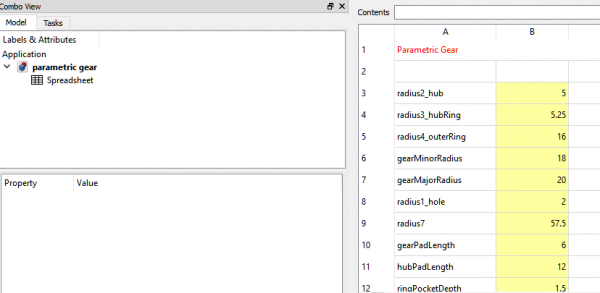
EasyAlias screenshot1, 열 A의 텍스트 레이블은 열 B의 별칭을 만드는 데 사용됩니다.
스크립트
ToolBar icon 
Macro_EasyAlias.FCMacro
# -*- coding: utf-8 -*-
import FreeCAD
import re
from PySide import QtGui

"""
EasyAlias.FCMacro.py

This macro can be used to easily create aliases based on the contents of selected spreadsheet
cells in the previous column. As an example, suppose you wish to have the following:

A1: content = 'radius', B1: content = '5', alias = 'radius'
A2: content = 'height', B1: content = '15', alias = 'height'

The traditional way to set this up would be:
Select A1
Enter radius
Select B1
Enter 5
Right-click B1
Select properties
Select Alias
Enter radius
click OK
Select A2
Enter height
Select B2
Enter 15
Right-click B2
Select Properties
Select Alias
Enter height
Click OK

Using this macro, the work flow becomes:
Select A1
Enter radius
Select B1
Enter 5
Select A2
Enter height
Select B2
Enter 15
Select A1 through A2
Run the EasyAlias macro
Done

"""

__title__ = "EasyAlias"
__author__ = "TheMarkster and rosta"
__url__ = "https://wiki.freecad.org/Macro_EasyAlias"
__Wiki__ = "https://wiki.freecad.org/Macro_EasyAlias"
__date__ = "2025.06.19" #year.month.date
__version__ = __date__
__icon__ = "https://wiki.freecad.org/images/5/5e/Easy-alias-icon.png"

CELL_ADDR_RE = re.compile(r"([A-Za-z]+)([1-9]\d*)")
CUSTOM_ALIAS_RE = re.compile(r".*\((.*)\)")
MAGIC_NUMBER = 64
REPLACEMENTS = {
    " ": "_",
    ".": "_",
    "ä": "ae",
    "ö": "oe",
    "ü": "ue",
    "Ä": "Ae",
    "Ö": "Oe",
    "Ü": "Ue",
    "ß": "ss",
    "'": ""
}

def getSpreadsheets():
    """
    Returns a set of selected spreadsheets in the active document or None if none is selected.
    :returns: a set of selected spreadsheets in the active document or None if none is selected
    :rtype: set
    """

    spreadsheets = set()
    for selectedObject in Gui.Selection.getSelection():
        if selectedObject.TypeId == 'Spreadsheet::Sheet':
            spreadsheets.add(selectedObject)
        elif selectedObject.TypeId == "App::Link":
            linkedObject = selectedObject.LinkedObject
            if linkedObject.TypeId == 'Spreadsheet::Sheet':
                spreadsheets.add(linkedObject)
    if spreadsheets:
        return spreadsheets
    else:
        # check if there is only one spreadsheet and use that one if none are selected
        doc = FreeCAD.ActiveDocument
        if not doc:
            return spreadsheets
        all_spreadsheets = [obj for obj in doc.Objects if obj.isDerivedFrom("Spreadsheet::Sheet")]
        if len(all_spreadsheets) == 1:
            return set(all_spreadsheets)
    return spreadsheets

# The original implementatin of a1_to_rowcol and rowcol_to_a1 can be found here:
# https://github.com/burnash/gspread/blob/master/gspread/utils.py

def a1_to_rowcol(label:str):
    """Translates a cell's address in A1 notation to a tuple of integers.
    :param str label: A cell label in A1 notation, e.g. 'B1'. Letter case is ignored.
    :returns: a tuple containing `row` and `column` numbers. Both indexed from 1 (one).
    :rtype: tuple
    Example:
    >>> a1_to_rowcol('A1')
    (1, 1)
    """

    match = CELL_ADDR_RE.match(label)

    row = int(match.group(2))

    column_label = match.group(1).upper()
    column = 0
    for i, c in enumerate(reversed(column_label)):
        column += (ord(c) - MAGIC_NUMBER) * (26**i)

    return (row, column)

def rowcol_to_a1(row:int, column:int):
    """Translates a row and column cell address to A1 notation.
    :param row: The row of the cell to be converted. Rows start at index 1.
    :type row: int, str
    :param col: The column of the cell to be converted. Columns start at index 1.
    :type row: int, str
    :returns: a string containing the cell's coordinates in A1 notation.
    Example:
    >>> rowcol_to_a1(1, 1)
    A1
    """

    row = int(row)

    column = int(column)
    dividend = column
    column_label = ""
    while dividend:
        (dividend, mod) = divmod(dividend, 26)
        if mod == 0:
            mod = 26
            dividend -= 1
        column_label = chr(mod + MAGIC_NUMBER) + column_label

    label = "{}{}".format(column_label, row)

    return label

def textToAlias(text:str):
    # support for custom aliases between parentheses
    match = CUSTOM_ALIAS_RE.match(text)
    if match:
        return match.group(1)

    for character in REPLACEMENTS:
        text = text.replace(character,REPLACEMENTS.get(character))
    return text

def main():
    spreadsheets = getSpreadsheets()
    if not spreadsheets:
        QtGui.QMessageBox.critical(None, "Error",
            "No spreadsheet selected.\nPlease select a spreadsheet in the tree view.")
        return
    for spreadsheet in spreadsheets:
        for selectedCell in spreadsheet.ViewObject.getView().selectedCells():
            contents = spreadsheet.getContents(selectedCell) #get() throws exception on empty cell
            if contents:
                contents = spreadsheet.get(selectedCell)
                alias = textToAlias(contents)
                row, column = a1_to_rowcol(selectedCell)
                nextCell = rowcol_to_a1(row, column + 1)
                try:
                    spreadsheet.setAlias(nextCell, alias)
                except:
                    inUse = spreadsheet.getCellFromAlias(alias) is not None
                    if inUse:
                        inUseMsg = "<br><br><b>Alias</b> <i>" + alias + "</i><b> is already in use at " + \
                        spreadsheet.getCellFromAlias(alias) + ", cannot have duplicate aliases.</b>"
                    else:
                        inUseMsg = "<br><br><b>Remember, aliases cannot begin with a numeral or an " + \
                        "underscore or contain any invalid characters.</b>"
                    QtGui.QMessageBox.critical(None, "Error",
                        "Unable to set alias <i>" + alias + "</i> at cell " + nextCell +
                        "<br>in spreadsheet <i>" + spreadsheet.FullName + "</i>." + inUseMsg)

    App.ActiveDocument.recompute()

main()
이 페이지에서 인용한 것은 https://wiki.freecad.org/Macro_EasyAlias