|
|
| Description |
|---|
| Utilisez cette fonction pour créer rapidement et facilement des alias pour les cellules de vos feuilles de calcul. Elle prend les étiquettes de texte que vous avez déjà créées dans une colonne et les utilise comme alias dans la colonne suivante. Version macro : 2025.06.19 Date dernière modification : 2025-06-19 Version FreeCAD : 0.21 Téléchargement : Icône de la barre d'outils Auteur: TheMarkster |
| Auteur |
| TheMarkster |
| Téléchargement |
| Icône de la barre d'outils |
| Liens |
| Page des macros Comment installer une macro Comment créer une barre d'outils |
| Version Macro |
| 2025.06.19 |
| Dernière modification |
| 2025-06-19 |
| Version(s) FreeCAD |
| 0.21 |
| Raccourci clavier |
| None |
| Voir aussi |
| None |

Description
Utilisez cette fonction pour créer rapidement et facilement des alias pour les cellules de vos feuilles de calcul. Elle prend les étiquettes de texte que vous avez déjà créées dans une colonne et les utilise comme alias dans la colonne suivante. Par exemple, les étiquettes de texte de la colonne A peuvent être utilisées pour créer des alias pour les cellules de la colonne B. Depuis la version 2022.03.21, si vous incluez du texte entre parenthèses, seul ce texte sera l'alias. Par exemple, "Height of top end (topHeight)" comme étiquette (sans les guillemets) fera l'alias de topHeight dans la colonne suivante.
Utilisation
Mettez en surbrillance les cellules contenant les étiquettes de texte et exécutez la macro. Les cellules adjacentes de la colonne suivante contiennent désormais des alias créés à partir des valeurs de texte des cellules mises en surbrillance.
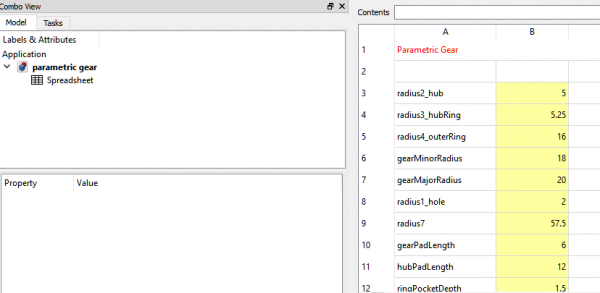
Capture d'écran EasyAlias1, les étiquettes de texte de la colonne A sont utilisées pour créer les alias de la colonne B.
Script
Icône de la barre d'outils 
Macro_EasyAlias.FCMacro
# -*- coding: utf-8 -*-
import FreeCAD
import re
from PySide import QtGui

"""
EasyAlias.FCMacro.py

This macro can be used to easily create aliases based on the contents of selected spreadsheet
cells in the previous column. As an example, suppose you wish to have the following:

A1: content = 'radius', B1: content = '5', alias = 'radius'
A2: content = 'height', B1: content = '15', alias = 'height'

The traditional way to set this up would be:
Select A1
Enter radius
Select B1
Enter 5
Right-click B1
Select properties
Select Alias
Enter radius
click OK
Select A2
Enter height
Select B2
Enter 15
Right-click B2
Select Properties
Select Alias
Enter height
Click OK

Using this macro, the work flow becomes:
Select A1
Enter radius
Select B1
Enter 5
Select A2
Enter height
Select B2
Enter 15
Select A1 through A2
Run the EasyAlias macro
Done

"""

__title__ = "EasyAlias"
__author__ = "TheMarkster and rosta"
__url__ = "https://wiki.freecad.org/Macro_EasyAlias"
__Wiki__ = "https://wiki.freecad.org/Macro_EasyAlias"
__date__ = "2025.06.19" #year.month.date
__version__ = __date__
__icon__ = "https://wiki.freecad.org/images/5/5e/Easy-alias-icon.png"

CELL_ADDR_RE = re.compile(r"([A-Za-z]+)([1-9]\d*)")
CUSTOM_ALIAS_RE = re.compile(r".*\((.*)\)")
MAGIC_NUMBER = 64
REPLACEMENTS = {
    " ": "_",
    ".": "_",
    "ä": "ae",
    "ö": "oe",
    "ü": "ue",
    "Ä": "Ae",
    "Ö": "Oe",
    "Ü": "Ue",
    "ß": "ss",
    "'": ""
}

def getSpreadsheets():
    """
    Returns a set of selected spreadsheets in the active document or None if none is selected.
    :returns: a set of selected spreadsheets in the active document or None if none is selected
    :rtype: set
    """

    spreadsheets = set()
    for selectedObject in Gui.Selection.getSelection():
        if selectedObject.TypeId == 'Spreadsheet::Sheet':
            spreadsheets.add(selectedObject)
        elif selectedObject.TypeId == "App::Link":
            linkedObject = selectedObject.LinkedObject
            if linkedObject.TypeId == 'Spreadsheet::Sheet':
                spreadsheets.add(linkedObject)
    if spreadsheets:
        return spreadsheets
    else:
        # check if there is only one spreadsheet and use that one if none are selected
        doc = FreeCAD.ActiveDocument
        if not doc:
            return spreadsheets
        all_spreadsheets = [obj for obj in doc.Objects if obj.isDerivedFrom("Spreadsheet::Sheet")]
        if len(all_spreadsheets) == 1:
            return set(all_spreadsheets)
    return spreadsheets

# The original implementatin of a1_to_rowcol and rowcol_to_a1 can be found here:
# https://github.com/burnash/gspread/blob/master/gspread/utils.py

def a1_to_rowcol(label:str):
    """Translates a cell's address in A1 notation to a tuple of integers.
    :param str label: A cell label in A1 notation, e.g. 'B1'. Letter case is ignored.
    :returns: a tuple containing `row` and `column` numbers. Both indexed from 1 (one).
    :rtype: tuple
    Example:
    >>> a1_to_rowcol('A1')
    (1, 1)
    """

    match = CELL_ADDR_RE.match(label)

    row = int(match.group(2))

    column_label = match.group(1).upper()
    column = 0
    for i, c in enumerate(reversed(column_label)):
        column += (ord(c) - MAGIC_NUMBER) * (26**i)

    return (row, column)

def rowcol_to_a1(row:int, column:int):
    """Translates a row and column cell address to A1 notation.
    :param row: The row of the cell to be converted. Rows start at index 1.
    :type row: int, str
    :param col: The column of the cell to be converted. Columns start at index 1.
    :type row: int, str
    :returns: a string containing the cell's coordinates in A1 notation.
    Example:
    >>> rowcol_to_a1(1, 1)
    A1
    """

    row = int(row)

    column = int(column)
    dividend = column
    column_label = ""
    while dividend:
        (dividend, mod) = divmod(dividend, 26)
        if mod == 0:
            mod = 26
            dividend -= 1
        column_label = chr(mod + MAGIC_NUMBER) + column_label

    label = "{}{}".format(column_label, row)

    return label

def textToAlias(text:str):
    # support for custom aliases between parentheses
    match = CUSTOM_ALIAS_RE.match(text)
    if match:
        return match.group(1)

    for character in REPLACEMENTS:
        text = text.replace(character,REPLACEMENTS.get(character))
    return text

def main():
    spreadsheets = getSpreadsheets()
    if not spreadsheets:
        QtGui.QMessageBox.critical(None, "Error",
            "No spreadsheet selected.\nPlease select a spreadsheet in the tree view.")
        return
    for spreadsheet in spreadsheets:
        for selectedCell in spreadsheet.ViewObject.getView().selectedCells():
            contents = spreadsheet.getContents(selectedCell) #get() throws exception on empty cell
            if contents:
                contents = spreadsheet.get(selectedCell)
                alias = textToAlias(contents)
                row, column = a1_to_rowcol(selectedCell)
                nextCell = rowcol_to_a1(row, column + 1)
                try:
                    spreadsheet.setAlias(nextCell, alias)
                except:
                    inUse = spreadsheet.getCellFromAlias(alias) is not None
                    if inUse:
                        inUseMsg = "<br><br><b>Alias</b> <i>" + alias + "</i><b> is already in use at " + \
                        spreadsheet.getCellFromAlias(alias) + ", cannot have duplicate aliases.</b>"
                    else:
                        inUseMsg = "<br><br><b>Remember, aliases cannot begin with a numeral or an " + \
                        "underscore or contain any invalid characters.</b>"
                    QtGui.QMessageBox.critical(None, "Error",
                        "Unable to set alias <i>" + alias + "</i> at cell " + nextCell +
                        "<br>in spreadsheet <i>" + spreadsheet.FullName + "</i>." + inUseMsg)

    App.ActiveDocument.recompute()

main()
Cette page est extraite de https://wiki.freecad.org/Macro_EasyAlias