|
|
| Description |
|---|
| This macro generates a listing of all objects in the current document - the list can be in a window or on the Report view. Macro version: 0.3 Last modified: 2023-01-14 FreeCAD version: 0.20 Download: ToolBar Icon Author: Piffpoof |
| Author |
| Piffpoof |
| Download |
| ToolBar Icon |
| Links |
| Macros recipes How to install macros How to customize toolbars |
| Macro Version |
| 0.3 |
| Date last modified |
| 2023-01-14 |
| FreeCAD Version(s) |
| 0.20 |
| Default shortcut |
| None |
| See also |
| None |

When developing complex object models it is easy to lose track of exactly which objects are present as some may be hidden, obscured or transparent. Additionally with a large number of objects a naming system becomes necessary to keep track of the objects.

Description
The Dump Object code takes the current document and enumerates all the objects. A report is then generated listing each object, then a summary giving the total number of instances of each Class, followed by the total number of Classes and finally the total number of objects. The output may be directed to the Report view or to a window. The window is non-modal and will stay open until closed by the user. Each window has the time of the object dump in it's title bar, so the contents of multiple windows can be compared, say before and after a piece of code running.
The default operation lists all objects, optionally the placement of each object can be listed. Also for Sketches, each segment of the Geometry can be listed.
Installation
All the code for dumpObject.FCMacro is in one macro. So installation is comprised of copying the code to the appropriate Macro directory and invoking dumpObject from the Macro menu. Alternatively it may be run from the console.
- see How to install macros for information on how to install this macro code
- see Customize Toolbars for information how to install as a button on a toolbar
Usage
Select the document you wish to dump objects for, then start the macro from one of:
- the Macro menu
- from the Python console
- from a Toolbar
Depending on the parameters selected in the first window, the report will be displayed on the Report view or in a window. The information will show all objects in the current document. Some of the benefits to be expected are the detection of:
- irregularities in object names (e.g. spelling errors or default names generated by FreeCAD)
- duplicate objects
- objects with duplicate names (where FreeCAD has had to make the second object name unique)
- unexpected objects
- unexpected object Placements (when the Show Positions option is selected)
- unexpected segments in the Sketch Geometry (when the Show Sketcher Segments option is selected)
User Interface
The first window will take input which configures the Object Dump:

The second window will be the report on the objects in the current document:
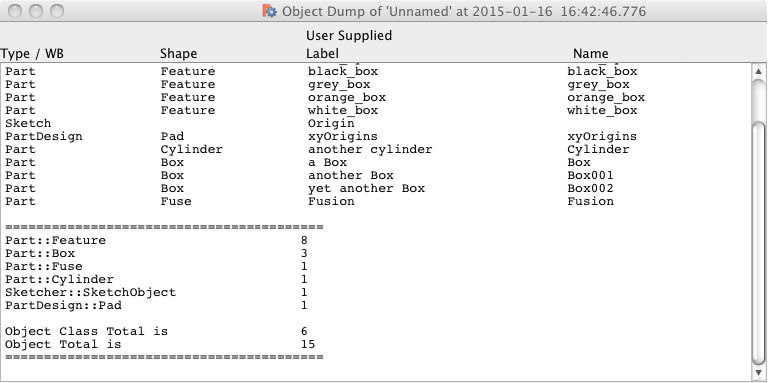
Options
- output may be directed to one of:
- the Report view
- a non-modal window
- segments in the Geometry for each Sketch may be listed
- Placement specifics may be listed for objects
Remarks
Although tested with many object types in FreeCAD, there probably are some objects that it does not expect, in that case it should list them generically.
Script
Toolbar Icon

Macro_Dump_Objects.FCMacro
#
#                       Dump Object
#                       v 0.3 - 14/01/2023 conversion to PySide2
#                       v 0.2 - added report to CSV file
#                       v 0.1 - added report to window
#                       v 0.0 - report to Report view
#
#***********************************************************************************
# routine to dump object space for Geometric model in the currently active file
#
__title__   = "Dump_Objects"
__author__  = "Piffpoof"
__url__     = "https://wiki.freecad.org/Macro_Dump_Objects"
__version__ = "0.3"
__date__    = "2023/01/14"    #YYYY/MM/DD
#

# import statements
from PySide2 import QtWidgets, QtGui, QtCore
from PySide2.QtWidgets import * #QDialog , QLineEdit, QPushButton, QApplication
from datetime import datetime       # datestamp on output window
from os.path import expanduser      # output directory for CSV
import math
# UI Class definitions

class configureMacro(QtWidgets.QDialog):
    """"""
    def __init__(self):
        super(configureMacro, self).__init__()
        self.initUI()
    def initUI(self):
        self.result         = None
        # set up display only field for selected path type
        self.cbss           = QtWidgets.QCheckBox("Show Sketcher Segments?", self)
        self.cbss.move(20,20)
        self.cbp            = QtWidgets.QCheckBox("Show Positions?", self)
        self.cbp.move(220,20)
        self.pathTypeLbl    = QtWidgets.QLabel("Select Report Destination:", self)
        self.pathTypeLbl.move(20, 70)
        # cancel button
        cancelButton = QtWidgets.QPushButton('Cancel', self)
        cancelButton.clicked.connect(self.onCancel)
        cancelButton.move(10, 100)
        # button #1
        button1 = QtWidgets.QPushButton(choice1, self)
        button1.clicked.connect(self.onBtn1)
        button1.move(120, 100)
        # button #2
        button2 = QtWidgets.QPushButton(choice2, self)
        button2.clicked.connect(self.onBtn2)
        button2.move(235, 100)
        # button #3
        button3 = QtWidgets.QPushButton(choice3, self)
        button3.clicked.connect(self.onBtn3)
        button3.move(327, 100)
        # define window     xLoc,yLoc,xDim,yDim
        self.setGeometry(   250, 250, 435, 150)
        self.setWindowTitle("Select a Report Destination")
        self.setWindowFlags(QtCore.Qt.WindowStaysOnTopHint)
        self.show()
    def onCancel(self):
        self.result = "cancelled"
        self.close()
    def onBtn1(self):
        self.result = choice1
        self.close()
    def onBtn2(self):
        self.result = choice2
        self.close()
    def onBtn3(self):
        self.result = choice3
        self.close()

class DisplayText(QtWidgets.QWidget):
    """"""
    def __init__(self, textToDisplay):
        self.text = textToDisplay
        super(DisplayText, self).__init__()
        self.initUI(textToDisplay)
    def initUI(self, textToDisplay):
        """Constructor"""
        self.textToDisplay = textToDisplay
        # some window dimensions
        self.windowHome = screenWidth * 0.05
        self.windowWidth = screenWidth * 0.9
        self.windowHeight = 400
        self.fieldMargin = 40
        # some column titles
        columnLabels = QtWidgets.QLabel(formatPrintLine("Type / WB","Shape","User Supplied Label","Name"))
        columnLabels.setFont('Courier')
        # set up text editing widget
        text_editor = QtWidgets.QTextEdit(self)
        #self.setCentralWidget(self.text_editor)
        text_editor.setFont('Courier')
        text_editor.setLineWrapMode(QtWidgets.QTextEdit.NoWrap)
        text_editor.move(self.fieldMargin,self.fieldMargin)
        text_editor.move(0,self.fieldMargin)
        text_editor.resize(self.windowWidth-(2*self.fieldMargin),self.windowHeight-(2*self.fieldMargin))
        text_editor.resize(self.windowWidth,self.windowHeight-(2*self.fieldMargin))
        text_editor.append(self.textToDisplay)
        # set up the layout
        vBox = QtWidgets.QVBoxLayout()
        vBox.addWidget(columnLabels)
        vBox.addWidget(text_editor)
        self.setLayout(vBox)
        # define window     xLoc,yLoc,xDim,yDim
        self.setGeometry(   self.windowHome, self.windowHome, self.windowWidth, self.windowHeight)
        self.setWindowTitle("Object Dump of '" + FreeCADGui.ActiveDocument.Document.Label + "' at " + str(datetime.now()))
        self.show()
    #----------------------------------------------------------------------
    def onOk(self):
        self.close()

# Class definitions

# Function Definitions

def countObjects():
    printList = list()
    objectTypeTable = {}
    # build up dictionary of different classes and keep a count
    for obj in FreeCAD.ActiveDocument.Objects:
        if objectTypeTable.__contains__(obj.TypeId):
            objectTypeTable[obj.TypeId] = objectTypeTable[obj.TypeId]+1
        else:
            objectTypeTable[obj.TypeId] = 1
        wb = obj.TypeId[0:obj.TypeId.find("::")]
        shape = obj.TypeId[obj.TypeId.find("::")+2:]
        #print wb + "---" + shape
        placementString = ""
        if obj.TypeId == "Sketcher::SketchObject":
            printList.append(formatPrintLine("Sketch", "", str(obj.Label)))
            if showSketcherSegmentsFlag:
                for i in obj.Geometry:
                    printList.append(formatPrintLine("", " -segment", str(i)))
        elif wb == "Part":
            if showPlacementFlag:
                placementString = str(obj.Placement)
            if shape in ("Cylinder", "Cut", "Box", "Fuse", "Loft", "Feature", "FeaturePython", "Part2DObjectPython"):
                printList.append(formatPrintLine(wb, shape, str(obj.Label), str(obj.Name)))
            else: # print shapes not in list above
                printList.append(formatPrintLine(str(obj.TypeId), "", str(obj.Label), str(obj.Name)))
        elif wb == "PartDesign":
            if showPlacementFlag:
                placementString = str(obj.Placement)
            if shape in ("Pad", "Feature", "Fillet", "Part2DObjectPython"):
                printList.append(formatPrintLine(wb, shape, str(obj.Label), str(obj.Name)))
            else: # print shapes not in list above
                printList.append(formatPrintLine(str(obj.TypeId), "", str(obj.Label), str(obj.Name)))
        elif obj.TypeId == "App::DocumentObjectGroup":
            printList.append(formatPrintLine("Group", "", str(obj.Label)))
        elif obj.TypeId == "Image::ImagePlane":
            printList.append(formatPrintLine(wb, shape, str(obj.Label), str(obj.Name)))
        else: # print workbench shapes not in lists above
            printList.append(formatPrintLine(str(obj.TypeId), str(obj.Label), str(obj.Name)))
        if showPlacementFlag and len(placementString)!=0:
            printList.append(formatPrintLineMax("", " -placement", placementString))

    printList.append("")
    printList.append(summarySeparator)
    from collections import OrderedDict
    sortedByTags = OrderedDict(sorted(objectTypeTable.items(), key=lambda x: x[1], reverse=True))
    for k, v in sortedByTags.items():
        printList.append(formatPrintLineSum(k,v))
    printList.append("")
    objectClassCount = 0; objectTotalCount = 0
    for i in objectTypeTable:
        objectTotalCount = objectTotalCount + objectTypeTable[i]
    objectCLassCount = len(objectTypeTable)
    printList.append(formatPrintLineSum("Object Class Total is ", str(objectCLassCount)))
    printList.append(formatPrintLineSum("Object Total is ", str(objectTotalCount)))
    printList.append(summarySeparator)
    return printList

def formatPrintLineSum(a,b):
    return printLineFormatter(2, a, str(b), "", "")

def formatPrintLineMax(a,b,c):
    return printLineFormatter(1, a, b, "", "")

def formatPrintLine(a,b,c, *args):
    d = ""
    if len(args)==1:
        d = args[0]
    return printLineFormatter(0, a, b, c, d)

def printLineFormatter(flag,a,b,c,d):
    # flag = 0  standard print, spread values over 4 columns
    # flag = 1  printing verbose things like Sketch details or Placements, combine columns 3 & 4
    # flag = 2  printing the summary lines, combine columns 1 & 2
    suffix = ""
    if csvFlag:
        pfs2 = printFormatString2csv
        pfs3 = printFormatString3csv
        pfs4 = printFormatString4csv
    else:
        pfs2 = printFormatString2
        pfs3 = printFormatString3
        pfs4 = printFormatString4
    if flag==0:
        aa = a[:f1]
        bb = b[:f2]
        cc = c[:f3]
        dd = d[:f4]
        return pfs4.format(aa,bb,cc,dd)
    elif flag==1:
        aa = a[:f1]
        bb = b[:f2]
        cc = c[:f3+f4]
        dd = d[:f4]
        return pfs3.format(aa,bb,cc)
    else:
        print(a)
        aa = a[:f1+f2]
        bb = b[:f3+f4]
        return pfs2.format(aa,bb)

# Constant definitions
# set some field widths
screenWidth = QtWidgets.QDesktopWidget().screenGeometry().width()
global f1, f2, f3, f4
# f1 = 15; f2 = 25; f3 = 45; f4 = 25 # 110 columns in 1000 pixels
f1 = math.floor(15*screenWidth/1000); f2 = math.floor(25*screenWidth/1000); f3 = math.floor(45*screenWidth/1000); f4 = math.floor(25*screenWidth/1000)
# and some print format strings
global printFormatString2, printFormatString3, printFormatString4
global printFormatString2csv, printFormatString3csv, printFormatString4csv
printFormatString2 = "{0:<"+str(f1+f2)+"} {1:<"+str(f3)+"}"
printFormatString2csv = "{0}, {1}"
printFormatString3 = "{0:<"+str(f1)+"} {1:<"+str(f2)+"} {2:<"+str(f3+f4)+"}"
printFormatString3csv = "{0}, {1}, {2}"
printFormatString4 = "{0:<"+str(f1)+"} {1:<"+str(f2)+"} {2:<"+str(f3)+"} {3:<"+str(f4)+"}"
printFormatString4csv = "{0}, {1}, {2}, {3}"
# some button labels that are checked in the code
global choice1, choice2, choice3, csvFlag
choice1 = "Report View"; choice2 = "CSV File"; choice3 = "Window"
csvFlag = False
summarySeparator = "======================================================="
summarySeparatorCsv = "-------------------------------------------------------"
# code ***********************************************************************************
if FreeCAD.ActiveDocument != None:
    # ask if to window or to Report View...
    form = configureMacro()
    form.exec_()
    showSketcherSegmentsFlag = False
    if form.cbss.isChecked():
        showSketcherSegmentsFlag = True
    showPlacementFlag = False
    if form.cbp.isChecked():
        showPlacementFlag = True
    if form.result == choice2:
        csvFlag = True
        showSketcherSegmentsFlag = False
        showPlacementFlag = False
        summarySeparator = summarySeparatorCsv
    printList = countObjects()
    if form.result == choice1: # report to Report View
        mainWindow = FreeCADGui.getMainWindow()
        dockWidgets = mainWindow.findChildren(QtWidgets.QDockWidget)
        reportViewFlag = False
        for dw in dockWidgets:
            if dw.objectName() == "Report view":
                reportViewFlag = True
        if reportViewFlag:
            print( printFormatString4.format(   "", "", "(User Supplied)", ""))
            print( printFormatString4.format(   "Type", "Shape", "Label", "Name"))
            print( "")
            for line in printList:
                print( line + "\n")
        else:
            QtWidgets.QMessageBox.information(None,"","Please use 'Menu->View->Views->Report view' to open the 'Report view'")
    if form.result == choice2: # report to CSV file
        filePath = QtWidgets.QFileDialog.getSaveFileName(parent=None,caption="Save CSV file as",dir=expanduser("~"),filter="*.csv")
        file = open(filePath[0],"w")
        for line in printList:
            file.write(line + "\n")
        file.close()
    if form.result == choice3: # report to window
        #----------------------------------------------------------------------
        longPrintLine = ""
        for line in printList:
            longPrintLine = longPrintLine + line + "\n"
        form = DisplayText(longPrintLine)
#
#OS: Windows 10 Version 2009
#Word size of FreeCAD: 64-bit
#Version: 0.21.0.31513 (Git)
#Build type: Release
#Branch: master
#Hash: b2ab8edba4bfd71681e639f8c3f1105066bed4c7
#Python 3.10.8, Qt 5.15.4, Coin 4.0.0, Vtk 9.1.0, OCC 7.6.3
#
#thus ends the macro...
Ta strona pochodzi z https://wiki.freecad.org/Macro_Dump_Objects