|
|
| Description |
|---|
| Cette macro génère une liste de tous les objets du document en cours. La liste peut se trouver dans une fenêtre ou dans la vue rapport. Version macro : 0.3 Date dernière modification : 2023-01-14 Version FreeCAD : 0.20 Téléchargement : Icône de la barre d'outils Auteur: Piffpoof |
| Auteur |
| Piffpoof |
| Téléchargement |
| Icône de la barre d'outils |
| Liens |
| Page des macros Comment installer une macro Comment créer une barre d'outils |
| Version Macro |
| 0.3 |
| Dernière modification |
| 2023-01-14 |
| Version(s) FreeCAD |
| 0.20 |
| Raccourci clavier |
| None |
| Voir aussi |
| None |

Lors du développement de modèles d'objets complexes, il est facile de perdre la trace des objets présents, car certains peuvent être cachés, masqués ou transparents. De plus, avec un grand nombre d'objets, un système de dénomination devient nécessaire pour garder la trace des objets.

Description
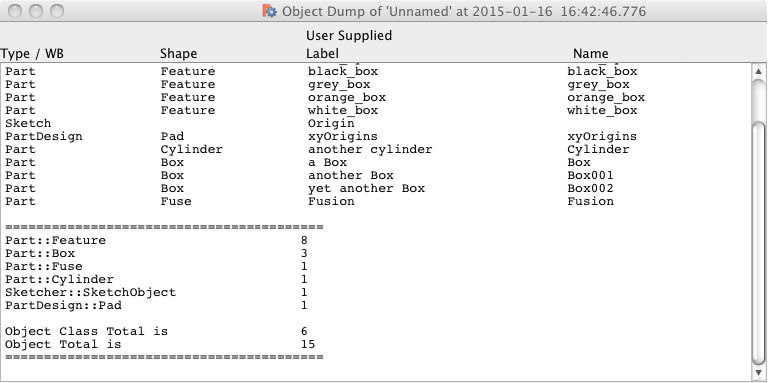
Le code Dump Object prend le document actuel et énumère tous les objets. Un rapport est alors généré listant chaque objet, puis un résumé donnant le nombre total d'instances de chaque classe, suivi du nombre total de classes et enfin du nombre total d'objets. La sortie peut être dirigée vers la Vue rapport ou vers une fenêtre. La fenêtre est non-modale et reste ouverte jusqu'à ce que l'utilisateur la ferme. Chaque fenêtre a l'heure du vidage de l'objet dans sa barre de titre, ainsi le contenu de plusieurs fenêtres peut être comparé, par exemple avant et après l'exécution d'un morceau de code.
L'opération par défaut répertorie tous les objets, éventuellement le placement de chaque objet peut être répertorié. Pour les esquisses, chaque segment de la géométrie peut également être répertorié.
Installation
Tout le code de dumpObject.FCMacro se trouve dans une seule macro. L'installation consiste donc à copier le code dans le répertoire Macro approprié et à invoquer dumpObject à partir du menu Macro. Alternativement, elle peut être exécutée depuis la console.
- Voir Comment installer des macros pour des informations sur la façon d'installer le code de cette macro.
- Voir Personnaliser les barres d'outils pour savoir comment l'installer en tant que bouton sur une barre d'outils.
Utilisation
Sélectionnez le document pour lequel vous souhaitez décharger des objets, puis lancez la macro à partir de l'un des éléments suivants :
- le menu Macro
- à partir de la console Python
- à partir d'une barre d'outils
Selon les paramètres sélectionnés dans la première fenêtre, le rapport sera affiché dans la vue Rapport ou dans une fenêtre. Les informations afficheront tous les objets du document en cours. Certains des avantages à attendre sont la détection de:
- irrégularités dans les noms d'objet (par exemple, les fautes d'orthographe ou les noms par défaut générés par FreeCAD)
- dupliquer des objets
- objets avec des noms en double (où FreeCAD a dû rendre le nom du deuxième objet unique)
- objets inattendus
- Emplacements d'objet inattendus (lorsque l'option Afficher les positions est sélectionnée)
- segments inattendus dans la géométrie d'esquisse (lorsque l'option Afficher les segments d'esquisse est sélectionnée)
Interface utilisateur
La première fenêtre prend en compte les données qui configurent l'Object Dump :

La seconde fenêtre sera le rapport sur les objets du document en cours:
Options
- la sortie peut être dirigée vers l'un des éléments suivants :
- la Vue rapport
- une fenêtre non modale
- les segments de la géométrie de chaque esquisse peuvent être répertoriés.
- les spécificités du placement peuvent être listées pour les objets.
Remarques
Bien que testé avec de nombreux types d'objets dans FreeCAD, certains objets ne sont probablement pas envisagés. Dans ce cas, il convient de les répertorier de manière générique.
Script
Icône de la barre d'outils

Macro_Dump_Objects.FCMacro
#
#                       Dump Object
#                       v 0.3 - 14/01/2023 conversion to PySide2
#                       v 0.2 - added report to CSV file
#                       v 0.1 - added report to window
#                       v 0.0 - report to Report view
#
#***********************************************************************************
# routine to dump object space for Geometric model in the currently active file
#
__title__   = "Dump_Objects"
__author__  = "Piffpoof"
__url__     = "https://wiki.freecad.org/Macro_Dump_Objects"
__version__ = "0.3"
__date__    = "2023/01/14"    #YYYY/MM/DD
#

# import statements
from PySide2 import QtWidgets, QtGui, QtCore
from PySide2.QtWidgets import * #QDialog , QLineEdit, QPushButton, QApplication
from datetime import datetime       # datestamp on output window
from os.path import expanduser      # output directory for CSV
import math
# UI Class definitions

class configureMacro(QtWidgets.QDialog):
    """"""
    def __init__(self):
        super(configureMacro, self).__init__()
        self.initUI()
    def initUI(self):
        self.result         = None
        # set up display only field for selected path type
        self.cbss           = QtWidgets.QCheckBox("Show Sketcher Segments?", self)
        self.cbss.move(20,20)
        self.cbp            = QtWidgets.QCheckBox("Show Positions?", self)
        self.cbp.move(220,20)
        self.pathTypeLbl    = QtWidgets.QLabel("Select Report Destination:", self)
        self.pathTypeLbl.move(20, 70)
        # cancel button
        cancelButton = QtWidgets.QPushButton('Cancel', self)
        cancelButton.clicked.connect(self.onCancel)
        cancelButton.move(10, 100)
        # button #1
        button1 = QtWidgets.QPushButton(choice1, self)
        button1.clicked.connect(self.onBtn1)
        button1.move(120, 100)
        # button #2
        button2 = QtWidgets.QPushButton(choice2, self)
        button2.clicked.connect(self.onBtn2)
        button2.move(235, 100)
        # button #3
        button3 = QtWidgets.QPushButton(choice3, self)
        button3.clicked.connect(self.onBtn3)
        button3.move(327, 100)
        # define window     xLoc,yLoc,xDim,yDim
        self.setGeometry(   250, 250, 435, 150)
        self.setWindowTitle("Select a Report Destination")
        self.setWindowFlags(QtCore.Qt.WindowStaysOnTopHint)
        self.show()
    def onCancel(self):
        self.result = "cancelled"
        self.close()
    def onBtn1(self):
        self.result = choice1
        self.close()
    def onBtn2(self):
        self.result = choice2
        self.close()
    def onBtn3(self):
        self.result = choice3
        self.close()

class DisplayText(QtWidgets.QWidget):
    """"""
    def __init__(self, textToDisplay):
        self.text = textToDisplay
        super(DisplayText, self).__init__()
        self.initUI(textToDisplay)
    def initUI(self, textToDisplay):
        """Constructor"""
        self.textToDisplay = textToDisplay
        # some window dimensions
        self.windowHome = screenWidth * 0.05
        self.windowWidth = screenWidth * 0.9
        self.windowHeight = 400
        self.fieldMargin = 40
        # some column titles
        columnLabels = QtWidgets.QLabel(formatPrintLine("Type / WB","Shape","User Supplied Label","Name"))
        columnLabels.setFont('Courier')
        # set up text editing widget
        text_editor = QtWidgets.QTextEdit(self)
        #self.setCentralWidget(self.text_editor)
        text_editor.setFont('Courier')
        text_editor.setLineWrapMode(QtWidgets.QTextEdit.NoWrap)
        text_editor.move(self.fieldMargin,self.fieldMargin)
        text_editor.move(0,self.fieldMargin)
        text_editor.resize(self.windowWidth-(2*self.fieldMargin),self.windowHeight-(2*self.fieldMargin))
        text_editor.resize(self.windowWidth,self.windowHeight-(2*self.fieldMargin))
        text_editor.append(self.textToDisplay)
        # set up the layout
        vBox = QtWidgets.QVBoxLayout()
        vBox.addWidget(columnLabels)
        vBox.addWidget(text_editor)
        self.setLayout(vBox)
        # define window     xLoc,yLoc,xDim,yDim
        self.setGeometry(   self.windowHome, self.windowHome, self.windowWidth, self.windowHeight)
        self.setWindowTitle("Object Dump of '" + FreeCADGui.ActiveDocument.Document.Label + "' at " + str(datetime.now()))
        self.show()
    #----------------------------------------------------------------------
    def onOk(self):
        self.close()

# Class definitions

# Function Definitions

def countObjects():
    printList = list()
    objectTypeTable = {}
    # build up dictionary of different classes and keep a count
    for obj in FreeCAD.ActiveDocument.Objects:
        if objectTypeTable.__contains__(obj.TypeId):
            objectTypeTable[obj.TypeId] = objectTypeTable[obj.TypeId]+1
        else:
            objectTypeTable[obj.TypeId] = 1
        wb = obj.TypeId[0:obj.TypeId.find("::")]
        shape = obj.TypeId[obj.TypeId.find("::")+2:]
        #print wb + "---" + shape
        placementString = ""
        if obj.TypeId == "Sketcher::SketchObject":
            printList.append(formatPrintLine("Sketch", "", str(obj.Label)))
            if showSketcherSegmentsFlag:
                for i in obj.Geometry:
                    printList.append(formatPrintLine("", " -segment", str(i)))
        elif wb == "Part":
            if showPlacementFlag:
                placementString = str(obj.Placement)
            if shape in ("Cylinder", "Cut", "Box", "Fuse", "Loft", "Feature", "FeaturePython", "Part2DObjectPython"):
                printList.append(formatPrintLine(wb, shape, str(obj.Label), str(obj.Name)))
            else: # print shapes not in list above
                printList.append(formatPrintLine(str(obj.TypeId), "", str(obj.Label), str(obj.Name)))
        elif wb == "PartDesign":
            if showPlacementFlag:
                placementString = str(obj.Placement)
            if shape in ("Pad", "Feature", "Fillet", "Part2DObjectPython"):
                printList.append(formatPrintLine(wb, shape, str(obj.Label), str(obj.Name)))
            else: # print shapes not in list above
                printList.append(formatPrintLine(str(obj.TypeId), "", str(obj.Label), str(obj.Name)))
        elif obj.TypeId == "App::DocumentObjectGroup":
            printList.append(formatPrintLine("Group", "", str(obj.Label)))
        elif obj.TypeId == "Image::ImagePlane":
            printList.append(formatPrintLine(wb, shape, str(obj.Label), str(obj.Name)))
        else: # print workbench shapes not in lists above
            printList.append(formatPrintLine(str(obj.TypeId), str(obj.Label), str(obj.Name)))
        if showPlacementFlag and len(placementString)!=0:
            printList.append(formatPrintLineMax("", " -placement", placementString))

    printList.append("")
    printList.append(summarySeparator)
    from collections import OrderedDict
    sortedByTags = OrderedDict(sorted(objectTypeTable.items(), key=lambda x: x[1], reverse=True))
    for k, v in sortedByTags.items():
        printList.append(formatPrintLineSum(k,v))
    printList.append("")
    objectClassCount = 0; objectTotalCount = 0
    for i in objectTypeTable:
        objectTotalCount = objectTotalCount + objectTypeTable[i]
    objectCLassCount = len(objectTypeTable)
    printList.append(formatPrintLineSum("Object Class Total is ", str(objectCLassCount)))
    printList.append(formatPrintLineSum("Object Total is ", str(objectTotalCount)))
    printList.append(summarySeparator)
    return printList

def formatPrintLineSum(a,b):
    return printLineFormatter(2, a, str(b), "", "")

def formatPrintLineMax(a,b,c):
    return printLineFormatter(1, a, b, "", "")

def formatPrintLine(a,b,c, *args):
    d = ""
    if len(args)==1:
        d = args[0]
    return printLineFormatter(0, a, b, c, d)

def printLineFormatter(flag,a,b,c,d):
    # flag = 0  standard print, spread values over 4 columns
    # flag = 1  printing verbose things like Sketch details or Placements, combine columns 3 & 4
    # flag = 2  printing the summary lines, combine columns 1 & 2
    suffix = ""
    if csvFlag:
        pfs2 = printFormatString2csv
        pfs3 = printFormatString3csv
        pfs4 = printFormatString4csv
    else:
        pfs2 = printFormatString2
        pfs3 = printFormatString3
        pfs4 = printFormatString4
    if flag==0:
        aa = a[:f1]
        bb = b[:f2]
        cc = c[:f3]
        dd = d[:f4]
        return pfs4.format(aa,bb,cc,dd)
    elif flag==1:
        aa = a[:f1]
        bb = b[:f2]
        cc = c[:f3+f4]
        dd = d[:f4]
        return pfs3.format(aa,bb,cc)
    else:
        print(a)
        aa = a[:f1+f2]
        bb = b[:f3+f4]
        return pfs2.format(aa,bb)

# Constant definitions
# set some field widths
screenWidth = QtWidgets.QDesktopWidget().screenGeometry().width()
global f1, f2, f3, f4
# f1 = 15; f2 = 25; f3 = 45; f4 = 25 # 110 columns in 1000 pixels
f1 = math.floor(15*screenWidth/1000); f2 = math.floor(25*screenWidth/1000); f3 = math.floor(45*screenWidth/1000); f4 = math.floor(25*screenWidth/1000)
# and some print format strings
global printFormatString2, printFormatString3, printFormatString4
global printFormatString2csv, printFormatString3csv, printFormatString4csv
printFormatString2 = "{0:<"+str(f1+f2)+"} {1:<"+str(f3)+"}"
printFormatString2csv = "{0}, {1}"
printFormatString3 = "{0:<"+str(f1)+"} {1:<"+str(f2)+"} {2:<"+str(f3+f4)+"}"
printFormatString3csv = "{0}, {1}, {2}"
printFormatString4 = "{0:<"+str(f1)+"} {1:<"+str(f2)+"} {2:<"+str(f3)+"} {3:<"+str(f4)+"}"
printFormatString4csv = "{0}, {1}, {2}, {3}"
# some button labels that are checked in the code
global choice1, choice2, choice3, csvFlag
choice1 = "Report View"; choice2 = "CSV File"; choice3 = "Window"
csvFlag = False
summarySeparator = "======================================================="
summarySeparatorCsv = "-------------------------------------------------------"
# code ***********************************************************************************
if FreeCAD.ActiveDocument != None:
    # ask if to window or to Report View...
    form = configureMacro()
    form.exec_()
    showSketcherSegmentsFlag = False
    if form.cbss.isChecked():
        showSketcherSegmentsFlag = True
    showPlacementFlag = False
    if form.cbp.isChecked():
        showPlacementFlag = True
    if form.result == choice2:
        csvFlag = True
        showSketcherSegmentsFlag = False
        showPlacementFlag = False
        summarySeparator = summarySeparatorCsv
    printList = countObjects()
    if form.result == choice1: # report to Report View
        mainWindow = FreeCADGui.getMainWindow()
        dockWidgets = mainWindow.findChildren(QtWidgets.QDockWidget)
        reportViewFlag = False
        for dw in dockWidgets:
            if dw.objectName() == "Report view":
                reportViewFlag = True
        if reportViewFlag:
            print( printFormatString4.format(   "", "", "(User Supplied)", ""))
            print( printFormatString4.format(   "Type", "Shape", "Label", "Name"))
            print( "")
            for line in printList:
                print( line + "\n")
        else:
            QtWidgets.QMessageBox.information(None,"","Please use 'Menu->View->Views->Report view' to open the 'Report view'")
    if form.result == choice2: # report to CSV file
        filePath = QtWidgets.QFileDialog.getSaveFileName(parent=None,caption="Save CSV file as",dir=expanduser("~"),filter="*.csv")
        file = open(filePath[0],"w")
        for line in printList:
            file.write(line + "\n")
        file.close()
    if form.result == choice3: # report to window
        #----------------------------------------------------------------------
        longPrintLine = ""
        for line in printList:
            longPrintLine = longPrintLine + line + "\n"
        form = DisplayText(longPrintLine)
#
#OS: Windows 10 Version 2009
#Word size of FreeCAD: 64-bit
#Version: 0.21.0.31513 (Git)
#Build type: Release
#Branch: master
#Hash: b2ab8edba4bfd71681e639f8c3f1105066bed4c7
#Python 3.10.8, Qt 5.15.4, Coin 4.0.0, Vtk 9.1.0, OCC 7.6.3
#
#thus ends the macro...
Cette page est extraite de https://wiki.freecad.org/Macro_Dump_Objects