|
|
| Descrizione |
|---|
| Questa macro genera un elenco di tutti gli oggetti del documento corrente. L'elenco può apparire nella finestra dei Rapporti o in una finestra indipendente. Versione macro: 1.0 Ultima modifica: 2015-03-02 Versione FreeCAD: <= 0.17 Download: ToolBar Icon Autore: Piffpoof |
| Autore |
| Piffpoof |
| Download |
| ToolBar Icon |
| Link |
| Raccolta di macro Come installare le macro Personalizzare la toolbar |
| Versione macro |
| 1.0 |
| Data ultima modifica |
| 2015-03-02 |
| Versioni di FreeCAD |
| <= 0.17 |
| Scorciatoia |
| Nessuna |
| Vedere anche |
| Nessuno |


Quando si sviluppano modelli di oggetti complessi, è facile perdere di vista esattamente quali oggetti siano presenti, poiché alcuni potrebbero essere nascosti, oscurati o trasparenti. Inoltre, con un gran numero di oggetti, diventa necessario un sistema di denominazione per tenerne traccia.

Descrizione
Il codice Dump Object enumera tutti gli oggetti contenuti nel documento corrente. Quindi genera un rapporto che elenca ogni oggetto, poi una sintesi che fornisce il numero totale di istanze di ogni Classe, seguito dal numero totale di classi e infine il numero totale di oggetti. L'output del rapporto può essere indirizzato alla vista Report o ad una finestra indipendente. La finestra è non-modale e rimane aperta fino a quando non viene chiusa dall'utente. Ogni finestra contiene nella barra del titolo la data e l'ora in cui è stata generata, quindi si può confrontare il contenuto di più finestre, ad esempio, prima e dopo l'esecuzione di una parte di codice.
Di default sono elencati tutti gli oggetti, come opzione si può indicare anche il posizionamento di ogni oggetto. Inoltre, per gli schizzi si può elencare ogni segmento della geometria.
Installazione
Tutto il codice per dumpObject.FCMacro è contenuto nella macro. L'installazione consiste nel copiare il suo codice nella appropriata directory delle Macro. Si attiva invocando dumpObject dal menu Macro. In alternativa, può essere eseguita dalla console.
- per informazioni su come installare il codice delle macro vedere la pagina Come installare le macro
- per informazioni su come installarla abbinata a un pulsante in una barra degli strumenti vedere la pagina Personalizzare la barra degli strumenti
Utilizzo
Selezionare il documento di cui si desidera analizzare gli oggetti per poi avviare la macro in uno di questi modi:
- dal menu Macro
- dalla console Python
- dalla barra degli strumenti
A seconda dei parametri selezionati nella prima finestra, il rapporto viene visualizzato nella vista Report o in una finestra. Le informazioni mostrano tutti gli oggetti del documento corrente. Alcuni dei benefici attesi sono l'individuazione di:
- irregolarità nei nomi di oggetti, ad esempio errori di ortografia o nomi predefiniti generati da FreeCAD
- oggetti duplicati
- oggetti con nomi duplicati (dove FreeCAD ha dovuto creare il secondo nome oggetto unico)
- oggetti inaspettati
- posizionamenti inattesi di oggetti (quando è selezionata l'opzione Show Positions)
- segmenti inattesi nella geometria dello schizzo (quando è selezionata l'opzione Show Sketcher Segments)
Interfaccia utente
La prima finestra è quella che serve per configurare Object Dump:

La seconda finestra è quella che contiene il rapporto sugli oggetti del documento corrente:
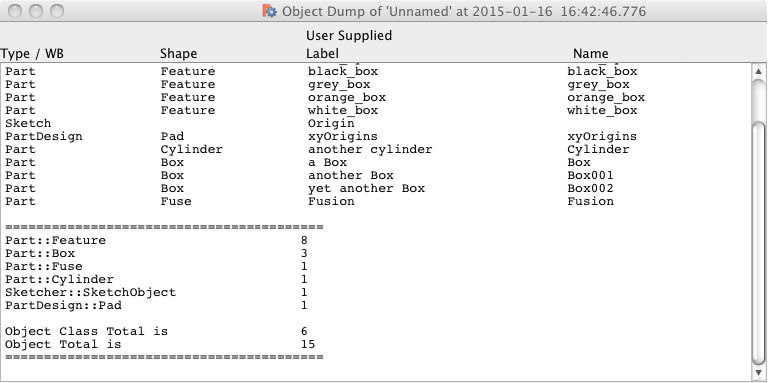
Opzioni
- l'output può essere diretto verso:
- la vista Report
- una finestra non-modale
- si possono elencare i segmenti della geometria di ogni schizzo
- si possono elencare le specifiche di posizionamento degli oggetti
Osservazioni
Anche se testata con molti tipi di oggetti in FreeCAD, ci sono probabilmente alcuni oggetti che sono inattesi, in questo caso dovrebbe elencarli genericamente.
Script
Icona barra degli strumenti

Macro_Dump_Objects.FCMacro
#
#                       Dump Object
#                       v 0.3 - 14/01/2023 conversion to PySide2
#                       v 0.2 - added report to CSV file
#                       v 0.1 - added report to window
#                       v 0.0 - report to Report view
#
#***********************************************************************************
# routine to dump object space for Geometric model in the currently active file
#
__title__   = "Dump_Objects"
__author__  = "Piffpoof"
__url__     = "https://wiki.freecad.org/Macro_Dump_Objects"
__version__ = "0.3"
__date__    = "2023/01/14"    #YYYY/MM/DD
#

# import statements
from PySide2 import QtWidgets, QtGui, QtCore
from PySide2.QtWidgets import * #QDialog , QLineEdit, QPushButton, QApplication
from datetime import datetime       # datestamp on output window
from os.path import expanduser      # output directory for CSV
import math
# UI Class definitions

class configureMacro(QtWidgets.QDialog):
    """"""
    def __init__(self):
        super(configureMacro, self).__init__()
        self.initUI()
    def initUI(self):
        self.result         = None
        # set up display only field for selected path type
        self.cbss           = QtWidgets.QCheckBox("Show Sketcher Segments?", self)
        self.cbss.move(20,20)
        self.cbp            = QtWidgets.QCheckBox("Show Positions?", self)
        self.cbp.move(220,20)
        self.pathTypeLbl    = QtWidgets.QLabel("Select Report Destination:", self)
        self.pathTypeLbl.move(20, 70)
        # cancel button
        cancelButton = QtWidgets.QPushButton('Cancel', self)
        cancelButton.clicked.connect(self.onCancel)
        cancelButton.move(10, 100)
        # button #1
        button1 = QtWidgets.QPushButton(choice1, self)
        button1.clicked.connect(self.onBtn1)
        button1.move(120, 100)
        # button #2
        button2 = QtWidgets.QPushButton(choice2, self)
        button2.clicked.connect(self.onBtn2)
        button2.move(235, 100)
        # button #3
        button3 = QtWidgets.QPushButton(choice3, self)
        button3.clicked.connect(self.onBtn3)
        button3.move(327, 100)
        # define window     xLoc,yLoc,xDim,yDim
        self.setGeometry(   250, 250, 435, 150)
        self.setWindowTitle("Select a Report Destination")
        self.setWindowFlags(QtCore.Qt.WindowStaysOnTopHint)
        self.show()
    def onCancel(self):
        self.result = "cancelled"
        self.close()
    def onBtn1(self):
        self.result = choice1
        self.close()
    def onBtn2(self):
        self.result = choice2
        self.close()
    def onBtn3(self):
        self.result = choice3
        self.close()

class DisplayText(QtWidgets.QWidget):
    """"""
    def __init__(self, textToDisplay):
        self.text = textToDisplay
        super(DisplayText, self).__init__()
        self.initUI(textToDisplay)
    def initUI(self, textToDisplay):
        """Constructor"""
        self.textToDisplay = textToDisplay
        # some window dimensions
        self.windowHome = screenWidth * 0.05
        self.windowWidth = screenWidth * 0.9
        self.windowHeight = 400
        self.fieldMargin = 40
        # some column titles
        columnLabels = QtWidgets.QLabel(formatPrintLine("Type / WB","Shape","User Supplied Label","Name"))
        columnLabels.setFont('Courier')
        # set up text editing widget
        text_editor = QtWidgets.QTextEdit(self)
        #self.setCentralWidget(self.text_editor)
        text_editor.setFont('Courier')
        text_editor.setLineWrapMode(QtWidgets.QTextEdit.NoWrap)
        text_editor.move(self.fieldMargin,self.fieldMargin)
        text_editor.move(0,self.fieldMargin)
        text_editor.resize(self.windowWidth-(2*self.fieldMargin),self.windowHeight-(2*self.fieldMargin))
        text_editor.resize(self.windowWidth,self.windowHeight-(2*self.fieldMargin))
        text_editor.append(self.textToDisplay)
        # set up the layout
        vBox = QtWidgets.QVBoxLayout()
        vBox.addWidget(columnLabels)
        vBox.addWidget(text_editor)
        self.setLayout(vBox)
        # define window     xLoc,yLoc,xDim,yDim
        self.setGeometry(   self.windowHome, self.windowHome, self.windowWidth, self.windowHeight)
        self.setWindowTitle("Object Dump of '" + FreeCADGui.ActiveDocument.Document.Label + "' at " + str(datetime.now()))
        self.show()
    #----------------------------------------------------------------------
    def onOk(self):
        self.close()

# Class definitions

# Function Definitions

def countObjects():
    printList = list()
    objectTypeTable = {}
    # build up dictionary of different classes and keep a count
    for obj in FreeCAD.ActiveDocument.Objects:
        if objectTypeTable.__contains__(obj.TypeId):
            objectTypeTable[obj.TypeId] = objectTypeTable[obj.TypeId]+1
        else:
            objectTypeTable[obj.TypeId] = 1
        wb = obj.TypeId[0:obj.TypeId.find("::")]
        shape = obj.TypeId[obj.TypeId.find("::")+2:]
        #print wb + "---" + shape
        placementString = ""
        if obj.TypeId == "Sketcher::SketchObject":
            printList.append(formatPrintLine("Sketch", "", str(obj.Label)))
            if showSketcherSegmentsFlag:
                for i in obj.Geometry:
                    printList.append(formatPrintLine("", " -segment", str(i)))
        elif wb == "Part":
            if showPlacementFlag:
                placementString = str(obj.Placement)
            if shape in ("Cylinder", "Cut", "Box", "Fuse", "Loft", "Feature", "FeaturePython", "Part2DObjectPython"):
                printList.append(formatPrintLine(wb, shape, str(obj.Label), str(obj.Name)))
            else: # print shapes not in list above
                printList.append(formatPrintLine(str(obj.TypeId), "", str(obj.Label), str(obj.Name)))
        elif wb == "PartDesign":
            if showPlacementFlag:
                placementString = str(obj.Placement)
            if shape in ("Pad", "Feature", "Fillet", "Part2DObjectPython"):
                printList.append(formatPrintLine(wb, shape, str(obj.Label), str(obj.Name)))
            else: # print shapes not in list above
                printList.append(formatPrintLine(str(obj.TypeId), "", str(obj.Label), str(obj.Name)))
        elif obj.TypeId == "App::DocumentObjectGroup":
            printList.append(formatPrintLine("Group", "", str(obj.Label)))
        elif obj.TypeId == "Image::ImagePlane":
            printList.append(formatPrintLine(wb, shape, str(obj.Label), str(obj.Name)))
        else: # print workbench shapes not in lists above
            printList.append(formatPrintLine(str(obj.TypeId), str(obj.Label), str(obj.Name)))
        if showPlacementFlag and len(placementString)!=0:
            printList.append(formatPrintLineMax("", " -placement", placementString))

    printList.append("")
    printList.append(summarySeparator)
    from collections import OrderedDict
    sortedByTags = OrderedDict(sorted(objectTypeTable.items(), key=lambda x: x[1], reverse=True))
    for k, v in sortedByTags.items():
        printList.append(formatPrintLineSum(k,v))
    printList.append("")
    objectClassCount = 0; objectTotalCount = 0
    for i in objectTypeTable:
        objectTotalCount = objectTotalCount + objectTypeTable[i]
    objectCLassCount = len(objectTypeTable)
    printList.append(formatPrintLineSum("Object Class Total is ", str(objectCLassCount)))
    printList.append(formatPrintLineSum("Object Total is ", str(objectTotalCount)))
    printList.append(summarySeparator)
    return printList

def formatPrintLineSum(a,b):
    return printLineFormatter(2, a, str(b), "", "")

def formatPrintLineMax(a,b,c):
    return printLineFormatter(1, a, b, "", "")

def formatPrintLine(a,b,c, *args):
    d = ""
    if len(args)==1:
        d = args[0]
    return printLineFormatter(0, a, b, c, d)

def printLineFormatter(flag,a,b,c,d):
    # flag = 0  standard print, spread values over 4 columns
    # flag = 1  printing verbose things like Sketch details or Placements, combine columns 3 & 4
    # flag = 2  printing the summary lines, combine columns 1 & 2
    suffix = ""
    if csvFlag:
        pfs2 = printFormatString2csv
        pfs3 = printFormatString3csv
        pfs4 = printFormatString4csv
    else:
        pfs2 = printFormatString2
        pfs3 = printFormatString3
        pfs4 = printFormatString4
    if flag==0:
        aa = a[:f1]
        bb = b[:f2]
        cc = c[:f3]
        dd = d[:f4]
        return pfs4.format(aa,bb,cc,dd)
    elif flag==1:
        aa = a[:f1]
        bb = b[:f2]
        cc = c[:f3+f4]
        dd = d[:f4]
        return pfs3.format(aa,bb,cc)
    else:
        print(a)
        aa = a[:f1+f2]
        bb = b[:f3+f4]
        return pfs2.format(aa,bb)

# Constant definitions
# set some field widths
screenWidth = QtWidgets.QDesktopWidget().screenGeometry().width()
global f1, f2, f3, f4
# f1 = 15; f2 = 25; f3 = 45; f4 = 25 # 110 columns in 1000 pixels
f1 = math.floor(15*screenWidth/1000); f2 = math.floor(25*screenWidth/1000); f3 = math.floor(45*screenWidth/1000); f4 = math.floor(25*screenWidth/1000)
# and some print format strings
global printFormatString2, printFormatString3, printFormatString4
global printFormatString2csv, printFormatString3csv, printFormatString4csv
printFormatString2 = "{0:<"+str(f1+f2)+"} {1:<"+str(f3)+"}"
printFormatString2csv = "{0}, {1}"
printFormatString3 = "{0:<"+str(f1)+"} {1:<"+str(f2)+"} {2:<"+str(f3+f4)+"}"
printFormatString3csv = "{0}, {1}, {2}"
printFormatString4 = "{0:<"+str(f1)+"} {1:<"+str(f2)+"} {2:<"+str(f3)+"} {3:<"+str(f4)+"}"
printFormatString4csv = "{0}, {1}, {2}, {3}"
# some button labels that are checked in the code
global choice1, choice2, choice3, csvFlag
choice1 = "Report View"; choice2 = "CSV File"; choice3 = "Window"
csvFlag = False
summarySeparator = "======================================================="
summarySeparatorCsv = "-------------------------------------------------------"
# code ***********************************************************************************
if FreeCAD.ActiveDocument != None:
    # ask if to window or to Report View...
    form = configureMacro()
    form.exec_()
    showSketcherSegmentsFlag = False
    if form.cbss.isChecked():
        showSketcherSegmentsFlag = True
    showPlacementFlag = False
    if form.cbp.isChecked():
        showPlacementFlag = True
    if form.result == choice2:
        csvFlag = True
        showSketcherSegmentsFlag = False
        showPlacementFlag = False
        summarySeparator = summarySeparatorCsv
    printList = countObjects()
    if form.result == choice1: # report to Report View
        mainWindow = FreeCADGui.getMainWindow()
        dockWidgets = mainWindow.findChildren(QtWidgets.QDockWidget)
        reportViewFlag = False
        for dw in dockWidgets:
            if dw.objectName() == "Report view":
                reportViewFlag = True
        if reportViewFlag:
            print( printFormatString4.format(   "", "", "(User Supplied)", ""))
            print( printFormatString4.format(   "Type", "Shape", "Label", "Name"))
            print( "")
            for line in printList:
                print( line + "\n")
        else:
            QtWidgets.QMessageBox.information(None,"","Please use 'Menu->View->Views->Report view' to open the 'Report view'")
    if form.result == choice2: # report to CSV file
        filePath = QtWidgets.QFileDialog.getSaveFileName(parent=None,caption="Save CSV file as",dir=expanduser("~"),filter="*.csv")
        file = open(filePath[0],"w")
        for line in printList:
            file.write(line + "\n")
        file.close()
    if form.result == choice3: # report to window
        #----------------------------------------------------------------------
        longPrintLine = ""
        for line in printList:
            longPrintLine = longPrintLine + line + "\n"
        form = DisplayText(longPrintLine)
#
#OS: Windows 10 Version 2009
#Word size of FreeCAD: 64-bit
#Version: 0.21.0.31513 (Git)
#Build type: Release
#Branch: master
#Hash: b2ab8edba4bfd71681e639f8c3f1105066bed4c7
#Python 3.10.8, Qt 5.15.4, Coin 4.0.0, Vtk 9.1.0, OCC 7.6.3
#
#thus ends the macro...
Questa pagina è recuperata da https://wiki.freecad.org/Macro_Dump_Objects