|
|
| Popis |
|---|
| Vytváří kružnici ze 3 bodů v prostoru. Version macro : 01.00 Date last modification : 2013-03-16 FreeCAD version : All Download : ToolBar Icon Autor: galou_breizh |
| Autor |
| galou_breizh |
| Download |
| ToolBar Icon |
| Odkazy |
| Makro recepty| Jak nainstalovat makra Jak přizpůsobit panely nástrojů |
| Verze |
| 01.00 |
| Datum poslední úpravy |
| 2013-03-16 |
| Verze FreeCAD |
| All |
| Výchozí zástupce |
| None |
| Viz též |
| None |


Description
Description
Toto makro vytváří kružnici ze 3 bodů v prostoru. Body mohou být objekty jako je krychle, válec, pak vybrané souřadnice jsou středy těchto tvarů.
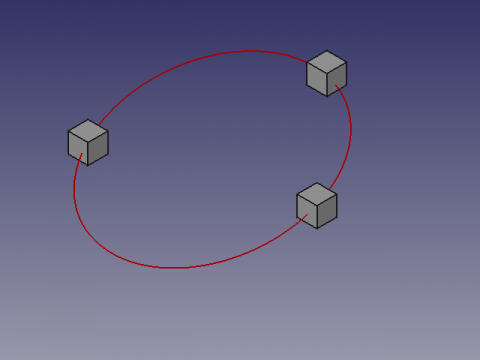
Usage
Použití
Vyberte 3 body nebo tvary ve 3D pohledu a spusťte makro. Je-li tvarem přímka souřadnicí bude střed přímky.
Limitations
Omezení
Pořadí výběru tvarů ovlivňuje úhel OS a zpětně sklon kružnice. V případě potřeby obraťte nebo změňte pořadí výběru tvarů. Souřadnice X, Y, Z s hodnotou 0 nebo se zarovnáním neumožňujícím výpočet mohou vrátit chybu dělení nulou s vysvětlením že "tři body jsou zarovnány (v řadě)"
Skript
ToolBar icon 
Macro_Draft_Circle_3_Points_3D.FCMacro
# -*- coding: utf-8 -*-
# Create a circle from 3 points selected on the X, Y, Z map
# 04/03/2013
# From https://en.wikipedia.org/wiki/Circumscribed_circle#Cartesian_coordinates_from_cross-_and_dot-products
# Also see : https://math.stackexchange.com/questions/2658318/how-to-find-the-circumcenter-of-a-triangle-and-the-length-of-the-corresponding-r
# O=R/2S*(acosα⋅A+bcosβ⋅B+ccosγ⋅C)  ; R is circumradius, S is area of triangle
# 08/08/2014 PyQt4 and PySide

#OS: Windows Vista
#Word size: 32-bit
#Version: 0.14.3700 (Git)
#Branch: releases/FreeCAD-0-14
#Hash: 32f5aae0a64333ec8d5d160dbc46e690510c8fe1
#Python version: 2.6.2
#Qt version: 4.5.2
#Coin version: 3.1.0
#SoQt version: 1.4.1
#OCC version: 6.5.1

try:
    import PyQt4
    from PyQt4 import QtCore, QtGui
except Exception:
    import PySide
    from PySide import QtCore, QtGui
from math import pi, asin
import Draft, FreeCAD, FreeCADGui
from FreeCAD import Base

def errorDialog(msg):
    # Create a simple dialog QMessageBox
    # The first argument indicates the icon used: one of QtGui.QMessageBox.{NoIcon, Information, Warning, Critical, Question}
    diag = QtGui.QMessageBox(QtGui.QMessageBox.Critical,u"Error Message",msg)
    diag.setWindowModality(QtCore.Qt.ApplicationModal)
    diag.exec_()

def affiche(x,y,z,r,angle):
    diag = QtGui.QMessageBox(QtGui.QMessageBox.Information,u"Coordinates",u"Coordinate X : "+str(x)+"\r\n"+u"Coordinate Y : "+str(y)+"\n"+u"Coordinate Z : "+str(z)+"\nRadius\t   : "+str(r)+"\nAngle\t   : "+str(angle))
    diag.setWindowModality(QtCore.Qt.ApplicationModal)
    diag.setWindowModality(QtCore.Qt.NonModal)
    diag.exec_()

# objects selected
sel = FreeCADGui.Selection.getSelection()
# If there are 3 selected points so...
if len(sel)==3 :
    # Assignment of variables
    P1 = sel[0].Shape.BoundBox.Center
    P2 = sel[1].Shape.BoundBox.Center
    P3 = sel[2].Shape.BoundBox.Center

    P1P2 = (P2 - P1).Length
    P2P3 = (P3 - P2).Length
    P3P1 = (P1 - P3).Length

    # Circle radius.
    l = ((P1 - P2).cross(P2 - P3)).Length
    try:
        #if l < 1e-8:
        #    errorDialog("The three points are aligned")
        r = P1P2 * P2P3 * P3P1 / 2 / l
    except:
        errorDialog("The three points are aligned")
    else:
        # Sphere center.
        a = P2P3**2 * (P1 - P2).dot(P1 - P3) / 2 / l**2
        b = P3P1**2 * (P2 - P1).dot(P2 - P3) / 2 / l**2
        c = P1P2**2 * (P3 - P1).dot(P3 - P2) / 2 / l**2
        P1.multiply(a)
        P2.multiply(b)
        P3.multiply(c)
        PC = P1 + P2 + P3

        # Creation of a circle
        pl = Base.Placement()
        v = (P1 - P2).cross(P3 - P2)
        v.normalize()
        axis = Base.Vector(0, 0, 1).cross(v)
        angle = asin(axis.Length) * 180 / pi
        axis.normalize()
        pl = Base.Placement(PC, axis, angle)
        Draft.makeCircle(r, placement=pl, face=False, support=None)
        # Displays the result in the windows
        affiche((PC.x),(PC.y),(PC.z),r,angle)
        # Displays the result in the FreeCAD report view
        #FreeCAD.Console.PrintMessage("Coordinate X : "+str(PC.x)+"\n")
        #FreeCAD.Console.PrintMessage("Coordinate Y : "+str(PC.y)+"\n")
        #FreeCAD.Console.PrintMessage("Coordinate Z : "+str(PC.z)+"\n")
        #FreeCAD.Console.PrintMessage("Radius       : "+str(r)+"\n")
        #FreeCAD.Console.PrintMessage("Angle        : "+str(angle)+"\n")
else:
    # If the condition is not met, repeat
    #FreeCAD.Console.PrintError("Select 3 points and repeat\n")
    errorDialog("Select 3 points and repeat\n")
Tato stránka je načtena z https://wiki.freecad.org/Macro_Draft_Circle_3_Points_3D