|
|
| Description |
|---|
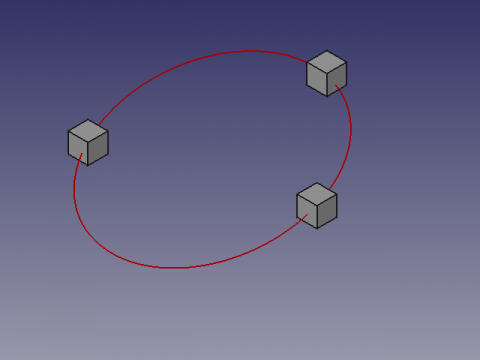
| This macro creates a circle on 3 selected points in the space. The points can be objects such as cubes, cylinder, then selected coordinates will be the centre of these forms. Macro version: 01.00 Last modified: 2013-03-16 FreeCAD version: All Download: ToolBar Icon Author: galou_breizh |
| Author |
| galou_breizh |
| Download |
| ToolBar Icon |
| Links |
| Macros recipes How to install macros How to customize toolbars |
| Macro Version |
| 01.00 |
| Date last modified |
| 2013-03-16 |
| FreeCAD Version(s) |
| All |
| Default shortcut |
| None |
| See also |
| None |

Description
This macro creates a circle on 3 selected points in the space. The points can be objects such as cubes, cylinder, then selected coordinates will be the centre of these forms.
Usage
Select 3 points, or forms in the 3D view and run the macro.
If the shape is a line, the coordinate will be the center of the line.
Limitations
The order of selection of fear forms influencing the AXIS angle and reverse the inclination of the circle. In this case, reverse or change the order of selection of the shapes.
The coordinates X, Y, Z of value 0 or alignment not allowing not calculating, can return a division by zero error, and translated as "The three points are aligned"
Script
ToolBar icon 
Macro_Draft_Circle_3_Points_3D.FCMacro
# -*- coding: utf-8 -*-
# Create a circle from 3 points selected on the X, Y, Z map
# 04/03/2013
# From https://en.wikipedia.org/wiki/Circumscribed_circle#Cartesian_coordinates_from_cross-_and_dot-products
# Also see : https://math.stackexchange.com/questions/2658318/how-to-find-the-circumcenter-of-a-triangle-and-the-length-of-the-corresponding-r
# O=R/2S*(acosα⋅A+bcosβ⋅B+ccosγ⋅C)  ; R is circumradius, S is area of triangle
# 08/08/2014 PyQt4 and PySide

#OS: Windows Vista
#Word size: 32-bit
#Version: 0.14.3700 (Git)
#Branch: releases/FreeCAD-0-14
#Hash: 32f5aae0a64333ec8d5d160dbc46e690510c8fe1
#Python version: 2.6.2
#Qt version: 4.5.2
#Coin version: 3.1.0
#SoQt version: 1.4.1
#OCC version: 6.5.1

try:
    import PyQt4
    from PyQt4 import QtCore, QtGui
except Exception:
    import PySide
    from PySide import QtCore, QtGui
from math import pi, asin
import Draft, FreeCAD, FreeCADGui
from FreeCAD import Base

def errorDialog(msg):
    # Create a simple dialog QMessageBox
    # The first argument indicates the icon used: one of QtGui.QMessageBox.{NoIcon, Information, Warning, Critical, Question}
    diag = QtGui.QMessageBox(QtGui.QMessageBox.Critical,u"Error Message",msg)
    diag.setWindowModality(QtCore.Qt.ApplicationModal)
    diag.exec_()

def affiche(x,y,z,r,angle):
    diag = QtGui.QMessageBox(QtGui.QMessageBox.Information,u"Coordinates",u"Coordinate X : "+str(x)+"\r\n"+u"Coordinate Y : "+str(y)+"\n"+u"Coordinate Z : "+str(z)+"\nRadius\t   : "+str(r)+"\nAngle\t   : "+str(angle))
    diag.setWindowModality(QtCore.Qt.ApplicationModal)
    diag.setWindowModality(QtCore.Qt.NonModal)
    diag.exec_()

# objects selected
sel = FreeCADGui.Selection.getSelection()
# If there are 3 selected points so...
if len(sel)==3 :
    # Assignment of variables
    P1 = sel[0].Shape.BoundBox.Center
    P2 = sel[1].Shape.BoundBox.Center
    P3 = sel[2].Shape.BoundBox.Center

    P1P2 = (P2 - P1).Length
    P2P3 = (P3 - P2).Length
    P3P1 = (P1 - P3).Length

    # Circle radius.
    l = ((P1 - P2).cross(P2 - P3)).Length
    try:
        #if l < 1e-8:
        #    errorDialog("The three points are aligned")
        r = P1P2 * P2P3 * P3P1 / 2 / l
    except:
        errorDialog("The three points are aligned")
    else:
        # Sphere center.
        a = P2P3**2 * (P1 - P2).dot(P1 - P3) / 2 / l**2
        b = P3P1**2 * (P2 - P1).dot(P2 - P3) / 2 / l**2
        c = P1P2**2 * (P3 - P1).dot(P3 - P2) / 2 / l**2
        P1.multiply(a)
        P2.multiply(b)
        P3.multiply(c)
        PC = P1 + P2 + P3

        # Creation of a circle
        pl = Base.Placement()
        v = (P1 - P2).cross(P3 - P2)
        v.normalize()
        axis = Base.Vector(0, 0, 1).cross(v)
        angle = asin(axis.Length) * 180 / pi
        axis.normalize()
        pl = Base.Placement(PC, axis, angle)
        Draft.makeCircle(r, placement=pl, face=False, support=None)
        # Displays the result in the windows
        affiche((PC.x),(PC.y),(PC.z),r,angle)
        # Displays the result in the FreeCAD report view
        #FreeCAD.Console.PrintMessage("Coordinate X : "+str(PC.x)+"\n")
        #FreeCAD.Console.PrintMessage("Coordinate Y : "+str(PC.y)+"\n")
        #FreeCAD.Console.PrintMessage("Coordinate Z : "+str(PC.z)+"\n")
        #FreeCAD.Console.PrintMessage("Radius       : "+str(r)+"\n")
        #FreeCAD.Console.PrintMessage("Angle        : "+str(angle)+"\n")
else:
    # If the condition is not met, repeat
    #FreeCAD.Console.PrintError("Select 3 points and repeat\n")
    errorDialog("Select 3 points and repeat\n")
This page is retrieved from https://wiki.freecad.org/Macro_Draft_Circle_3_Points_3D