|
|
| Description |
|---|
| Donne les valeurs Delta xyz de 2 points et donne la distance entre ces points. Si la touche "SHIFT" est enfoncée, la valeur Delta commence sur la coordonnée 0,0,0 jusqu'au point cliqué (la coordonnée 0,0,0 est affichée en rouge). Une option est possible pour que la macro reste résidente (continue) puis appuyez sur la touche "Q" pour quitter la macro, et l'option pour imposer le nombre de décimales ou utiliser le nombre de décimale(s) dans l'option des préférence. Version macro : 0.2 Date dernière modification : 2020-10-23 Version FreeCAD : Toutes Téléchargement : Icône de la barre d'outils Auteur: Mario52 |
| Auteur |
| Mario52 |
| Téléchargement |
| Icône de la barre d'outils |
| Liens |
| Page des macros Comment installer une macro Comment créer une barre d'outils |
| Version Macro |
| 0.2 |
| Dernière modification |
| 2020-10-23 |
| Version(s) FreeCAD |
| Toutes |
| Raccourci clavier |
| SHIFT, Q |
| Voir aussi |
| Std Mesure |

Description
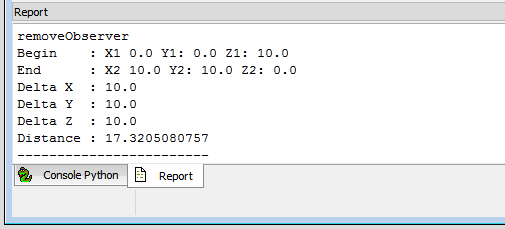
Donne la valeur Delta de la ligne située entre 2 points et la longueur de la distance entre ces points.
Si la touche "SHIFT" est enfoncée, la valeur Delta commence sur la coordonnée 0,0,0 au point cliqué (la coordonnée 0,0,0 est affichée en rouge).
Une option est possible pour la macro reste résidente (continue) puis appuyez sur la touche "Q" pour quitter la macro, et l'option pour imposer le nombre de décimales ou utiliser la décimale dans l'option de préférence.
Utilisation
- Démarrez la macro
- Sélectionnez du premier point dans la vue 3D
- Sélectionnez le second point dans la vue 3D et le informations sont affichée dans la vue rapport
Si la touche SHIFT est enfoncée, la valeur Delta commence sur la coordonnée 0,0,0 au point cliqué (la coordonnée 0,0,0 est affichée en rouge)
Si la macro reste résidente (continue) appuyez sur la touche Q pour quitter la macro.
Configuration
Pour modifier la valeur: allez dans : FreeCAD → Menu → Tools → Edit parameters... → BaseApp/Preferences/Macros/FCMmacros/Delta_XYZ.
_____switchDecimalsPref_____
true1 : la valeur arrondie prend la valeur des préférences globalesfalse0 : la valeur ronde prend votre choix
_____setArrondi_____
- défini la valeur de l'arrondie à votre choix
- si votre choix = 0: la valeur arrondie est 3 par défaut
_____switchResident_____
true1 : la macro reste résidente (Tapez Q pour quitter)false0 : la macro est utilisée lors de l'exécution et se ferme après utilisation
Script
Icône de la barre d'outils 
Macro_Delta_xyz.FCMacro
# -*- coding: utf-8 -*-
#Delta x y z Click Q to quit
#
#OS: Windows 10 (10.0)
#Word size of OS: 64-bit
#Word size of FreeCAD: 64-bit
#Version: 0.19.22808 (Git)
#Build type: Release
#Branch: master
#Hash: 72eb41b24f12b572d55081042160954b93f4614c
#Python version: 3.6.8
#Qt version: 5.12.1
#Coin version: 4.0.0a
#OCC version: 7.3.0
#Locale: French/Mars(fr_Ma)
#
__title__   = "Delta_XYZ"
__author__  = "Mario52"
__url__     = "https://wiki.freecad.org/Main_Page"
__Wiki__    = "https://wiki.freecad.org/Macro_Delta_xyz"
__version__ = "00.02"
__date__    = "2020/10/23"    #YYYY/MM/DD

import Draft, Part
import math
from FreeCAD import Base
import FreeCAD, FreeCADGui
App = FreeCAD
Gui = FreeCADGui

global positionX1 ;positionX1 = 0.0
global positionY1 ;positionY1 = 0.0
global positionZ1 ;positionZ1 = 0.0
global positionX2 ;positionX2 = 0.0
global positionY2 ;positionY2 = 0.0
global positionZ2 ;positionZ2 = 0.0
global pas        ;pas        = 0

global setArrondi                    # round value
global switchResident                # switch resident 0=not resident, 1=stay resident
global switchDecimalsPref            # switch unit preference or not

#### Configuration begin      ####
#### NOT MODIFY THE CODE HERE ####
#### for modify : go to : FreeCAD >Menu >Tools >Edit parameters... >BaseApp/Preferences/Macros/FCMmacros/Delta_XYZ ####
##
FreeCAD.ParamGet("User parameter:BaseApp/Preferences/Macros/FCMmacros/" + __title__).SetString("Version", __version__ + " (" + __date__ + ")")
##
switchResident = FreeCAD.ParamGet("User parameter:BaseApp/Preferences/Macros/FCMmacros/" + __title__).GetBool("switchResident")   # switch Resident or not
if switchResident == False:
    FreeCAD.ParamGet("User parameter:BaseApp/Preferences/Macros/FCMmacros/" + __title__).SetBool("switchResident", switchResident)# switch Resident or not : 0 = Not Resident 1 = Resident
##
switchDecimalsPref = FreeCAD.ParamGet("User parameter:BaseApp/Preferences/Macros/FCMmacros/" + __title__).GetBool("switchDecimalsPref")   # switch unit preference or not
if switchDecimalsPref == True:
    setArrondi = FreeCAD.ParamGet("User parameter:BaseApp/Preferences/Units").GetInt("Decimals")    # unit in preferences
else:
    FreeCAD.ParamGet("User parameter:BaseApp/Preferences/Macros/FCMmacros/" + __title__).SetBool("switchDecimalsPref", switchDecimalsPref)#
    setArrondi = FreeCAD.ParamGet("User parameter:BaseApp/Preferences/Macros/FCMmacros/" + __title__).GetInt("setArrondi")
    if setArrondi < 1:
        FreeCAD.ParamGet("User parameter:BaseApp/Preferences/Macros/FCMmacros/" + __title__).SetInt("setArrondi", 3) # setArrondi
        setArrondi = FreeCAD.ParamGet("User parameter:BaseApp/Preferences/Macros/FCMmacros/" + __title__).GetInt("setArrondi")

##
####Configuration###################################################################################################################

## Tool Draft def : sub, length, dist
def sub(first, other):
	"sub(Vector,Vector) - subtracts second vector from first one"
	if isinstance(first,FreeCAD.Vector) and isinstance(other,FreeCAD.Vector):
		return FreeCAD.Vector(first.x-other.x, first.y-other.y, first.z-other.z)
def length(first):
	"lengh(Vector) - gives vector length"
	if isinstance(first,FreeCAD.Vector):
		return math.sqrt(first.x*first.x + first.y*first.y + first.z*first.z)
def dist(first, other):
	"dist(Vector,Vector) - returns the distance between both points/vectors"
	if isinstance(first,FreeCAD.Vector) and isinstance(other,FreeCAD.Vector):
		return length(sub(first,other))

import FreeCAD, FreeCADGui

#########
doc = FreeCAD.ActiveDocument
if doc == None:
    doc = FreeCAD.newDocument("Delta x y z")
#########

##key
global i     ; i = 0
global c     ; c = ""
global d     ; d = ""
global v     ; v = Gui.activeDocument().activeView()
global o     ; o = ""
global s     ; s = ""
global SHIFT ; SHIFT = ""
global DOWN  ; DOWN = ""
##

class ViewObserver:
    def keyPosition(self, info):
#        global i
#        global c
        global SHIFT
        global DOWN
        global s
        global d
        global v
        global o

        SHIFT = ""
        key = info["Key"]

        if (key.upper() == "SHIFT") and (info["ShiftDown"] == False):  #
            SHIFT = "SHIFT"
            DOWN  = "DOWN"
            key   = ""

        if key.upper() == "Q":
            FreeCADGui.Selection.removeObserver(s)                     # Uninstalls the resident function
            v.removeEventCallback("SoKeyboardEvent",d)
            App.Console.PrintMessage("____End Delta_XYZ____" + "\n")
        xx = info["Key"]

class SelObserver:
    def addSelection(self,document, object, element, position):  # Selection
        global pas
        global positionX1
        global positionY1
        global positionZ1
        global positionX2
        global positionY2
        global positionZ2
        global SHIFT
        global DOWN
        global s
        global d
        global v

        pas+=1
        if (SHIFT == "SHIFT") and (DOWN == "DOWN"):
            positionX1 = 0.0
            positionY1 = 0.0
            positionZ1 = 0.0
            App.Console.PrintError("Begin    : X1 "+str(positionX1)+" Y1: "+str(positionY1)+" Z1: "+str(positionZ1)+"\n")
            pas = 2
            SHIFT = DOWN  = ""

        if pas==1:
            positionX1 = round(position[0],setArrondi)
            positionY1 = round(position[1],setArrondi)
            positionZ1 = round(position[2],setArrondi)
            App.Console.PrintMessage("Begin    : X1 "+str(positionX1)+" Y1: "+str(positionY1)+" Z1: "+str(positionZ1)+"\n")
        else:
            positionX2 = round(position[0],setArrondi)
            positionY2 = round(position[1],setArrondi)
            positionZ2 = round(position[2],setArrondi)
            App.Console.PrintMessage("End      : X2 "+str(positionX2)+" Y2: "+str(positionY2)+" Z2: "+str(positionZ2)+"\n")
            App.Console.PrintMessage("Delta X  : "+str(round(abs(positionX1-positionX2),setArrondi))+"\n")
            App.Console.PrintMessage("Delta Y  : "+str(round(abs(positionY1-positionY2),setArrondi))+"\n")
            App.Console.PrintMessage("Delta Z  : "+str(round(abs(positionZ1-positionZ2),setArrondi))+"\n")
            v1=FreeCAD.Vector(positionX1,positionY1,positionZ1)
            v2=FreeCAD.Vector(positionX2,positionY2,positionZ2)
            distance = dist(v1,v2)
            App.Console.PrintMessage("Distance : "+ str(round(distance,setArrondi))+"\n")
            App.Console.PrintMessage("__________________________________"+"\n")
            pas=0
            if switchResident == False:
                FreeCADGui.Selection.removeObserver(s)                     # Uninstalls the resident function
                v.removeEventCallback("SoKeyboardEvent",d)                 # Uninstalls the resident function


pas = 0
s=SelObserver()
FreeCADGui.Selection.addObserver(s)          # install the function mode resident
## key
o = ViewObserver()                           # install the function mode resident
d = v.addEventCallback("SoKeyboardEvent",o.keyPosition)
App.Console.PrintMessage("____Begin Delta_XYZ____" + "\n")
##
FreeCAD.Console.PrintMessage("\n"+"####Configure################################################################################################" + "\n\n")
FreeCAD.Console.PrintMessage("For modify the value : go to : FreeCAD >Menu >Tools >Edit parameters... >BaseApp/Preferences/Macros/FCMmacros/Delta_XYZ"+"\n\n")
FreeCAD.Console.PrintMessage("_____switchDecimalsPref_____  ")
FreeCAD.Console.PrintError("Actual " + str(switchDecimalsPref)+"\n")
FreeCAD.Console.PrintMessage("switchDecimalsPref : True  1 : the round value takes the global preferences value "+"\n")
FreeCAD.Console.PrintMessage("                   : False 0 : the round value takes your choice "+"\n\n")
FreeCAD.Console.PrintMessage("_____setArrondi_____  ")
FreeCAD.Console.PrintError("Actual " + str(setArrondi)+"\n")
FreeCAD.Console.PrintMessage("setArrondi         : set your choice round value"+"\n")
FreeCAD.Console.PrintMessage("                   : if your choice = 0 : the round value is 3 by default "+"\n\n")
FreeCAD.Console.PrintMessage("_____switchResident_____  ")
FreeCAD.Console.PrintError("Actual " + str(switchResident)+"\n")
FreeCAD.Console.PrintMessage("switchResident     : True  1 : the macro stay resident (Type Q to quit)"+"\n")
FreeCAD.Console.PrintMessage("                   : False 0 : the macro is used on run and quit after use"+"\n")
FreeCAD.Console.PrintMessage("\n"+"####Configure end############################################################################################" + "\n")
FreeCAD.Console.PrintMessage("\n"+"####Use######################################################################################################" + "\n")
FreeCAD.Console.PrintMessage("Use : click the first point, click the second point, the data is diplayed"+"\n")
FreeCAD.Console.PrintMessage("    : press the SHIFT button click the point, the Delta is displayed with the coordinate X=0,Y=0,Z=0 to point clicked X, Y, Z"+"\n")
FreeCAD.Console.PrintMessage("    : the first coordinate X=0, Y=0, Z=0 is displayed in red"+"\n")
FreeCAD.Console.PrintMessage("####Use end#######################################################################################################" + "\n\n")
##
Version
Version 0.2 2020-10-23 : ajout appuyez sur la touche SHIFT, cliquez sur un point et la valeur delta commence 0,0,0 au point cliqué, Q pour quitter la macro
Ajout d'options configurables dans les préférence de FC
Version 0.1 2013-11-29 : view toolbar : measure distance tool
Cette page est extraite de https://wiki.freecad.org/Macro_Delta_xyz