|
|
| Popis |
|---|
| dává hodnotu Delta mezi 2 body. Version macro : 0.2 Date last modification : 2020-10-23 FreeCAD version : All Download : ToolBar Icon Autor: Mario52 |
| Autor |
| Mario52 |
| Download |
| ToolBar Icon |
| Odkazy |
| Makro recepty| Jak nainstalovat makra Jak přizpůsobit panely nástrojů |
| Verze |
| 0.2 |
| Datum poslední úpravy |
| 2020-10-23 |
| Verze FreeCAD |
| All |
| Výchozí zástupce |
| SHIFT, Q |
| Viz též |
Part Measure Linear 
|


Description
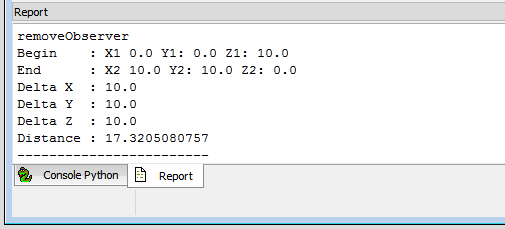
Dává hodnotu Delta a vzdálenost mezi 2 body.
Pokud je stisknuto tlačítko SHIFT, hodnota Delta začíná na souřadnici 0,0,0 do bodu, na který je kliknuto (souřadnice 0,0,0 je zobrazena červeně).
Jedna možnost je možná, aby makro zůstalo rezidentní (nepřetržité), poté stiskněte Q pro opuštění makra a jedna možnost pro uložení počtu desetinných míst.
Jak používat
- Spusťte makro
- Vyberte první bod ve 3D zobrazení
- Vyberte druhý bod v 3D pohledu
Pokud je stisknuto tlačítko SHIFT, hodnota Delta začíná na souřadnici 0,0,0 do bodu, na který je kliknuto (souřadnice 0,0,0 je zobrazena červeně).
Pokud je jeho konfigurace nastavena na „Trvalé“ (průběžné), kliknutím na tlačítko Q ukončete makro
Konfigurovat
Chcete-li upravit hodnotu: přejděte na : FreeCAD → Menu → Tools → Edit parameters... → BaseApp/Preferences/Macros/FCMmacros/Delta_XYZ.
_____switchDecimalsPref_____
true1: zaokrouhlená hodnota přebírá hodnotu globálních předvolebfalse0: zaokrouhlená hodnota si vybere
_____setArrondi_____
- nastavte si zaokrouhlenou hodnotu
- pokud je vaše volba = 0: zaokrouhlená hodnota je ve výchozím nastavení 3
_____switchResident_____
true1: makro zůstane rezidentem (ukončete zadáním Q)false0: makro se používá při spuštění a po použití se ukončí
Skript
ToolBar Icon 
Macro_Delta_xyz.FCMacro
# -*- coding: utf-8 -*-
#Delta x y z Click Q to quit
#
#OS: Windows 10 (10.0)
#Word size of OS: 64-bit
#Word size of FreeCAD: 64-bit
#Version: 0.19.22808 (Git)
#Build type: Release
#Branch: master
#Hash: 72eb41b24f12b572d55081042160954b93f4614c
#Python version: 3.6.8
#Qt version: 5.12.1
#Coin version: 4.0.0a
#OCC version: 7.3.0
#Locale: French/Mars(fr_Ma)
#
__title__   = "Delta_XYZ"
__author__  = "Mario52"
__url__     = "https://wiki.freecad.org/Main_Page"
__Wiki__    = "https://wiki.freecad.org/Macro_Delta_xyz"
__version__ = "00.02"
__date__    = "2020/10/23"    #YYYY/MM/DD

import Draft, Part
import math
from FreeCAD import Base
import FreeCAD, FreeCADGui
App = FreeCAD
Gui = FreeCADGui

global positionX1 ;positionX1 = 0.0
global positionY1 ;positionY1 = 0.0
global positionZ1 ;positionZ1 = 0.0
global positionX2 ;positionX2 = 0.0
global positionY2 ;positionY2 = 0.0
global positionZ2 ;positionZ2 = 0.0
global pas        ;pas        = 0

global setArrondi                    # round value
global switchResident                # switch resident 0=not resident, 1=stay resident
global switchDecimalsPref            # switch unit preference or not

#### Configuration begin      ####
#### NOT MODIFY THE CODE HERE ####
#### for modify : go to : FreeCAD >Menu >Tools >Edit parameters... >BaseApp/Preferences/Macros/FCMmacros/Delta_XYZ ####
##
FreeCAD.ParamGet("User parameter:BaseApp/Preferences/Macros/FCMmacros/" + __title__).SetString("Version", __version__ + " (" + __date__ + ")")
##
switchResident = FreeCAD.ParamGet("User parameter:BaseApp/Preferences/Macros/FCMmacros/" + __title__).GetBool("switchResident")   # switch Resident or not
if switchResident == False:
    FreeCAD.ParamGet("User parameter:BaseApp/Preferences/Macros/FCMmacros/" + __title__).SetBool("switchResident", switchResident)# switch Resident or not : 0 = Not Resident 1 = Resident
##
switchDecimalsPref = FreeCAD.ParamGet("User parameter:BaseApp/Preferences/Macros/FCMmacros/" + __title__).GetBool("switchDecimalsPref")   # switch unit preference or not
if switchDecimalsPref == True:
    setArrondi = FreeCAD.ParamGet("User parameter:BaseApp/Preferences/Units").GetInt("Decimals")    # unit in preferences
else:
    FreeCAD.ParamGet("User parameter:BaseApp/Preferences/Macros/FCMmacros/" + __title__).SetBool("switchDecimalsPref", switchDecimalsPref)#
    setArrondi = FreeCAD.ParamGet("User parameter:BaseApp/Preferences/Macros/FCMmacros/" + __title__).GetInt("setArrondi")
    if setArrondi < 1:
        FreeCAD.ParamGet("User parameter:BaseApp/Preferences/Macros/FCMmacros/" + __title__).SetInt("setArrondi", 3) # setArrondi
        setArrondi = FreeCAD.ParamGet("User parameter:BaseApp/Preferences/Macros/FCMmacros/" + __title__).GetInt("setArrondi")

##
####Configuration###################################################################################################################

## Tool Draft def : sub, length, dist
def sub(first, other):
	"sub(Vector,Vector) - subtracts second vector from first one"
	if isinstance(first,FreeCAD.Vector) and isinstance(other,FreeCAD.Vector):
		return FreeCAD.Vector(first.x-other.x, first.y-other.y, first.z-other.z)
def length(first):
	"lengh(Vector) - gives vector length"
	if isinstance(first,FreeCAD.Vector):
		return math.sqrt(first.x*first.x + first.y*first.y + first.z*first.z)
def dist(first, other):
	"dist(Vector,Vector) - returns the distance between both points/vectors"
	if isinstance(first,FreeCAD.Vector) and isinstance(other,FreeCAD.Vector):
		return length(sub(first,other))

import FreeCAD, FreeCADGui

#########
doc = FreeCAD.ActiveDocument
if doc == None:
    doc = FreeCAD.newDocument("Delta x y z")
#########

##key
global i     ; i = 0
global c     ; c = ""
global d     ; d = ""
global v     ; v = Gui.activeDocument().activeView()
global o     ; o = ""
global s     ; s = ""
global SHIFT ; SHIFT = ""
global DOWN  ; DOWN = ""
##

class ViewObserver:
    def keyPosition(self, info):
#        global i
#        global c
        global SHIFT
        global DOWN
        global s
        global d
        global v
        global o

        SHIFT = ""
        key = info["Key"]

        if (key.upper() == "SHIFT") and (info["ShiftDown"] == False):  #
            SHIFT = "SHIFT"
            DOWN  = "DOWN"
            key   = ""

        if key.upper() == "Q":
            FreeCADGui.Selection.removeObserver(s)                     # Uninstalls the resident function
            v.removeEventCallback("SoKeyboardEvent",d)
            App.Console.PrintMessage("____End Delta_XYZ____" + "\n")
        xx = info["Key"]

class SelObserver:
    def addSelection(self,document, object, element, position):  # Selection
        global pas
        global positionX1
        global positionY1
        global positionZ1
        global positionX2
        global positionY2
        global positionZ2
        global SHIFT
        global DOWN
        global s
        global d
        global v

        pas+=1
        if (SHIFT == "SHIFT") and (DOWN == "DOWN"):
            positionX1 = 0.0
            positionY1 = 0.0
            positionZ1 = 0.0
            App.Console.PrintError("Begin    : X1 "+str(positionX1)+" Y1: "+str(positionY1)+" Z1: "+str(positionZ1)+"\n")
            pas = 2
            SHIFT = DOWN  = ""

        if pas==1:
            positionX1 = round(position[0],setArrondi)
            positionY1 = round(position[1],setArrondi)
            positionZ1 = round(position[2],setArrondi)
            App.Console.PrintMessage("Begin    : X1 "+str(positionX1)+" Y1: "+str(positionY1)+" Z1: "+str(positionZ1)+"\n")
        else:
            positionX2 = round(position[0],setArrondi)
            positionY2 = round(position[1],setArrondi)
            positionZ2 = round(position[2],setArrondi)
            App.Console.PrintMessage("End      : X2 "+str(positionX2)+" Y2: "+str(positionY2)+" Z2: "+str(positionZ2)+"\n")
            App.Console.PrintMessage("Delta X  : "+str(round(abs(positionX1-positionX2),setArrondi))+"\n")
            App.Console.PrintMessage("Delta Y  : "+str(round(abs(positionY1-positionY2),setArrondi))+"\n")
            App.Console.PrintMessage("Delta Z  : "+str(round(abs(positionZ1-positionZ2),setArrondi))+"\n")
            v1=FreeCAD.Vector(positionX1,positionY1,positionZ1)
            v2=FreeCAD.Vector(positionX2,positionY2,positionZ2)
            distance = dist(v1,v2)
            App.Console.PrintMessage("Distance : "+ str(round(distance,setArrondi))+"\n")
            App.Console.PrintMessage("__________________________________"+"\n")
            pas=0
            if switchResident == False:
                FreeCADGui.Selection.removeObserver(s)                     # Uninstalls the resident function
                v.removeEventCallback("SoKeyboardEvent",d)                 # Uninstalls the resident function


pas = 0
s=SelObserver()
FreeCADGui.Selection.addObserver(s)          # install the function mode resident
## key
o = ViewObserver()                           # install the function mode resident
d = v.addEventCallback("SoKeyboardEvent",o.keyPosition)
App.Console.PrintMessage("____Begin Delta_XYZ____" + "\n")
##
FreeCAD.Console.PrintMessage("\n"+"####Configure################################################################################################" + "\n\n")
FreeCAD.Console.PrintMessage("For modify the value : go to : FreeCAD >Menu >Tools >Edit parameters... >BaseApp/Preferences/Macros/FCMmacros/Delta_XYZ"+"\n\n")
FreeCAD.Console.PrintMessage("_____switchDecimalsPref_____  ")
FreeCAD.Console.PrintError("Actual " + str(switchDecimalsPref)+"\n")
FreeCAD.Console.PrintMessage("switchDecimalsPref : True  1 : the round value takes the global preferences value "+"\n")
FreeCAD.Console.PrintMessage("                   : False 0 : the round value takes your choice "+"\n\n")
FreeCAD.Console.PrintMessage("_____setArrondi_____  ")
FreeCAD.Console.PrintError("Actual " + str(setArrondi)+"\n")
FreeCAD.Console.PrintMessage("setArrondi         : set your choice round value"+"\n")
FreeCAD.Console.PrintMessage("                   : if your choice = 0 : the round value is 3 by default "+"\n\n")
FreeCAD.Console.PrintMessage("_____switchResident_____  ")
FreeCAD.Console.PrintError("Actual " + str(switchResident)+"\n")
FreeCAD.Console.PrintMessage("switchResident     : True  1 : the macro stay resident (Type Q to quit)"+"\n")
FreeCAD.Console.PrintMessage("                   : False 0 : the macro is used on run and quit after use"+"\n")
FreeCAD.Console.PrintMessage("\n"+"####Configure end############################################################################################" + "\n")
FreeCAD.Console.PrintMessage("\n"+"####Use######################################################################################################" + "\n")
FreeCAD.Console.PrintMessage("Use : click the first point, click the second point, the data is diplayed"+"\n")
FreeCAD.Console.PrintMessage("    : press the SHIFT button click the point, the Delta is displayed with the coordinate X=0,Y=0,Z=0 to point clicked X, Y, Z"+"\n")
FreeCAD.Console.PrintMessage("    : the first coordinate X=0, Y=0, Z=0 is displayed in red"+"\n")
FreeCAD.Console.PrintMessage("####Use end#######################################################################################################" + "\n\n")
##
Verze
Version 0.2 2020-10-23 : přidáním stiskněte klávesu SHIFT, klikněte na jeden bod a hodnota delta začíná 0,0,0 na bod, na který jste klikli, Q pro ukončení makra
Přidání možností konfigurovatelných v preferenci FC
Version 0.1 2013-11-29 : view toolbar : measure distance tool
Tato stránka je načtena z https://wiki.freecad.org/Macro_Delta_xyz