|
|
| Description |
|---|
| Gives the Delta values and distance between 2 points. Start the macro Select the first point in 3D view Select the second point in 3D view If the "SHIFT" key is pressed, the Delta value begin on coordinate 0,0,0 to point clicked (the coordinate 0,0,0 is displayed in red). One option is possible for the macro stay resident (continuous) then push "Q" key to quit the macro, and option for impose the number of decimals or use the decimal in the preference option. Macro version: 0.2 Last modified: 2020-10-23 FreeCAD version: All Download: ToolBar Icon Author: Mario52 |
| Author |
| Mario52 |
| Download |
| ToolBar Icon |
| Links |
| Macros recipes How to install macros How to customize toolbars |
| Macro Version |
| 0.2 |
| Date last modified |
| 2020-10-23 |
| FreeCAD Version(s) |
| All |
| Default shortcut |
| SHIFT, Q |
| See also |
| Std Measure |

Description
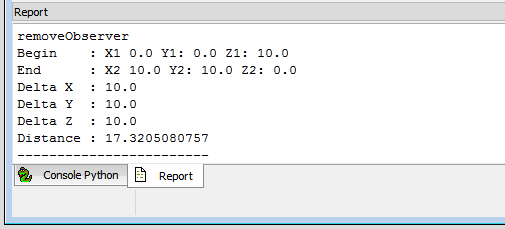
Gives the Delta values and distance between 2 points.
If the SHIFT key is pressed, the Delta value begin on coordinate 0,0,0 to point clicked (the coordinate 0,0,0 is displayed in red).
One option is possible for the macro stay resident (continuous) then push Q to quit the macro, and one option for impose the number of decimals.
Usage
- Start the macro
- Select the first point in 3D view
- Select the second point in 3D view
If the SHIFT key is pressed, the Delta value begin on coordinate 0,0,0 to point clicked (the coordinate 0,0,0 is displayed in red).
If its is configured "Permanent" (continuous), click the Q key for quit the macro
Configure
For modify the value : go to : FreeCAD → Menu → Tools → Edit parameters... → BaseApp/Preferences/Macros/FCMmacros/Delta_XYZ.
_____switchDecimalsPref_____
true1 : the round value takes the global preferences valuefalse0 : the round value takes your choice
_____setArrondi_____
- set your choice round value
- if your choice = 0 : the round value is 3 by default
_____switchResident_____
true1 : the macro stay resident (Type Q to quit)false0 : the macro is used on run and quit after use
Script
ToolBar Icon 
Macro_Delta_xyz.FCMacro
# -*- coding: utf-8 -*-
#Delta x y z Click Q to quit
#
#OS: Windows 10 (10.0)
#Word size of OS: 64-bit
#Word size of FreeCAD: 64-bit
#Version: 0.19.22808 (Git)
#Build type: Release
#Branch: master
#Hash: 72eb41b24f12b572d55081042160954b93f4614c
#Python version: 3.6.8
#Qt version: 5.12.1
#Coin version: 4.0.0a
#OCC version: 7.3.0
#Locale: French/Mars(fr_Ma)
#
__title__   = "Delta_XYZ"
__author__  = "Mario52"
__url__     = "https://wiki.freecad.org/Main_Page"
__Wiki__    = "https://wiki.freecad.org/Macro_Delta_xyz"
__version__ = "00.02"
__date__    = "2020/10/23"    #YYYY/MM/DD

import Draft, Part
import math
from FreeCAD import Base
import FreeCAD, FreeCADGui
App = FreeCAD
Gui = FreeCADGui

global positionX1 ;positionX1 = 0.0
global positionY1 ;positionY1 = 0.0
global positionZ1 ;positionZ1 = 0.0
global positionX2 ;positionX2 = 0.0
global positionY2 ;positionY2 = 0.0
global positionZ2 ;positionZ2 = 0.0
global pas        ;pas        = 0

global setArrondi                    # round value
global switchResident                # switch resident 0=not resident, 1=stay resident
global switchDecimalsPref            # switch unit preference or not

#### Configuration begin      ####
#### NOT MODIFY THE CODE HERE ####
#### for modify : go to : FreeCAD >Menu >Tools >Edit parameters... >BaseApp/Preferences/Macros/FCMmacros/Delta_XYZ ####
##
FreeCAD.ParamGet("User parameter:BaseApp/Preferences/Macros/FCMmacros/" + __title__).SetString("Version", __version__ + " (" + __date__ + ")")
##
switchResident = FreeCAD.ParamGet("User parameter:BaseApp/Preferences/Macros/FCMmacros/" + __title__).GetBool("switchResident")   # switch Resident or not
if switchResident == False:
    FreeCAD.ParamGet("User parameter:BaseApp/Preferences/Macros/FCMmacros/" + __title__).SetBool("switchResident", switchResident)# switch Resident or not : 0 = Not Resident 1 = Resident
##
switchDecimalsPref = FreeCAD.ParamGet("User parameter:BaseApp/Preferences/Macros/FCMmacros/" + __title__).GetBool("switchDecimalsPref")   # switch unit preference or not
if switchDecimalsPref == True:
    setArrondi = FreeCAD.ParamGet("User parameter:BaseApp/Preferences/Units").GetInt("Decimals")    # unit in preferences
else:
    FreeCAD.ParamGet("User parameter:BaseApp/Preferences/Macros/FCMmacros/" + __title__).SetBool("switchDecimalsPref", switchDecimalsPref)#
    setArrondi = FreeCAD.ParamGet("User parameter:BaseApp/Preferences/Macros/FCMmacros/" + __title__).GetInt("setArrondi")
    if setArrondi < 1:
        FreeCAD.ParamGet("User parameter:BaseApp/Preferences/Macros/FCMmacros/" + __title__).SetInt("setArrondi", 3) # setArrondi
        setArrondi = FreeCAD.ParamGet("User parameter:BaseApp/Preferences/Macros/FCMmacros/" + __title__).GetInt("setArrondi")

##
####Configuration###################################################################################################################

## Tool Draft def : sub, length, dist
def sub(first, other):
	"sub(Vector,Vector) - subtracts second vector from first one"
	if isinstance(first,FreeCAD.Vector) and isinstance(other,FreeCAD.Vector):
		return FreeCAD.Vector(first.x-other.x, first.y-other.y, first.z-other.z)
def length(first):
	"lengh(Vector) - gives vector length"
	if isinstance(first,FreeCAD.Vector):
		return math.sqrt(first.x*first.x + first.y*first.y + first.z*first.z)
def dist(first, other):
	"dist(Vector,Vector) - returns the distance between both points/vectors"
	if isinstance(first,FreeCAD.Vector) and isinstance(other,FreeCAD.Vector):
		return length(sub(first,other))

import FreeCAD, FreeCADGui

#########
doc = FreeCAD.ActiveDocument
if doc == None:
    doc = FreeCAD.newDocument("Delta x y z")
#########

##key
global i     ; i = 0
global c     ; c = ""
global d     ; d = ""
global v     ; v = Gui.activeDocument().activeView()
global o     ; o = ""
global s     ; s = ""
global SHIFT ; SHIFT = ""
global DOWN  ; DOWN = ""
##

class ViewObserver:
    def keyPosition(self, info):
#        global i
#        global c
        global SHIFT
        global DOWN
        global s
        global d
        global v
        global o

        SHIFT = ""
        key = info["Key"]

        if (key.upper() == "SHIFT") and (info["ShiftDown"] == False):  #
            SHIFT = "SHIFT"
            DOWN  = "DOWN"
            key   = ""

        if key.upper() == "Q":
            FreeCADGui.Selection.removeObserver(s)                     # Uninstalls the resident function
            v.removeEventCallback("SoKeyboardEvent",d)
            App.Console.PrintMessage("____End Delta_XYZ____" + "\n")
        xx = info["Key"]

class SelObserver:
    def addSelection(self,document, object, element, position):  # Selection
        global pas
        global positionX1
        global positionY1
        global positionZ1
        global positionX2
        global positionY2
        global positionZ2
        global SHIFT
        global DOWN
        global s
        global d
        global v

        pas+=1
        if (SHIFT == "SHIFT") and (DOWN == "DOWN"):
            positionX1 = 0.0
            positionY1 = 0.0
            positionZ1 = 0.0
            App.Console.PrintError("Begin    : X1 "+str(positionX1)+" Y1: "+str(positionY1)+" Z1: "+str(positionZ1)+"\n")
            pas = 2
            SHIFT = DOWN  = ""

        if pas==1:
            positionX1 = round(position[0],setArrondi)
            positionY1 = round(position[1],setArrondi)
            positionZ1 = round(position[2],setArrondi)
            App.Console.PrintMessage("Begin    : X1 "+str(positionX1)+" Y1: "+str(positionY1)+" Z1: "+str(positionZ1)+"\n")
        else:
            positionX2 = round(position[0],setArrondi)
            positionY2 = round(position[1],setArrondi)
            positionZ2 = round(position[2],setArrondi)
            App.Console.PrintMessage("End      : X2 "+str(positionX2)+" Y2: "+str(positionY2)+" Z2: "+str(positionZ2)+"\n")
            App.Console.PrintMessage("Delta X  : "+str(round(abs(positionX1-positionX2),setArrondi))+"\n")
            App.Console.PrintMessage("Delta Y  : "+str(round(abs(positionY1-positionY2),setArrondi))+"\n")
            App.Console.PrintMessage("Delta Z  : "+str(round(abs(positionZ1-positionZ2),setArrondi))+"\n")
            v1=FreeCAD.Vector(positionX1,positionY1,positionZ1)
            v2=FreeCAD.Vector(positionX2,positionY2,positionZ2)
            distance = dist(v1,v2)
            App.Console.PrintMessage("Distance : "+ str(round(distance,setArrondi))+"\n")
            App.Console.PrintMessage("__________________________________"+"\n")
            pas=0
            if switchResident == False:
                FreeCADGui.Selection.removeObserver(s)                     # Uninstalls the resident function
                v.removeEventCallback("SoKeyboardEvent",d)                 # Uninstalls the resident function


pas = 0
s=SelObserver()
FreeCADGui.Selection.addObserver(s)          # install the function mode resident
## key
o = ViewObserver()                           # install the function mode resident
d = v.addEventCallback("SoKeyboardEvent",o.keyPosition)
App.Console.PrintMessage("____Begin Delta_XYZ____" + "\n")
##
FreeCAD.Console.PrintMessage("\n"+"####Configure################################################################################################" + "\n\n")
FreeCAD.Console.PrintMessage("For modify the value : go to : FreeCAD >Menu >Tools >Edit parameters... >BaseApp/Preferences/Macros/FCMmacros/Delta_XYZ"+"\n\n")
FreeCAD.Console.PrintMessage("_____switchDecimalsPref_____  ")
FreeCAD.Console.PrintError("Actual " + str(switchDecimalsPref)+"\n")
FreeCAD.Console.PrintMessage("switchDecimalsPref : True  1 : the round value takes the global preferences value "+"\n")
FreeCAD.Console.PrintMessage("                   : False 0 : the round value takes your choice "+"\n\n")
FreeCAD.Console.PrintMessage("_____setArrondi_____  ")
FreeCAD.Console.PrintError("Actual " + str(setArrondi)+"\n")
FreeCAD.Console.PrintMessage("setArrondi         : set your choice round value"+"\n")
FreeCAD.Console.PrintMessage("                   : if your choice = 0 : the round value is 3 by default "+"\n\n")
FreeCAD.Console.PrintMessage("_____switchResident_____  ")
FreeCAD.Console.PrintError("Actual " + str(switchResident)+"\n")
FreeCAD.Console.PrintMessage("switchResident     : True  1 : the macro stay resident (Type Q to quit)"+"\n")
FreeCAD.Console.PrintMessage("                   : False 0 : the macro is used on run and quit after use"+"\n")
FreeCAD.Console.PrintMessage("\n"+"####Configure end############################################################################################" + "\n")
FreeCAD.Console.PrintMessage("\n"+"####Use######################################################################################################" + "\n")
FreeCAD.Console.PrintMessage("Use : click the first point, click the second point, the data is diplayed"+"\n")
FreeCAD.Console.PrintMessage("    : press the SHIFT button click the point, the Delta is displayed with the coordinate X=0,Y=0,Z=0 to point clicked X, Y, Z"+"\n")
FreeCAD.Console.PrintMessage("    : the first coordinate X=0, Y=0, Z=0 is displayed in red"+"\n")
FreeCAD.Console.PrintMessage("####Use end#######################################################################################################" + "\n\n")
##
Version
Version 0.2 2020-10-23 : adding push the key SHIFT, click one point and the delta value begin 0,0,0 to point clicked, Q for quit the macro
Adding options configurable in preference FC
Version 0.1 2013-11-29 : view toolbar : measure distance tool
This page is retrieved from https://wiki.freecad.org/Macro_Delta_xyz