|
|
| Descrizione |
|---|
| Questa macro crea automaticamente alias in una tabella bidimensionale utilizzando i nomi di righe e colonne. Una seconda funzione può creare un collegamento tra una cella e il valore di una proprietà in un oggetto. |
| Autore |
| 2cv001 |
| Download |
| Link |
| Raccolta di macro Come installare le macro Personalizzare la toolbar |
| Versione macro |
| beta |
| Data ultima modifica |
| 22-02-2024 |
| Versioni di FreeCAD |
| All |
| Scorciatoia |
| Nessuna |
| Vedere anche |
| Nessuno |

Descrizione
Questa macro crea automaticamente alias in una tabella bidimensionale utilizzando i nomi di righe e colonne. Una seconda funzione può creare un collegamento tra una cella e il valore di una proprietà di un oggetto. Per poter utilizzare questa funzione, è sufficiente inserire il nome dell'oggetto in questione nella colonna e il nome della proprietà nella riga.
La sintassi per l'alias creato dalla macro è: LabelObject_Property.

La macro può anche compilare automaticamente i valori delle proprietà degli oggetti (ad esempio corpo, schizzo, ecc.) in base a questi alias.
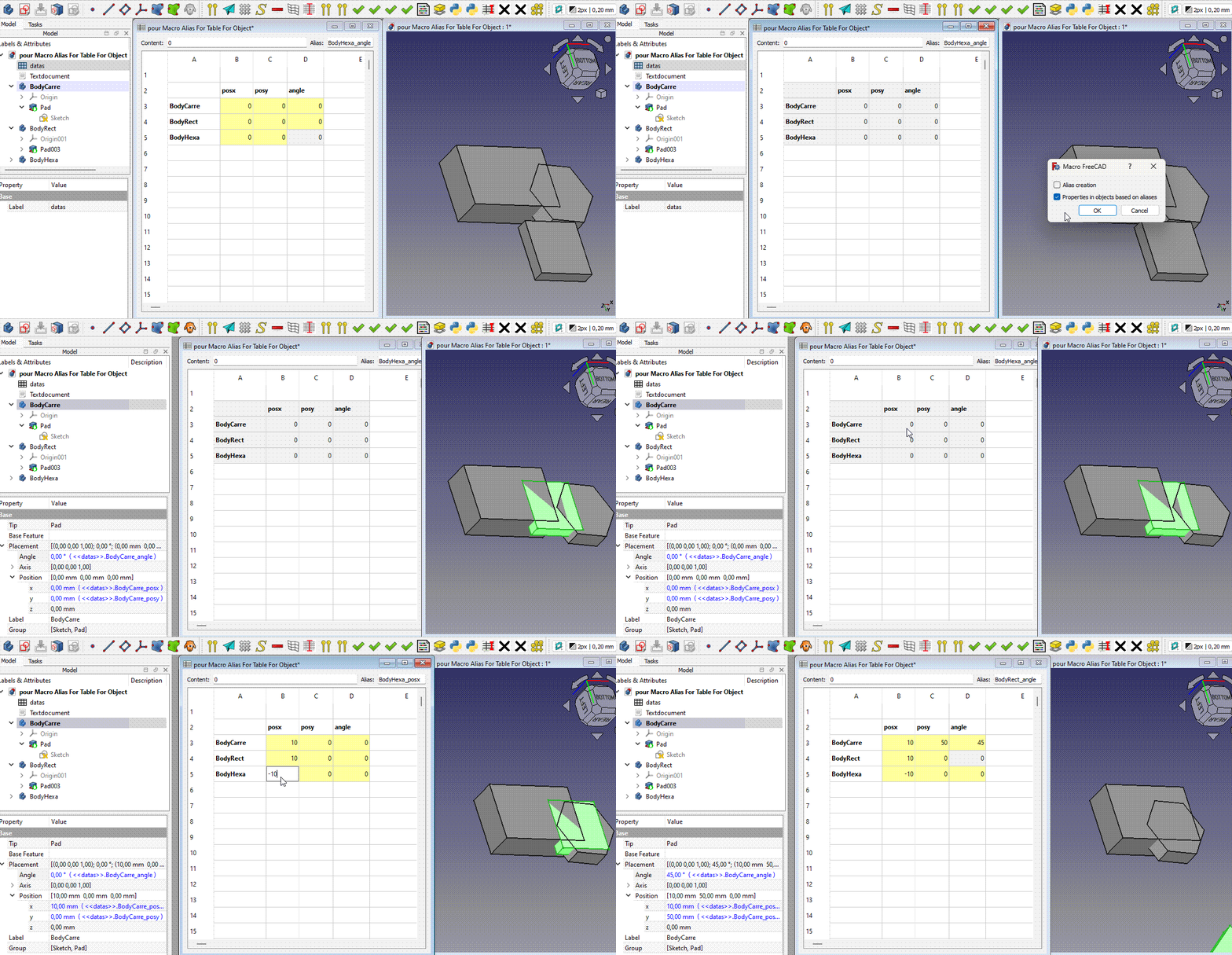
Utilizzo
Creazione automatica di alias
Preparare un foglio di calcolo con una colonna contenente le etichette degli oggetti (Body, Sketch, Pad, ...) e una riga corrispondente alle proprietà. Nel codice si troverà la corrispondenza tra le proprietà e cosa inserire in questa riga. Vedere dico= di seguito.
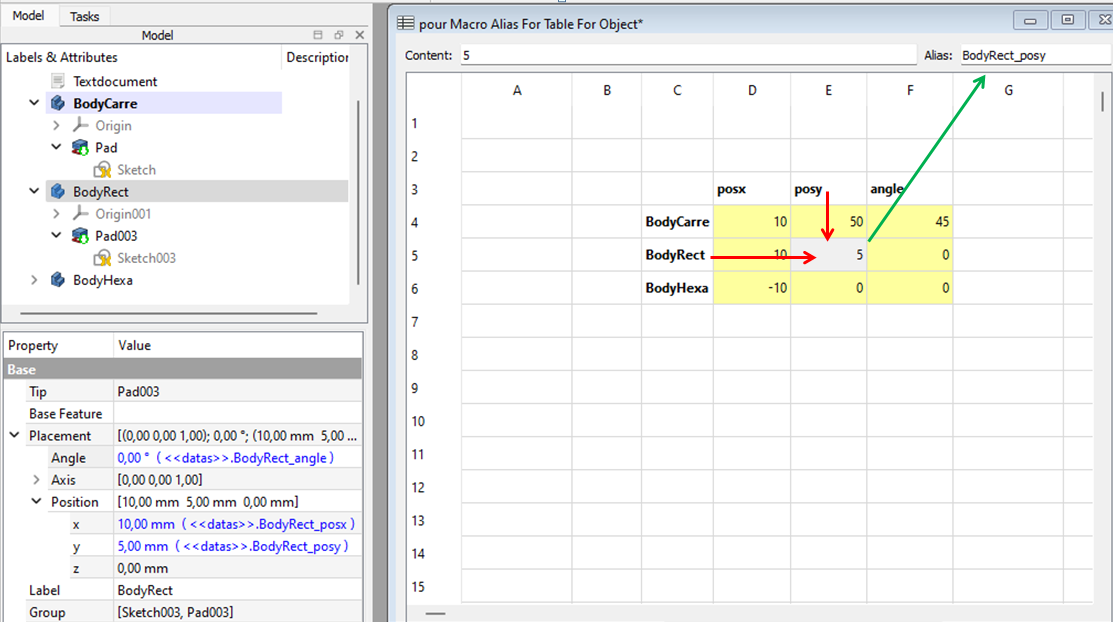
Ad esempio, utilizzare posy per la proprietà Placement.Base.y.
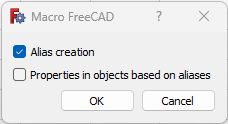
Selezionare le celle nella tabella con la colonna delle etichette degli oggetti e la riga delle proprietà, quindi eseguire la macro e selezionare la prima opzione:
La macro creerà alias con questa sintassi: LabelObject_Property. Ad esempio: BodyRect_posy.
Parte del dico (controllare il codice della macro per il dico completo):
dico={
        "posx" : "Placement.Base.x",
        "posy" : "Placement.Base.y",
        "posz" : "Placement.Base.z",
        "posX" : "Placement.Base.x",
        "posY" : "Placement.Base.y",
        "posZ" : "Placement.Base.z",
        "angle": "Placement.Rotation.Angle",
        "ang"  : "Placement.Rotation.Angle",
        "axisx": "Placement.Rotation.Axis.x",
        "axisy": "Placement.Rotation.Axis.y",
        "axisz": "Placement.Rotation.Axis.z",
        "axeX" : "Placement.Rotation.Axis.x",
        "axeY" : "Placement.Rotation.Axis.y",
        "axeZ" : "Placement.Rotation.Axis.z",
        "attachementX" : "AttachmentOffset.Base.x",
        "attachementY" : "AttachmentOffset.Base.y",
        "attachementZ" : "AttachmentOffset.Base.z",
        "attachementAngle" : "AttachmentOffset.Rotation.Angle",
        "attachementAxisX" : "AttachmentOffset.Rotation.Axis.x",
        "attachementAxisY" : "AttachmentOffset.Rotation.Axis.y",
        "attachementAxisZ" : "AttachmentOffset.Rotation.Axis.z",
        "Length" : "Length",
        "Length2": "Length2",
        "Radius" : "Radius",
        "Height" : "Height",
        "FirstAngle" : "FirstAngle",
        "SecondAngle": "SecondAngle",
        "Angle1" : "Angle1",
        "Angle2" : "Angle2",
        "Angle3" : "Angle3",
Valori automatici nelle proprietà
Selezionare alcune celle nella tabella con valori e alias creati in precedenza. Eseguire la macro e selezionare la seconda opzione (entrambe le opzioni possono essere selezionate contemporaneamente per concatenarle).

La macro assegnerà i valori alle proprietà tramite un'espressione che fa riferimento all'alias delle celle. D'ora in poi, se si modifica un valore nella tabella, il valore della proprietà cambierà e tutto verrà ricalcolato.

Esempi
Pad

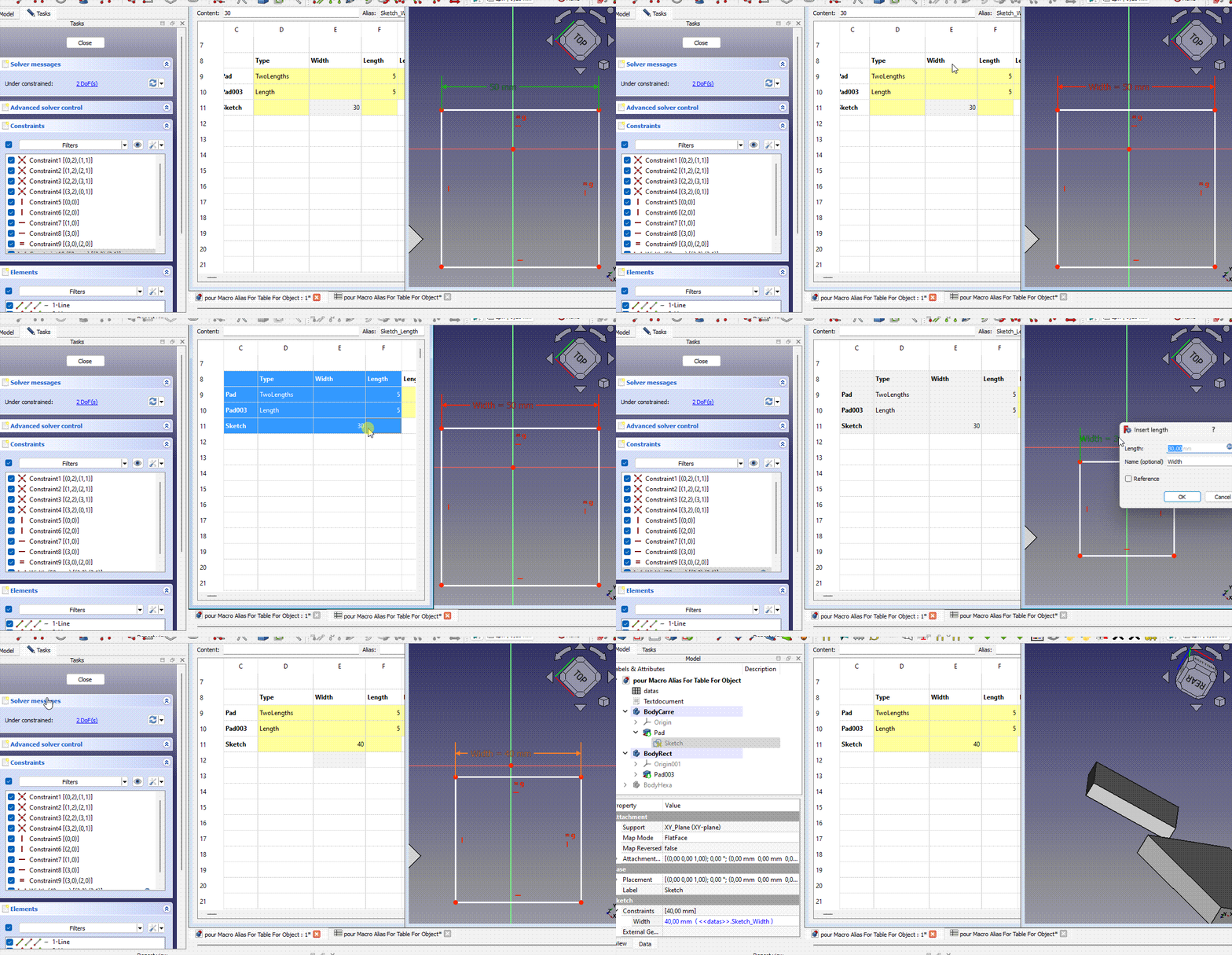
Vincoli schizzo
Assegnare un nome al vincolo (in questo caso: Width) (fare attenzione alle maiuscole/minuscole). Aggiungere una colonna con questo nome di vincolo nella riga delle proprietà e aggiungere una riga con l'etichetta dello schizzo (in questo caso: Schizzo). Eseguire la macro.
Ringraziamenti
Questa macro è stata sviluppata partendo da un'idea suggerita da Esprit. Si ringrazia inoltre Esprit per le numerose idee e i test che ha svolto.
Informazioni sulle versioni
ver 25/02/2024 da 2cv001 Alias_For_Table_For_Object.FCMacro
Codice

#!/usr/bin/env python
# -*- coding: utf-8 -*-
# ========================================================================
# Macro Alias for table for object
# file name : Alias_For_Table_For_Object.FCMacro
# ========================================================================


__Name__   = "Alias for table for object"
__Comment__ ="Automatically creates aliases in a two-dimensional table using the names of the rows and columns"
__Author__ = "2cv001"
__Title__   = "Alias For Table For Object"
__Date__    = "2024/02/20"    #YYYY/MM/DD 14;21 Béta
__Version__ = __Date__
__License__ = "Apache-2.0"
__Wiki__ = "https://wiki.freecad.org/Macro_Alias_For_Table_For_Object"
# https://forum.freecad.org/viewtopic.php?t=84878
#===========================================================================================
# The macro automatically creates alias in a two-dimensional table using the name of the row
# and the name of the column. To be able to use the "Table to object" function
# put the name of the concerned object in the column and the name of the property in the row.
# the alias creation function will create alias (except dico, see below)
# with this syntax  "LabelObject_property"
#
# The macro can also automatically fill the properties of objects (body, sketch, ...) based on
# aliases created by 'Create alias for table' and which indicate the object and the property
#
# The dico (see further in the code) is used to convert what you put in the top line to match
# what needs to be put in the expression. For example, if you have "posx" in the
# first line of your selection, in the expression, for the property part, there will be
# "Placement.Base.x"
#==========================================================================================


import FreeCAD, FreeCADGui
import re
from PySide import QtGui, QtCore, QtWidgets

addNumberIfOther=True

class CheckBoxDialog(QtWidgets.QDialog):
    def __init__(self, parent=None):
        super(CheckBoxDialog, self).__init__(parent)

        self.setWindowTitle("Macro FreeCAD")

        self.createAliasForTableCheckBox = QtWidgets.QCheckBox("Alias creation")
        self.createAliasForTableCheckBox.setToolTip("Creates an alias in each selected cell" +
                "\nbased on the first selected row and column" +
                "\nThe aliases will be in the format 'LabelObject_property'")
        self.tableToObjectCheckBox = QtWidgets.QCheckBox("Properties in objects based on aliases")
        self.tableToObjectCheckBox.setToolTip("Automatically fills the properties of objects (body, sketch, ...)" +
                "\nbased on aliases which must be in the format 'LabelObject_property'")
        buttonBox = QtWidgets.QDialogButtonBox(QtWidgets.QDialogButtonBox.Ok | QtWidgets.QDialogButtonBox.Cancel)
        buttonBox.accepted.connect(self.accept)
        buttonBox.rejected.connect(self.reject)

        layout = QtWidgets.QVBoxLayout()
        layout.addWidget(self.createAliasForTableCheckBox)
        layout.addWidget(self.tableToObjectCheckBox)
        layout.addWidget(buttonBox)
        self.setLayout(layout)

    def accept(self):
        super(CheckBoxDialog, self).accept()


def get_column(cell):
    column = ''.join([c for c in cell if not c.isdigit()])
    return column

def get_row(cell):
    row = ''.join([c for c in cell if c.isdigit()])
    if row=='' :
        row='1'
    return int(row)


#################################################################################
# part code for alias
#################################################################################
# parameters for alias creation
separateur = " "      # typically put " " so blanks will be replaced by nouveauCaract
nouveauCaract = ''    #Put for example "_" to have the separators replaced by "_". Put "" to have no separator
majuscule = True      #set to True if you want  "Diametre du cercle" to be "DiametreDuCercle"
changeTexteCellule = False  # the text will only be changed if changeCellText is True.
                          # This does not change anything for the allias itself
premierCaractereEnMinuscule = False # Force the first character to be in lower case

# list of characters to be replaced by an equivalent. for example an @ will be replaced by 'a'
# if you add characters, please send me a private message. Il will eventually add it in my code.
caracEquivalents = [ ['é','e'],['è','e'],['ê','e'],['à','a'],['@','a'],['&','e'],['ç','c'],
                  ['²','2'],["'",''],['?',''],['"',''],['(',''],[')',''],['#',''],['.',''],
                  [',',''],[';',''],['$',''],['+',''],['-',''],['*',''],['/',''],['\\',''] ,
                  ['[',''],[']',''],
                  ]


def traitementChaineSource(chaineSource, separateur, nouveauCaract, majuscule):
# If separator is ' ' and nouveauCaract is '_', and majuscule is True
# transforms "Diametre du cylindre" into "Diametre_Du_Cylindre

    def remplaceCararcDansMot(mot):

        def remplaceCartatParEquivalent(caractere):
        # replaces a character with its equivalent if it exists
            caracResult = caractere
            for couple in caracEquivalents:
                if (couple[0] == caractere):
                    caracResult = couple[1]
                    break
            return caracResult

    #replaces all characters of the word with its equivalent if it exists
        motResult = mot
        for caract in mot:
            a = remplaceCartatParEquivalent(caract)
            motResult = motResult.replace(caract, a)
        return motResult


    chaineResult = ''
    first = True
    carctDeSeparation = ''
    for mots in chaineSource.split(separateur):
        mots = remplaceCararcDansMot(mots)
        if (not (first)):
            carctDeSeparation = nouveauCaract
            if (majuscule):
                chaineResult = chaineResult + nouveauCaract + mots[:1].upper() + mots[1:]
                # We use "[:1]" instead of "[0]",
                # for no crash in case of an empty string (which happens if the cell is empty)
        else:
            chaineResult = chaineResult + nouveauCaract + mots
        first=False
    if premierCaractereEnMinuscule :
        chaineResult = chaineResult[:1].lower() + chaineResult[1:]
    return chaineResult


def create_alias_for_table_cells_Selected():
    mySpreadsheet = Gui.ActiveDocument.ActiveView.getSheet()
    aw = Gui.getMainWindow().centralWidget().activeSubWindow() # Store the active window
    # To get list of all selected cells
    sel_items = aw.widget().findChild(QtGui.QTableView).selectedIndexes()

    getCellName = lambda r,c:'{}{}{}'.format(chr(c//26 + 64) if c//26 > 0 else '', chr(c%26 + 65), r + 1)


    for item in sel_items: # The selected cells are scanned

        if  (sel_items[0].column()!=item.column() and sel_items[0].row()!=item.row()) :
            cellName=getCellName(item.row(), item.column())
            firstcellName=getCellName(sel_items[0].row(), sel_items[0].column())

            cellTextLine=get_column(firstcellName)+str(get_row(cellName))
            cellTextColumn=get_column(cellName)+ str(get_row(firstcellName))
            try :
                textLine = mySpreadsheet.get(cellTextLine)
                textColumn = mySpreadsheet.get(cellTextColumn)

            except :
                #print('Des cellules en première colonne ou en première ligne ne sont pas conformes')
                continue
            textAlias =  str(textLine) + '_'  + str(textColumn)
            textAlias=traitementChaineSource(textAlias, separateur, nouveauCaract, majuscule)
            if addNumberIfOther :
                startIndexForTextAlias=1
                for i in range(startIndexForTextAlias, 201):
                    try:
                        if i == 1:
                            mySpreadsheet.setAlias(cellName, textAlias)
                        else:
                            mySpreadsheet.setAlias(cellName, textAlias + '_' + str(i-1))
                            startIndexForTextAlias=i+1
                        break  # Arrête la boucle si aucune exception n'est levée
                    except:
                        continue  # Passe à l'itération suivante si une exception est levée


# The dictionary is used to convert what you put in the top line to match
# what needs to be put in the expression. For example, if you have “posx” in the
# first line of your selection, in the expression, for the property part, there will be
# "Placement.Base.x"
dico={
        "posx" : "Placement.Base.x",
        "posy" : "Placement.Base.y",
        "posz" : "Placement.Base.z",
        "posX" : "Placement.Base.x",
        "posY" : "Placement.Base.y",
        "posZ" : "Placement.Base.z",
        "angle": "Placement.Rotation.Angle",
        "ang": "Placement.Rotation.Angle",
        "axisx": "Placement.Rotation.Axis.x",
        "axisy": "Placement.Rotation.Axis.y",
        "axisz": "Placement.Rotation.Axis.z",
        "axeX": "Placement.Rotation.Axis.x",
        "axeY": "Placement.Rotation.Axis.y",
        "axeZ": "Placement.Rotation.Axis.z",
        "attachementX" : "AttachmentOffset.Base.x",
        "attachementY" : "AttachmentOffset.Base.y",
        "attachementZ" : "AttachmentOffset.Base.z",
        "attachementAngle" : "AttachmentOffset.Rotation.Angle",
        "attachementAxisX" : "AttachmentOffset.Rotation.Axis.x",
        "attachementAxisY" : "AttachmentOffset.Rotation.Axis.y",
        "attachementAxisZ" : "AttachmentOffset.Rotation.Axis.z",
        "Length" : "Length",
        "Length2" : "Length2",
        "Radius" : "Radius",
        "Height" : "Height",
        "FirstAngle" : "FirstAngle",
        "SecondAngle" : "SecondAngle",
        "Angle1" : "Angle1",
        "Angle2" : "Angle2",
        "Angle3" : "Angle3",
     }


def set_constraint_expression(sketchLabel, constraint_name, expression):
    # Get all Sketches with this label
    findConstraint = False
    sketches = App.ActiveDocument.getObjectsByLabel(sketchLabel)
    if len(sketches) > 1 :
        print("Warning, multiple sketches have the same label. "
              " All these sketches will be processed. "
              "This may cause problems if different sketches with the same label "
              "have constraints with the same name.")
    # Go through all Sketches

    for sketch in sketches:

        # Go through all constraints in the Sketch
        for i in range(sketch.ConstraintCount):
            # Get the constraint
            constraint = sketch.Constraints[i]

            # Check if the constraint name matches the one we're looking for
            if constraint.Name == constraint_name:
                # Modify the constraint value
                sketch.setExpression(f'Constraints[{i}]', expression)
                findConstraint=True
                break
    return findConstraint


def set_property_based_on_alias(sheet,cell):

    # alias of the cell
    alias = sheet.getAlias(cell)
    # Check if the alias is valid
    if sheet.getContents(cell)!='' :
        if alias is None:
            print(f"The selected cell {cell} does not have an alias.")
            return

    # Separate the alias into body name and property name
    # ex 'body_Name_posX' -> body_Name for the object and posX for property name
    parts = alias.rsplit('_', 1)
    if len(parts) != 2:
        print("The alias must be in the form 'BodyName_PropertyName'.")
        return

    objLabel, property_name = parts
    try :
        obj=App.ActiveDocument.getObjectsByLabel(objLabel)[0]
    except :
        print('no object with this label : ',objLabel)
        return
    try :
        property_name=dico[property_name]
    except :
        try :
            if  obj.TypeId != 'Sketcher::SketchObject' :
                print (f'property {property_name} not found in the dictionary. See at the top of the source code')
        except :
            pass


    if obj is None:
        print(f"There is no object named '{objLabel}' in the document.")
        return

    # Create an expression that refers to the cell's alias
    expression = f"<<{sheet.Label}>>.{alias}"

    # Modify the object's property
    # if it's a constraint
    if  obj.TypeId == 'Sketcher::SketchObject' :
        findConstraint=set_constraint_expression(objLabel, property_name, expression)
        if findConstraint : # if not we continue to find a property
            return

    if hasattr(obj, property_name.split('.')[0]): # Placement.Base.x -> Placement
        obj.setExpression(property_name, expression)
    else:
        print(f"The object '{objLabel}' does not have a property '{property_name}'.")


def tableToObject() :
    sheet = Gui.ActiveDocument.ActiveView.getSheet()
    # Check if the spreadsheet is active
    if sheet.TypeId != 'Spreadsheet::Sheet':
        print("Please select cells in a spreadsheet.")
        return

    # active cell
    #cell = Gui.activeView().currentIndex()

    aw = Gui.getMainWindow().centralWidget().activeSubWindow() # Store the active window
    # To get list of all selected cells
    sel_items = aw.widget().findChild(QtGui.QTableView).selectedIndexes()
    getCellName = lambda r,c:'{}{}{}'.format(chr(c//26 + 64) if c//26 > 0 else '', chr(c%26 + 65), r + 1)
    for cell in sel_items: # The selected cells are scanned
        cellName=getCellName(cell.row(), cell.column())

        if str(sheet.getContents(cellName))!= '' :
            set_property_based_on_alias(sheet, cellName)


def main():
    dialog = CheckBoxDialog()
    result = dialog.exec_()
    if result and dialog.createAliasForTableCheckBox.isChecked() :
        create_alias_for_table_cells_Selected()
    if result and dialog.tableToObjectCheckBox.isChecked() :
        tableToObject()
    return result


if __name__ == '__main__':
    main()
Questa pagina è recuperata da https://wiki.freecad.org/Macro_Alias_For_Table_For_Object