|
|
| Description |
|---|
| Cette macro crée automatiquement des alias dans un tableau bidimensionnel en utilisant les noms des lignes et des colonnes. Une deuxième fonction permet de créer un lien entre une cellule et une valeur de propriété d'un objet. |
| Auteur |
| 2cv001 |
| Téléchargement |
| Liens |
| Page des macros Comment installer une macro Comment créer une barre d'outils |
| Version Macro |
| beta |
| Dernière modification |
| 2024-02-22 |
| Version(s) FreeCAD |
| Toutes |
| Raccourci clavier |
| None |
| Voir aussi |
| None |

Description
Cette macro crée automatiquement des alias dans un tableau bidimensionnel en utilisant les noms des lignes et des colonnes. Une deuxième fonction permet de créer un lien entre une cellule et une valeur de propriété d'un objet. Pour pouvoir utiliser cette fonction, il suffit de placer le nom de l'objet concerné dans la colonne et le nom de la propriété dans la ligne.
La syntaxe des alias créé par la macro est la suivante : LabelObject_Property.

La macro peut également remplir automatiquement les valeurs des propriétés des objets (comme le corps, l'esquisse, etc.) sur la base de ces alias.
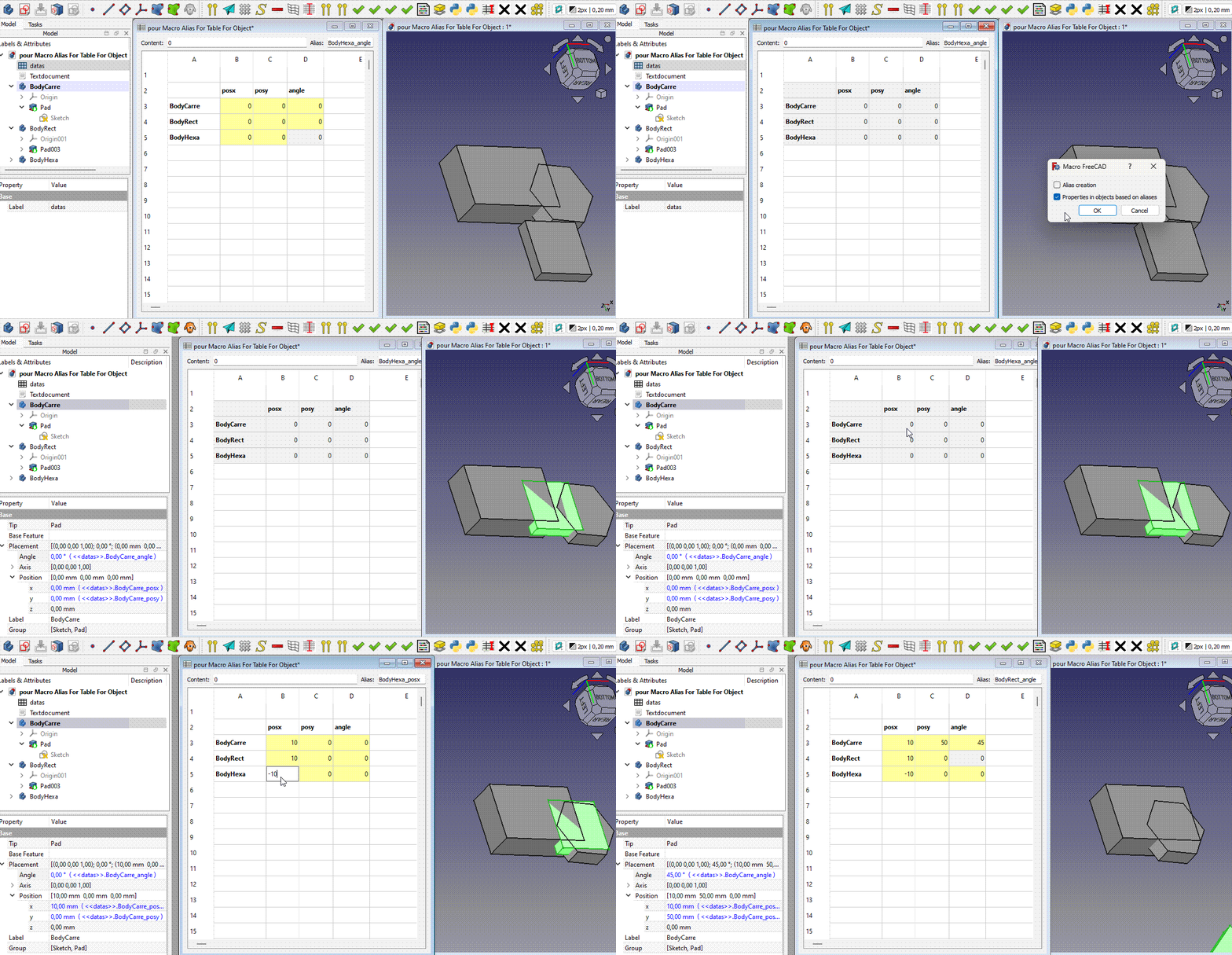
Utilisation
Création automatique d'alias
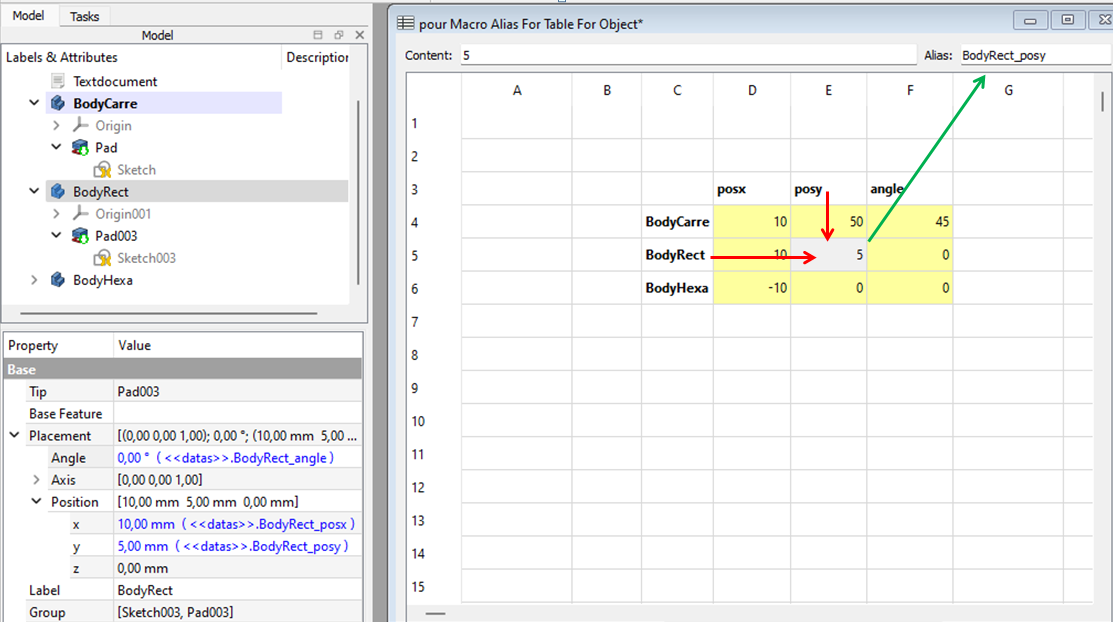
Remplissez une feuille de calcul avec une colonne contenant des étiquettes d'objets (corps, esquisse, protrusion, ...) et une ligne correspondant aux propriétés. Dans le code, vous trouverez la correspondance entre les propriétés et ce qu'il faut mettre dans cette ligne. Voir dico= ci-dessous.
Par exemple, utilisez posy pour la propriété Placement.Base.y.
Sélectionnez les cellules du tableau avec la colonne des étiquettes d'objet et la ligne des propriétés, puis exécutez la macro et cochez la première option :
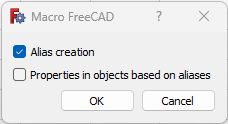
La macro créera des alias avec la syntaxe suivante : LabelObjet_Propriété. Par exemple : BodyRect_posy.
Partie du dico (vérifiez le code de la macro pour le dico complet) :
dico={
        "posx" : "Placement.Base.x",
        "posy" : "Placement.Base.y",
        "posz" : "Placement.Base.z",
        "posX" : "Placement.Base.x",
        "posY" : "Placement.Base.y",
        "posZ" : "Placement.Base.z",
        "angle": "Placement.Rotation.Angle",
        "ang"  : "Placement.Rotation.Angle",
        "axisx": "Placement.Rotation.Axis.x",
        "axisy": "Placement.Rotation.Axis.y",
        "axisz": "Placement.Rotation.Axis.z",
        "axeX" : "Placement.Rotation.Axis.x",
        "axeY" : "Placement.Rotation.Axis.y",
        "axeZ" : "Placement.Rotation.Axis.z",
        "attachementX" : "AttachmentOffset.Base.x",
        "attachementY" : "AttachmentOffset.Base.y",
        "attachementZ" : "AttachmentOffset.Base.z",
        "attachementAngle" : "AttachmentOffset.Rotation.Angle",
        "attachementAxisX" : "AttachmentOffset.Rotation.Axis.x",
        "attachementAxisY" : "AttachmentOffset.Rotation.Axis.y",
        "attachementAxisZ" : "AttachmentOffset.Rotation.Axis.z",
        "Length" : "Length",
        "Length2": "Length2",
        "Radius" : "Radius",
        "Height" : "Height",
        "FirstAngle" : "FirstAngle",
        "SecondAngle": "SecondAngle",
        "Angle1" : "Angle1",
        "Angle2" : "Angle2",
        "Angle3" : "Angle3",
Valeurs automatiques dans les propriétés
Sélectionnez certaines cellules du tableau avec les valeurs et les alias créés précédemment. Exécutez la macro et sélectionnez la deuxième option (les deux options peuvent être sélectionnées en même temps pour les enchaîner).

La macro attribuera des valeurs aux propriétés via une expression faisant référence à l'alias des cellules. Désormais, si vous changez une valeur dans le tableau, la valeur de la propriété changera et tout sera recalculé.

Exemples
Protrusion

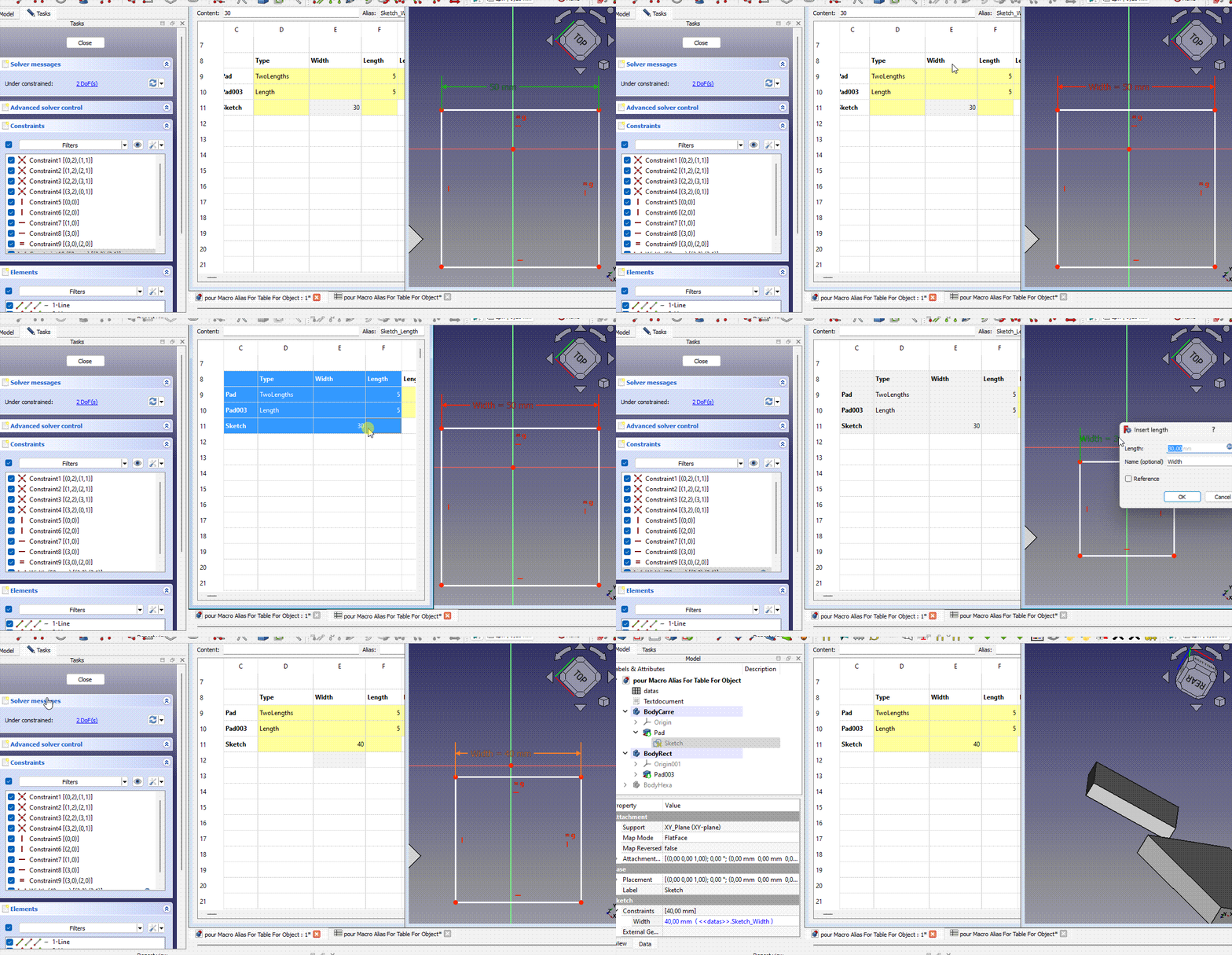
Contraintes d'esquisse
Donnez un nom à la contrainte (ici : Width) (Faites attention à la casse.) Ajoutez une colonne avec le nom de cette contrainte dans la ligne des propriétés, et ajoutez une ligne avec l'étiquette de l'esquisse (ici : Sketch). Exécutez la macro.
Crédits
Cette macro a été développée sur la base d'une idée suggérée par Esprit. Un grand merci également à lui pour les nombreuses idées et tests qu'il a réalisés.
Informations sur les versions
ver 25/02/2024 par 2cv001 Alias_For_Table_For_Object.FCMacro
Code

#!/usr/bin/env python
# -*- coding: utf-8 -*-
# ========================================================================
# Macro Alias for table for object
# file name : Alias_For_Table_For_Object.FCMacro
# ========================================================================


__Name__   = "Alias for table for object"
__Comment__ ="Automatically creates aliases in a two-dimensional table using the names of the rows and columns"
__Author__ = "2cv001"
__Title__   = "Alias For Table For Object"
__Date__    = "2024/02/20"    #YYYY/MM/DD 14;21 Béta
__Version__ = __Date__
__License__ = "Apache-2.0"
__Wiki__ = "https://wiki.freecad.org/Macro_Alias_For_Table_For_Object"
# https://forum.freecad.org/viewtopic.php?t=84878
#===========================================================================================
# The macro automatically creates alias in a two-dimensional table using the name of the row
# and the name of the column. To be able to use the "Table to object" function
# put the name of the concerned object in the column and the name of the property in the row.
# the alias creation function will create alias (except dico, see below)
# with this syntax  "LabelObject_property"
#
# The macro can also automatically fill the properties of objects (body, sketch, ...) based on
# aliases created by 'Create alias for table' and which indicate the object and the property
#
# The dico (see further in the code) is used to convert what you put in the top line to match
# what needs to be put in the expression. For example, if you have "posx" in the
# first line of your selection, in the expression, for the property part, there will be
# "Placement.Base.x"
#==========================================================================================


import FreeCAD, FreeCADGui
import re
from PySide import QtGui, QtCore, QtWidgets

addNumberIfOther=True

class CheckBoxDialog(QtWidgets.QDialog):
    def __init__(self, parent=None):
        super(CheckBoxDialog, self).__init__(parent)

        self.setWindowTitle("Macro FreeCAD")

        self.createAliasForTableCheckBox = QtWidgets.QCheckBox("Alias creation")
        self.createAliasForTableCheckBox.setToolTip("Creates an alias in each selected cell" +
                "\nbased on the first selected row and column" +
                "\nThe aliases will be in the format 'LabelObject_property'")
        self.tableToObjectCheckBox = QtWidgets.QCheckBox("Properties in objects based on aliases")
        self.tableToObjectCheckBox.setToolTip("Automatically fills the properties of objects (body, sketch, ...)" +
                "\nbased on aliases which must be in the format 'LabelObject_property'")
        buttonBox = QtWidgets.QDialogButtonBox(QtWidgets.QDialogButtonBox.Ok | QtWidgets.QDialogButtonBox.Cancel)
        buttonBox.accepted.connect(self.accept)
        buttonBox.rejected.connect(self.reject)

        layout = QtWidgets.QVBoxLayout()
        layout.addWidget(self.createAliasForTableCheckBox)
        layout.addWidget(self.tableToObjectCheckBox)
        layout.addWidget(buttonBox)
        self.setLayout(layout)

    def accept(self):
        super(CheckBoxDialog, self).accept()


def get_column(cell):
    column = ''.join([c for c in cell if not c.isdigit()])
    return column

def get_row(cell):
    row = ''.join([c for c in cell if c.isdigit()])
    if row=='' :
        row='1'
    return int(row)


#################################################################################
# part code for alias
#################################################################################
# parameters for alias creation
separateur = " "      # typically put " " so blanks will be replaced by nouveauCaract
nouveauCaract = ''    #Put for example "_" to have the separators replaced by "_". Put "" to have no separator
majuscule = True      #set to True if you want  "Diametre du cercle" to be "DiametreDuCercle"
changeTexteCellule = False  # the text will only be changed if changeCellText is True.
                          # This does not change anything for the allias itself
premierCaractereEnMinuscule = False # Force the first character to be in lower case

# list of characters to be replaced by an equivalent. for example an @ will be replaced by 'a'
# if you add characters, please send me a private message. Il will eventually add it in my code.
caracEquivalents = [ ['é','e'],['è','e'],['ê','e'],['à','a'],['@','a'],['&','e'],['ç','c'],
                  ['²','2'],["'",''],['?',''],['"',''],['(',''],[')',''],['#',''],['.',''],
                  [',',''],[';',''],['$',''],['+',''],['-',''],['*',''],['/',''],['\\',''] ,
                  ['[',''],[']',''],
                  ]


def traitementChaineSource(chaineSource, separateur, nouveauCaract, majuscule):
# If separator is ' ' and nouveauCaract is '_', and majuscule is True
# transforms "Diametre du cylindre" into "Diametre_Du_Cylindre

    def remplaceCararcDansMot(mot):

        def remplaceCartatParEquivalent(caractere):
        # replaces a character with its equivalent if it exists
            caracResult = caractere
            for couple in caracEquivalents:
                if (couple[0] == caractere):
                    caracResult = couple[1]
                    break
            return caracResult

    #replaces all characters of the word with its equivalent if it exists
        motResult = mot
        for caract in mot:
            a = remplaceCartatParEquivalent(caract)
            motResult = motResult.replace(caract, a)
        return motResult


    chaineResult = ''
    first = True
    carctDeSeparation = ''
    for mots in chaineSource.split(separateur):
        mots = remplaceCararcDansMot(mots)
        if (not (first)):
            carctDeSeparation = nouveauCaract
            if (majuscule):
                chaineResult = chaineResult + nouveauCaract + mots[:1].upper() + mots[1:]
                # We use "[:1]" instead of "[0]",
                # for no crash in case of an empty string (which happens if the cell is empty)
        else:
            chaineResult = chaineResult + nouveauCaract + mots
        first=False
    if premierCaractereEnMinuscule :
        chaineResult = chaineResult[:1].lower() + chaineResult[1:]
    return chaineResult


def create_alias_for_table_cells_Selected():
    mySpreadsheet = Gui.ActiveDocument.ActiveView.getSheet()
    aw = Gui.getMainWindow().centralWidget().activeSubWindow() # Store the active window
    # To get list of all selected cells
    sel_items = aw.widget().findChild(QtGui.QTableView).selectedIndexes()

    getCellName = lambda r,c:'{}{}{}'.format(chr(c//26 + 64) if c//26 > 0 else '', chr(c%26 + 65), r + 1)


    for item in sel_items: # The selected cells are scanned

        if  (sel_items[0].column()!=item.column() and sel_items[0].row()!=item.row()) :
            cellName=getCellName(item.row(), item.column())
            firstcellName=getCellName(sel_items[0].row(), sel_items[0].column())

            cellTextLine=get_column(firstcellName)+str(get_row(cellName))
            cellTextColumn=get_column(cellName)+ str(get_row(firstcellName))
            try :
                textLine = mySpreadsheet.get(cellTextLine)
                textColumn = mySpreadsheet.get(cellTextColumn)

            except :
                #print('Des cellules en première colonne ou en première ligne ne sont pas conformes')
                continue
            textAlias =  str(textLine) + '_'  + str(textColumn)
            textAlias=traitementChaineSource(textAlias, separateur, nouveauCaract, majuscule)
            if addNumberIfOther :
                startIndexForTextAlias=1
                for i in range(startIndexForTextAlias, 201):
                    try:
                        if i == 1:
                            mySpreadsheet.setAlias(cellName, textAlias)
                        else:
                            mySpreadsheet.setAlias(cellName, textAlias + '_' + str(i-1))
                            startIndexForTextAlias=i+1
                        break  # Arrête la boucle si aucune exception n'est levée
                    except:
                        continue  # Passe à l'itération suivante si une exception est levée


# The dictionary is used to convert what you put in the top line to match
# what needs to be put in the expression. For example, if you have “posx” in the
# first line of your selection, in the expression, for the property part, there will be
# "Placement.Base.x"
dico={
        "posx" : "Placement.Base.x",
        "posy" : "Placement.Base.y",
        "posz" : "Placement.Base.z",
        "posX" : "Placement.Base.x",
        "posY" : "Placement.Base.y",
        "posZ" : "Placement.Base.z",
        "angle": "Placement.Rotation.Angle",
        "ang": "Placement.Rotation.Angle",
        "axisx": "Placement.Rotation.Axis.x",
        "axisy": "Placement.Rotation.Axis.y",
        "axisz": "Placement.Rotation.Axis.z",
        "axeX": "Placement.Rotation.Axis.x",
        "axeY": "Placement.Rotation.Axis.y",
        "axeZ": "Placement.Rotation.Axis.z",
        "attachementX" : "AttachmentOffset.Base.x",
        "attachementY" : "AttachmentOffset.Base.y",
        "attachementZ" : "AttachmentOffset.Base.z",
        "attachementAngle" : "AttachmentOffset.Rotation.Angle",
        "attachementAxisX" : "AttachmentOffset.Rotation.Axis.x",
        "attachementAxisY" : "AttachmentOffset.Rotation.Axis.y",
        "attachementAxisZ" : "AttachmentOffset.Rotation.Axis.z",
        "Length" : "Length",
        "Length2" : "Length2",
        "Radius" : "Radius",
        "Height" : "Height",
        "FirstAngle" : "FirstAngle",
        "SecondAngle" : "SecondAngle",
        "Angle1" : "Angle1",
        "Angle2" : "Angle2",
        "Angle3" : "Angle3",
     }


def set_constraint_expression(sketchLabel, constraint_name, expression):
    # Get all Sketches with this label
    findConstraint = False
    sketches = App.ActiveDocument.getObjectsByLabel(sketchLabel)
    if len(sketches) > 1 :
        print("Warning, multiple sketches have the same label. "
              " All these sketches will be processed. "
              "This may cause problems if different sketches with the same label "
              "have constraints with the same name.")
    # Go through all Sketches

    for sketch in sketches:

        # Go through all constraints in the Sketch
        for i in range(sketch.ConstraintCount):
            # Get the constraint
            constraint = sketch.Constraints[i]

            # Check if the constraint name matches the one we're looking for
            if constraint.Name == constraint_name:
                # Modify the constraint value
                sketch.setExpression(f'Constraints[{i}]', expression)
                findConstraint=True
                break
    return findConstraint


def set_property_based_on_alias(sheet,cell):

    # alias of the cell
    alias = sheet.getAlias(cell)
    # Check if the alias is valid
    if sheet.getContents(cell)!='' :
        if alias is None:
            print(f"The selected cell {cell} does not have an alias.")
            return

    # Separate the alias into body name and property name
    # ex 'body_Name_posX' -> body_Name for the object and posX for property name
    parts = alias.rsplit('_', 1)
    if len(parts) != 2:
        print("The alias must be in the form 'BodyName_PropertyName'.")
        return

    objLabel, property_name = parts
    try :
        obj=App.ActiveDocument.getObjectsByLabel(objLabel)[0]
    except :
        print('no object with this label : ',objLabel)
        return
    try :
        property_name=dico[property_name]
    except :
        try :
            if  obj.TypeId != 'Sketcher::SketchObject' :
                print (f'property {property_name} not found in the dictionary. See at the top of the source code')
        except :
            pass


    if obj is None:
        print(f"There is no object named '{objLabel}' in the document.")
        return

    # Create an expression that refers to the cell's alias
    expression = f"<<{sheet.Label}>>.{alias}"

    # Modify the object's property
    # if it's a constraint
    if  obj.TypeId == 'Sketcher::SketchObject' :
        findConstraint=set_constraint_expression(objLabel, property_name, expression)
        if findConstraint : # if not we continue to find a property
            return

    if hasattr(obj, property_name.split('.')[0]): # Placement.Base.x -> Placement
        obj.setExpression(property_name, expression)
    else:
        print(f"The object '{objLabel}' does not have a property '{property_name}'.")


def tableToObject() :
    sheet = Gui.ActiveDocument.ActiveView.getSheet()
    # Check if the spreadsheet is active
    if sheet.TypeId != 'Spreadsheet::Sheet':
        print("Please select cells in a spreadsheet.")
        return

    # active cell
    #cell = Gui.activeView().currentIndex()

    aw = Gui.getMainWindow().centralWidget().activeSubWindow() # Store the active window
    # To get list of all selected cells
    sel_items = aw.widget().findChild(QtGui.QTableView).selectedIndexes()
    getCellName = lambda r,c:'{}{}{}'.format(chr(c//26 + 64) if c//26 > 0 else '', chr(c%26 + 65), r + 1)
    for cell in sel_items: # The selected cells are scanned
        cellName=getCellName(cell.row(), cell.column())

        if str(sheet.getContents(cellName))!= '' :
            set_property_based_on_alias(sheet, cellName)


def main():
    dialog = CheckBoxDialog()
    result = dialog.exec_()
    if result and dialog.createAliasForTableCheckBox.isChecked() :
        create_alias_for_table_cells_Selected()
    if result and dialog.tableToObjectCheckBox.isChecked() :
        tableToObject()
    return result


if __name__ == '__main__':
    main()
Cette page est extraite de https://wiki.freecad.org/Macro_Alias_For_Table_For_Object