FreeCAD Logo FreeCAD 1.0
  • English Afrikaans Arabic Belarusian Catalan Czech German Greek Spanish Spanish Basque Finnish Filipino French Galician Croatian Hungarian Indonesian Italian Japanese Kabyle Korean Lithuanian Dutch Norwegian Bokmal Polish Portuguese Portuguese Romanian Russian Slovak Slovenian Serbian Swedish Turkish Ukrainian Valencian Vietnamese Chinese Chinese
  • Features
  • Download
  • Blog
  • Documentation
    Documentation index Getting started Users documentation The FreeCAD manual Workbenches documentation Python coding documentation C++ coding documentation Tutorials Frequently asked questions Privacy policy About FreeCAD
  • Contribute
    How to help Sponsor Report a bug Make a pull request Jobs and funding Contribution guidelines Developers handbook Translations
  • Community
    Code of conduct Forum The FPA GitHub GitLab Codeberg Mastodon Matrix IRC IRC via Webchat Gitter Discord Reddit Twitter Facebook LinkedIn Calendar
  • ♥ Donate

Donate

$
SEPA Information
Please set up your SEPA bank transfer to:
Beneficiary: The FreeCAD project association
IBAN: BE04 0019 2896 4531
BIC/SWIFT: GEBABEBBXXX
Bank agency: BNP Paribas Fortis
Address: Rue de la Station 64, 1360 Perwez, Belgium

While Stripe doesn't support monthly donations, you can still become a sponsor! Simply make a one-time donation equivalent to 12 months of support, and you'll gain access to the corresponding sponsoring tier. It's an easy and flexible way to contribute.

If you are not sure or not able to commit to a regular donation, but still want to help the project, you can do a one-time donation, of any amount.

Choose freely the amount you wish to donate one time only.

You can support FreeCAD by sponsoring it as an individual or organization through various platforms. Sponsorship provides a steady income for developers, allowing the FPA to plan ahead and enabling greater investment in FreeCAD. To encourage sponsorship, we offer different tiers, and unless you choose to remain anonymous, your name or company logo will be featured on our website accordingly.

from 1 USD / 1 EUR per month. You will not have your name displayed here, but you will have helped the project a lot anyway. Together, normal sponsors maintain the project on its feet as much as the bigger sponsors.

from 25 USD / 25 EUR per month. Your name or company name is displayed on this page.

from 100 USD / 100 EUR per month. Your name or company name is displayed on this page, with a link to your website, and a one-line description text.

from 200 USD / 200 EUR per month. Your name or company name and logo displayed on this page, with a link to your website and a custom description text. Companies that have helped FreeCAD early on also appear under Gold sponsors.

Instead of donating each month, you might find it more comfortable to make a one-time donation that, when divided by twelve, would give you right to enter a sponsoring tier. Don't hesitate to do so!

Choose freely the amount you wish to donate each month.

Please inform your forum name or twitter handle as a notein your transfer, or reach to us, so we can give you proper credits!

Fluid Section for 1D Flow
Current Density Boundary Condition
FEM

FEM ConstraintElectromagnetic

Menu location
Model → Electromagnetic Boundary Conditions → Electromagnetic Boundary Condition
Workbenches
FEM
Default shortcut
None
Introduced in version
-
See also
FEM capacitance example, FEM tutorial

Solvers
1.0 and below: Elmer
1.1 and above: Elmer, CalculiX

Description

Creates a FEM boundary condition for electrostatic potential or (introduced in 1.2) magnetic flux density. To be used together with the Electrostatic, Electricforce, Magnetodynamic, Magnetodynamic2D or Static current equation.

introduced in 1.1: Works also with the refactored CalculiX solver object.

introduced in 1.2: Can also be used to apply a magnetic flux density boundary condition.

Electrostatic potential boundary condition in the capacitance of two spheres FEM Example

Usage

  1. There are several ways to invoke the command:
    • Press the Electromagnetic Boundary Condition button.
    • Select the Model → Electromagnetic Boundary Conditions → Electromagnetic Boundary Condition option from the menu.
  2. 1.1 and above: Select a boundary condition type and its parameters:
    • Dirichlet - select and specify Potential or Electromagnetic Potential. Optionally, set Electric Infinity (1.2 and above: Far field) and Potential Constant.
    • Neumann - specify Electric Flux Density or (introduced in 1.2) check Magnetic flux density and specify its vector components.
  3. Optionally, define the Capacitance Body.
  4. Press the Add button.
  5. In the 3D View select the object the boundary condition should be applied to. introduced in 1.1: To remove objects from the selection, press the Remove button.

Options

The dialog offers the following settings:
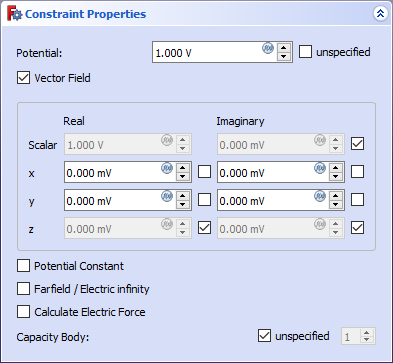
  • Boundary Condition: To choose between Dirichlet (prescribed potential) and Neumann (prescribed electric flux density) boundary condition type. introduced in 1.1
  • Potential: The electric potential in V.
  • Electromagnetic Potential: To enable the input of the components of a potential vector field.
    • x/y/z: The real/imaginary part of the potential in x, y or z-direction in V. For other coordinate systems than Cartesian 3D, this will be the first, second or third coordinate of the system instead of x, y or z. If the coordinate system has no third coordinate, z will be ignored.
    • x, y, z checkboxes: To declare the corresponding potential as unknown for the solver.
  • Electric Infinity (1.2 and above: Far field): Option to make a spherical approximation that the volume above the face extends to infinity.
  • Potential Constant: Option to set a constant potential.
  • Electric Flux Density: The electric flux density (electric displacement field D) in C/m^2. introduced in 1.1
  • Magnetic Flux Density To enable the input of the components of a magnetic flux density in mT. introduced in 1.2
    • x/y/z: The real/imaginary part of the magnetic flux density in x, y or z-direction in mT. For other coordinate systems than Cartesian 3D, this will be the first, second or third coordinate of the system instead of x, y or z. If the coordinate system has no third coordinate, z will be ignored.
    • x, y, z checkboxes: To declare the corresponding magnetic flux density as unknown for the solver.
  • Capacitance Body: Counter of the body (or face) with a capacitance.

Notes

  • The following are Elmer-specific features and won't work with CalculiX:
    • Capacitance Body
    • Electric Infinity (1.2 and above: Far field)
    • Potential Constant
    • introduced in 1.2: Magnetic Flux Density


Fluid Section for 1D Flow
Current Density Boundary Condition
FEM

This page is retrieved from https://wiki.freecad.org/FEM_ConstraintElectromagnetic

Get in touch!
Forum GitHub Mastodon Matrix IRC Gitter.im Discord Reddit Twitter Facebook LinkedIn

© The FreeCAD Team. Homepage image credits (top to bottom): ppemawm, r-frank, epileftric, regis, rider_mortagnais, bejant.

This project is supported by: , KiCad Services Corp. and other sponsors

GitHubImprove this page on GitHub