


|
|
| Menu location |
|---|
| Model → Electrostatic Constraints → Constraint Electrostatic Potential |
| Workbenches |
| FEM |
| Default shortcut |
| None |
| Introduced in version |
| - |
| See also |
| FEM tutorial |

Описание
Creates a FEM boundary condition for electrostatic potential or (introduced in 1.2) magnetic flux density. To be used together with the Electrostatic, Electricforce, Magnetodynamic, Magnetodynamic2D or Static current equation.
introduced in 1.1: Works also with the refactored CalculiX solver object.
introduced in 1.2: Can also be used to apply a magnetic flux density boundary condition.

Electrostatic potential boundary condition in the capacitance of two spheres FEM Example
Применение
- There are several ways to invoke the command:
- Press the
 Electromagnetic Boundary Condition button.
 - Select the Model → Electromagnetic Boundary Conditions → Electromagnetic Boundary Condition option from the menu.
- Press the
- 1.1 and above: Select a boundary condition type and its parameters:
- Dirichlet - select and specify Potential or Electromagnetic Potential. Optionally, set Electric Infinity (1.2 and above: Far field) and Potential Constant.
- Neumann - specify Electric Flux Density or (introduced in 1.2) check Magnetic flux density and specify its vector components.
- Optionally, define the Capacitance Body.
- Press the Add button.
- In the 3D View select the object the boundary condition should be applied to. introduced in 1.1: To remove objects from the selection, press the Remove button.
Опции
The dialog offers the following settings:
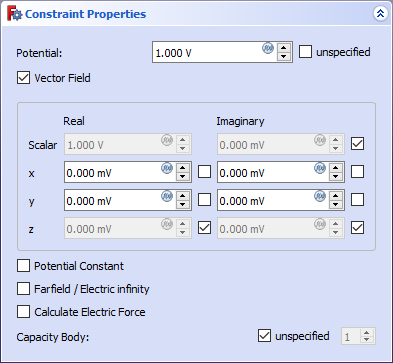
- Boundary Condition: To choose between Dirichlet (prescribed potential) and Neumann (prescribed electric flux density) boundary condition type. introduced in 1.1
- Potential: The electric potential in V.
- Electromagnetic Potential: To enable the input of the components of a potential vector field.
- x/y/z: The real/imaginary part of the potential in x, y or z-direction in V. For other coordinate systems than Cartesian 3D, this will be the first, second or third coordinate of the system instead of x, y or z. If the coordinate system has no third coordinate, z will be ignored.
- x, y, z checkboxes: To declare the corresponding potential as unknown for the solver.
- Electric Infinity (1.2 and above: Far field): Option to make a spherical approximation that the volume above the face extends to infinity.
- Potential Constant: Option to set a constant potential.
- Electric Flux Density: The electric flux density (electric displacement field D) in C/m^2. introduced in 1.1
- Magnetic Flux Density To enable the input of the components of a magnetic flux density in mT. introduced in 1.2
- x/y/z: The real/imaginary part of the magnetic flux density in x, y or z-direction in mT. For other coordinate systems than Cartesian 3D, this will be the first, second or third coordinate of the system instead of x, y or z. If the coordinate system has no third coordinate, z will be ignored.
- x, y, z checkboxes: To declare the corresponding magnetic flux density as unknown for the solver.
- Capacitance Body: Counter of the body (or face) with a capacitance.
Notes
- The following are Elmer-specific features and won't work with CalculiX:
- Capacitance Body
- Electric Infinity (1.2 and above: Far field)
- Potential Constant
- introduced in 1.2: Magnetic Flux Density
Эта страница получена от https://wiki.freecad.org/FEM_ConstraintElectromagnetic