This documentation is not finished. Please help and contribute documentation.
GuiCommand model explains how commands should be documented. Browse Category:UnfinishedDocu to see more incomplete pages like this one. See Category:Command Reference for all commands.
See WikiPages to learn about editing the wiki pages, and go to Help FreeCAD to learn about other ways in which you can contribute.


|
|
| Menu location |
|---|
| Gear → Internal Involute Gear |
| Workbenches |
| Gear |
| Default shortcut |
| None |
| Introduced in version |
| 1.0 |
| See also |
| FCGear InvoluteGear |
Description
The  FCGear InternalInvoluteGear command creates an internal involute gear wheel with spur gearing by default that can also be transformed into a helical gearing or a double helical gearing.
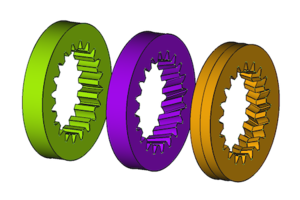
Internal involute gears from left to right: Spur gearing, helical gearing, double helical gearing
Usage
- Switch to the
 Gear Workbench.
 - There are several ways to invoke the command:
- Press the Internal Involute Gear button in the toolbar.
- Select the Gear → Internal Involute Gear option from the menu.
- Press the
- Change the gear parameter to the required conditions (see Properties).
Properties
See also: Property View.
An FCGear InternalInvoluteGear object is derived from a Part Feature object and inherits all its properties. It also has the following additional properties:
Data
accuracy
- Datanumpoints (
Integer): Default is6. Change of the involute profile. Changing the value can lead to unexpected results.
base
- Datagear (
PythonObject): Python gear object. - Dataheight (
Length): Default is5 mm. Value of the gear width. - Datamodule (
Length): Default is1 mm. Module is the ratio of the reference diameter of the gear divided by the number of teeth (see Notes). - Datanum_teeth (
Integer): Default is15. Number of teeth (see Notes). - Datathickness (
Length): Default is5 mm. Thickness of the uncut outer part of the gear.
computed
- Dataaddendum_diameter (
Length): Default is17 mm. Inside diameter, measured at the addendum (the tip of the teeth). - Dataangular_backlash (
Angle): (read-only) The angle by which this gear can turn without moving the mating gear. - Dataoutside_diameter (
Length): (read-only) Outside diameter. - Datapitch_diameter (
Length): (read-only) Working pitch diameter. - Dataroot_diaeter (
Length): (read-only) Root diameter, measured at the foot of the teeth. - Datatransverse_pitch (
Length): (read-only) Pitch in the plane of rotation.
fillets
- Datahead_fillet (
Float): Default is0 mm. - Dataroot_fillet (
Float): Default is0 mm.
helical
- Datadouble_helix (
Bool): Default isfalse,truecreates a double helix gear (see Notes). - Datahelix_angle (
Angle): Default is0°. With the helix angle β a helical gear is created – positive value → rotation direction right, negative value → rotation direction left (see Notes). - Dataproperties_from_tool (
Bool): Default isfalse. Iftrueand Databeta is not zero, gear parameters are recomputed internally for the rotated gear.
involute
- Datapressure_angle (
Angle): Default is20°(see Notes). - Datashift (
Float): Default is0. Generates a positive and negative profile shift (see Notes).
precision
- Datasimple (
Bool): Default isfalse,truegenerates a simplified display (without teeth and only a cylinder in pitch diameter).
tolerance
- Databacklash (
Length): Default is0 mm. Backlash, also called lash or play, is the distance between the teeth at a gear pair. - Dataclearance (
Float): Default is0.25(see Notes). - Datahead (
Float): Default is-0.4 mm. This value is used to change the tooth height. - Datareversed_backlash (
Bool):truebacklash decrease orfalse(default) backlash increase (see Notes).
version
- Dataversion (
String):
Notes
See FCGear InvoluteGear.
Useful formulas
See FCGear InvoluteGear.
Scripting
Use the power of Python to automate your gear modeling:
import FreeCAD as App
import FreeCADGui as Gui
import freecad.gears.commands
gear = freecad.gears.commands.CreateInternalInvoluteGear.create()
gear.num_teeth = 20
gear.helix_angle = 20
gear.height = 10
gear.double_helix = True
App.ActiveDocument.recompute()
Gui.SendMsgToActiveView("ViewFit")
This page is retrieved from https://wiki.freecad.org/FCGear_InternalInvoluteGear