


|
|
| Ubicación en el Menú |
|---|
| Boceto → Vista de forma 2D |
| Entornos de trabajo |
| Boceto, Arquitectura |
| Atajo de teclado por defecto |
| Ninguno |
| Introducido en versión |
| - |
| Ver también |
| Ninguno |

Descripción
Esta herramienta coloca en el documento un objeto 2D que es una vista aplanada de un objeto seleccionado Shape, proyectado a lo largo de la dirección de vista actual.
Draft Shape2DView projections can be displayed on a TechDraw Workbench page using the TechDraw DraftView command. Alternatively the TechDraw Workbench offer its own projection commands. But these create projections that are only displayed on the drawing page and not in the 3D View.
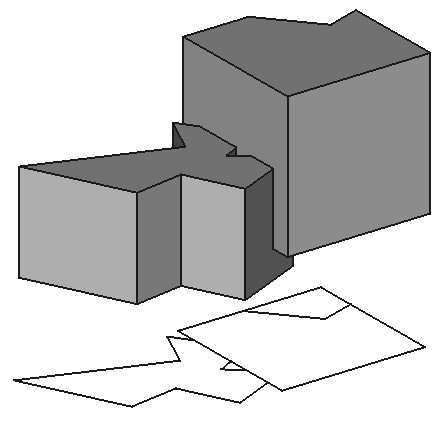
Projection of solid shapes onto the XY-plane
Utilización
- Selecciona el objeto que quieres extraer a una vista 2D
- Presiona el botón
 Vista de forma 2D
How to produce plans and sections with different linewidths
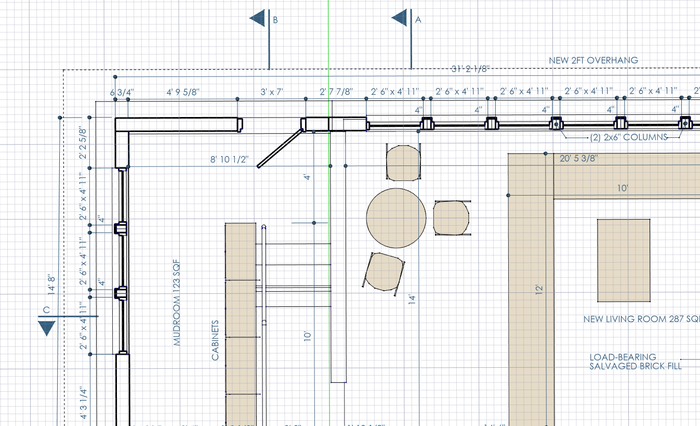
Drawings with different linewidths for viewed and cut lines can easily be produced by using two shape2Dview objects from a same Arch SectionPlane. One of the shape2Dview objects has its projection mode set to Solid, which renders the viewed lines, and another set to Cut lines or Cut faces to render the cut lines. The two shape2Dviews are then placed at the same location, one on top of the other.
Propiedades
See also: Property View.
A Draft Shape2DView object is derived from a Part Part2DObject and inherits all its properties. It also has the following additional properties:
Data
Draft
- DatosProjection: La dirección de la proyección
- DatosProjection Mode: El modo de la proyección: sólido, caras individuales o líneas de corte.
View
Draft
- VistaPattern (
Enumeration): specifies the Draft Pattern with which to fill the projected faces of solids in the Draft Shape2DView. This property only works if DatosProjection Mode isCutfacesand if VistaDisplay Mode isFlat Lines. - VistaPattern Size (
Float): specifies the size of the Draft Pattern.
Scripting
Programación
La herramienta de vista 2D de forma se puede utilizar en macros y desde la consola de Python utilizando la siguiente función:
shape2dview = make_shape2dview(baseobj, projectionVector=None, facenumbers=[])
- Añade una forma 2D al documento, la cual es una proyección 2D del objeto dado.
- Se puede indicar un vector de proyección específico.
- Devuelve el objeto generado.
- También puedes proporcionar una lista de números de caras a considerar.
Change the ProjectionMode property of the created object if required. It can be: "Solid", "Individual Faces", "Cutlines", "Cutfaces" or "Solid faces".
Ejemplo:
import FreeCAD as App
import Draft

doc = App.newDocument()

box = doc.addObject("Part::Box", "Box")
box.Length = 2300
box.Width = 500
box.Height = 1000

shape1 = Draft.make_shape2dview(box)

shape2 = Draft.make_shape2dview(box, App.Vector(1, -1, 1))

shape3 = Draft.make_shape2dview(box, App.Vector(-1, 1, 1), [0, 5])
shape3.ProjectionMode = "Individual Faces"

doc.recompute()
Esta página ha sido recuperada de https://wiki.freecad.org/Draft_Shape2DView