


|
|
| Menü konumu |
|---|
| Taslak → Etiket |
| Tezgahlar |
| Taslak, Mimari |
| Varsayılan kısayol |
| D L |
| Versiyonda tanıtıldı |
| - |
| Ayrıca bkz |
| Metin, Şekil dizesi |

Tanım
Etiket aracı, 2 segmentli bir lider satırı ve bir ok içeren çok satırlı bir metin kutusu ekler. Komutu başlatırken bir nesne veya bir alt eleman (yüz, kenar veya tepe) seçilirse, Etiket, konum, uzunluk, alan, hacim veya malzeme de dahil olmak üzere seçilen öğenin belirli bir niteliğini görüntülemek için yapılabilir.
If an object or a sub-element (face, edge or vertex) is selected when starting the command, the text can be made to display one or two attributes of the selected element, including position, length, area, volume and material. The text will then be linked to the attributes and will update if their values change.
Oksuz daha basit bir metin elemanı eklemek için Metin kullanın. Düz metin şekilleri oluşturmak için Şekil dizesi ile Parça Çıkar kullanın.
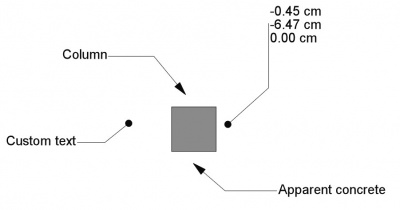
Farklı yönelimleri, ipucu sembolleri ve bilgileri içeren çeşitli etiketler
Nasıl Kullanılır
See also: Draft Tray, Draft Snap and Draft Constrain.
-
 Etiket düğmesine basın veya D ardından L tuşlarına basın.
 - 3D görünümde bir ilk noktaya tıklayın veya bir koordinat yazın ve
 Nokta ekle düğmesine basın. Bu nokta hedefi gösterir (ok başı). Bu herhangi bir yerde olabilir, bir unsur olması gerekmez.
 - 3D görünümünde ikinci bir noktaya tıklayın veya bir koordinat yazın ve Nokta ekle düğmesine basın. Bu nokta yatay veya dikey bir liderin başlangıcını gösterir.
- 3D görünümünde üçüncü bir noktaya tıklayın veya bir koordinat yazın ve Nokta ekle düğmesine basın. Bu nokta metnin temel noktasını gösterir.
Seçenekler
The single character keyboard shortcuts available in the task panel can be changed. See Draft Preferences. The shortcuts mentioned here are the default shortcuts.
- "Özel", "Ad", "Etiket", "Konum", "Uzunluk", "Alan", "hacim" dahil "Görüntülenecek bilgi türünü seçmek için Label type tıklayın. "başlık" ve "Malzeme" olarak etiketleyin.
- Koordinatları manuel olarak girmek için sayıları girin, ardından her bir X, Y ve Z bileşeni arasında Enter tuşuna basın. Noktayı yerleştirmek istediğiniz değerleri aldığınızda Nokta ekle düğmesine basabilirsiniz.
- Etiketi yerleştirirken, Yakalama noktanızı mesafeden bağımsız olarak en yakın çıtçıt konumuna zorlamak için Ctrl tuşunu basılı tutun.
- Geçerli komutu iptal etmek için Esc veya Close tuşuna basınız.
Etiket türleri
The following label types are available:
- Custom:, Veri Custom Text içeriğini görüntüler.
- Name: hedef nesnenin dahili adını görüntüler; iç ad, yaratılış zamanında nesneye atanır ve nesnenin varlığı boyunca sabit kalır.
- Label: hedef nesnenin etiketini görüntüler; Nesnenin etiketi kullanıcı tarafından herhangi bir zamanda değiştirilebilir.
- Position:, hedef nesnenin taban noktasının, hedef köşenin veya varsa, hedef alt öğenin kütle merkezinin koordinatlarını görüntüler.
- Length:, varsa, hedef alt öğenin uzunluğunu gösterir.
- Area:, eğer varsa, hedef alt öğenin alanını gösterir.
- Volume:, eğer varsa, hedef nesnenin hacmini gösterir.
- Tag:, örneğin Mimari ile oluşturulan nesneler gibi bir özelliğe sahipse, hedef nesnenin
Tagözniteliğini görüntüler. - Material:, hedef nesnenin böyle bir özelliği varsa, hedef nesnenin malzemesinin etiketini görüntüler.
Notes
Not: yatay düz parçanın yönü, sağa veya sola doğru, metni otomatik olarak ters yöne hizalar. Lider dikey olarak yukarı çıkarsa, metin sola hizalanır; dikey olarak aşağı inerse, sağa hizalanır.
Özellikler
See also: Property View.
A Draft Label object is derived from an App FeaturePython object and inherits all its properties. The following properties are additional unless otherwise stated:
Data
Label
Veri
- Veri Label Type: bu etiket tarafından gösterilen bilgilerin türünü belirtir (aşağıya bakın).
- Veri Custom Text: Veri Label Type "Özel" olarak ayarlandığında veya etiket parametrik olmadığında görüntülenecek metin bloğunu belirtir. Metin dizelerin bir listesi olarak verilmiştir; listedeki her öğe, virgülle ayrılmış olarak, yeni bir metin satırı belirtir.
- Veri Text: (salt okunur), Veri Label Type 'e bağlı olarak etiket tarafından görüntülenen gerçek metni gösterir.
- Veri Target Point: liderin ipucunun konumunu belirtir.
- Veri Straight Direction: Liderin düz segmentinin yönünü yatay veya dikey olarak belirtir.
- Veri Straight Distance: metnin taban noktasından başlayarak satırın düz bölümünün uzunluğunu belirtir. Mesafe pozitifse, lider metnin sağ tarafından başlar ve metin sağa hizalanır; Aksi takdirde, lider metnin solundan başlar ve metin sola hizalanır.
- Veri Position: metin bloğunun ilk satırının taban noktasını belirtir; aynı zamanda liderin nasıl çizildiğini de etkiler.
- Veri Angle: metin bloğunun ilk satırının taban çizgisinin dönüşünü belirtir; ayrıca liderin nasıl çizileceğini de etkiler, çünkü artık yatay veya dikey olmayacaktır.
- Veri Axis: döndürme için kullanılacak ekseni belirtir.
Leader
- VeriPoints (
VectorList): specifies the points of the leader. - VeriStraight Direction (
Enumeration): specifies the direction of the first leader segment:Custom,HorizontalorVertical. - VeriStraight Distance (
Distance): specifies the length of the first leader segment. Only used if VeriStraight Direction isHorizontalorVertical. If the distance is positive, the leader starts from the right side of the text and the text aligns to the right. Otherwise the leader starts from the left side of the text and the text aligns to the left.
Target
- VeriTarget (
LinkSub): specifies the object and optional subelement the label is linked to. - VeriTarget Point (
Vector): specifies the position of the tip of the leader, which is where the arrow is attached.
View
Annotation
- GörünümAnnotation Style (
Enumeration): specifies the annotation style applied to the label. See Draft AnnotationStyleEditor. - GörünümScale Multiplier (
Float): specifies the general scaling factor applied to the label.
Display Options
- GörünümDisplay Mode (
Enumeration): specifies how the text is displayed. If it isWorldthe text will be displayed on a plane defined by the VeriPlacement of the label. If it isScreenthe text will always face the screen. This is an inherited property. The mentioned options are the renamed options (introduced in 0.21).
Graphics
Görünüm
- Görünüm Metin Yazı Tipi: metni çizmek için kullanılacak yazı tipini belirtir. "Arial" gibi bir font adı, "sans", "serif" veya "mono" gibi bir varsayılan stil, "Arial, Helvetica, sans" gibi bir aile veya "gibi bir stil içeren bir ad olabilir. Arial: "Kalın. Belirtilen font sistemde bulunmuyorsa, bunun yerine genel olan kullanılır.
- Görünüm Text Size: metnin boyutunu belirtir. Etiket nesnesi ağaç görünümünde oluşturulmuşsa ancak 3D görünümünde hiçbir metin görünmüyorsa, metnin boyutunu görünene kadar artırın.
- Görünüm Text Alignment: metnin taban çizgisinin öncüye göre dikey olarak hizalanmasını belirtir. Üst, orta veya alt olabilir.
- Görünüm Text Color: Bir RGB demetindeki metnin rengini belirtir (R, G, B).
- Görünüm Line Width: liderin genişliğini belirtir.
- Görünüm Çizgi Rengi: liderin rengini belirtir.
- Görünüm Arrow Size: liderin ucunda görüntülenen sembolün boyutunu belirtir.
- Görünüm Arrow Type: liderin ucunda görüntülenen, nokta, daire, ok veya kene olabilecek sembolün türünü belirtir.
- Görünüm Frame: "Dikdörtgen" ise, metnin etrafına bir çerçeve çizer.
- Görünüm Line:
trueise, lider satır görüntülenecektir; Aksi halde, sadece baştaki metin ve sembol gösterilecektir. - Görünüm Display Mode: "3B metin" ise, metin başlangıçta XY düzleminde olacak şekilde sahne eksenlerine hizalanır; "2B metin" ise, metin her zaman kameraya dönük olacaktır.
Text
- GörünümFont Name (
Font): specifies the font used to draw the text. It can be a font name, such asArial, a default style such assans,seriformono, a family such asArial,Helvetica,sans, or a name with a style such asArial:Bold. If the given font is not found on the system, a default font is used instead. introduced in 0.21 - GörünümFont Size (
Length): specifies the size of the letters. The text can be invisible in the 3D View if this value is very small. introduced in 0.21 - GörünümJustification (
Enumeration): specifies the horizontal alignment of the text:Left,CenterorRight. Only used if VeriStraight Direction isCustom. Otherwise the horizontal alignment is based on the sign (positive or negative) of VeriStraight Distance. - GörünümLine Spacing (
Float): specifies the factor applied to the default line height of the text. - GörünümMax Chars (
Integer): specifies the maximum number of characters on each line of the text. - GörünümText Alignment (
Enumeration): specifies the vertical alignment of the text:Top,MiddleorBottom. - GörünümText Color (
Color): specifies the color of the text.
Scripting
Betik
Ayrıca bkz.: Taslak API ve FreeCAD Betik esasları.
label = make_label(target_point=App.Vector(0, 0, 0),
                   placement=App.Vector(30, 30, 0),
                   target_object=None, subelements=None,
                   label_type="Custom", custom_text="Label",
                   direction="Horizontal", distance=-10,
                   points=None)
Örnek:
import FreeCAD as App
import Draft

doc = App.newDocument()

rectangle = Draft.make_rectangle(4000, 1000)
doc.recompute()

p1 = App.Vector(-200, 1000, 0)
place1 = App.Placement(App.Vector(-1000, 1300, 0), App.Rotation())

label1 = Draft.make_label(p1, place1, target_object=rectangle, distance=500, label_type="Label")
label1.ViewObject.FontSize= 200

p2 = App.Vector(-200, 0, 0)
place2 = App.Placement(App.Vector(-1000, -300, 0), App.Rotation())

label2 = Draft.make_label(p2, place2, target_object=rectangle, distance=500, label_type="Custom",
                          custom_text="Beware of the sharp edges")
label2.ViewObject.FontSize= 200

p3 = App.Vector(1000, 1200, 0)
place3 = App.Placement(App.Vector(2000, 1800, 0), App.Rotation())

label3 = Draft.make_label(p3, place3, target_object=rectangle, distance=-500, label_type="Area")
label3.ViewObject.FontSize= 200

doc.recompute()
Bu sayfa şu adresten alınmıştır https://wiki.freecad.org/Draft_Label