


|
|
| Posizione nel menu |
|---|
| Path → Tasca |
| Ambiente |
| Path |
| Avvio veloce |
| P,O |
| Introdotto nella versione |
| - |
| Vedere anche |
| Nessuno |

Descrizione
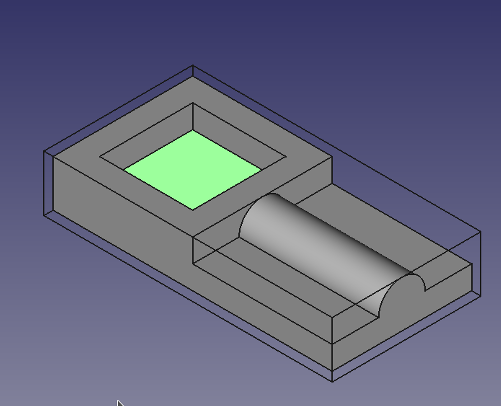
Questo strumento crea un'operazione di scavo basato sulle facce o sulle pareti inferiori selezionate in una o più tasche dell'oggetto in lavorazione.
L'oggetto Tasca di Path è fatto per essere parte di una Lavorazione.
Utilizzo
- Selezionare una faccia o una parete inferiore di una tasca. Mentre di solito è più facile selezionare il fondo, le parete devono essere selezionati quando una tasca passa attraverso tutto.
- Premere il pulsante
 Tasca
Tasca - Regolare le proprietà desiderate
Proprietà
Note : Not all of these Properties are available in the Task Window Editor. Some are only accessible in the Data tab of the Properties View panel for this Operation.
Base
Note: It is suggested that you do not edit the Placement property of path operations. Rather, move or rotate the CAM Job model as needed.
- DatiPlacement: Overall placement[position and rotation] of the object - with respect to the origin (or origin of parent object container)
- DatiAngle: Angle in degrees applied to rotation of the object around Axis property value
- DatiAxis: Axis (one or multiple) around which to rotate the object, set in sub-properties: X, Y, Z
- DatiX: X-axis value
- DatiY: Y-axis value
- DatiZ: Z-axis value
- DatiPosition: Position of the object, set in sub-properties: X, Y, Z - with respect to the origin (or origin of parent object container)
- DatiX: X-distance value
- DatiY: Y-distance value
- DatiZ: Z-distance value
- DatiLabel: User-provided name of the object (UTF-8)
Depth
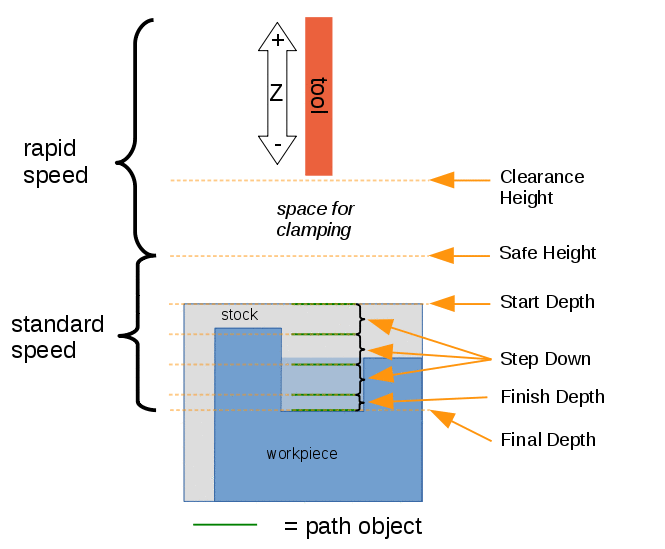
Descrizione delle proprietà dello strumento tasca
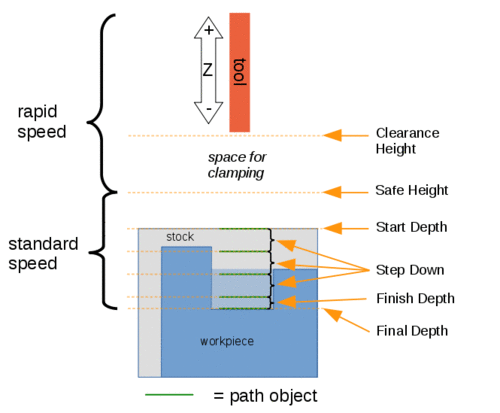
Visual reference for Depth properties (settings)
Extension
- DatiExtension Corners: When enabled connected extension edges are combined to wires.
- DatiExtension Length Default: Default length of extensions.
Face
- DatiOffset Pattern: Clearing pattern to use. (Select in which manner the horizontal movements should be done.)
Path
- DatiActive: Make False, to prevent operation from generating code
- DatiComment: An optional comment for this Operation
- DatiUser Label: User assigned label
- DatiTool Controller: Defines the Tool controller used in the Operation
- DatiCut Mode: Specifies a CW or CCW move for the cut
- DatiExtra Offset: Extra offset to apply to the operation. Direction is operation dependent. (Extra value to stay away from final profile good for roughing toolpath)
- DatiKeep Tool Down: Attempts to avoid unnecessary retractions.
- DatiMin Travel: Use 3D Sorting of Path (when multiple base geometries used).
- DatiStart At: Start pocketing at center or boundary.
- DatiStep Over: Select the horizontal step over (Percent of tool diameter: 100% = tool diameter).
- DatiUse Outline: Uses the outline of the base geometry.
- DatiZig Zag Angle: Angle of the zigzag pattern. (Select the path angle relative to X-axis.)
- DatiSortingMode: Controls how multiple selected base geometries are ordered.
Automaticuses automatic sorting.Manualfollows the selection order.
Rotation
- DatiAttempt Inverse Angle: Automatically attempt Inverse Angle if initial rotation is incorrect.
DatiB_Axis Error Override: Visually orient B(y) rotations to model (error in FreeCAD rendering).- DatiEnable Rotation: Enable rotation to gain access to pockets or areas not normal to Z axis.
- DatiInverse Angle: Inverse the angle of the rotation. Example: change a rotation from -22.5 to 22.5 degrees.
- DatiReverse Direction: Reverse orientation of Operation by 180 degrees.
Start Point
- DatiStart Point: The start point of this path.
- DatiUse Start Point: Make True, if manually specifying a Start Point, then enter Start Points in the property data Start Points field.
Tasks Window Editor Layout
Descriptions for the settings are provided in the Properties list above.
This section is simply a layout map of the settings in the window editor for the Operation.
Base Geometry
- Add: Adds selected element(s) which should be the base(s) for the path(s)
- Delete: Delete the selected item(s) in the Base Geometry list
- Clear: Clear all items in the Base Geometry list
Extensions
- DatiShow All: If selected, all potential extensions are visualized. Enabled extensions in purple, disabled extensions in yellow.
- DatiExtension Corners
- DatiExtension Length Default
- Enable
- Disable
- Clear
Depths
- DatiStart Depth
- DatiFinal Depth
- DatiStep Down
Heights
- DatiSafe Height
- DatiClearance Height
Operation
- DatiTool Controller
- DatiCut Mode
- DatiPattern (Offset Pattern)
- DatiAngle (Zig Zag Angle)
- DatiStep Over Percent (Step Over)
- DatiPass Extension: The distance the facing operation will extend beyond the boundary shape (base geometry)
Scripting
See also: FreeCAD Scripting Basics.
#Place code example here.
Questa pagina è recuperata da https://wiki.freecad.org/CAM_Pocket_Shape