Эта документация не закончена. Пожалуйста, помогите и внесите свой вклад в разработку документации.
Пример документирования команды Gui объясняет, как должны быть задокументированы команды. Просмотрите Category:UnfinishedDocu/ru, чтобы увидеть больше незавершённых страниц, подобных этой. Смотрите Category:Command Reference/ru для всех команд.
Смотрите Wiki Страницы, чтобы узнать о редактировании вики-страниц, и зайдите на страницу Помоги FreeCAD, чтобы узнать о других способах, которыми вы можете внести свой вклад.


|
|
| Menu location |
|---|
| CAM → 3D Pocket |
| Workbenches |
| CAM |
| Default shortcut |
| None |
| Introduced in version |
| - |
| See also |
| None |
Описание
The  CAM Pocket3D command inserts a 3D Pocket object into the Job. This operation takes into account the bottom surface of the pocket, as well as selected walls that are not vertical. In its current state, this operation is used to rough out a pocket with non-vertical walls and/or non-horizontal bottom. A common finishing technique is to use a ball end mill with the experimental
  3D Surface operation.
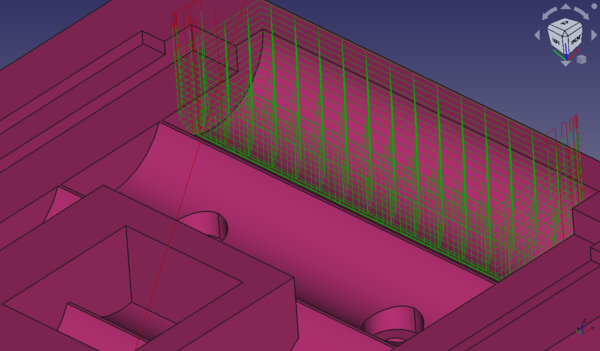
Sample image of 3D Pocket operation used to clear cylindrical battery holder.
Применение
Creating a 3D Pocket
- From within a Job, select one or more Faces from the Job Model to include as the Base Geometry.
- Invoke the
 Pocket 3D or select CAM → Pocket 3D command from the top menu.
 - Choose a Tool controller from the pop up selection dialogue window.
- Add or subtract Base Geometry elements as needed to configure the Operation.
- Check the Depths tab to ensure the Start Depth, Finish Depth, and Step Down percentage are correct. The Final Depth is determined by the Body Geometry selection and is not modifiable.
- Check the Heights tab to ensure the Safe and Clearance Heights are appropriate.
- Check the Operation tab where the Tool controller can be re-selected, the Cut mode can be configured for Climb or Conventional milling, the Pattern can be set, the Step Over percentage can be adjusted, and Pass Extension can be applied.
- Click Apply to observe the milling path for the passes of the Operation. Adjust parameters until satisfied with the Operation.
- Click OK to save the Operation.
Примечания
- All paths generated from this operation are based on a standard end mill using the diameter of the tool you selected for this 3D Pocket operation.
- Ball end mills and other shapes are not respected for path generation even if selected as the tool for this operation.
Options
- Use the ДанныеAdaptive Pocket Finish property to attempt to minimize air milling below a 3D Pocket in cases where the pocket is a hole through the model.
- Use the ДанныеAdaptive Pocket Start property to attempt to minimize air milling upon entry to the pocket. For example, look at the sample image above in the Description section of this page. In order to reduce the air milling above that 3D Pocket, toggle this property to True and the paths will begin closer to the pocket, much nearer to where the pocket actually begins. See the following image and note the difference in the path start height. The air milling is reduced.
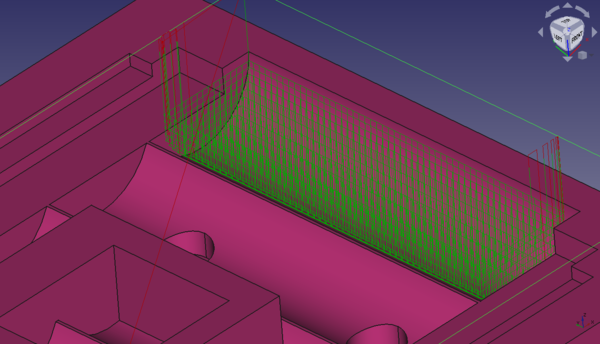
Sample image of 3D Pocket operation used to clear cylindrical battery holder with the Adaptive Pocket Start enabled in order to reduce air milling upon entry.
- If you wish to process the entire model and stock as a whole, use the ДанныеProcess Stock Area property set to True with no Base Geometry selected.
Properties
Data
Base
Note: It is suggested that you do not edit the Placement property of path operations. Rather, move or rotate the CAM Job model as needed.
- ДанныеPlacement: Overall placement[position and rotation] of the object - with respect to the origin (or origin of parent object container)
- ДанныеAngle: Angle in degrees applied to rotation of the object around Axis property value
- ДанныеAxis: Axis (one or multiple) around which to rotate the object, set in sub-properties: X, Y, Z
- ДанныеX: X-axis value
- ДанныеY: Y-axis value
- ДанныеZ: Z axis value
- ДанныеPosition: Position of the object, set in sub-properties: X, Y, Z - with respect to the origin (or origin of parent object container)
- ДанныеX: X-distance value
- ДанныеY: Y-distance value
- ДанныеZ: Z-distance value
- ДанныеLabel: User-provided name of the object (UTF-8)
Depth
- ДанныеClearance Height: The height needed to clear clamps and obstructions
- ДанныеFinal Depth: Final Depth of Tool- lowest value in Z
- ДанныеFinish Depth: Maximum material removed on final pass.
- ДанныеSafe Height: The above which Rapid motions are allowed.
- ДанныеStart Depth: Starting Depth of Tool- first cut depth in Z
- ДанныеStep Down: Incremental Step Down of Tool
Face
- ДанныеOffset Pattern: Clearing pattern to use. (Select in which manner the horizontal movements should be done.)
Path
- ДанныеActive: Make False, to prevent operation from generating code
- ДанныеBase: The base geometry for this operation
- ДанныеComment: An optional comment for this Operation
- ДанныеCoolant Mode: The coolant mode for this operation.
- ДанныеCycle Time: The cycle time estimation for this operation.
- ДанныеTool Controller: Defines the Tool controller used in the Operation
- ДанныеUser Label: User assigned label
- ДанныеAdaptive Pocket Finish: Use adaptive algorithm to eliminate excessive air milling below planar pocket bottom.
- ДанныеAdaptive Pocket Start: Use adaptive algorithm to eliminate excessive air milling above planar pocket top.
- ДанныеCut Mode: The direction that the toolpath should go around the part ClockWise (CW) or CounterClockWise (CCW)
- ДанныеExtra Offset: Extra offset to apply to the operation. Direction is operation dependent.
- ДанныеHandle Multiple Features: Choose how to process multiple Base Geometry features.
- ДанныеKeep Tool Down: Attempts to avoid unnecessary retractions.
- ДанныеMin Travel: Use 3D Sorting of Path
- ДанныеProcess Stock Area: Process the model and stock in an operation with no Base Geometry selected.
- ДанныеStart At: Start pocketing at center or boundary
- ДанныеStep Over: Percent of cutter diameter to step over on each pass
- ДанныеZig Zag Angle: Angle of the zigzag pattern
Rotation
Note: Rotation is not available for 3D Pocket as of 0.19.
- ДанныеEnable Rotation: Enable rotation to gain access to pockets or areas not normal to Z axis.
Start Point
- ДанныеStart Point: The custom start point for the path of this operation.
- ДанныеX: X-distance value
- ДанныеY: Y-distance value
- ДанныеZ: Z-distance value
- ДанныеUse Start Point: Make True, if manually specifying a Start Point. Set the start point in the property data Start Point field.
View
Empty
Scripting
See also: FreeCAD Scripting Basics.
Example:
#Place code example here.
Эта страница получена от https://wiki.freecad.org/CAM_Pocket3D