


|
|
| Menyplacering |
|---|
| Arch → Stairs |
| Arbetsbänkar |
| Arch |
| Standard genväg |
| S R |
| Introducerad i version |
| 0.14 |
| Se även |
| Arch Structure/sv, Arch Equipment/sv |
Description
The Arch Stairs tool allows you to build several types of stairs automatically. Straight stairs (with or without a central landing) can be created from scratch. More complex stairs require base objects.
See the Stairs entry in wikipedia for a definition of the different terms used to describe parts of stairs.
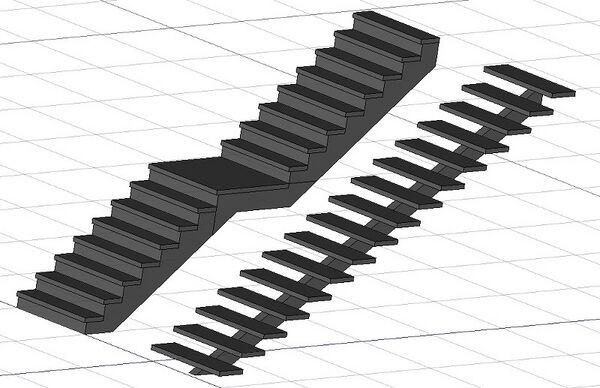
Two constructed stairs, one with a massive structure and a landing, the other with a single stringer.
Options
Usage
- Optionally select one or more base objects, for example Draft Lines, Draft Wires and Sketches:
- Draft Wires or Sketches with two or more segments will be used to create landings. They must be on a plane parallel to the global XY-plane. For example, select a U-shaped wire for a half-turn landing and an L-shaped wire for a corner landing.
- Draft Lines and Sketches with a single edge will be used to create flights.
- If the vertices of all lines and wires have correct Z-coordinates, the created stairs will use this information. A Sketch (plane-parallel to the XY-plane) with a single edge, or a Draft Line without a delta Z will also work for a flight, the Height is then be used to construct the flight.
- The base objects must be selected in the correct order starting with the bottom object.
- Press the
 Stairs button, or press S, R keys.
 - Adjust the desired properties. Some parts of the stairs, such as the structure, might not appear immediately, if any of the properties makes it impossible, such as a structure thickness of 0.


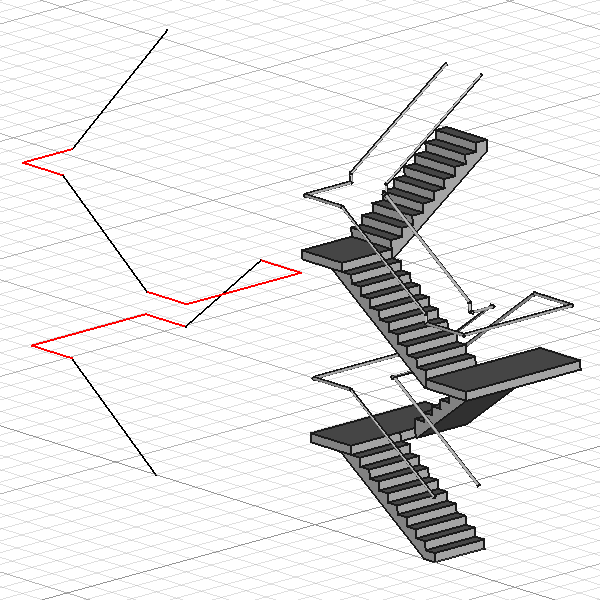
Complex stairs based on a selection of lines and wired as shown on the left.
In red the wires used for the landings at Z=1500mm, Z=3000mm and Z=4500mm.
In black the lines connecting them used for the flights.
Properties
An Arch Stairs object shares the common properties and behaviors of all Arch Components.
Data
Segment and Parts
- DataAbs Top (
Vector): (read-only) The absolute top level the stairs lead to. - DataLast Segment (
Link): Last segment (flight or landing) of an Arch Stairs connecting to this segment. The start level of the stairs will be the end level of this last segment. - DataOutline Left (
VectorList): The left outline of the stairs (read-only). - DataOutline Left All (
VectorList): The left outline of all segments of the stairs (read-only). - DataOutline Right (
VectorList): The right outline of the stairs (read-only). - DataOutline Right All (
VectorList): The right outline of all segments of the stairs (read-only). - DataRailing Height Left (
Length): Height of the left railing of the stairs or landing. - DataRailing Height Right (
Length): Height of the right railing of the stairs or landing. - DataRailing Left (
LinkHidden): The left railing object. introduced in 0.20: Property type updated fromStringtoLinkHidden. - DataRailing Offset Left (
Length): Offset of the left railing from the edge of the stairs or landing. - DataRailing Offset Right (
Length): Offset of the right railing from the edge of the stairs or landing. - DataRailing Right (
LinkHidden): The right railing object. introduced in 0.20: Property type updated fromStringtoLinkHidden.
Stairs
- DataAlign (
Enumeration): The alignment of the stairs on the baseline. Only used if a baseline is defined. Can beLeft,RightorCenter. - DataHeight (
Length): The total height of the stairs. Only used if no baseline is defined, or if the baseline is horizontal. Ignored if DataRiser Height Enforce is non-zero. - DataLength (
Length): The total length of the stairs if no baseline is defined. Ignored if DataTread Depth Enforce is non-zero. - DataWidth (
Length): The width of the stairs. - DataWidth of Landing (
FloatList): If the DataNumber Of Steps is 1, the stairs object acts as a landing. When this is the case and the baseline is multi-segment, the width of the first segment of the landing follows the DataWidth, and the widths of subsequent segments follow the list set here.
Steps
- DataBlondel Ratio (
Float): (read-only) The calculated Blondel ratio. This ratio indicates comfortable stairs and should be between 62 and 64cm or 24.5 and 25.5in. - DataLanding Depth (
Length): The depth of the landing of the flight, if enabled in DataLandings. Defaults to the DataWidth if 0. - DataNosing (
Length): The size of the nosing. - DataNumber Of Steps (
Integer): The numbers of steps (risers). Must be at least 2 for a single flight, and at least 4 for stairs with a central landing. - DataRiser Height (
Length): (read-only) The height of the risers. If DataRiser Height Enforce is 0 it is calculated (DataHeight / DataNumber of Steps). Else it is the same as DataRiser Height Enforce. - DataRiser Height Enforce (
Length): The enforced height of the risers. - DataRiser Thickness (
Length): The thickness of the risers. - DataTread Depth (
Length): (read-only) The depth of the treads. If DataTread Depth Enforce is 0 it is calculated (DataLength / DataNumber of Steps). Else it is the same as DataTread Depth Enforce. - DataTread Depth Enforce (
Length): The enforced depth of the treads. - DataTread Thickness (
Length): The thickness of the treads.
Structure
- DataConnection Down Start Stairs (
Enumeration): The type of connection between the lower floor slab and the start of the stairs. Can beHorizontalCut,VerticalCutorHorizontalVerticalCut. - DataConnection End Stairs Up (
Enumeration): The type of connection between the end of the stairs and the upper floor slab. Can betoFlightThicknessortoSlabThickness. - DataDown Slab Thickness (
Length): The thickness of the lower floor slab. - DataFlight (
Enumeration): The direction of the flight after the landing. Can beStraight,HalfTurnLeftorHalfTurnRight. The DataLandings property must be set toAt center. - DataLandings (
Enumeration): The type of landings. Can beNoneorAt center(At each cornernot implemented yet). - DataStringer Overlap (
Length): The overlap of the stringers above the bottom of the treads. - DataStringer Width (
Length): The width of the stringers. - DataStructure (
Enumeration): The structure type of the stairs. Can beNone,Massive,One stringerorTwo stringers. For the last two options, the DataStringer Width and DataTread Thickness properties must have non-zero values. - DataStructure Offset (
Length): The offset between the border of the stairs and the structure. - DataStructure Thickness (
Length): The thickness of the structure. - DataUp Slab Thickness (
Length): The thickness of the upper floor slab. - Data (Hidden)Winders (
Enumeration): The type of winders. Not implemented.
Limitations
- Straight, HalfTurnLeft or HalfTurnRight stairs and landings are available at the moment
- See the forum entry for circle stairs.
- See the forum announcement.
Scripting
Skript
Stairs = makeStairs(baseobj=None, length=None, width=None, height=None, steps=None, name="Stairs")
- Creates a
Stairsobject from the givenbaseobj. - If
baseobjis not given, it will uselength,width,height, andsteps, to build a solid object.
Example:
import Arch

Stairs = Arch.makeStairs(length=5000, width=1200, height=3000, steps=14)
Denna sida hämtas från https://wiki.freecad.org/Arch_Stairs