


|
|
| Menyplacering |
|---|
| Arch → Roof |
| Arbetsbänkar |
| Arch |
| Standard genväg |
| R F |
| Introducerad i version |
| - |
| Se även |
| Ingen |
Beskrivning
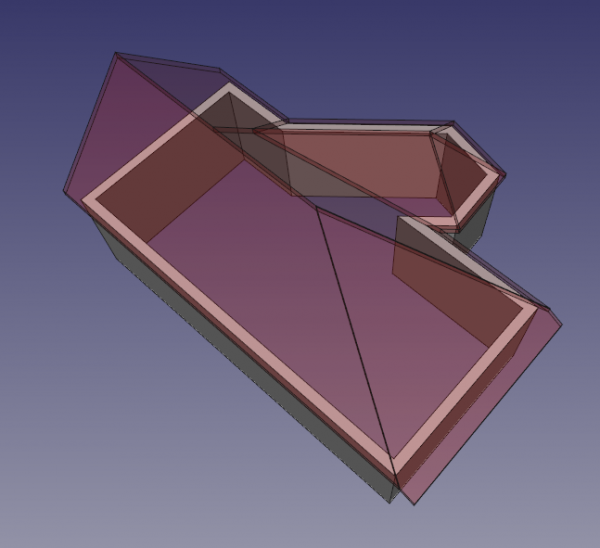
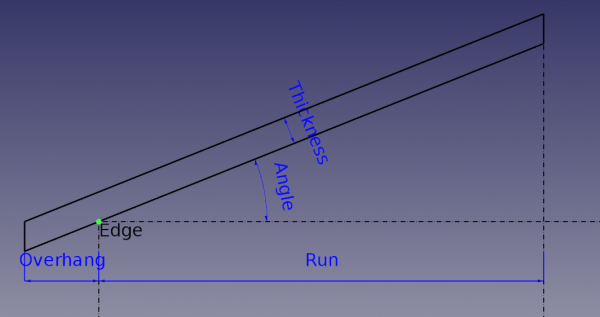
The Arch Roof tool allows for the creation of a sloped roof from a selected wire. The created roof object is parametric, keeping its relationship with the base object. The principle is that each edge is seen allotting a profile of roof (slope, width, overhang, thickness).
Note: This tool is still in development, and might fail with very complex shapes.
Bruk
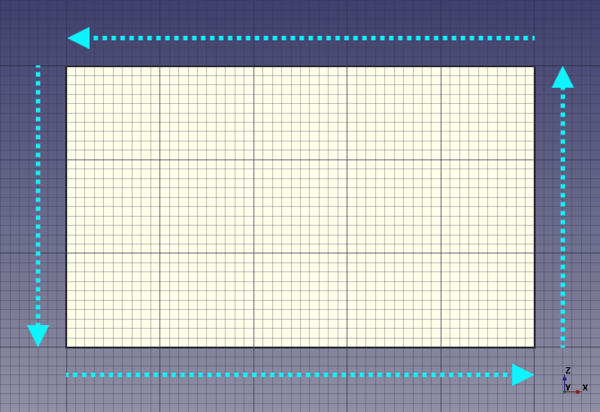
- Create a closed wire with following the counter-clockwise direction and select it.
- Press the
 Roof button, or press R then F keys
 - The default roof object could have a strange shape, it's because the tool is missing some necessary information.
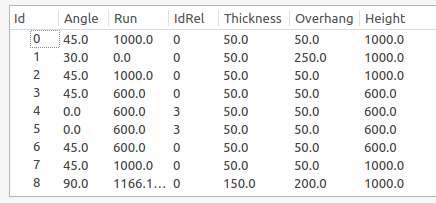
- After creating the default roof, double click on the object in the Tree View to access and edit all the properties. Angle must be between 0 and 90.
- Each line corresponds to a roof pane. So you can set the properties you want for each roof pane.
- To help you, you can set
AngleorRunto0and define aRelative Id, this makes an automatic calculation to find the data relative to theRelative Id. - It works like this:
- If
Angle = 0andRun = 0then profile is identical to the relative profile. - If
Angle = 0thenAngleis calculated so that the height is the same one as the relative profile. - If
Run = 0thenRunis calculated so that the height is the same one as the relative profile.
- If
- Finally, set an Angle to 90° to make a gable.
- Note: for better comprehension, please see this youtube clip.
Usage (solid base)
If your roof has a complex shape (e.g. contains pitched windows or other non-standard features) you can create a custom solid object using various other FreeCAD workbenches (Part, Sketcher etc.). And then use this solid as the DataBase object of your roof:
- Select the solid base object.
- Press the Arch Roof button, or press R then F keys.
Subtracting a roof
Roofs have an automatically generated subtraction volume (introduced in 1.0 for roofs with a solid base). When a roof is removed from the walls of a building, both the roof itself as well as everything above it is subtracted from the walls.
introduced in 1.0: It is possible to override the automatic subtraction volume by setting the DataSubvolume property of the roof to a custom solid object.
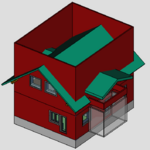
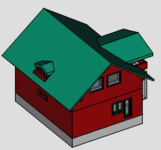
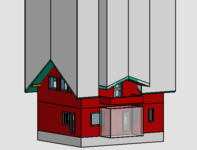
Solid-based roof before (1st image) and after (2nd image) removing it from walls.
The 3rd image shows the automatically generated subtraction volume.
Properties
An Arch Roof object shares the common properties and behaviors of all Arch Components.
Data
Roof
- DataAngles (
FloatList): The list of angles of the roof segments. - DataBorder Length (
Length): The total length of the borders of the roof. - DataFace (
Integer): The face number of the base object used to build the roof (not used). - DataFlip (
Bool): Specifies if the direction of the roof should be flipped. - DataHeights (
FloatList): The list of calculated heights of the roof segments. - DataId Rel (
IntegerList): The list of IDs of the relative profiles of the roof segments. - DataOverhang (
FloatList): The list of overhangs of the roof segments. - DataRidge Length (
Length): The total length of the ridges and hips of the roof. - DataRuns (
FloatList): The list of horizontal length projections of the roof segments. - DataSubvolume (
Link): The volume to subtract. If specified it is used instead of the auto-generated subvolume. introduced in 1.0 - DataThickness (
FloatList): The list of thicknesses of the roof segments.
Scripting
See also: Arch API and FreeCAD Scripting Basics.
The Roof tool can be used in macros and from the Python console by using the following function:
Roof = makeRoof(baseobj=None, facenr=0, angles=[45.,], run=[], idrel=[0,], thickness=[50.,], overhang=[100.,], name="Roof")
- Creates a
Roofobject from the givenbaseobj, which can be a closed wire or a solid object.- If
baseobjis a wire, you can provide lists forangles,run,idrel,thickness, andoverhang, for each edge in the wire to define the shape of the roof. - The lists are automatically completed to match the number of edges in the wire.
- If
Example:
import FreeCAD as App
import Arch, Draft

doc = App.newDocument()

rect = Draft.makeRectangle(3000, 4000)
doc.recompute()

roof = Arch.makeRoof(rect, angles=[30.,])

p1 = App.Vector(0, 0, 0)
p2 = App.Vector(1000, 1000, 0)
p3 = App.Vector(0, 2000, 0)

wire = Draft.make_wire([p1, p2, p3], closed=True)
doc.recompute()

roof1 = Arch.makeRoof(wire)

doc.recompute()
Denna sida hämtas från https://wiki.freecad.org/Arch_Roof