|
|
| poziția meniului |
|---|
| Arch → Rebar |
| Ateliere |
| Arch |
| scurtătură |
| R B |
| Prezentat în versiune |
| - |
| A se vedea, de asemenea, |
| Arch Structure |


|
|
| poziția meniului |
|---|
| Arch → Rebar |
| Ateliere |
| Arch |
| scurtătură |
| R B |
| Prezentat în versiune |
| - |
| A se vedea, de asemenea, |
| Arch Structure |
Descriere
Instrumentul Rebar vă permite să plasați barele de armătură [1] în interiorul obiectelor Arch Structure. Obiectele bare de armătură sunt bazate pe profilele 2D, cum ar fi sketches sau draft objects, care trebuie să fie desenate pe o față a unui obiect de structură. Puteți apoi să reglați configurația armăturilor, cum ar fi numărul și diametrul barelor sau distanța de decalaj dintre cele două capete ale elementului structural.
Rebar objects are based on 2D profiles such as Draft objects and Sketches, that must be drawn on a face of the structural object. After creation you can adjust the properties of the rebar, including the number and diameter of the bars, and the offset distance between them and the faces of the structural element.
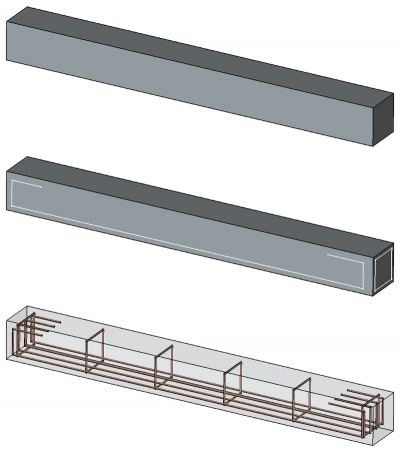
Imaginea de mai sus prezintă un obiect structural, în care sunt desenate două schițe, care definesc două diagrame de bare. Aceste două schițe sunt apoi transformate în obiecte de armătură.
Cum se folosește
- Creați un elemente de structure
- Switch to the Sketcher Workbench
- Select one face of the structural element
- Press the
 New Sketch button to start a new sketch on the selected face
 - Draw the diagram of your bar
- Press the
 Leave Sketch button to finish
 - Switch back to the Arch Workbench
- Select the sketch you just drew
- Press the
 Arch Rebar button, or press R then B keys
 - Reglați proprietățile dorite (armăturae dvs. ar putea să nu apară imediat dacă unele dintre proprietăți creează o situație imposibilă, cum ar fi diametrul barei fiind 0 sau distanțele dispuse mai mari decât lungimea elementului structural)
Although normally a rebar is used inside an Arch Structure, since FreeCAD 0.19 the rebar can be created outside of any host object. To host a rebar inside an object, you just need to set its DateHost.
Opţiuni
- Barele partajează proprietățile și comportamentele comune ale tuturor Arch Components
- The rounding value is expressed in times the diameter. If your bar has a diameter of 5mm, a rounding value of 3 will create rounding at angles with a radius of 15mm.
- Default values for new rebars can be set in the Arch preferences settings.
- If a direction vector is not specified, the direction and distance along which the bars will spread is calculated automatically from the host structural object, by taking the normal direction of the base sketch, and taking its intersection with the structural object. If you specify a direction vector, the length of that vector will also be taken into account.
- Valoarea distanței este calculată din cantitatea curentă de bare și reprezintă distanța dintre axele fiecărei bare. Prin urmare, trebuie să scădeți diametrul barei pentru a obține dimensiunea spațiului liber dintre bare.
Proprietăți
An Arch Rebar object shares the common properties and behaviors of all Arch Components.
- DateAmount: Cantitatea de bare.
- DateDiameter: The diameter of the bars.
- DateDirection: The direction (and length) along which the bars must spread. If the value is (0,0,0), the direction is calculated automatically from the host structural object.
- DateOffset Start: The offset distance between the border of the structural object and the first bar.
- DateOffset End: The offset distance between the border of the structural object and the last bar.
- DateRounding: A rounding value to be applied to the corners of the bars, expressed in times the diameter.
- DateSpacing: Distanța dintre axele fiecărei bare.
Scrip-Programare
See also: Arch API and FreeCAD Scripting Basics.
Instrumentul Rebar poate fi folosit în macros și din consola python utilizând următoarea funcție:
Rebar = makeRebar(baseobj=None, sketch=None, diameter=None, amount=1, offset=None, name="Rebar")
- Adăugă un obiect Bar armare la obiectul structural dat, utilizând schița dată ca profil.
- Dacă nu este indicat niciun diametru, valoare sau valoare de compensare, se aplică valorile implicite din setările preferințelor Arch.
- Returnează noul obiect Rebar.
Exempluː
import FreeCAD, Arch, Part

Structure = Arch.makeStructure(None, length=1000, width=1000, height=3000)
Structure.ViewObject.Transparency = 80
FreeCAD.ActiveDocument.recompute()

p1 = FreeCAD.Vector(-400, 400, 0)
p2 = FreeCAD.Vector(400, 400, 0)
Sketch = FreeCAD.ActiveDocument.addObject('Sketcher::SketchObject', 'Sketch')
Sketch.MapMode = "FlatFace"
Sketch.AttachmentSupport = [(Structure, "Face6")]
Sketch.addGeometry(Part.LineSegment(p1, p2))
FreeCAD.ActiveDocument.recompute()

Rebar = Arch.makeRebar(Structure, Sketch, diameter=80, amount=7, offset=50)
Rebar.OffsetStart = 100
Rebar.OffsetEnd = 100
FreeCAD.ActiveDocument.recompute()
Această pagină este preluată de la https://wiki.freecad.org/Arch_Rebar