



The FreeCAD BugTracker is the place toː report bugs, submit feature requests, patches, or request to merge your branch if you developed something using Git. The tracker is divided into 'Workbenches', so please be specific and file your request in the appropriate subsection. In case of doubt, leave it in the "FreeCAD" section.
Recommended Workflow

As shown in the above flowchart, before creating tickets, please always first search the forums and bugtracker to discover if your issue is a known issue. This saves a lot of time/work for developers and volunteers that could be spending said time making FreeCAD even more awesome.
Rapportera buggar
Om du tror att du funnit en bugg, så är du välkommen att rapportera den där. Men innan du rapporterar en bugg, kontrollera följande punkter:
- Försäkra dig om att din bugg verkligen är en bugg, vilket är något som ska fungera men inte fungerar. Om du inte är säker, tveka inte att förklara ditt problem på forumet och fråga vad du ska göra.
- Innan du skickar något, läs ofta ställda frågor, gör en sökning på forumet, och försäkra dig om att buggen inte har rapporterats innan , genom att söka i bug trackern.
- Beskriv problemet så klart och noggrant som möjkligt, och hur det kan reproduceras. Om vi inte kan verifiera buggen, så kanske vi inte kan fixa den.
- Skicka med följande information: Ditt operativsystem, om det är 32 eller 64 bitars, och vilken FreeCAD version du kör.
- Var snäll och posta en separat rapport för varje bugg.
- Om du är på ett linuxsystem och din bugg orsakar en krasch i FreeCAD, så kan du försöka köra en debug backtrace: Från en terminal så kör du gdb freecad (med antagandet att paketet gdb är installerat), sedan, inuti gdb, skriv run . FreeCAD kommer att starta. Efter att kraschen har uppstått , skriv bt , för att få hela backtracen. Inkludera denna backtrace i din buggrapport.
Begära funktioner
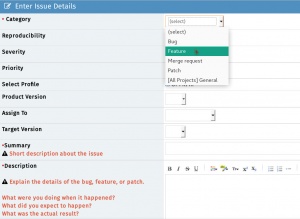
Om du vill ha något i FreeCAD som inte finns ännu, så är detta inte en bugg utan en funktionsbegäran. Du kan också skicka den på samma tracker (posta den som en funktionsbegäran istället för bugg), men tänk på att det finns inga garantier att din önskan blir uppfylld.
- IMPORTANTː Before requesting a potential Feature Request please be certain that you are the first one doing so by searching the forums and the bugtracker. If you have concluded that there are no pre-existing tickets/discussions the next step is toː
- Start a forum thread to discuss your feature request with the community via the Open Discussion forum.
- Once the community agrees that this is a valid Feature, you then can open a ticket on the tracker (file it under feature request instead of bug).
- NOTE #1 To keep things organized please remember to link the forum thread URL into the ticket and the ticket number (as a link) in to the forum thread.
- NOTE #2 Keep in mind there are no guarantees that your wish will be fulfilled.
Skicka patchar
Om du har programmerat en buggfix, en extension eller något annat som kan vara allmänt gångbart i FreeCAD, skapa en patch genom att använda Subversion's diff verktyg och posta den på samma tracker (posta den som en patch).
Requesting merge
(Same guidelines as Submiting patches)
If you have created a git branch containing changes that you would like to see merged into the FreeCAD code, you can ask there to have your branch reviewed and merged if the FreeCAD developers are OK with it. You must first publish your branch to a public git repository (github, gitlab, bitbucket, sourceforge etc...) and then give the URL of your branch in your merge request.
MantisBT Tips and Tricks
MantisBT Markup
MantisBT (Mantis Bug Tracker) has it's own unique markup.
- @mention - works just like on GitHub where if you prepend '@' to someone's username they will receive an email that they have been 'mentioned' in a ticket thread

- #1234 - By adding a hash tag in front of a number a shortcut to link to another ticket within MantisBT will present.
- Note: if you hover over a ticket it will show you the summary + if the ticket is closed, it will be struck-through like
#1234.
- Note: if you hover over a ticket it will show you the summary + if the ticket is closed, it will be struck-through like

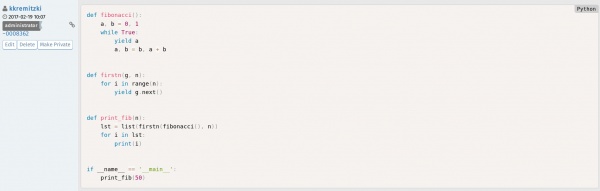
- ~5678 - a shortcut that links to a bug note within a ticket. This can be used to reference someone's response within the thread. Each person that posts will show a unique ~#### number next to their username. If you look at the image in the example, you see that the shortcut is referencing the ticket number:comment number of said ticket

- <del></del> - Using these tags will
strikeout text.

- <code></code> - To present a line or block of code, use this tag and it will colorize and differentiate it elegantly.
MantisBT BBCode
In addition to the above MantisBT Markup one also has the possibility to use BBCode format. For a comprehensive list see the BBCode plus plugin page. Here is a list of supported BBCode tagsː
[img][/img] - Images

[url][/url] - Links

[email][/email] - Email addresses

[color=red][/color] - Colored text

[highlight=yellow][/highlight] - Highlighted text

[size][/size] - Font size

[list][/list] - Lists

[list=1][/list] - Numbered lists (number is starting number)

[*] - List items

[b][/b] - Bold

[u][/u] - underline

[i][/i] - Italic

[s][/s] - Strikethrough

[left][/left] - Left align

[center][/center] - Center

[right][/right] - Right align

[justify][/justify] - Justify

[hr] - Horizontal rule

[sub][/sub] - Subscript

[sup][/sup] - Superscript

[table][/table] - Table

[table=1][/table] - Table with border of specified width

[tr][/tr] - Table row

[td][/td] - Table column

[code][/code] - Code block

[code=sql][/code] - Code block with language definition

[code start=3][/code] - Code block with line numbers starting at number

[quote][/quote] - Quote by *someone* (no name)

[quote=name][/quote] - Quote by *name*
MantisBT <=> GitHub Markup
Below are special MantisBT Source-Integration plugin keywords which will link to the FreeCAD GitHub repo. See GitHub and MantisBT.
- c:FreeCAD:git commit hash: - c stands for 'commit'. FreeCAD stands for the FreeCAD GitHub repo. 'git commit hash' is the specific git commit hash to reference. Note: the trailing colon is necessary. Exampleː
cːFreeCADː709d2f325db0490016807b8fa6f49d1c867b6bd8ː - d:FreeCAD:git commit hash: - similar to the above, d stands for 'diff' which will provide a Diff view of the commit. Exampleː
dːFreeCADː709d2f325db0490016807b8fa6f49d1c867b6bd8ː - p:FreeCAD:pullrequest: - similar to the above, p stands for Pull Request. Exampleː
pːFreeCADː498ː

GitHub and MantisBT
The FreeCAD bugtracker has a plug-in called Source Integration which essentially ties both the FreeCAD GitHub repo to our MantisBT tracker. It makes it easier to track and associate git commits with their respective MantisBT tickets. The Source Integration plugin scans the git commit messages for specific keywords in order to execute the following actions:
Note The below keywords need to be added in the git commit message and not the PR subject
Remotely referencing a ticket
Using this pattern will automagically associate a git commit to a ticket (Note: this will not close the ticket.) The format MantisBT will recognize:
- bug #1234
- bugs #1234, #5678
- issue #1234
- issues #1234, #5678
- report #1234
- reports #1234, #5678
For the inquisitive here is the regex MantisBT uses for this operation:
/(?:bugs?|issues?|reports?)+\s*:?\s+(?:#(?:\d+)[,\.\s]*)+/i
Remotely resolving a ticket
The format MantisBT will recognize:
- fix #1234
- fixed #1234
- fixes #1234
- fixed #1234, #5678
- fixes #1234, #5678
- resolve #1234
- resolved #1234
- resolves #1234
- resolved #1234, #5678
- resolves #1234, #5678
For the inquisitive here is the regex MantisBT uses for this operation:
/(?:fixe?d?s?|resolved?s?)+\s*:?\s+(?:#(?:\d+)[,\.\s]*)+/i
Denna sida hämtas från https://wiki.freecad.org/Tracker