



FreeCAD BugTracker - это место, где можно сообщать об ошибках, отправлять запросы функций, исправления или запросы на объединение вашей ветки, если вы разработали что-то с помощью Git. Трекер разделен на «Рабочие места», поэтому, пожалуйста, будьте конкретны и отправьте запрос в соответствующий подраздел. В случае сомнений оставьте это в разделе «FreeCAD».
Рекомендуемая последовательность действий

Как показано на приведенной выше блок-схеме, перед созданием заявок всегда сначала ищите на форумах и в багтрекере, чтобы выяснить, является ли ваша проблема известной. Это экономит много времени / работы для разработчиков и волонтеров, которые могут потратить указанное время, делая FreeCAD еще более потрясающим.
Как сообщить об ошибке
Если вы считаете, что, возможно, нашли ошибку, вы можете сообщить о ней, если вы следовали нашим пошаговым инструкциямː
- Убедитесь, что вы используете самую последнюю версию FreeCAD. ПРИМЕЧАНИЕː ваша ошибка может быть исправлена в разрабатываемой (нестабильной) версии. Средний пользователь использует стабильную версию FreeCAD.
- Убедитесь что ваша ошибка, это действительно ошибка, то есть то, то что должно работать, но не работает. Убедитесь, что о той же ошибке не сообщалось ранее, выполнив сначала поиск в багтрекере и на форуме.
- Помните: если вы не уверены, не постесняйтесь сообщить о вашей проблеме на форуме и спросить что делать.
- Примечание: перед сообщением прочитайте правила форума.
- Опишите как можно более четко проблему, и как она может быть воспроизведена. Если мы не можем воспроизвести ошибку, мы не могли бы это исправить.
- Это означает отчет в ясной, хорошо форматированной, пошаговой форме, чтобы даже пользователь-любитель мог воспроизвести.
- Рекомендация: также очень полезно включать скриншоты ошибки. Пользователи Windows: пожалуйста, не прикрепляйте снимки экрана в формате Word или PDF. Используйте инструмент Windows Snipping, чтобы сохранить снимок в формате PNG.
- Рекомендация: Еще лучше - Анимированный GIF-файл или скринкаст, это также повысит вероятность воспроизведения проблемы.
- Добавьте пример файла FreeCAD (файл .FCStd), чтобы разработчики/тестировщики могли быстро воспроизвести ошибку.
- Не архивируйте файл * .FCStd, он уже заархивирован.
- Размер прикрепленных файлов ограничен. Если ваш файл * .FCStd слишком велик для прикрепления, вы можете использовать онлайн-хранилище (многие из них бесплатны, например, Google Диск, Microsoft OneDrive, Dropbox).
- Включите всю информацию из кнопки «Копировать в буфер обмена» в диалоге 'Help (меню) -> About FreeCAD' . Убедитесь, что ваши данные включают версию OCC или OCE.
- Пожалуйста, отправляйте отдельный отчет по каждой ошибке.
- Если ваша ошибка вызывает сбой в FreeCAD, и вы используете систему, которая ее поддерживает, вы можете попробовать запустить 'обратную трассировку отладки' и прикрепить указанную трассировку к заявке. Это может сэкономить разработчикам много времени на выявление источника сбоя. Смотрите Отладку для получения более подробной информации.
Запрос о новой возможности
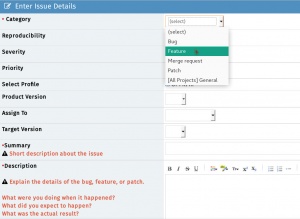
Если вы хотите чтобы в FreeCAD что-то, что пока не реализовано: то это не баг, а запрос новой функциональности (feature request).
- IMPORTANTː Before requesting a potential Feature Request please be certain that you are the first one doing so by searching the forums and the bugtracker. If you have concluded that there are no pre-existing tickets/discussions the next step is toː
- Start a forum thread to discuss your feature request with the community via the Open Discussion forum.
- Once the community agrees that this is a valid Feature, you then can open a ticket on the tracker (file it under feature request instead of bug).
- NOTE #1 To keep things organized please remember to link the forum thread URL into the ticket and the ticket number (as a link) in to the forum thread.
- NOTE #2 Keep in mind there are no guarantees that your wish will be fulfilled.
Отправка патчей
В случае если вы програмно исправили ошибку, расширение или что нибудь другое, что может быть общего использования в FreeCAD, создайте патч используя Subversion diff инструмент и сообщив, его нам на трэкер (файл как патч).
Запрос на слияние (merge)
(Same guidelines as Submiting patches)
If you have created a git branch containing changes that you would like to see merged into the FreeCAD code, you can ask there to have your branch reviewed and merged if the FreeCAD developers are OK with it. You must first publish your branch to a public git repository (github, gitlab, bitbucket, sourceforge etc...) and then give the URL of your branch in your merge request.
MantisBT Tips and Tricks
MantisBT Markup
MantisBT (Mantis Bug Tracker) has it's own unique markup.
- @mention - works just like on GitHub where if you prepend '@' to someone's username they will receive an email that they have been 'mentioned' in a ticket thread

- #1234 - By adding a hash tag in front of a number a shortcut to link to another ticket within MantisBT will present.
- Note: if you hover over a ticket it will show you the summary + if the ticket is closed, it will be struck-through like
#1234.
- Note: if you hover over a ticket it will show you the summary + if the ticket is closed, it will be struck-through like

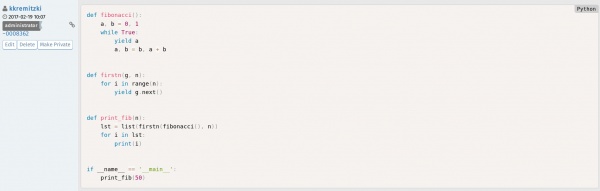
- ~5678 - a shortcut that links to a bug note within a ticket. This can be used to reference someone's response within the thread. Each person that posts will show a unique ~#### number next to their username. If you look at the image in the example, you see that the shortcut is referencing the ticket number:comment number of said ticket

- <del></del> - Using these tags will
strikeout text.

- <code></code> - To present a line or block of code, use this tag and it will colorize and differentiate it elegantly.
MantisBT BBCode
In addition to the above MantisBT Markup one also has the possibility to use BBCode format. For a comprehensive list see the BBCode plus plugin page. Here is a list of supported BBCode tagsː
[img][/img] - Images

[url][/url] - Links

[email][/email] - Email addresses

[color=red][/color] - Colored text

[highlight=yellow][/highlight] - Highlighted text

[size][/size] - Font size

[list][/list] - Lists

[list=1][/list] - Numbered lists (number is starting number)

[*] - List items

[b][/b] - Bold

[u][/u] - underline

[i][/i] - Italic

[s][/s] - Strikethrough

[left][/left] - Left align

[center][/center] - Center

[right][/right] - Right align

[justify][/justify] - Justify

[hr] - Horizontal rule

[sub][/sub] - Subscript

[sup][/sup] - Superscript

[table][/table] - Table

[table=1][/table] - Table with border of specified width

[tr][/tr] - Table row

[td][/td] - Table column

[code][/code] - Code block

[code=sql][/code] - Code block with language definition

[code start=3][/code] - Code block with line numbers starting at number

[quote][/quote] - Quote by *someone* (no name)

[quote=name][/quote] - Quote by *name*
MantisBT <=> GitHub Markup
Below are special MantisBT Source-Integration plugin keywords which will link to the FreeCAD GitHub repo. See GitHub and MantisBT.
- c:FreeCAD:git commit hash: - c stands for 'commit'. FreeCAD stands for the FreeCAD GitHub repo. 'git commit hash' is the specific git commit hash to reference. Note: the trailing colon is necessary. Exampleː
cːFreeCADː709d2f325db0490016807b8fa6f49d1c867b6bd8ː - d:FreeCAD:git commit hash: - similar to the above, d stands for 'diff' which will provide a Diff view of the commit. Exampleː
dːFreeCADː709d2f325db0490016807b8fa6f49d1c867b6bd8ː - p:FreeCAD:pullrequest: - similar to the above, p stands for Pull Request. Exampleː
pːFreeCADː498ː

GitHub and MantisBT
The FreeCAD bugtracker has a plug-in called Source Integration which essentially ties both the FreeCAD GitHub repo to our MantisBT tracker. It makes it easier to track and associate git commits with their respective MantisBT tickets. The Source Integration plugin scans the git commit messages for specific keywords in order to execute the following actions:
Note The below keywords need to be added in the git commit message and not the PR subject
Remotely referencing a ticket
Using this pattern will automagically associate a git commit to a ticket (Note: this will not close the ticket.) The format MantisBT will recognize:
- bug #1234
- bugs #1234, #5678
- issue #1234
- issues #1234, #5678
- report #1234
- reports #1234, #5678
For the inquisitive here is the regex MantisBT uses for this operation:
/(?:bugs?|issues?|reports?)+\s*:?\s+(?:#(?:\d+)[,\.\s]*)+/i
Remotely resolving a ticket
The format MantisBT will recognize:
- fix #1234
- fixed #1234
- fixes #1234
- fixed #1234, #5678
- fixes #1234, #5678
- resolve #1234
- resolved #1234
- resolves #1234
- resolved #1234, #5678
- resolves #1234, #5678
For the inquisitive here is the regex MantisBT uses for this operation:
/(?:fixe?d?s?|resolved?s?)+\s*:?\s+(?:#(?:\d+)[,\.\s]*)+/i
Эта страница получена от https://wiki.freecad.org/Tracker