


|
|
| Расположение в меню |
|---|
| TechDraw → Добавить Линии → Добавить вспомогательную линию между 2-мя точками |
| Верстаки |
| TechDraw |
| Быстрые клавиши |
| Нет |
| Представлено в версии |
| 0.19 |
| См. также |
| Добавить осевую линию к граням, Добавить осевую линию между 2 линиями |
Описание
The TechDraw 2PointCosmeticLine tool adds a cosmetic line between two points. The points can be 2D or 3D. The resulting line can be used for dimensioning.
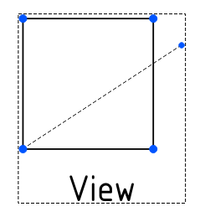
Cosmetic line between two points
Применение
- Select two points in a TechDraw View or two points in the 3D View.
- If you have selected points in the 3D View: add the correct TechDraw View to the selection by selecting it in the Tree View.
- There are several ways to invoke the tool:
- Press the
 Cosmetic Line Through 2 points button.
 - Select the TechDraw → Add Lines → Cosmetic Line Through 2 points option from the menu.
- Press the
- A task panel opens.
- Optionally adjust the coordinates of the points.
- Press the OK button.
- A cosmetic line connecting the two points is added. In the case of 3D points, the line connects the projection of the points.
Usage edit
To change the endpoints of a cosmetic line:
- Select the cosmetic line.
- There are several ways to invoke the tool:
- Press the Cosmetic Line Through 2 points button.
- Select the TechDraw → Add Lines → Cosmetic Line Through 2 points option from the menu.
- Press the
- A task panel opens.
- Adjust the coordinates of the points.
- Press the OK button.
Notes
- To delete a cosmetic line select it and press Delete. introduced in 1.0
- To change the appearance of a cosmetic line use
 TechDraw DecorateLine.
Свойства
Cosmetic lines have no properties of their own, as they are not document objects.
Программирование
См. так же: TechDraw API и Основы составления скриптов FreeCAD.
Cosmetic lines can be created using the makeCosmeticLine(v1, v2) or makeCosmeticLine3d(v1, v2) methods of DrawViewPart.
Эта страница получена от https://wiki.freecad.org/TechDraw_2PointCosmeticLine