


|
|
| Menu location |
|---|
| Surface → Fill Boundary Curves |
| Workbenches |
| Surface |
| Default shortcut |
| None |
| Introduced in version |
| 0.17 |
| See also |
| None |
Description
The  Surface GeomFillSurface tool creates a parametric surface from two, three, or four boundary edges, trying to create a smooth transition between them.
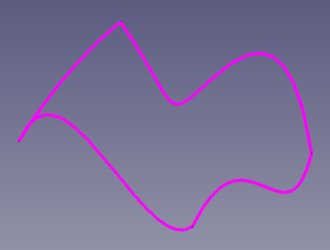
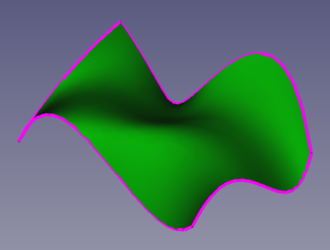
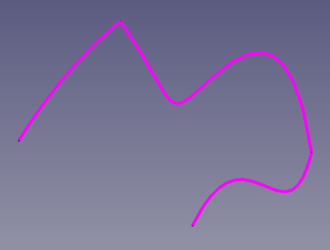
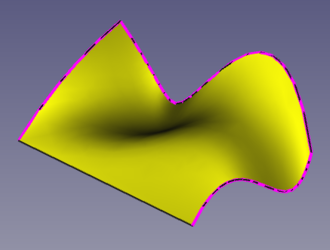
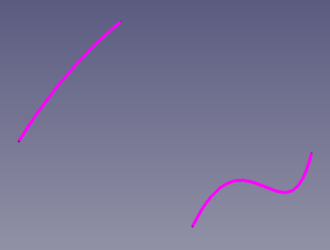
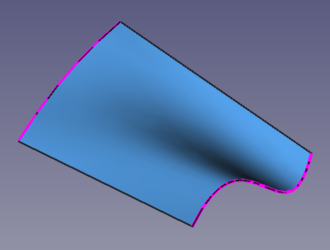
Left: edges that are used to generate a surface with the GeomFillSurface tool, 4 connected edges, 3 connected edges, and 2 disconnected edges. Right: resulting surface from using the 4, 3, and 2 edges, respectively.
Kako koristiti
- There are several ways to invoke the tool:
- Press the Fill Boundary Curves button.
- Select the Surface → Fill Boundary Curves option from the menu.
- Press the
- Select edges in the 3D View. The edges must be connected and form a closed boundary.
- Press OK.
Note: once created, it is not possible to apply additional constraints to the created surface.
Opcije
Fill type:  Stretch, Coons, or Curved.
Svojstva
A Surface GeomFillSurface object (Surface::GeomFillSurface class) is derived from the basic Part Feature (Part::Feature class, through the Part::Spline subclass), therefore it shares all the latter's properties.
In addition to the properties described in Part Feature, the Surface GeomFillSurface object has the following properties in the Property View.
Data
Base
- PodaciFill Type (
Enumeration): the applied filling algorithm; Stretch, the style with the flattest patches;Coons, a rounded style with less depth than Curved; Curved, the style with the most rounded patches. - PodaciBoundary List (
LinkSubList): a list of edges that will be used to build the surface. - Podaci ((hidden))Reversed List (
BoolList):
Pogled
Base
- PregledControl Points (
Bool): it defaults tofalse; if set totrue, it will show an overlay with the control points of the surface.
Twisting of the surface
The shape of the surface depends on the direction of the chosen edges; if edges are selected and the result is a surface that "twists" on itself, one of the edges may need its list of vertices in the reverse order. A surface that twists on itself will probably have self-intersections, and thus will be an invalid Shape; this can be verified with  Part CheckGeometry.
For example, if two curves have the points
curve1 = [a, b, c, d]
curve2 = [e, f, g]
and the resulting surface after using Surface GeomFillSurface or  Surface Sections is a twisted surface, you may create a third curve that is equal to one of the two original curves but with a reversed list of points.
Ili
curve1 = [a, b, c, d]
curve3 = [g, f, e]
ili
curve3 = [d, c, b, a]
curve2 = [e, f, g]
should work to generate a surface that doesn't twist.
In practical terms this means that all edges used to generate a surface should be created preferably in the same clockwise or anti-clockwise direction. Following this simple rule usually guarantees that the surface will follow the smoothest direction and won't twist.
When the surface's PregledLighting property is One side, a face will be painted completely black if its normal direction points into the 3D View (away from the current viewer), indicating a flipped face with respect to the other colored faces.
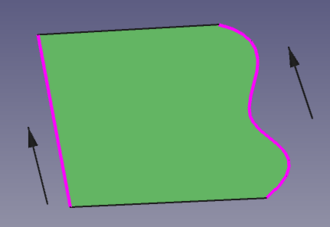
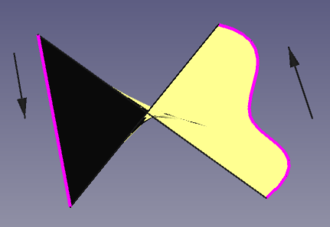
Left: the boundary edges are oriented in the same direction, and thus the generated surface is smooth. Right: the boundary edges have opposite directions, and thus the generated surface twists on itself, resulting in self-intersections.
Scripting
See also: FreeCAD Scripting Basics.
The Surface GeomFillSurface tool can be used in macros and from the Python Console by adding the Surface::GeomFillSurface object.
- The edges to be used to define the surface must be assigned as a LinkSubList to the
BoundaryListproperty of the object. - The type of algorithm must be assigned like a string to the
FillTypeproperty. - All objects with edges need to be computed before they can be used as input for the properties of the GeomFillSurface object.
import FreeCAD as App
import Draft

doc = App.newDocument()

a = App.Vector(-140, -100, 0)
b = App.Vector(175, -108, 0)
c = App.Vector(200, 101, 0)
d = App.Vector(-135, 107, 70)

points1 = [a, App.Vector(-55, -91, 65), App.Vector(35, -85, -5), b]
obj1 = Draft.make_bspline(points1)

points2 = [b, App.Vector(217, -45, 55), App.Vector(217, 35, -15), c]
obj2 = Draft.make_bspline(points2)

points3 = [c, App.Vector(33, 121, 55), App.Vector(0, 91, 15), App.Vector(-80, 121, -40), d]
obj3 = Draft.make_bspline(points3)

points4 = [d, App.Vector(-140, 0, 45), a]
obj4 = Draft.make_bspline(points4)
doc.recompute()

surf = doc.addObject("Surface::GeomFillSurface", "Surface")
surf.BoundaryList = [(obj1, "Edge1"),
                     (obj2, "Edge1"),
                     (obj3, "Edge1"),
                     (obj4, "Edge1")]
doc.recompute()
Ova stranica je preuzeta s https://wiki.freecad.org/Surface_GeomFillSurface