


|
|
| Menu location |
|---|
| View → Standard Views → Axonometric → Isometric |
| Workbenches |
| All |
| Default shortcut |
| 0 |
| Introduced in version |
| - |
| See also |
| Std ViewDimetric, Std ViewTrimetric |
Description
The Std ViewIsometric command realigns the camera in the active 3D View to obtain an isometric view. For a truly isometric view the 3D View must be in orthographic mode, but the command also works if the view is in perspective mode.
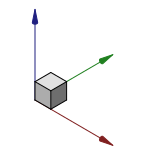
The axis cross and a cube in isometric view
Usage
- There are several ways to invoke the command:
- Press the
 Isometric button.
 - Select the View → Standard Views → Axonometric → Isometric option from the menu.
- Select the Standard Views → Isometric option from the 3D View context menu.
- Select the Isometric option from the Mini-cube menu of the Navigation Cube.
- Use the keyboard shortcut: 0.
- Press the
Scripting
See also: Autogenerated API documentation and FreeCAD Scripting Basics.
Use the viewIsometric method of the View object to change to isometric view. The viewDimetric and viewTrimetric methods are also available.
import FreeCADGui

view = FreeCADGui.ActiveDocument.ActiveView
view.viewIsometric()
This page is retrieved from https://wiki.freecad.org/Std_ViewIsometric