


|
|
| Menu location |
|---|
| View → Perspective View |
| Workbenches |
| All |
| Default shortcut |
| V P |
| Introduced in version |
| - |
| See also |
| Std OrthographicCamera |
Description
The Std PerspectiveCamera command switches the camera in the active 3D View to perspective view mode. In this mode, objects that are further from the camera appear smaller than those that are closer.
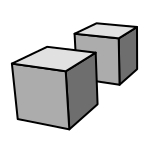
Two cubes with the same dimensions in perspective view
Usage
- There are several ways to invoke the command:
- Select the View →
 Perspective View option from the menu.
 - Select the Perspective View option from the Mini-cube menu of the Navigation Cube.
- Use the keyboard shortcut: V then P.
- Select the View →
Preferences
Scripting
Tato stránka je načtena z https://wiki.freecad.org/Std_PerspectiveCamera