FreeCAD Logo FreeCAD 1.0
  • English Afrikaans Arabo Bielorusso Catalano Czech German Greek Spanish Spanish Basco Finnish Filippino Français Galiziano Croatian Hungarian Indonesiano Italiano Japanese Kabyle Coreano Lituano Dutch Norvegese Bokmal Polish Portuguese Portuguese Romanian Russian Slovak Slovenian Serbo Swedish Turkish Ukrainian Valenziano Vietnamita Cinese Cinese
  • Funzioni
  • Download
  • Blog
  • Documentazione
    Indice di documentazione Per iniziare Documentazione utenti Il manuale FreeCAD Documentazione degli ambienti di lavoro Documentazione di scripting Python Documentazione codice C++ Tutorial Domande frequenti Politica sulla Privacy Informazioni Su FreeCAD
  • Contribuire
    Come aiutare Sponsor Segnala un bug Fai una richiesta Opportunità di lavoro e ricompense Linee guida per contribuire Manuale degli sviluppatori Traduzioni
  • Comunità
    Codice di condotta Forum The FPA GitHub GitLab Codeberg Mastodon Matrix IRC IRC via Webchat Gitter Discord Reddit Twitter Facebook LinkedIn Calendario
  • ♥ Donate

Donate

$
Informazioni SEPA
Si prega di intestare il bonifico SEPA a:
Beneficiary: The FreeCAD project association
IBAN: BE04 0019 2896 4531
BIC/SWIFT: GEBABEBBXXX
Agenzia bancaria: BNP Paribas Fortis
Indirizzo: Rue de la Station 64, 1360 Perwez, Belgium

While Stripe doesn't support monthly donations, you can still become a sponsor! Simply make a one-time donation equivalent to 12 months of support, and you'll gain access to the corresponding sponsoring tier. It's an easy and flexible way to contribute.

If you are not sure or not able to commit to a regular donation, but still want to help the project, you can do a one-time donation, of any amount.

Choose freely the amount you wish to donate one time only.

You can support FreeCAD by sponsoring it as an individual or organization through various platforms. Sponsorship provides a steady income for developers, allowing the FPA to plan ahead and enabling greater investment in FreeCAD. To encourage sponsorship, we offer different tiers, and unless you choose to remain anonymous, your name or company logo will be featured on our website accordingly.

from 1 USD / 1 EUR per month. You will not have your name displayed here, but you will have helped the project a lot anyway. Together, normal sponsors maintain the project on its feet as much as the bigger sponsors.

from 25 USD / 25 EUR per month. Your name or company name is displayed on this page.

from 100 USD / 100 EUR per month. Your name or company name is displayed on this page, with a link to your website, and a one-line description text.

from 200 USD / 200 EUR per month. Your name or company name and logo displayed on this page, with a link to your website and a custom description text. Companies that have helped FreeCAD early on also appear under Gold sponsors.

Instead of donating each month, you might find it more comfortable to make a one-time donation that, when divided by twelve, would give you right to enter a sponsoring tier. Don't hesitate to do so!

Choose freely the amount you wish to donate each month.

Please inform your forum name or twitter handle as a notein your transfer, or reach to us, so we can give you proper credits!

Crea link
Sostituisci con il link
Menu di Base

Crea un link relativo

Posizione nel menu
Nessuna
Ambiente
Tutti
Avvio veloce
Nessuno
Introdotto nella versione
0.19
Vedere anche
Parte, Gruppo, Crea un link

Descrizione

Lo strumento Crea un link relativo crea un App Link (classe App::Link), così come fa Crea un link, ma opera prima sui sottoelementi selezionati e imposta DatiLink Transform su True.

Utilizzo

Con selezione:

  1. Selezionare un sottoelemento nella vista 3D, ad esempio un vertice, uno spigolo o una faccia o una qualsiasi combinazione di questi. Questi sottoelementi devono appartenere a un singolo oggetto.
  2. Premere il pulsante Crea un link relativo. L'oggetto prodotto ha la stessa icona dell'oggetto originale, ma ha due frecce sovrapposte che indicano che è un collegamento relativo.

Senza selezione:

  • Se non è selezionato alcun oggetto, questo comando non fa nulla.
  • Se un oggetto è selezionato solo nella vista ad albero, ma nella vista 3D non è selezionato nessun sottoelemento, questo comando non fa nulla.
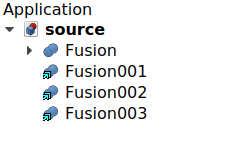
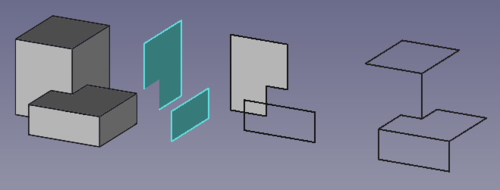
Corpo originale e tre collegamenti creati dai suoi elementi secondari, inclusi bordi e facce.

Proprietà

See Std LinkMake.

In particolare, DatiLink Transform è impostata su True, quindi DatiPlacement viene nascosto e invece DatiLink Placement controlla la posizione del Link rispetto alla posizione di DatiLinked Object.

Script

Vedere Crea link per le informazioni generali.

Viene creato un App Link con il metodo addObject() del documento. Per definire un collegamento relativo, il suo metodo setLink viene utilizzato per selezionare l'oggetto sorgente e uno o più dei suoi sottoelementi. Quindi l'attributo LinkTransform è impostato su True.

import FreeCAD as App

doc = App.newDocument()
body = App.ActiveDocument.addObject("Part::Box", "Box")

obj = App.ActiveDocument.addObject("App::Link", "Link")
obj.setLink(body, '', ['Edge1', 'Edge6', 'Edge7', 'Edge10', 'Face2', 'Face3'])
obj.LinkTransform = True
obj.LinkPlacement.Base = App.Vector(20, 20, 0)
App.ActiveDocument.recompute()


Crea link
Sostituisci con il link
Menu di Base

Questa pagina è recuperata da https://wiki.freecad.org/Std_LinkMakeRelative

Tieniti aggiornato!
Forum GitHub Mastodon Matrix IRC Gitter.im Discord Reddit Twitter Facebook LinkedIn

© The FreeCAD Team. Homepage image credits (top to bottom): ppemawm, r-frank, epileftric, regis, rider_mortagnais, bejant.

Questo progetto è supportato da: , KiCad Services Corp. e altri sponsor

GitHubMigliora questa pagina su GitHub