FreeCAD Logo FreeCAD 1.0
  • Inglés Africano Árabe Bielorruso Catalán Checo Alemán Griego Español Español Euskera Finlandés Filipino Francés Gallego Croata Húngaro Indonesio Italiano Japonés Cabilio Coreano Lituano Neerlandés bokmal de Noruega Polaco Portugués Portugués Rumano Ruso Eslovaco Esloveno Serbio Sueco Turco Ucraniano Valenciano Vietnamita Chino Chino
  • Características
  • Descarga
  • Blog
  • Documentación
    Índice de documentación Primeros pasos Documentacion para el usuario El manual de FreeCAD Documentación de entornos de trabajo Documentación sobre FreeCAD + Python Documentación de codificación de C++ Tutoriales Preguntas frecuentes Política de privacidad Acerca de FreeCAD
  • Contribuir
    ¿Cómo puedo ayudar? Sponsor Informar de un error Hacer un pull request Trabajos y financiación Pautas de contribución Manual de desarrolladores Traducciones
  • Comunidad
    Código de conducta Foro The FPA GitHub GitLab Codeberg Mastodon Matrix IRC IRC via Webchat Gitter Discord Reddit Twitter Facebook LinkedIn Calendario
  • ♥ Donate

Donate

$
Información de SEPA
Configure su transferencia bancaria SEPA a:
Beneficiary: The FreeCAD project association
IBAN: BE04 0019 2896 4531
BIC/SWIFT: GEBABEBBXXX
Agencia bancaria: BNP Paribas Fortis
Dirección: Rue de la Station 64, 1360 Perwez, Belgium

While Stripe doesn't support monthly donations, you can still become a sponsor! Simply make a one-time donation equivalent to 12 months of support, and you'll gain access to the corresponding sponsoring tier. It's an easy and flexible way to contribute.

If you are not sure or not able to commit to a regular donation, but still want to help the project, you can do a one-time donation, of any amount.

Choose freely the amount you wish to donate one time only.

You can support FreeCAD by sponsoring it as an individual or organization through various platforms. Sponsorship provides a steady income for developers, allowing the FPA to plan ahead and enabling greater investment in FreeCAD. To encourage sponsorship, we offer different tiers, and unless you choose to remain anonymous, your name or company logo will be featured on our website accordingly.

from 1 USD / 1 EUR per month. You will not have your name displayed here, but you will have helped the project a lot anyway. Together, normal sponsors maintain the project on its feet as much as the bigger sponsors.

from 25 USD / 25 EUR per month. Your name or company name is displayed on this page.

from 100 USD / 100 EUR per month. Your name or company name is displayed on this page, with a link to your website, and a one-line description text.

from 200 USD / 200 EUR per month. Your name or company name and logo displayed on this page, with a link to your website and a custom description text. Companies that have helped FreeCAD early on also appear under Gold sponsors.

Instead of donating each month, you might find it more comfortable to make a one-time donation that, when divided by twelve, would give you right to enter a sponsoring tier. Don't hesitate to do so!

Choose freely the amount you wish to donate each month.

Please inform your forum name or twitter handle as a notein your transfer, or reach to us, so we can give you proper credits!

Sketcher
This tool is obsolete, it is not available in 1.0 and above. Use Sketcher Translate instead.

Sketcher RectangularArray

Ubicación en el Menú
Sketch → Sketcher tools → Rectangular Array
Entornos de trabajo
Sketcher, PartDesign
Atajo de teclado por defecto
Ninguno
Introducido en versión
0.16
Ver también
Ninguno

Description

The Sketcher Rectangular array command creates an array of selected sketcher elements.

Usage

  1. Select sketcher elements in task panel or in 3D view.
  2. There are several ways to invoke the command:
    • Press the Rectangular array button.
    • Select the Sketch → Sketcher tools → Rectangular array option from the menu.
  3. Specify the options for the array in the dialog that opens.
  4. Press the OK button.
  5. Move the mouse in the 3D view towards the desired reference point.
    By keeping Ctrl pressed, the angle to the reference point can be fixed in steps of 5°. introduced in 0.20
  6. Left-click in the 3D view to create the array.
  7. To set the distances between the array elements, edit the dimensional constraints of the array.

Options
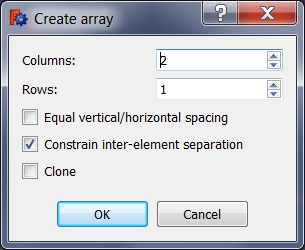
Rectangular array has the following options:

  • Colums: The number of columns for the array.
  • Rows: The number of rows for the array.
  • Equal vertical/horizontal spacing: If the vertical distance between the array elements should be the same as the horizontal distance.
  • Constrain inter-element separation: When this is checked, the distance between the array elements will be constrained.
    If you for example only know that you need a 23 x 15 mm array, use this option to later be able to change these constraints to the dimensions you need.
  • Clone: If selected, dimensional constraints are replaced by geometric constraints in the copies, so that any change in the original element is also reflected in the copies.


Sketcher

Esta página ha sido recuperada de https://wiki.freecad.org/Sketcher_RectangularArray

¡Contáctanos!
Forum GitHub Mastodon Matrix IRC Gitter.im Discord Reddit Twitter Facebook LinkedIn

© El equipo de FreeCAD. Créditos de imagen de la página principal (de arriba a abajo): ppemawm, r-frank, epileftric, regis, rider_mortagnais, bejant.

Este proyecto es apoyado por: , KiCad Services Corp. y otros patrocinadores

GitHubMejora esta página en GitHub